| Speed | 6.0 / 10 |
|---|---|
| Servers | 1.0 / 10 |
| User Experience | 6.0 / 10 |
| Support | 5.0 / 10 |
| Pricing | 6.0 / 10 |
WARP VPNReview 2026: Before You Buy, Is It Worth It?
- Written By Clement Adegbenro Cybersecurity & Tech Writer
WARP VPN Overview
Cloudflare is already famous for delivering faster content and secure websites to internet users. So, I was excited when I discovered that it would be bringing its experience to the VPN space with its new WARP VPN service. WARP, which got almost 2 million sign-ups for its waitlist in 2019, is part of Cloudflare’s 1.1.1.1 service (a DNS resolver that makes your web requests faster and more secure). But I wanted to test this service myself and see if it lived up to the hype.
After conducting my tests, I found that WARP falls short compared to most VPNs due to several limitations. It cannot unblock popular streaming platforms, lacks the option to choose a VPN server, and doesn’t deliver the advertised speed. Nonetheless, it did manage to establish a secure encryption tunnel during my testing.
Luckily, WARP offers a free service with the choice of upgrading to a premium offer . However, there’s no money-back guarantee in case you’re unsatisfied with this premium offer. As an alternative, I recommend you check out these top VPNs on the market that provide premium features and can unblock every popular streaming platform.
Don’t Have Time? Here’s a 1-Minute Summary
- Performs poorly with popular streaming platforms. I was disappointed that WARP VPN couldn’t unblock popular streaming sites during my tests. Find out why it couldn’t .
- No significant improvement in my speeds.Even after upgrading to the premium WARP+ offer, I didn’t enjoy the benefits of faster speeds. Check my speed test results .
- Offers basic security but has an intrusive privacy policy . I wasn’t impressed with WARP’s security features and found that it logs too much data. Learn more about its security .
- Unlimited device connections. I was pleased that I could use WARP on all my devices without restrictions. Find out how to connect all your devices .
- Unresponsive support. WARP didn’t respond to my inquiry even after 2 days, but the FAQ section was helpful. See other ways you can get help .
- No money-back guarantee. I was disappointed that I had a short 2 days to get a refund from Google Playstore. Find out how to get a refund .
I felt let down by WARP’s limitation of unblocking the streaming platform solely through the nearest server to your location . Upon connecting to WARP, it automatically linked me to the server closest to where I was. While this VPN may be capable of bypassing restrictions on popular streaming platforms, it restricts me to nearby server locations without granting the ability to choose my desired region. This poses an inconvenience for individuals who wish to access content from their home country while traveling overseas.
WARP VPN only unblocked the library of the closest server to my location . I thought I could access my Netflix US account while I traveled abroad. However, the VPN routed me through Netflix Netherlands — the closest server to my location at the time.
“Your device is connected to the Internet using a VPN or proxy service.”
Similarly, it’s not possible to access BBC iPlayer using WARP VPN. It displays a similar error message to the one above.
Editor’s Note: Transparency is one of our core values at WizCase, so you should know we are in the same ownership group as CyberGhost VPN. That said, our detailed reviews follow a strict methodology that examines all relevant performance factors to help you arrive at your own informed conclusion.
WARP’s Speed Isn’t as Fast as Advertised
I was disappointed with WARP’s speeds during my tests. WARP was slow, but the premium WARP+ registered better speeds. I tested WARP and WARP+ over my cellular network and WiFi and found the results between the two offers to be similarly slow, with just a slight improvement while using WARP+. That said, the speeds were okay enough for streaming and surfing the web securely.
Cloudflare’s 1.1.1.1 application provides an alternative to the DNS service provided by your internet service provider. The WARP and WARP+ functions are part of the Cloudflare 1.1.1.1 program. The service uses its DNS resolution servers rather than your ISP’s DNS resolution servers for the purpose of keeping your browsing activity private . The company claims DNS lookups take around 13.66 ms ping, two times faster than Google DNS, which results in smoother website loading times.
Speed Test Results
My initial internet speed was 28.20Mbps during the tests. Upon connecting with WARP, the speed decreased to 13.69Mbps, which represents a significant 51% drop. Seeking potential improvements, I decided to upgrade to WARP+ and reevaluate my base internet speed of 38.76Mbps. However, even with the premium offer, the speed only reached 24.31Mbps, resulting in a 31% reduction. I must admit that I found this outcome disappointing, especially considering the additional cost associated with the premium offer
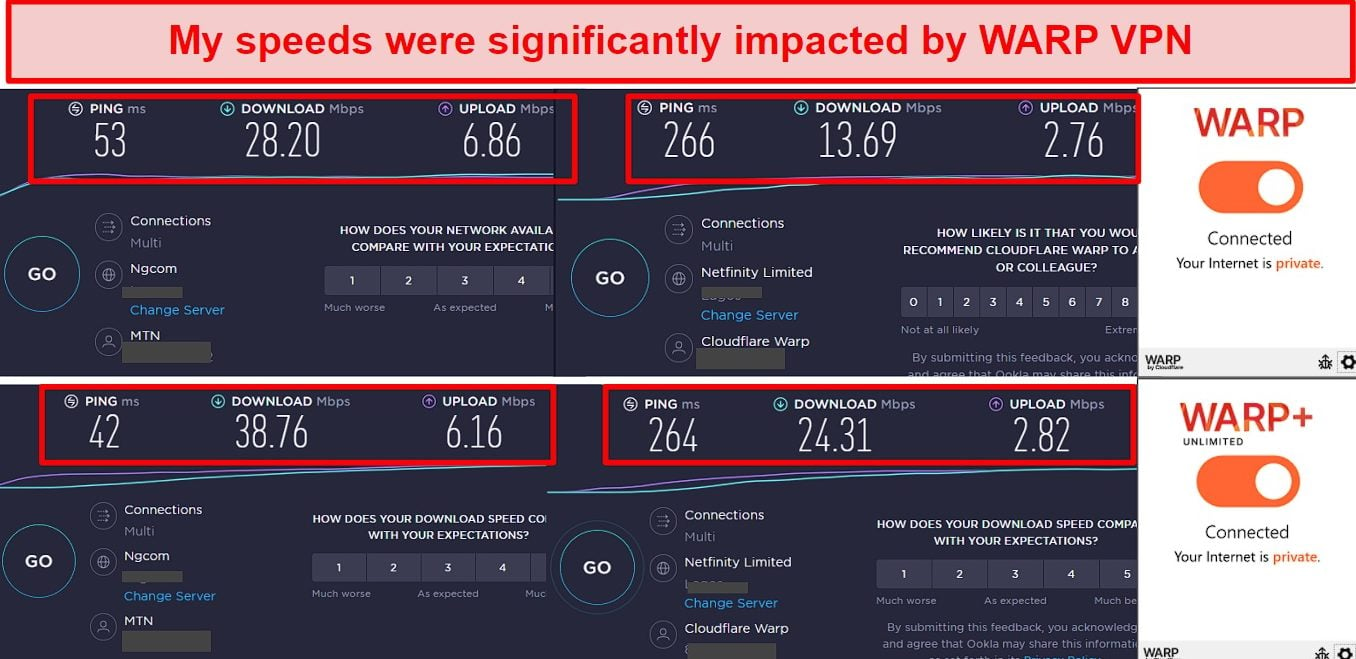
The upload speeds didn’t perform any better. On a base upload speed of 6Mbps, WARP produced 2.76Mbps and WARP+ saw 2.82Mbps. The latency was also high at 260ms from slightly above 40ms with my base connection. Moreover, the speeds weren’t steady during my tests . Sometimes, the speeds dropped significantly. Other times, there were slight improvements. These inconsistencies go against Cloudflare’s claims of better, more reliable internet speeds.
Except for the basic connection without any adjustments, Cloudflare 1.1.1.1 without WARP provides the swiftest performance, which aligns with my initial speed. In this setup, only your DNS queries are encrypted and directed through Cloudflare.
ExpressVPN offers one of the fastest VPN speeds of any VPN provider out there. While many VPN providers jumped on the Wireguard bandwagon in an effort to improve their speeds, ExpressVPN aimed to achieve even better results. It developed a proprietary protocol named Lightway, which achieved two to three times the bandwidth of OpenVPN without compromising security.
| Download speed reduction | Upload speed reduction | Ping time to Google.com | Average time to connect (seconds) | Unblock successful for | |
|---|---|---|---|---|---|
| WARP VPN | 162ms | 3 | |||
| Average score of top 10 VPNs | 11% (UK) | 16% (FRA) | 24ms | 11 | Netflix Hulu Kodi ESPN Youtube BBC iPlayer |
| WARP VPN | Average score of top 10 VPNs | |
|---|---|---|
| Download speed reduction | 11% (UK) | |
| Upload speed reduction | 16% (FRA) | |
| Ping time to Google.com | 162ms | 24ms |
| Average time to connect (seconds) | 3ms | 11ms |
| Unblock successful for |
Server Network — Servers in 275+ Cities in 100+ Countries
WARP is based on Cloudflare’s fast global network in 275 cities and over 100 countries. This is an impressive built-in infrastructure that many other VPNs lack. WARP+ uses Argo Smart Routing to devise the shortest path through its global network of data centers for faster speeds.
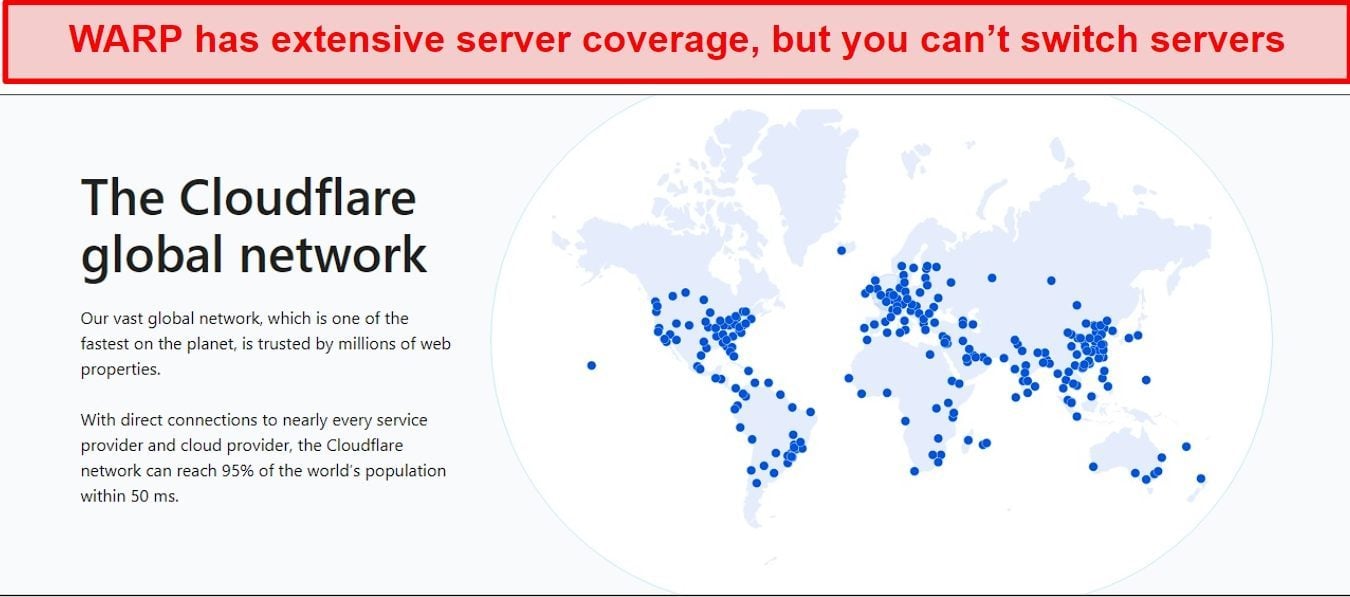
Unfortunately, you can’t take full advantage of WARP’s extensive network as you’re always auto-connected to the closest server. You also can’t use WARP to access geo-blocked content since it wasn’t designed with geolocation spoofing in mind (unlike most other VPNs). Having access to such an extensive network means that you should have a reliable local connection from anywhere.
As an alternative to WARP VPN, CyberGhost provides a more extensive server network with over 11,690 servers located in over 100 countries. The wide and expansive network of CyberGhost makes it a great choice for individuals seeking to access content from restricted areas. Those who travel frequently and wish to protect their data and have access to their content from any location will find this service extremely useful.
Editor’s Note: Transparency is one of our core values at WizCase, so you should know we are in the same ownership group as CyberGhost VPN. That said, our detailed reviews follow a strict methodology that examines all relevant performance factors to help you arrive at your own informed conclusion.
Security — Bare-Minimum Security Features
WARP VPN offers basic security features. The VPN is an extension of the 1.1.1.1 DNS resolver service and allows you to get an encrypted tunnel in addition to its encrypted DNS. You can switch between DNS over HTTPS or DNS over TLS encryption. WARP’s VPN encryption is built on Wireguard, and WARP calls this custom implementation BoringTun.
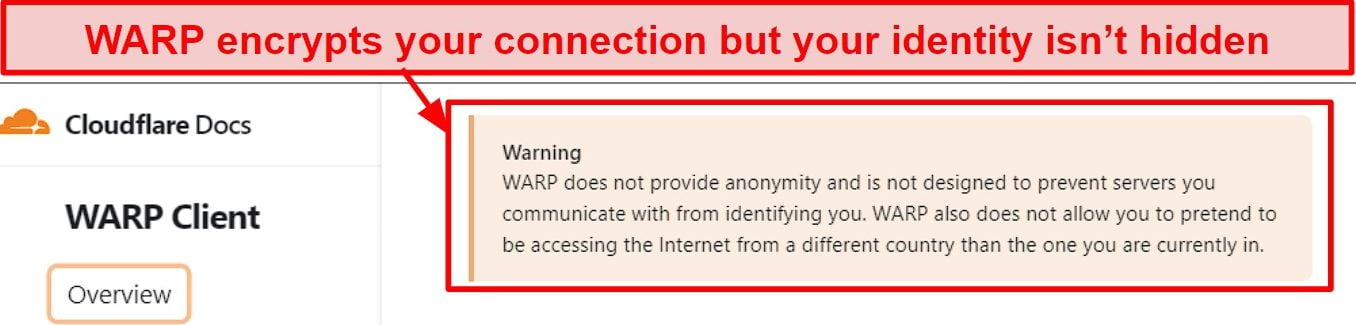
WARP VPN hides your traffic from your ISP and anyone locally sharing your network, giving you increased privacy and preventing third-party spying when you use public WiFi. This is a great first step, but it doesn’t hide your identity from websites you visit — if you want complete privacy, this isn’t the best solution.
You can integrate Cloudflare’s Gateway service into WARP for free by signing up and entering your unique ID in the app. This gives you another layer of security by blocking dangerous DNS requests by matching them against its threat database (which monitors new and evolving threats, including malware and spyware across over 25 million websites). The “Custom Endpoint” feature also allows you to select how your data is routed.
WARP has a split-tunneling feature that allows you to select apps that it should exclude from the service. Apps like Netflix, HBO Max, YouTube, and other streaming services are automatically excluded from the service. It also has a malware/adult content blocker which proved very effective during my tests.
As VPNs are designed to protect your privacy against prying eyes, even from your ISP, leaking information is something that you do not want to occur at any cost. I tested for IP, DNS, and WebRTC leaks using a WARP+ server in the Netherlands and did not find any leaks.
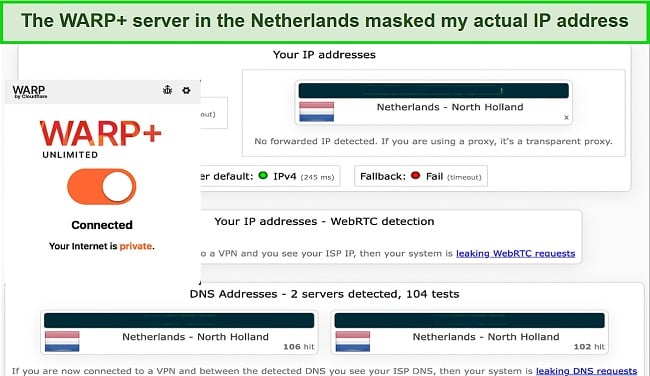
On the other hand, connecting to the Cloudflare 1.1.1.1 DNS resolver only revealed my IP address . For optimal results, WARP+ and Cloudflare 1.1.1.1 should be used together to achieve the highest speed and security levels. The Cloudflare 1.1.1.1 DNS resolver is best known for delivering fast DNS lookups, a characteristic that sets it apart from VPNs.
As well as the main DNS address (1.1.1.1), Cloudflare also offers DNS addresses for blocking malware (1.1.1.2) and adult content (1.1.1.3). These DNS addresses can be enabled through the app’s settings. Click on the three bars at the top right corner of the app screen > Advanced > Connection Options > DNS Settings > 1.1.1.1 for Families and select the option you wish to use.
ExpressVPN offers truly high-quality technical security that far surpasses that of WARP VPN. It uses the AES-256 cryptographic algorithm, along with an RSA-4096 handshake and an SHA-512 keyed-hash message authentication code. The Elliptic Curve Diffie-Hellman key exchange method is used to encrypt data channels in order to achieve perfect forward secrecy.
Privacy — Not Recommend for Privacy
WARP simply doesn’t cut it for privacy. Although the VPN promises privacy for everyone, it logs a lot of data. There’s also no ad blocker to protect users from intrusive ads.
Cloudflare only claims to store the absolute minimum necessary logs, including performance data (how much users transfer), anonymized device data, request data (source IP, source port, and destination IP), crash logs, DNS resolver information, and type of operating system.
I was concerned that WARP retains request data for 24 hours — supposedly to respond to emergency law enforcement requests. This could show which websites a user visited, which most premium VPNs aim to avoid with various methods.
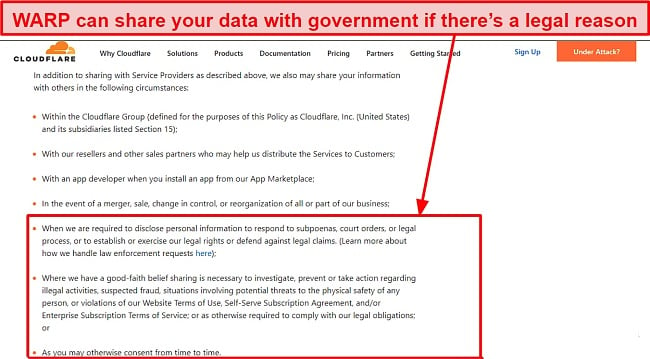
Cloudflare stores its users’ information in the United States, the European Economic Area (the “EEA”), and the United Kingdom . Upon checking the DNS logs tab on the app, I saw a record of my recent browsing history. I found this quite intrusive. Unlike WARP, CyberGhost doesn’t log your connection data and so doesn’t have any data to share with government requests.
Torrenting — Bad Choice for Torrenting
I don’t recommend torrenting with WARP since it doesn’t hide your identity from the websites you visit. Although you can download torrents, it won’t protect your digital identity.
ExpressVPN offers high security and fast connection speeds ideal for torrenting and peer-to-peer downloads. Additionally, it has a no-logs policy, highly secure applications, and a privacy-friendly offshore jurisdiction to ensure the protection of customer data.
My team and I don’t condone illegal torrenting , so be sure to check the rules and regulations in your country. Always make sure the torrents you download are copyright-free, no matter which VPN you decide to use.
Editor’s Note: Transparency is one of our core values at WizCase, so you should know we are in the same ownership group as ExpressVPN. That said, our detailed reviews follow a strict methodology that examines all relevant performance factors to help you arrive at your own informed conclusion.
Does WARP VPN Work in China? No, Don’t Try!
WARP doesn’t work in China. WARP only encrypts your data using your existing IP address . This means it cannot unblock content that’s blocked inside China. If you want a reliable VPN for secure browsing when traveling to China, I recommend trying ExpressVPN to access the internet in China safely .
Keep in mind that non-government-approved VPNs are illegal in China, but there have been no public cases of tourists being penalized by the Chinese government. The common practice is that China fights VPNs by technologically blocking them and not by chasing after the people who use them.
Simultaneous Device Connections — Unlimited Number of Devices
You can use WARP on all your devices simultaneously. If you upgrade to the WARP+ Unlimited service (which can only be done on mobile), you can also use the premium service on every device . To do that, I simply copied the license key from my WARP+ app and replaced the one on my other devices that were using the base WARP offer, including my Windows PC. This way, I could use the premium service on my desktop.
I tested WARP on 2 Android devices and 2 Windows PCs using the offer I made with my Google account. I stayed connected on all devices for almost a day, and the connection never dropped or slowed down.
Device Compatibility — Available for Popular Operating Systems
WARP VPN works with popular operating systems. You can use the service with Android, iOS, macOS, Windows, and Linux. The app worked fine across all the devices that I tested. It took just a few seconds to download, install, and start using the service.
However, the VPN doesn’t work with routers or gaming consoles. It also lacks browser extensions for Chrome, Firefox, or Safari browser extensions, which I find quite disappointing. I would have liked to see WARP supported on my router so that I don’t have to manually install the app on all my devices.
Ease of Setup & Installation — Easy to Install on Mobile and Desktop
I was impressed with the simplicity of the WARP setup process . The installation process is simple and straightforward. The app can be installed from the website or the Appstore. I tested the VPN on my Windows PC and Android phone. With one click, I was able to set up the app on my phone and PC. WARP features a neat interface with a large toggle button to activate the service. There’s also a hamburger menu that allows you to adjust the connection settings.
WARP has a “1.1.1.1 for Families” feature that comes with malware and adult content blockers. The app also allows switching between the DNS-only 1.1.1.1 service or 1.1.1.1 with WARP’s full encryption from the settings menu.
Steps to Installing WARP VPN on Windows:
- Download the WARP client. Visit the provider’s website to download the Windows version of the WARP client.
- Run the installation file. You will need to follow the steps in the setup wizard to install the software.
- Establish connection. Toggle on the connection button to activate the service.
- That’s it. Start browsing securely.
Cloudflare has made reaching customer support far more difficult than it should be. It even warns users in its forums not to contact support through traditional means (email, live chat, and phone). Instead, you have to submit feedback through a contact form (with a bug report) and wait for a response. I sent a message and asked if Cloudflare could advise me on how to improve speeds. Unfortunately, more than a week later, I still haven’t heard back. This makes me wonder if support is sufficiently managed or just used for bug reports.
| VPN vendor | Email response time | 24/7 support | Live chat | Refund policy | Native English |
|---|---|---|---|---|---|
| WARP VPN |
| WARP VPN | |
|---|---|
| Email response time | |
| 24/7 support | |
| Live chat | |
| Refund policy | |
| Native English |
WARP is free to use, but you can also get an upgrade to a monthly premium offer . The free WARP version limits your data usage to 10GB per month, and any usage over this limit will slow your connection. Purchasing WARP+, the premium version of the service, will grant you faster speeds and unlimited data, but you can only do so via the App Store or Google Play Store. There’s also the option to refer another user and get 1GB of bandwidth for each referral.
WARP’s pricing varies by region of the world you’re located in . If you live in North America or Europe, you’re likely to pay slightly more than what someone in South America or Africa would pay. Also, depending on the device operating system you’re signing up with, there could be slight differences. That said, the price is relatively low wherever you’re paying from.
Payment is made through your credit/debit card attached to your AppStore account. There’s no official money-back guarantee from Cloudflare — you’re only able to get one if you purchase through Google Play and initiate the refund within 48 hours. You won’t be able to get a refund on iOS. Fortunately, I bought my offer on Android and successfully got a refund.
Check out these VPNs if you’re interested in a risk-free monthly offer – they all offer an unconditional 30-day refund policy, so you can purchase with confidence.
WARP VPN has the following offers
Final Verdict
WARP offers an encrypted tunnel and DNS protection but overall fails to compare to other premium VPNs on the market.
I was most excited to see WARP’s supposed higher speeds but experienced slower speeds on both WiFi and mobile instead. It fills a very niche spot in the VPN market — primarily offering protection against those sharing your local network and hiding your browsing from your ISP and other prying eyes. However, it doesn’t hide your identity from the websites you visit. If the speeds and security features can be improved, I might change my mind. For now, I can’t recommend getting WARP.
If you’re searching for a more fully-featured VPN with high speeds, strong security, and the ability to unblock numerous streaming platforms while on a budget, ExpressVPN is a better option. You can easily install ExpressVPN on all devices, and enjoy lightning-fast speeds with its large server network.
Editor’s Note: Transparency is one of our core values at WizCase, so you should know we are in the same ownership group as ExpressVPN. That said, our detailed reviews follow a strict methodology that examines all relevant performance factors to help you arrive at your own informed conclusion.
Yes, you can get WARP completely for free on mobile or PC . But the speeds are lackluster, and you have to deal with bandwidth limitations.
If you decide to upgrade to the premium offer, you have just 48 hours to apply for a refund on the Google Playstore. If you’d like to find out more about other free VPNs, you can check out this list of the best free VPNs on the market . However, I recommend against using free VPNs for their weak performance and security issues.
- Overall
- Speed
- Servers
- User Experience
- Support
- Pricing

Editor’s Note: We value our relationship with our readers, and we strive to earn your trust through transparency and integrity. We are in the same ownership group as some of the industry-leading products reviewed on this site: ExpressVPN, CyberGhost, Private Internet Access, and Intego. That said, our detailed reviews follow a strict methodology that examines all relevant performance factors to help you arrive at your own informed conclusion.

