| Speed | 2.0 / 10 |
|---|---|
| Servers | 5.0 / 10 |
| User Experience | 4.0 / 10 |
| Support | 4.0 / 10 |
| Pricing | 5.0 / 10 |
TuxlerReview 2026: Before You Buy, Is It Worth It?
- Written By Clement Adegbenro Cybersecurity & Tech Writer
Tuxler Overview
Tuxler touts itself as the first free residential VPN powered by community volunteers. The company has a reputation for unblocking restriction-based and censored services – something I did not expect from a free VPN. I decided to run several in-depth tests to determine the validity of the company’s claims and how it compares to the top VPNs in 2026 .
The free version of Tuxler is definitely worth a shot, at least for its simplicity and ease of use. Tuxler’s inconsistent performance, insufficient security features, questionable logging policy, and lack of a refund policy are the downsides I found during my review. While it managed to unblock certain streaming sites, the videos were sluggish and of poor quality.
Tuxler offers a free service that rivals most of its competitors. You can use the VPN to watch movies and listen to music without worrying about bandwidth limitations. However, It restricts the number of server switches you can make and the number of proxy IP addresses you can access at any given time.
Don’t Have Time? Here’s a 1-Minute Summary
- Great unblocking performance. While I was able to access several streaming platforms, the slow connection was an inconvenience. See what I could watch with Tuxler .
- Slow and inconsistent speeds. Free plan users will see disappointing results due to its extreme slowness. Take a look at my speed test results .
- Widespread server network. There were a few unsuccessful connections despite the extensive presence of servers. Find out which locations are covered .
- Questionable no-logs policy. The privacy policy of the company indicates that it collects and shares personal information. Familiarize yourself with its privacy policy .
- Tuxler utilizes a ticketing system. Getting a response might take a long time, depending on whether it’s a weekday or weekend. I tested the customer support myself. Find out how support answered my questions here .
- Tuxler has a free and paid version. Even though there is a free version, the paid version does not come with a money-back guarantee. I go into more detail about this below .
Tuxler enables users to unblock geo-restricted content on popular streaming platforms like Netflix, HBO Max, and more . However, it’s worth noting that the service’s speed may result in lower resolution when streaming movies and TV shows. Although Tuxler offers a premium option promising improved quality and performance, there are doubts regarding the legitimacy of this claim.
Tuxler supports a wide range of Netflix regions, including the UK, Canada, several European countries, Germany, New Zealand, Nigeria, and India. However, Netflix’s American library was unavailable to me because my connection to the server was inconsistent. You will need an alternative VPN service to get access to your US Netflix library while abroad.

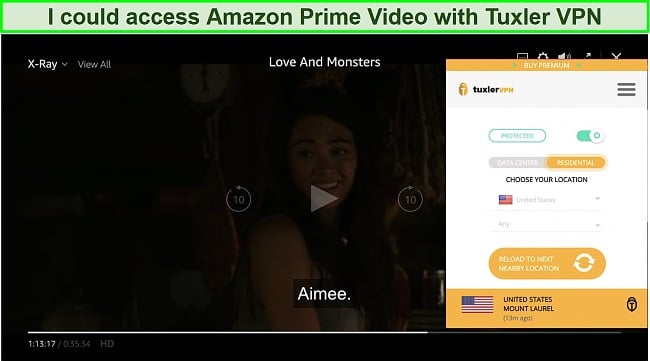
Tuxler is also able to stream US-based streaming services like Hulu and HBO Max, though with a lot of lag.
Disney+ and BBC iPlayer: Blocked
I was unable to log into my Disney account after connecting to Tuxler’s USA servers. There’s a similar problem when trying to access BBC iPlayer via the network’s UK servers.
The Disney+ streaming service is available in countries such as Canada, New Zealand, Australia, and select parts of Europe. As its US platform contains exclusive content, I attempted to bypass its geo-restriction several times with Tuxler but instead received error messages.
BBC iPlayer also specifies that its services are available only to legal UK residents. An attempt by my UK colleague to access the streaming platform’s shows using Tuxler was flagged as suspicious. Simply put, the system detected that my colleague in the United Kingdom was using a VPN service and blocked him.
On the whole, I would consider Tuxler to be an above-average product in terms of its streaming capabilities. I personally prefer CyberGhost for watching content I paid for while abroad since it provides seamless HD streaming and lets me reliably access US Netflix.
Editor’s Note: Transparency is one of our core values at WizCase, so you should know we are in the same ownership group as CyberGhost VPN. That said, our detailed reviews follow a strict methodology that examines all relevant performance factors to help you arrive at your own informed conclusion.
Slow and Inconsistent on Most Servers
Tuxler has the lowest speed of any VPN I have tested so far. Your connection speed will be affected since there are an unknown number of people sharing your network. Fortunately, paying Tuxler customers do not have to worry about this since their networks will not be transformed into servers.
The free version has the advantage of offering unlimited bandwidth. You can use the service as much as you want since there are no data transfer limits. Many VPN services offer unlimited bandwidth for subscription plans, but not for free or trial accounts. As Tuxler’s free speeds are generally very slow, it makes very little difference.
Speed Test Results
Tuxler completely slowed down my downloads and uploads. While I expected some drops with any VPN, these results were rather shocking. You can also expect slow speeds if there aren’t as many users available in your target region. The best you can expect is to stream 480p videos and browse the Internet at the very most.
For comparison purposes, I measured my base speed to be 45.33 Mbps download and 48.13 Mbps upload, and ping of 27 ms. Next, I tested servers closer to my actual location (in my case, the United States). I was disappointed that the fastest server dropped my speed by 94%.
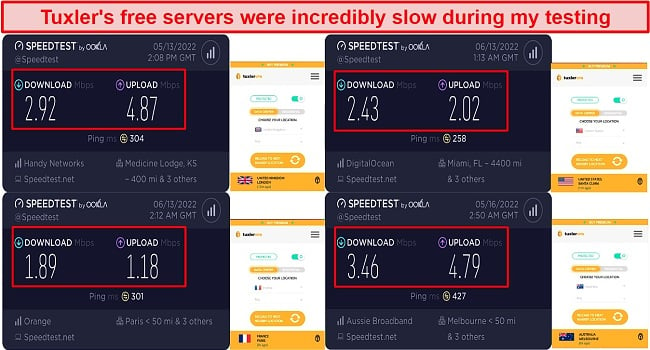
Then I went further and tested Tuxler’s servers in the UK, France, and Australia. I received a 2.92 Mbps download speed in the UK, which is a 93% decrease from my base speed. My download speed in France and Australia dropped by 95% and 92%, respectively (down to 1.89 and 3.46 Mbps).
Given these poor results, you can expect a much better performance from the Premium version. The company claims that paying customers experience four times as much speed as those on the free plan. It could be true since customers who purchase a paid plan do not become servers. The number of server locations available to me as a free user was limited, and I could only change my location a few times daily.
I recommend avoiding Tuxler if you require speed and stability, as its pings are incredibly high and its speeds are poor. If you only need a VPN for a short period of time, these top-rated month-to-month VPNs have speeds that let you stream HD-quality video, download files quickly, and play online games seamlessly. Also, they’ll let you conduct your daily online activities with minimal interruption.
| Download speed reduction | Upload speed reduction | Ping time to Google.com | Average time to connect (seconds) | Unblock successful for | |
|---|---|---|---|---|---|
| Tuxler | 93% (UK) | 97% (FRA) | 141.39ms | 8 | Youtube Netflix BBC iPlayer Hulu Kodi ESPN |
| Average score of top 10 VPNs | 11% (UK) | 16% (FRA) | 24ms | 11 | Netflix Hulu Kodi ESPN Youtube BBC iPlayer |
| Tuxler | Average score of top 10 VPNs | |
|---|---|---|
| Download speed reduction | 93% (UK) | 11% (UK) |
| Upload speed reduction | 97% (FRA) | 16% (FRA) |
| Ping time to Google.com | 141.39ms | 24ms |
| Average time to connect (seconds) | 8ms | 11ms |
| Unblock successful for |
Server Network — Large but Unreliable
The primary focus of Tuxler’s marketing efforts is its expansive network of residential IPs. The VPN transmits web requests via residential IP addresses assigned by real Internet service providers (ISPs).
According to the site, you have access to 300,000 IP addresses spread across 92 countries, which is quite impressive considering its global reach. The VPN also provides you with over 70,000 new IP addresses every month and residential IP addresses from more than 182 ISPs. In spite of the company’s assertions that 100% of its IP addresses are private ones, you need to activate a switch to take advantage of these features.
Tuxler’s locations are spread throughout Europe, Asia, Africa, South America, the Middle East, and North America. I had success connecting to a variety of countries during testing, including the United States, the United Kingdom, the Netherlands, Hong Kong, France, Israel, Singapore, Japan, Germany, Canada, and Australia. By regularly changing the locations it connects to, this VPN is able to avoid being blocked by institutions.
Server availability is primarily dependent on the bandwidth of nearby users. Other users cannot see your IP address unless it’s online through the app. You are, therefore, entirely dependent on the activity of other Tuxler customers in your target area. If there are no active users within your area or your preferred location, the app automatically connects you to the nearest server available. My attempts to connect to the United States were redirected to countries like Germany, Portugal, and Canada.
Security — Strong Encryption but Lacking in Any Other Security Features
Tuxler uses SOCKS5 to protect data transfers. By using proxy servers, the advanced protocol is able to establish UDP or TCP connections through IP addresses. While this proxy protocol increases privacy by hiding your real IP address, it does not ensure security. The information you send over a proxy connection is not encrypted, unlike OpenVPN or L2TP/IPSec protocols. In this way, your IP is masked, but your activity is not hidden.
According to Tuxler’s customer support, the product utilizes the virtually unbreakable AES-256-bit encryption technology, coupled with an RSA2048 key. So, the proxy protocol provides a high level of protection just like other top VPNs.
Compared to more traditional VPN services, this software differs significantly in its communal nature. Consequently, it is unable to directly compete with the major industry players. It lacks standard VPN features, such as stealth mode, split tunneling, and multi-hop.
The Tuxler website does not mention IP or DNS leak protection , so it makes sense to test the free version. I found no IP or DNS leak using Tuxler on any type of connection after performing a number of tests on various servers. Any application that uses IPv6 or WebRTC can expose your true IP address (even when using a VPN). VPN services that use IPv6 sometimes suffer leaks, even the best of them. I found it surprising that even though I switched servers a few times, Tuxler never suffered from leaks of any kind.
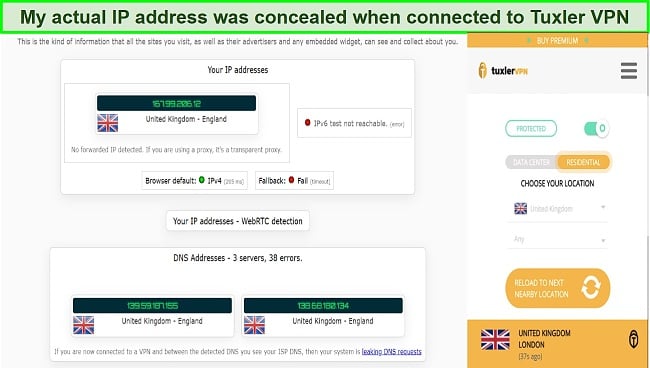
In the screenshot, it correctly points out that I am in the United Kingdom, yet my actual DNS address is not visible. I tested different countries and got different DNS addresses, but none revealed my real one.
Privacy — Raises Concerns
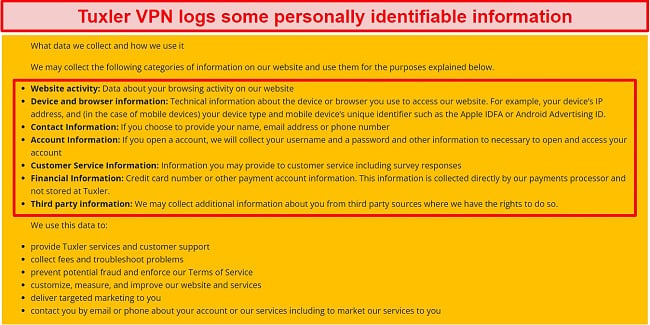
Additionally, every time you run the Tuxler free software on your computer, your computer becomes a tunnel for other users. You essentially agree to let others access the internet with your IP address and conduct business as if they were you. The risk is that others can use your resources for suspicious or even criminal activities, and such misuse can cause severe issues for you with law enforcement.
Torrenting — Supported, but Not Recommended
Both paid and free versions of Tuxler lack dedicated VPN servers for torrenting. However, the servers can be used for P2P sharing. And you’ll probably be satisfied if you connect to an adequate Tuxler server, as I did in the Czech Republic.
I tested Tuxler’s torrenting speeds using servers in the US, the UK, and Australia. I received speeds of 2.43 Mbps (US), 2.92 Mbps (UK), and 3.46 Kbps (Australia). Unfortunately, the results are poor, plus the software is missing a kill switch, making the process of downloading torrents extremely dangerous.
Additionally, you should be aware that the company is based in the United States and that your data may be logged to an unknown extent. In this regard, Tuxler should not be considered a safe torrenting service.
CyberGhost boasts the fastest speeds and highest security standards for torrenting and P2P downloads. This Romania-based company offers a good selection of custom applications, and our testing found it to be consistently good. Also, you can be assured that your data is protected through a no logs policy, highly secure applications, and a safe, privacy-friendly offshore jurisdiction.
Do not forget to exercise caution when downloading anything through torrents. Although it seems harmless, the consequences can be worse than you could ever imagine. The range of concerns varies from legal issues to malware-infected files. Not to mention you’re making yourself easier to target by exposing your real IP address.
Does Tuxler Work in China? Maybe!
This VPN uses the SOCKS5 protocol, which is one of the most effective at getting around geographical restrictions. Although I haven’t tested it myself, user feedback indicates it can be used to access blocked websites and apps.
Taking it a step further, I asked its customer service team if it worked in China to which it responded within two hours. Unfortunately, the response provided did not adequately answer my question. I was advised to download the free software and test it out on my own.
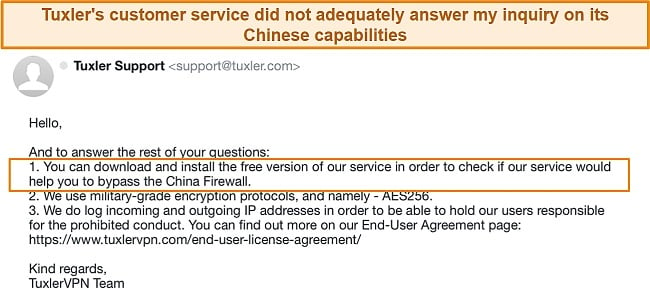
Even if it could get around the Great Firewall of China, Tuxler’s absence of obfuscation features significantly limits its use. Top VPN services typically offer obfuscated VPN servers with additional layers of encryption designed to guard against censorship in heavily censored countries. For this purpose, opt for a VPN service that has been well-tested instead.
ExpressVPN is one of the most popular VPNs used by tourists in China , thanks to the ease with which it is able to navigate the Great Firewall. Its wide range of server locations is a big plus here, with Hong Kong, Taiwan, and Japan-based servers coming in especially handy.
Editor’s Note: Transparency is one of our core values at WizCase, so you should know we are in the same ownership group as ExpressVPN. That said, our detailed reviews follow a strict methodology that examines all relevant performance factors to help you arrive at your own informed conclusion.
Server Locations
Simultaneous Device Connections — Just 1 Device Connection
Tuxler’s a free trial and paid versions each work on just one device. I like to use a variety of devices to access the internet including smartphones, tablets, and laptops. So, it is dispiriting to join a VPN service to protect your data only to be restricted to connecting just one device. It is also not ideal for families or groups seeking anonymity and safety on the web.
In a move likely to attract gadget collectors like myself who want comprehensive insurance, CyberGhost offers the possibility of connecting up to 7 devices with a single subscription.
Editor’s Note: Transparency is one of our core values at WizCase, so you should know we are in the same ownership group as CyberGhost VPN. That said, our detailed reviews follow a strict methodology that examines all relevant performance factors to help you arrive at your own informed conclusion.
Device Compatibility — Limited Device Support
Tuxler provides access to some of the most popular platforms, such as full extensions for Chrome and Firefox, Mac computers, and Windows. There are no applications for Android and iPhone yet, but the website indicates that they will be available soon. In addition to only being available on certain devices, this VPN excludes users who use Linux. Also excluded are users who want the VPN for their TVs and game consoles.
Ease of Setup & Installation — Super Easy and Simple
I was able to easily install Tuxler on both my Mac and Windows computers , and I used the Chrome extension without any problem. Upon installing the application, it took a couple of seconds for a VPN connection to be established.
If you are using the extension, you can select whether you wish to connect or disconnect from the VPN at any time. There are tools on Tuxler that can simplify your search for servers in a particular country. All you have to do is select the locations from the menu and pick from the cities and countries listed.
How to Install and Set Up Tuxler on Windows
- Download the app. Select the VPN app for your device from the downloads section on the Tuxler website.
- Run the installation file. The installation wizard will guide you through the process.
- Connect to a server. Select the server you want from the drop-down list. An option for choosing a random location is also provided.
In addition, the website does not offer live chat, and you can only reach the support team by email or through the website contact form . TuxlerVPN replied to my inquiry regarding its security policies and protocols shortly after I reached out. Also on the same day, I exchanged a few emails with the agent. However, my questions weren’t answered as thoroughly as I would have liked.
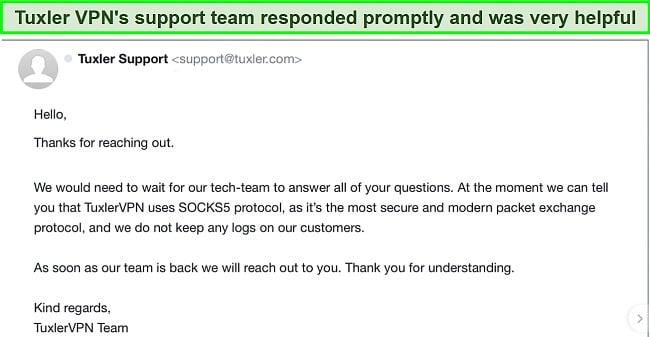
According to the customer care representative, the company does not keep user activity logs and provides end-to-end encryption. Surely, this information could have been displayed on the website. Tuxler has a social media presence, but the accounts don’t seem to have any form of maintenance.
| VPN vendor | Email response time | 24/7 support | Live chat | Refund policy | Native English |
|---|---|---|---|---|---|
| Tuxler | 24 hours |
| Tuxler | |
|---|---|
| Email response time | 24 hours |
| 24/7 support | |
| Live chat | |
| Refund policy | |
| Native English |
The Tuxler software is available in free and premium versions. The free version of Tuxler is available for life, so there is no time limit on how long you will be able to use it. Tuxler seems to be doing its best to provide a compelling free plan in comparison with its premium version. As a result, you probably won’t need to upgrade.
It’s disappointing that Tuxler doesn’t offer reimbursements, knowing that the industry standard for refunds is 30 days. The provider argues that this is because it already offers a free version of the software. However, this is absurd considering that the paid version apparently runs four times as fast and has advanced location options.
Tuxler has the following offers
Final Verdict
The free version of Tuxler leaves you vulnerable and at the mercy of the activities of other users. You will have no knowledge of another user’s activities on your IP address or network. The service has unlimited bandwidth, good geo-unblocking abilities, and access to many locations thanks to a pool of residential IP addresses, however, security and privacy are seriously lacking. Additionally, the speed is not very impressive, and you won’t be able to do any decent streaming or downloading.
Even if you choose to purchase the Premium version, the lack of a refund policy and the inability to connect on multiple devices simultaneously are major deterrents. The extensive testing I performed for this Tuxler review led me to conclude that you are better off exploring other options. Rest assured that there is no shortage of free or inexpensive VPN and proxy services that guarantee you private and secure access to the internet.
ExpressVPN offers a best-in-class VPN service, providing an array of comprehensive features, top-notch security, lightning-fast speeds, and seamless access to geo-blocked websites. You can test ExpressVPN out completely risk-free as it’s backed by a 30*-day money-back guarantee — if you don’t like it, you can easily get a full refund.
Editor’s Note: Transparency is one of our core values at WizCase, so you should know we are in the same ownership group as ExpressVPN. That said, our detailed reviews follow a strict methodology that examines all relevant performance factors to help you arrive at your own informed conclusion.
If you are absolutely committed to using a free VPN, I would highly recommend these reliable free options . They are much better alternatives to Tuxler, in that they offer a host of advanced security features, a no-logging policy, and mobile app compatibility.
- Overall
- Speed
- Servers
- User Experience
- Support
- Pricing

Editor’s Note: We value our relationship with our readers, and we strive to earn your trust through transparency and integrity. We are in the same ownership group as some of the industry-leading products reviewed on this site: ExpressVPN, CyberGhost, Private Internet Access, and Intego. That said, our detailed reviews follow a strict methodology that examines all relevant performance factors to help you arrive at your own informed conclusion.

