| Speed | 7.0 / 10 |
|---|---|
| Servers | 3.0 / 10 |
| User Experience | 4.0 / 10 |
| Support | 1.0 / 10 |
| Pricing | 2.0 / 10 |
SpeedVPN Free VPN Proxy Review 2026: Is It Worth Buying?
- Written By Clement Adegbenro Cybersecurity & Tech Writer
SpeedVPN Free VPN Proxy Overview
It’s clear SpeedVPN Secure has a massive user base thanks to its 100 million downloads. The company’s value proposition is focused on speed, its ability to unblock geographically restricted websites, and its assurance of online privacy and security. As such, I was obliged to test it to verify if these claims are true and if it can compete with the top VPNs on the market .
The tests I conducted revealed that SpeedVPN Secure is a completely untrustworthy VPN — it lacks essential security features, logs user data, has terrible streaming performance, and does not offer any customer support. As a matter of fact, SpeedVPN Secure is dangerous and you should not install it on your Android device.
Don’t Have Time? Here’s a 1-Minute Summary
- Limited streaming support. It was disappointing to find out that SpeedVPN Secure couldn’t unblock all the streaming platforms I tried. Learn how my streaming test went .
- Reliable speeds. I experienced fast speeds on most servers – even those located in remote regions. Find out which servers are the fastest .
- Limited server network. In comparison to other VPN service providers, this VPN has fewer servers available. Read more about SpeedVPN Secure’s network here .
- Torrenting is not advised. The unreliable logging policy and lack of essential security features of SpeedVPN Secure make it unsuitable for torrenting. Read more about the risks of torrenting with SpeedVPN Secure .
- Limited compatibility. The servers are specifically designed to support Android devices. Learn how to set up SpeedVPN Secure .
- Totally free service. SpeedVPN Secure is available for free but the app is riddled with adverts. Find out my research on the VPN’s pricing here .
SpeedVPN Secure couldn’t unblock the geo-restrictions of every streaming service I tested, regardless of the server I used. My first attempt to stream The Turning Point was blocked by Netflix. As the platform could not determine that my location had changed, it restricted my access. I found this to be strange – Netflix often blocks VPNs by claiming it has detected a proxy server. This time, Netflix did not see the change in location at all.
A colleague in London also encountered a similar issue while trying to access BBC iPlayer using a UK server. The platform detected that he was using a proxy, so it prevented him from accessing the website. HBO Max was also inaccessible. My attempts to access the platform were instantly blocked by its geo-blocks, even after I switched servers. As with Netflix, it didn’t see any change in my geographical location.
You should check out other VPNs if you are looking for ones that support Netflix and other top streaming services. ExpressVPN supports 65+ streaming services and is extremely fast for smooth streaming.
Good and Reliable Speed on All Servers
SpeedVPN Secure offers reliable download speeds, but upload speeds and pings were much slower. Since SpeedVPN Secure prioritizes speed over anything else, I was especially interested in its speed test.
I ran tests on SpeedVPN Secure to check the speed of a few popular servers popular with international streamers. While my speeds were the fastest when connected to a US server, I also had decent speeds from distant servers in Japan, although HD videos buffered frequently.
Speed Test Results
I experienced decent speeds on nearby servers, but slower speeds on distant servers. In my tests with Ookla, SpeedVPN Secure produced a 50% speed loss across all servers. The connection speed was not as good as any of the leading VPNs on the market, but it was adequate for streaming, browsing, and other everyday tasks.
Without SpeedVPN Secure connected, my download speed was 41.98 Mbps, upload speed was 15.42 Mbps, and ping time was 2 ms. Using SpeedVPN Secure’s quick-connect feature, you can automatically connect to the fastest server based on your location. However, the feature did not work for me – it connected me to a Dutch server instead of an American one.
So, I manually connected to a server in the US instead, which was 38 percent faster than the Netherlands server. My download speed dropped to 26.98 Mbps while connected to a local US server. I was surprised to see my ping time jump from 2 to 20 considering I reside in the United States. As far as streaming or browsing is concerned, I experienced no difficulties at all.
I experienced a 60% drop in speed while connected to a UK server. In spite of this, websites loaded within 5 seconds, and HD and 4K videos within 2–3 seconds. Most of the best VPN services typically have little or no delay when connected to the fastest servers.
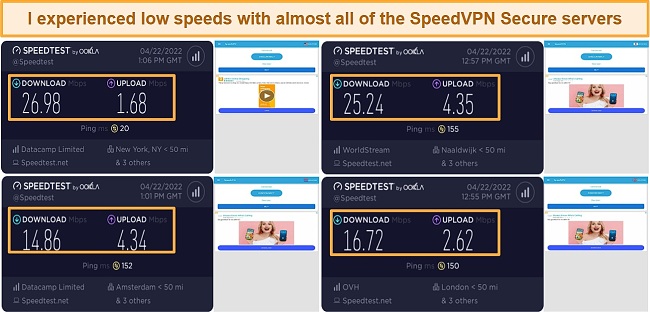
Surprisingly, the Japanese server outperformed the UK and Netherlands ones. In my test, I recorded a download speed of 25.24Mbps, an upload speed of 4.35Mbps, and a ping time of 155ms. Considering how far my data has to travel from where I am in the United States, it wasn’t expected.
Overall, SpeedVPN Secure performed fairly well on both local and long-distance servers. You should also keep in mind that your results may be different from mine, based on your internet connection and geographic position.
| Download speed reduction | Upload speed reduction | Ping time to Google.com | Average time to connect (seconds) | Unblock successful for | |
|---|---|---|---|---|---|
| SpeedVPN Free VPN Proxy | 60% (UK) | 80% (FRA) | 453ms | 14 | Youtube Netflix Hulu |
| Average score of top 10 VPNs | 11% (UK) | 16% (FRA) | 24ms | 11 | Netflix Hulu Kodi ESPN Youtube BBC iPlayer |
| SpeedVPN Free VPN Proxy | Average score of top 10 VPNs | |
|---|---|---|
| Download speed reduction | 60% (UK) | 11% (UK) |
| Upload speed reduction | 80% (FRA) | 16% (FRA) |
| Ping time to Google.com | 453ms | 24ms |
| Average time to connect (seconds) | 14ms | 11ms |
| Unblock successful for |
Server Network — Only Nine Server Locations
SpeedVPN Secure has servers in 9 locations, including the United States, the United Kingdom, the Netherlands, Canada, France, Singapore, Germany, Japan, and Hong Kong. Having said that, SpeedVPN Secure is not open about how many servers it has — leading VPN providers generally disclose their server count, which boosts their transparency.
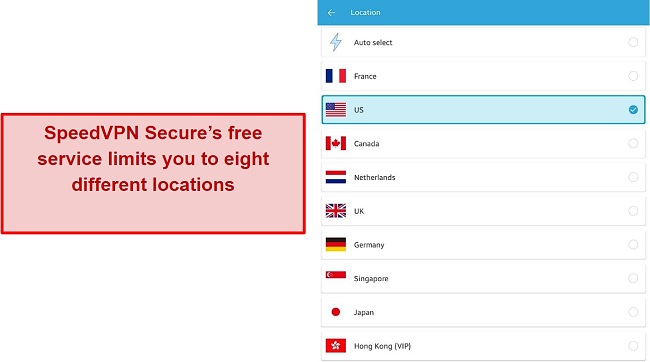
SpeedVPN Secure doesn’t offer servers in Eastern Europe, the Middle East, Africa, or South America, so it’s hard to find fast servers if you are situated in those regions. In addition, you can’t select individual cities or states within the locations, so those hoping for geo-specific content are out of luck.
The geographical diversity of a server network might facilitate faster connections. You will receive faster transfer speeds if you use a server that is located relatively near your physical location. Contrary to this, it helps to have a good selection of servers located around the world if you want to spoof your location to access geo-restricted sites.
It’s for reasons like these that VPNs such as CyberGhost maintain extensive server networks that contain thousands of servers in hundreds of different geographic locations. CyberGhost’s number of servers is so large that it boasts about how diverse its locations are.
Security — Flawed Security
SpeedVPN Secure provides very little information about its encryption and security features. There is no website dedicated to this app, and no mention is made of any of the important details about protocols and hardware in its description on Google Play – not even a vague assurance about security. My request to the company to express exactly how it encrypts and protects its users did not receive a response.
The application does not provide basic security features such as a kill switch, nor does it provide additional security tools or configuration options. In the absence of a kill switch, anyone can easily see what websites you visit and what files you download if you lose your connection.
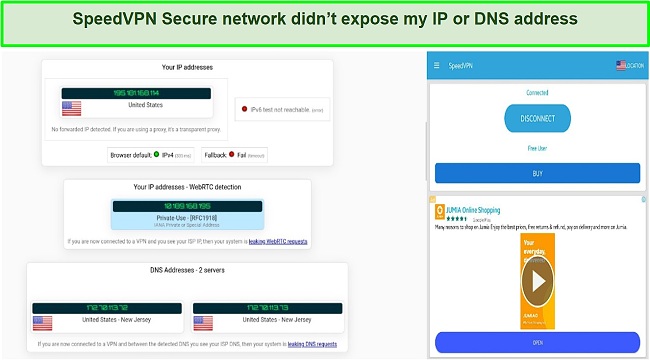
Despite its lack of basic security features, I was surprised to find out that SpeedVPN Secure offers IPv6 and DNS leak protection. I conducted over ten leak tests and did not encounter any IP/DNS leaks. That said, I did notice some WebRTC leaks during the test.
SpeedVPN Secure offers Split Tunneling (called App Filter), allowing you to choose which apps use the VPN and which ones use your ISP’s network. However, SpeedVPN Secure’s split-tunneling doesn’t enable you to split-tunnel third-party apps. It only allows you to exclude operating system-related features like phone calls, photo editors, radios, etc.
Privacy — Suspicious Logging Policy
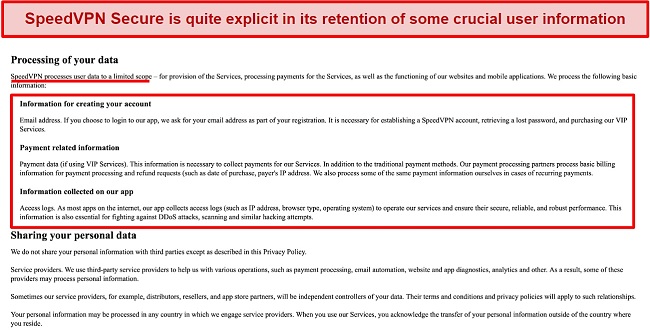
The logging policy of SpeedVPN Secure exemplifies everything you don’t want from a VPN provider. It doesn’t go into details, but states that logs are kept – IP addresses, browser types, and operating systems are among the basic information it keeps.
In addition, SpeedVPN Secure collects your email address and payment information. There is no statement in the policy as to whether or not SpeedVPN Secure records your internet traffic (sites you visit and files you download).
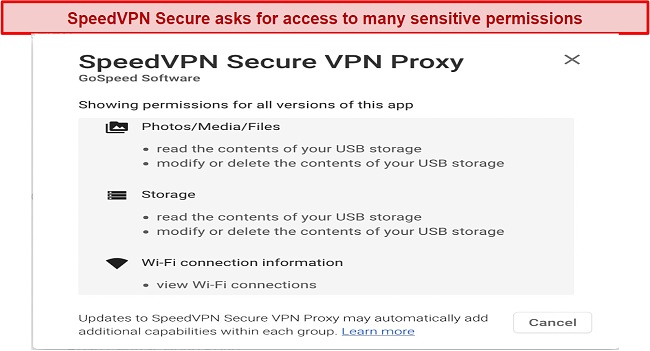
Upon closer examination of the app, I discovered it requested a number of sensitive permissions, including reading your phone’s status and identity, reading and modifying the contents of your storage, as well as accessing your network (view your network and WiFi connections).
There is no information on the SpeedVPN Secure app description about where it is headquartered. Its Google Play store page shows the address of a Hong Kong office, and its only method of contact is a Gmail account. The developer of the program is listed as GoSpeed Software, but its website does not appear to exist. I was redirected to SpeedVPN Secure’s Google Play Store download page when I attempted to visit the site.
You should absolutely avoid using a VPN that disregards user privacy so clearly and is so opaque about its processes. Unlike this provider, ExpressVPN has stricter and clearer no-logs policies , which have been independently verified by multiple independent investigators.
Editor’s Note: Transparency is one of our core values at WizCase, so you should know we are in the same ownership group as ExpressVPN. That said, our detailed reviews follow a strict methodology that examines all relevant performance factors to help you arrive at your own informed conclusion.
Torrenting — Allowed, but Not Safe
My team and I do not condone any involvement in any illegal activities. We recommend that you check with the rules and regulations of your country to ensure that you are not breaking any law.
Does SpeedVPN Secure Proxy Work in China? No!
No evidence exists that SpeedVPN Secure Proxy can get around censorship, and I haven’t seen a single example of people successfully using it for this purpose. The service is not equipped with obfuscation tools to get around Chinese censorship. Furthermore, customer support was unavailable to answer my queries about China censorship.
While you should exercise caution when using a VPN within Chinese borders, you are unlikely to suffer any legal repercussions. No public cases have been reported where the Chinese government has taken action against foreigners for using a VPN to access restricted content or websites. The usual practice is that China blocks VPN services by implementing technological measures, rather than pursuing individuals who use them.
Server Locations
Simultaneous Device Connections — One Device per Offer
SpeedVPN Secure’s premium service allows you to connect a single device per offer. Alternatively, you can use the free offer with any number of Android devices since you are not required to create an account.
Consider IPVanish if you are looking for a VPN that will protect all of your household devices. IPVanish allows you to connect unlimited devices simultaneously on one account, giving you the flexibility to share your offer with your family and friends. It works with all major operating systems and can be set up directly on your router.
Device Compatibility — Android-Exclusive
SpeedVPN Secure is only available for Android devices, making it an extremely limited offering. This product is not compatible with iOS, Windows, macOS, Linux, or routers, which means that you will need to look for another provider if you want VPN services on other platforms.
Ease of Setup & Installation — Quick Setup & Easy to Use
It was quite easy to set up the SpeedVPN Secure app. The app can be installed like any other Android application since it doesn’t require rooting. You should have it up and running in under a minute.
There is an App Filter feature in the menu, a form of split tunneling that allows you to choose which apps will use the VPN and which ones will use your regular connection. There are no additional settings and options on this screen as SpeedVPN Secure is more about simplicity than features.
How to Install and Set Up SpeedVPN Secure:
- Download SpeedVPN Secure. It can be easily found and downloaded on Google Play.
- Skip ads. You will probably see some advertisements upon opening the app after installation. Close them, then click “Continue”.
- Connect to a server. You should now find yourself on the app’s main page. Click the flag in the top right corner to connect to the country of your choice, or click “Connect” to connect automatically.
- Confirm connection request. Your device will display a popup titled “Connection Request” the first time you use the VPN. Click “OK” to proceed.
- That’s it! Your connection should now be established!
Support at SpeedVPN Secure is terrible – there’s no phone support, live chat support, or support guides. There is a Gmail account available for customers to contact the provider, but I have not received a response after contacting the provider for more than five days.
| VPN vendor | Email response time | 24/7 support | Live chat | Refund policy | Native English |
|---|---|---|---|---|---|
| SpeedVPN Free VPN Proxy |
| SpeedVPN Free VPN Proxy | |
|---|---|
| Email response time | |
| 24/7 support | |
| Live chat | |
| Refund policy | |
| Native English |
The monthly price of SpeedVPN Secure’s offers is among the cheapest out there, but its longer offers are quite expensive. In addition, paid offers include access to the Hong Kong server, no timed VPN sessions, and ad-free usage. The fact that you can only view the paid offers after you download the application is a significant inconvenience.
SpeedVPN Secure supports a range of Google Play payment methods (credit cards, PayPal, Google Pay, and mobile phone billing,), but does not offer a refund policy.
SpeedVPN Free VPN Proxy has the following offers
Final Verdict
Despite its Android-only focus, SpeedVPN Secure lacks basic security features, does not protect your privacy, and is among the least trustworthy VPNs available. This VPN doesn’t have essential VPN security features such as 256-bit encryption and a kill switch, and it logs your IP address, browser type, and operating system. On top of that, the network is limited, it does not support streaming and it does not have advanced security features like RAM-only servers or perfect forward secrecy.
SpeedVPN Secure has good speed and offers a free offer with unlimited data, but other than that, there are no other noteworthy features. Furthermore, the split tunneling functionality does not exclude third-party apps, customer support is lacking, and VIP membership does not come with a money-back guarantee.
All things considered, I highly recommend you avoid installing SpeedVPN Secure on your Android device. If you’re looking for a service to unblock streaming sites, provide you with powerful security features, and provide super-fast speeds, you can try ExpressVPN without risking a penny . You can get a refund if you aren’t happy with it because the product comes with a 30*-day money-back guarantee.
Editor’s Note: Transparency is one of our core values at WizCase, so you should know we are in the same ownership group as ExpressVPN. That said, our detailed reviews follow a strict methodology that examines all relevant performance factors to help you arrive at your own informed conclusion.
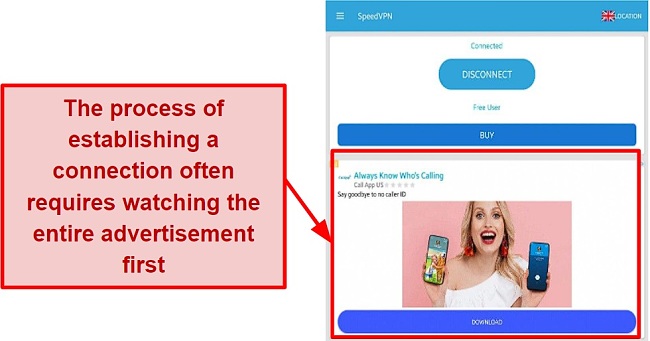
SpeedVPN Secure is primarily a free service, but I wouldn’t recommend it. Free users are limited to 240 minutes per session and must reconnect to the VPN after each session expires. In addition, the app will show ads at random times whilst you use it.
The downsides of using free VPNs are that they typically provide fewer server choices, slower speeds, and less privacy. But if you’re okay with that and would like to try out other VPN services, here are some of the best free options .
- Overall
- Speed
- Servers
- User Experience
- Support
- Pricing

Editor’s Note: We value our relationship with our readers, and we strive to earn your trust through transparency and integrity. We are in the same ownership group as some of the industry-leading products reviewed on this site: ExpressVPN, CyberGhost, Private Internet Access, and Intego. That said, our detailed reviews follow a strict methodology that examines all relevant performance factors to help you arrive at your own informed conclusion.

