| Speed | 4.0 / 10 |
|---|---|
| Servers | 4.0 / 10 |
| User Experience | 6.0 / 10 |
| Support | 7.0 / 10 |
| Pricing | 7.0 / 10 |
Smart DNS ProxyReview 2024: Is It Worth It?
- Written By Clement Adegbenro Cybersecurity & Tech Writer
Smart DNS Proxy Overview
Smart DNS Proxy appears to have an established presence dating back to 1995. The provider touts the capability to unblock more than 400 websites and digital media quickly. As such, I decided to put it to the test to determine if its longevity and claimed ability to access various streaming sites are superior to those of the leading VPNs in the industry.
Although Smart DNS Proxy performs exceptionally well in streaming, it falls short in other areas. Its services are primarily dedicated to providing access to streaming services such as Netflix, HBO, BBC, and other geographically restricted channels through its dedicated servers and Smart DNS service. However, its limited server network, slow speeds, incompatibility with Netflix, and intrusive logging policy have negatively impacted its reputation.
If you’re considering Smart DNS Proxy, you can take advantage of their 14-day free trial to evaluate if it suits your needs. As a first-time user, you can also use its 30-day refund policy on all offers should you decide to continue using the VPN. If it fails to meet your expectations, you can choose from other top-rated VPN providers .
Try Smart DNS Proxy risk-free
Don’t Have Time? Here’s a 1-Minute Summary
- Supports multiple streaming platforms. It was only able to unblock Netflix, Amazon Prime Video, BBC iPlayer, and Disney+ with the VPN. Jump to all streaming tests .
- Decent speeds, but only on local servers. Smart DNS Proxy’s international servers can significantly slow down your connection speeds by as much as 80%. I laid out my test results below .
- Limited servers and locations. Smart DNS Proxy service currently maintains a limited number of servers across 26 countries. See how many servers are available .
- Supports all major operating systems. Smart DNS Proxy offers apps for Windows, macOS, iOS, Android, and supports manual configurations on other devices. See if it supports your device .
- Customer support is easily accessible. Smart DNS Proxy provides dependable customer support through a live chat and a well-equipped knowledge base. More details about its customer service are available here .
- Competitive pricing. Smart DNS Proxy is cheaper than most VPNs available in the market. See all pricing options .
Try Smart DNS Proxy risk-free
Just so you know, SmartDNS doesn’t use any encryption to protect your web surfing like a VPN does. That’s the main difference between them. So, it’s not the best for security, but it is faster than a VPN and it’s super easy to set up.
Luckily, Smart DNS Proxy works with US Netflix, and you can use the A-NTFX US West server to access it . You can also use this service to access Netflix libraries in Canada, the UK, and Germany. Just connect to a server in one of these countries to access your local account there.
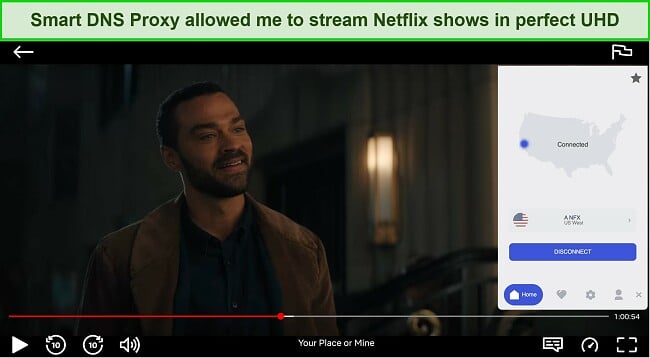

Next, Smart DNS proxy was tested to stream Disney+ and it worked really well. It also worked great in the UK, and it successfully unblocked BBC iPlayer during every test.
Hulu and HBO Max: Blocked
Regrettably, Smart DNS Proxy was unable to connect to Hulu, HBO Max, iTV, DAZN, and Paramount+ during testing . For those searching for a service that can seamlessly grant access to all leading streaming platforms and beyond, CyberGhost VPN is a fitting selection. CyberGhost’s extensive range of servers has consistently proven to be capable of bypassing geo-restrictions in numerous countries, making it an admirable option.
Try Smart DNS Proxy risk-free
Slow Speeds on Far Away Servers
The Smart DNS Proxy service’s speed is not the best but neither is it the worst among the competition. I found that the service offered satisfactory speed levels when connecting to servers that were located nearby, but it did noticeably slow down when connecting to servers that were far away.
Speed Test Results
To establish a benchmark, I connected to my UK-based ISP and recorded 320 Mbps downloads, 13.07 Mbps uploads, and 33 ms pings on my 1 Gbps connection. Then, I tested a local server and found an 80% drop in download speed and an 89.43% drop in upload speed . After this, I wanted to see how Smart VPN Proxy would perform on servers farther away from my location. So, I ran multiple speed tests on different long-distance servers.
First, I connected to a server in New York, about 7505.72 km away, and achieved a download speed of 102.06 Mbps, an upload speed of 8.61 Mbps, and 96 pings. Then, I connected to a server in Mumbai, India and achieved a download speed of 117.73 Mbps, an upload speed of 7.26 Mbps, and 162 ms pings. Finally, I connected to a server in Paris, France and achieved a download speed of 60.16 Mbps , an upload speed of 9.20 Mbps, and 39 ms pings.
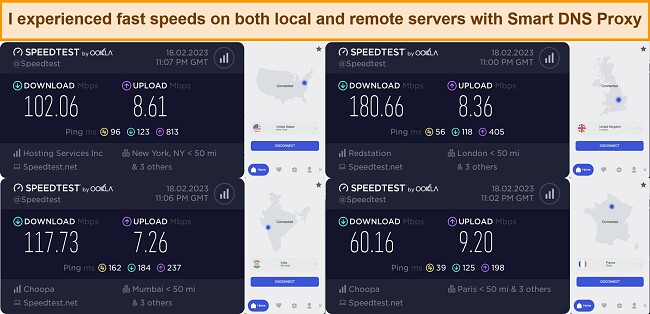
Smart VPN Proxy’s speeds may not look great on paper, and the results were inconsistent during testing. However, in actual real-world performance, I did not experience unbearably low speeds. If you have a sufficiently fast internet connection, you may not even notice Smart VPN Proxy running in the background.
Try Smart DNS Proxy risk-free
| Download speed reduction | Upload speed reduction | Ping time to Google.com | Average time to connect (seconds) | Unblock successful for | |
|---|---|---|---|---|---|
| Smart DNS Proxy | 43% (UK) | 29% (FRA) | 35.31ms | 7 | Netflix BBC iPlayer Youtube Kodi |
| Average score of top 10 VPNs | 11% (UK) | 16% (FRA) | 24ms | 11 | Netflix Hulu Kodi ESPN Youtube BBC iPlayer |
| Smart DNS Proxy | Average score of top 10 VPNs | |
|---|---|---|
| Download speed reduction | 43% (UK) | 11% (UK) |
| Upload speed reduction | 29% (FRA) | 16% (FRA) |
| Ping time to Google.com | 35.31ms | 24ms |
| Average time to connect (seconds) | 7ms | 11ms |
| Unblock successful for |
Server Network — Narrow Server Network
Smart DNS Proxy has a small number of servers available, with approximately 40+ servers in 26 countries around the world. Most of these servers are located in North America and Europe, but some are also found in Africa, Asia, Australia, and South America.
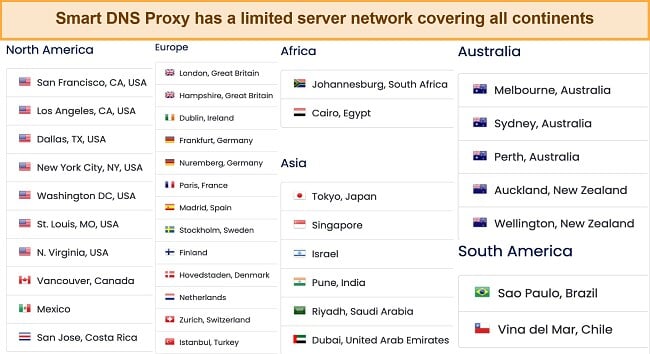
I conducted several experiments to evaluate the servers’ ability to handle daily tasks like web browsing, video streaming, and online gaming. Some servers were slow, but I was able to find a reliable server that provided enough speed to stream videos in standard definition . Additionally, switching servers is easy in case of any connection issues.
Smart DNS Proxy has specialized servers for streaming and torrenting , allowing you to stream popular sites like Netflix, Hulu, and BBC iPlayer. However, the servers may not always work correctly, as I experienced difficulties with streaming on Hulu and HBO Max when I tested them.
Compared to CyberGhost’s coverage of 100 countries, Smart DNS Proxy’s network is relatively limited. As a result, it may be wise to consider CyberGhost if you require a more extensive selection of servers .
Editor’s Note: Transparency is one of our core values at WizCase, so you should know we are in the same ownership group as CyberGhost VPN. That said, our detailed reviews follow a strict methodology that examines all relevant performance factors to help you arrive at your own informed conclusion.
Security — Limited Security Features
While lacking in advanced features, Smart DNS Proxy offers fundamental capabilities to ensure your utmost online security. With its reliable protection, you can rest assured that your network traffic remains unmonitored, and your IP address evades detection from potential trackers.
Some of the key security features of Smart DNS Proxy include:
- Military-grade encryption – Smart DNS Proxy prioritizes the protection of your data by implementing the highest level of encryption – AES 256-bit encryption, a military-grade encryption standard widely adopted by reputable institutions such as banks and the military. With this encryption, rest assured that your data is highly secure as it would take even the most skilled hacker an unimaginable one billion years to decode.
- Secure protocols – the provider offers access to several encryption protocols such as L2TP, IKEv2, and OpenVPN. The custom clients of Windows and Android allow users to access OpenVPN encryption and select between UDP and TCP. However, Mac and iOS solely provide native access to IKEv2, thereby necessitating the use of a third-party client for connecting via OpenVPN.
- Kill switch – the kill switch is a feature that makes sure your apps and internet connections stop working if your VPN connection goes down. This helps protect your information from getting leaked out. I tried it out and it worked just like it was supposed to.
- DNS leak protection – the primary function of DNS leak protection is to prevent your device from unintentionally exposing your browsing activities to your internet service provider (ISP) or other prying eyes.
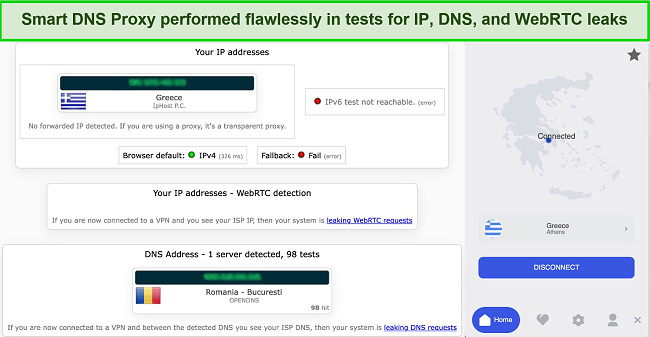
Seeing that it offers DNS leak protection, I tested Smart DNS Proxy to see if it had any leaks, and it turned out to be totally safe with no DNS, IP, or WebRTC leaks . I tried different tools to check its security, and it all seemed good.
Privacy — Unclear Logging Policy
While the provider promises to secure the collected data with industry-standard security systems, it admits that it cannot guarantee complete security for data submitted, transmitted, or stored on its systems , which poses a potential risk of unauthorized access.
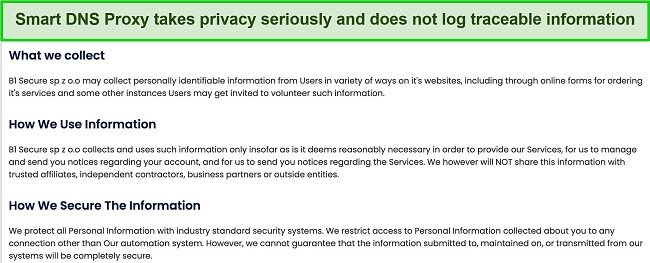
Based on its questionable policy, I would recommend exercising caution when using Smart DNS Proxy. Additionally, it is noteworthy that their law firm is located in Canada, which indicates that despite being registered in Seychelles, it might actually be operated from Canada. As you are probably aware, Canada is a member of the 14 Eyes Alliance, an international surveillance coalition composed of several countries worldwide . These nations cooperate to collect and exchange mass data of their citizens when requested by authorities.
I would have felt better if Smart DNS Proxy made it clear on their website what their policies are. Also, VPNs are starting to hire renowned companies to check that their services are secure for users — it would be great if Smart DNS Proxy did the same .
Try Smart DNS Proxy risk-free
Torrenting — P2P-Friendly
Smart DNS Proxy offers torrenting access on a select number of servers located in Canada, Netherlands, Sweden, and Switzerland , which can be easily accessed from the dropdown menu. Although these servers are optimized for torrenting, the VPN may not be the fastest option available.
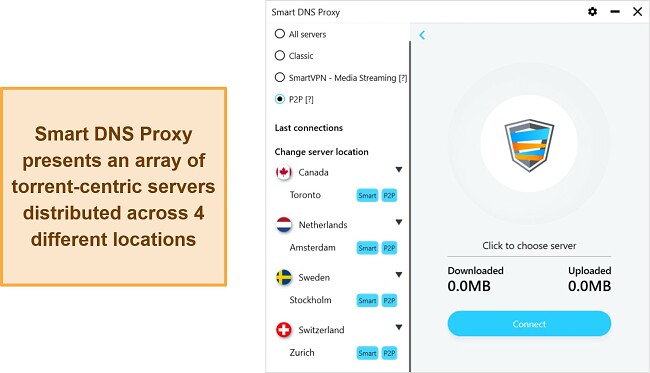
During my testing, I didn’t encounter any issues while downloading files due to the excellent initial speed . However, if your speed isn’t sufficient, the VPN may experience slow and irregular performance due to the limited number of servers available. Additionally, it is worth noting that Smart DNS Proxy operates in a jurisdiction that is not particularly privacy-friendly, and its data retention policy is unclear, so caution is advised when using its services.
If you desire a VPN that provides both rapid speed and dependable security for maintaining your privacy, my recommendation would be to give ExpressVPN some serious thought for file sharing . Note that my team and I do not support nor encourage illegal torrenting, thus it’s vital that you familiarize yourself with your country’s laws and regulations to avoid any potential consequences.
Editor’s Note: Transparency is one of our core values at WizCase, so you should know we are in the same ownership group as ExpressVPN. That said, our detailed reviews follow a strict methodology that examines all relevant performance factors to help you arrive at your own informed conclusion.
Does Smart DNS Proxy Work in China? No!
While I wasn’t able to do an in-person investigation due to my location, the Smart DNS Proxy support team confirmed that the service cannot be used in China due to geographical restrictions . I wasn’t surprised by this finding as the VPN service doesn’t have any methods of disguising its traffic which would have made it easier to get around such restrictions.
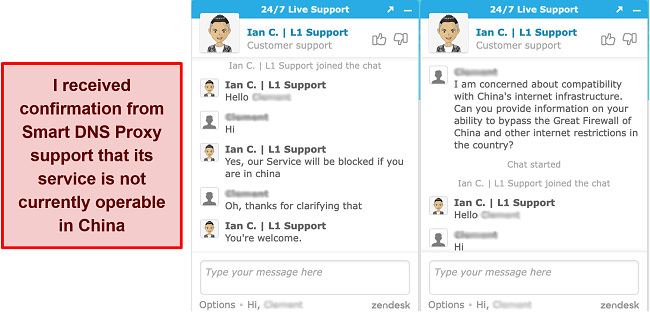
If you offer to visit China and wish to access content available only in specific regions, you will require a VPN. ExpressVPN is a good choice since it functions effectively in China , despite the country’s ongoing efforts to enhance its Firewall. It’s worth noting that the Chinese government does not allow unauthorized VPNs, but no incidents have been reported regarding travelers being penalized for utilizing them. Instead of targeting individuals who use VPNs, China generally blocks them through technological means.
Try Smart DNS Proxy risk-free
Editor’s Note: Transparency is one of our core values at WizCase, so you should know we are in the same ownership group as ExpressVPN. That said, our detailed reviews follow a strict methodology that examines all relevant performance factors to help you arrive at your own informed conclusion.
Server Locations
Simultaneous Device Connections — Up to 5 Device Connections at Once
The Smart DNS Proxy service lets you link up to 5 devices all at once . This is the most common practice in the industry and is generally deemed sufficient as most individuals don’t own more than 5 devices.
But if you require the option to connect more than 5 devices at the same time, it would be wise to consider using CyberGhost instead. CyberGhost permits you to link up to 7 devices without compromising your connection’s speed.
Editor’s Note: Transparency is one of our core values at WizCase, so you should know we are in the same ownership group as CyberGhost VPN. That said, our detailed reviews follow a strict methodology that examines all relevant performance factors to help you arrive at your own informed conclusion.
Device Compatibility — Available on Popular Platforms and OSes
Smart DNS Proxy offers customized applications for various commonly used operating systems and devices , such as Windows, Mac, iOS, and Android. Additionally, it is compatible with Linux, gaming consoles, routers and streaming devices, but these require manual setup. Although the setup process can be challenging, the website provides a “How to Setup” section that offers detailed instructions on how to configure the service.
Here are all the devices that Smart DNS Proxy supports:
- Computer – Chromebook, Mac OS X, Ubuntu, Windows 7, Windows 8, Windows XP, Windows Vista
- Phones – iPhone, iPad, Android
- Television – LG Smart, Panasonic, Samsung, Sony, Toshiba
- Game consoles – PlayStation 3, PlayStation 4, PS Vita, Wii, Wii U, XBOX 360
- Streaming devices – Amazon Kindle Fire TV, Apple TV, Boxee Box, Chromecast, Google TV, Roku, WD TV Live
- Router – 2Wire, Actiontec R1000H, Airport Extreme, Apple Time Capsule, Asus, Belkin, Bell Aliant Speedstream, D-Link, Linksys, Netgear, TP-Link, Tomato, and DD-WRT
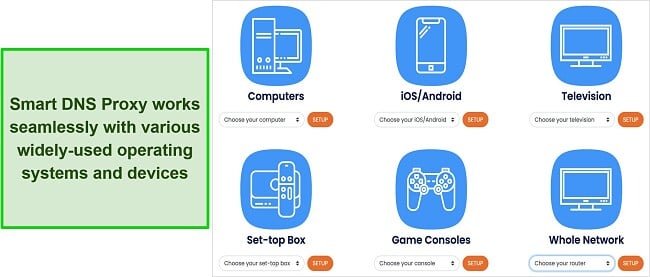
If you have the ability to adjust the DNS settings yourself, then it will function correctly. My own experience testing the configuration on both my SmartTV and Router showed that it was easy to set up. While I did not encounter any problems as expected, I did notice a decrease in internet speed and streaming quality.
Ease of Setup & Installation — Simple to Use
The process of setting up Smart DNS Proxy is quite easy, even for beginners . All you need to do is go to the offers and packages page, choose your desired package, and create an account by providing your email and password. Alternatively, you can try the 14-day free trial that does not require a credit card.
Once you’ve signed up and selected your offer, you’ll be taken to your user dashboard , where you can find useful information about your account, payments, and more. Then, you can download the appropriate software for your operating system from the download section.
I personally downloaded the Windows client, which was a quick and hassle-free process, similar to setting up a standard VPN service . I followed the setup wizard, selected file location and start-up and shortcut options, and then started using the VPN client immediately. When I launched the client, Smart DNS Proxy introduced itself briefly and asked for my login details.
Despite its simplicity, the client has all the necessary features , including a connection slider, traffic usage details, and a list of available servers. The server list even indicates which servers are best for specific activities like P2P file sharing or streaming.
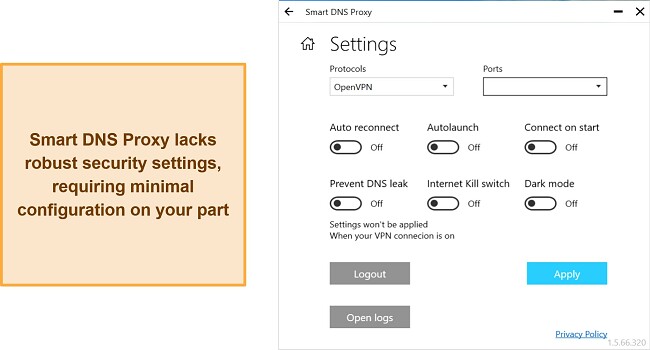
To adjust your preferences, click on the small gear icon located at the top of the software. This will open a new window where you can make changes to your security measures , start-up settings, and other similar options. Nevertheless, it’s important to note that the customization options provided are not very extensive and are quite simple.
Steps to Installing Smart DNS Proxy on Windows
- Go to the Smart DNS Proxy website . Open your preferred web browser and navigate to the Smart DNS Proxy website.
- Sign up for an account . Click on the “Sign Up” button on the homepage and select an offer that fits your needs. Enter your personal information and payment details, then click “Create Account” to complete the sign-up process.
- Download the Smart DNS Proxy client . Once you have created your account, log in to the Smart DNS Proxy website and click on the “how to Setup” tab. From there, click the “Download” button under the Windows logo to download the Smart DNS Proxy client for Windows.
- Install the client . Locate the downloaded installer file on your computer and double-click it to begin the installation process. Follow the prompts on the screen to complete the installation, making sure to accept any necessary terms and conditions.
- Establish connection . Select the server location you want to use and enable the Smart DNS Proxy service.
Smart DNS Proxy is known for its exceptional customer service, which is available 24/7. The service only offers live chat support, but it stands out from others by providing immediate assistance from a representative within seconds. I confirmed this during my review, as the live chat team was consistently available throughout the day.
For those who prefer to troubleshoot or set up the VPN themselves, Smart DNS Proxy has an extensive knowledge base with online tutorials . These tutorials cover all common issues and questions that users may have, and they are well-written and helpful. By using the knowledge base, you can easily resolve any problems without needing to contact the support team.
Try Smart DNS Proxy risk-free
| VPN vendor | Email response time | 24/7 support | Live chat | Refund policy | Native English |
|---|---|---|---|---|---|
| Smart DNS Proxy | 1 hour |
| Smart DNS Proxy | |
|---|---|
| Email response time | 1 hour |
| 24/7 support | |
| Live chat | |
| Refund policy | |
| Native English |
The VPN service has a range of purchase options to suit different needs, including monthly, 3-month, 1-year, 2-year, and lifetime offers.While the monthly and yearly options are reasonably priced, the lifetime offer provides excellent value. Please take into account that the lifetime offer carries a certain level of uncertainty due to the unpredictable nature of life. Hence, opting for the annual option could be a wiser choice since it offers flexibility at the end of each year.
One great thing about this VPN service is that all offers come with the same set of features and benefits, making it a fair choice for everyone. Payment security is a top priority for VPN providers, and unfortunately, Smart DNS Proxy only accepts major credit/debit cards . This means that alternative options such as Paypal, Alipay, or cryptocurrency are not available.
Thankfully, Smart DNS Proxy offers a 14-day free trial to anyone who wishes to try out the service before making a commitment. Simply provide your email address on the homepage, and the team will guide you through getting started without the need for a credit card or cancellation.
Additionally, Smart DNS Proxy has an impressive 30-day money-back guarantee , which enables you to claim a full refund if you are not satisfied with the service. This guarantee provides a risk-free opportunity to test the service without putting any hard-earned money at stake, making it a win-win situation for potential customers. If Smart DNS Proxy doesn’t fulfill your needs, you may consider one of these VPNs that offer great deals on their monthly offers .
Smart DNS Proxy has the following offers
Final Verdict
Nevertheless, based on the deficiencies in its VPN service and the ambiguous nature of its logging policy, I do not recommend using Smart DNS Proxy. Furthermore, the provider’s emphasis on preventing illegal activities that may lead to account suspension implies that they might monitor user behavior, making it difficult to ensure privacy.
While Smart DNS Proxy is a viable option to consider, there are alternative VPN services that may offer additional functionalities to meet your requirements. ExpressVPN, in particular, stands out as the optimal choice due to its assurance of not retaining any user activity logs and its ability to unblock the majority of well-known streaming platforms. You can test ExpressVPN out for yourself and if you’re not satisfied, you have up to 30* days to claim a refund.
Try Smart DNS Proxy risk-free
Yes, Smart DNS Proxy offers a free trial period of 14 days to allow prospective users to evaluate the service and determine if it suits their requirements . Additionally, for new customers, there is a 30-day money-back guarantee if you change your mind after purchasing an offer.
It’s important to note that free VPNs do not provide the same level of security and privacy protection as paid VPNs, and some may even disclose your personal information to third parties. If you find Smart DNS Proxy to be unsatisfactory, you may want to consider using one of our suggested reliable free VPN services .
Yes, Smart DNS Proxy is a secure service that employs military-grade encryption and a few other security measures to safeguard your privacy . Nevertheless, it is worth noting that the provider’s logging policy remains unclear , and its jurisdiction is in Canada, which is part of the 14-Eyes Alliance, a group of countries that collaborate on intelligence gathering. Therefore, it would be wise to exercise caution when using this service.
Try Smart DNS Proxy risk-free
- Overall
- Speed
- Servers
- User Experience
- Support
- Pricing

Editor’s Note: We value our relationship with our readers, and we strive to earn your trust through transparency and integrity. We are in the same ownership group as some of the industry-leading products reviewed on this site: ExpressVPN, CyberGhost, Private Internet Access, and Intego. That said, our detailed reviews follow a strict methodology that examines all relevant performance factors to help you arrive at your own informed conclusion.

