| Speed | 5.0 / 10 |
|---|---|
| Servers | 2.0 / 10 |
| User Experience | 5.0 / 10 |
| Support | 2.0 / 10 |
| Pricing | 3.0 / 10 |
Rocket VPNReview 2026: Before You Buy, Is It Worth It?
- Written By Clement Adegbenro Cybersecurity & Tech Writer
Rocket VPN Overview
Rocket VPN is part of mobile app developer Liquidum’s product line. You might know them for their Android file manager or the Hexlock security app, which are excellent tools. It sparked my curiosity to find out if the VPN service matched the renowned creators’ reputation and whether the encryption, privacy, and fast speed claims could compete with the top VPNs on the market . Hence, I tested this VPN extensively to determine its reliability.
From my experience, Rocket VPN is an average provider that doesn’t offer anything interesting. Whether it’s security, speed, streaming capacity, or anything else, Rocket VPN won’t blow you away. The lack of details about its security implementation, lack of a kill switch, and limited server network doesn’t make it stand out.
Don’t Have Time? Here’s a 1-Minute Summary
- Unblocks Netflix. Rocket VPN could not unblock other services that are popular with streaming users. Discover more about its streaming capability .
- Speeds are average at best. Although the speeds were decent enough for streaming across servers, they weren’t fast enough for gaming. My speed test results can be found here .
- Small coverage area. The coverage area of Rocket VPN is smaller than that of most premium VPN services. Check out its full server count here .
- Privacy concerns. Rocket VPN stores personal information despite not being subject to strict privacy laws. See my full analysis of Rocket VPN’s privacy policies .
- Easy to use and install. The app was easy to download, install, and navigate. Learn just how simple it is to use .
- Quite expensive. This product is costly considering what it offers, with no money-back guarantee. Read the full breakdown of Rocket VPN pricing here .
Unblocking streaming services is not Rocket VPN’s strongest suit. Of all the streaming services that I tested, it could only access Netflix. In the case of Hulu, a proxy error message was displayed, and Disney+ became stuck on the login page. It is also unable to access BBC iPlayer.
Netflix: Unblocked
Rocket VPN is able to access Netflix, including its US library of movies and TV shows. During tests, it could stream the US library exclusive show called The Photograph without restrictions. This applies to both the paid and free versions of Rocket VPN.
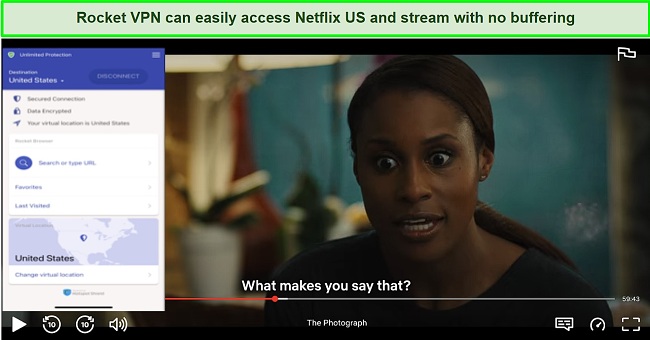
Rocket VPN also unblocks regional Netflix libraries in Singapore, Australia, France, and the United Kingdom.
“Your device is connected to the internet using a VPN or proxy service. Please disable it and try again.”
My first attempt was with Hulu, but I was disappointed with the results. Logging in to my account worked fine, but a proxy error message appeared when I tried to play anything. After Hulu, I attempted to access Disney+. I couldn’t log into my account, let alone stream anything. My screen went black as soon as I clicked on the login button.
ExpressVPN is an excellent alternative if you want to unblock popular streaming platforms . This service can unblock all the above streaming platforms and many others owing to its faster speeds and better-optimized servers compared to Rocket VPN.
Consistently Average Connection Speeds
A thorough speed test of Rocket VPN’s service showed that it slowed my connections by half. With such a decent speed, you can stream online content and unblock YouTube videos you might not be able to access while traveling. It should also be possible to make VoIP calls without any difficulty.
Speed Test Results
Streaming speeds for the US, UK, French, and German connections averaged 13-20 Mbps. The speeds weren’t terrible, but they were lacking when compared to other top-notch services.
I first ran an Ookla speed test using my regular connection without Rocket VPN turned on. I had a base speed of 40.69Mbps when the test was conducted. I experienced a 50% decline in speed after connecting to a local server. Connections to servers in the UK and France did not produce better results – both declined by 64%. I conducted real-world testing on Youtube, and no fluctuations were detected while watching videos in 1080p resolution.
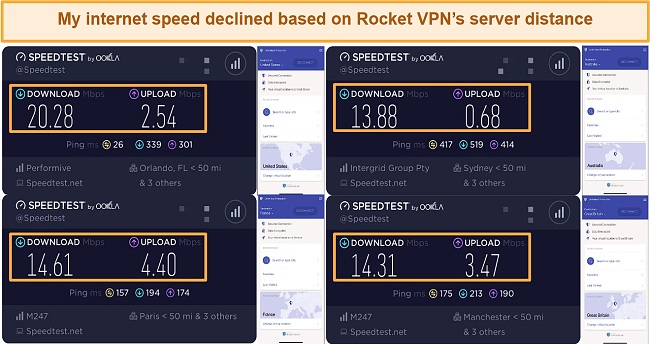
After testing Rocket VPN’s performance over short-distance servers, I decided to test it over a long-distance server in Australia. Since I only achieved average speeds from nearby servers, I did not expect results from a place as far away as Australia would be fast. As expected, the Sydney server slowed down my internet speed by 65%.
Overall, the performance of Rocket VPN was quite average on both local and long-distance servers. Be aware that VPN speeds can vary quite a bit. You have to take into account your internet connection and your location. Thus, your speed test results can differ from mine.
| Download speed reduction | Upload speed reduction | Ping time to Google.com | Average time to connect (seconds) | Unblock successful for | |
|---|---|---|---|---|---|
| Rocket VPN | 64% (UK) | 76% (FRA) | 24.79ms | 5 | Netflix Youtube |
| Average score of top 10 VPNs | 11% (UK) | 16% (FRA) | 24ms | 11 | Netflix Hulu Kodi ESPN Youtube BBC iPlayer |
| Rocket VPN | Average score of top 10 VPNs | |
|---|---|---|
| Download speed reduction | 64% (UK) | 11% (UK) |
| Upload speed reduction | 76% (FRA) | 16% (FRA) |
| Ping time to Google.com | 24.79ms | 24ms |
| Average time to connect (seconds) | 5ms | 11ms |
| Unblock successful for |
Server Network — Minimal Server Options
The Rocket VPN service offers the option to select from 7 virtual locations worldwide, including locations in the US, UK, Germany, and France. The only other locations outside these servers are Australia, Japan, and Singapore.
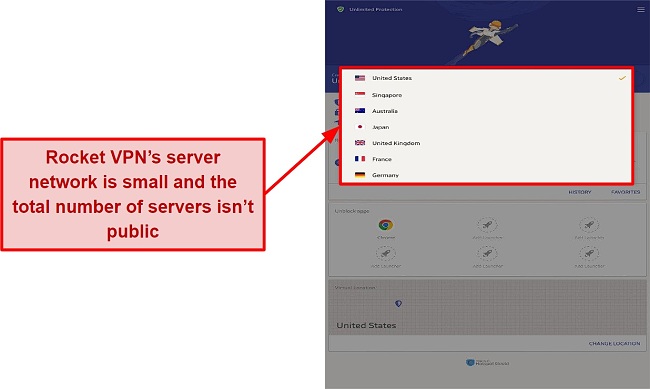
There is also no option to select city-level servers, which can be particularly frustrating if you reside in a large country such as the United States. It is worth mentioning that Rocket VPN utilizes Hotspot Shield’s servers, which means you are sharing your internet traffic with Hotspot Shield users.
Consider using Cyberghost in order to have access to more server options . As of right now, it has 11,690 servers in 100 countires, making it one of the best VPNs on the market. My experience indicates that performance is also very good, although your results may vary depending on where you are located and the speed of your connection.
Security — Unknown Security Implementation
This VPN leaves you completely in the dark when it comes to security. There is no information available on the protocol, cipher, handshake, authentication, or whether Perfect Forward Secrecy is employed. It is possible that this VPN does not encrypt your data at all, giving you a false sense of security when your ISP can still track everything you do online.
Sadly, there is no kill switch available with this VPN provider. So, your internet connection won’t be automatically terminated if there is a problem connecting to the VPN server or if the connection drops. It is important to keep this in mind when using the VPN, especially if you are concerned about the security of your browsing data.
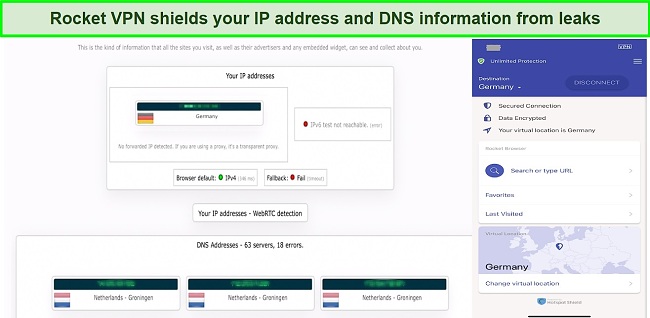
In the absence of a leak protection feature, I conducted a few leak tests of my own to see if Rocket VPN was fully leakproof. To be more precise, I checked for IP leaks, DNS leaks, and WebRTC leaks. Rocket VPN appeared to be very safe, protecting all my personal information . It is my virtual information that is visible, so there are no surprises.
ExpressVPN should be your choice of VPN based on its technical security capabilities. With top-tier encryption solutions, sophisticated obfuscation ciphers, and additional mechanisms for verification, it represents the pinnacle of VPN technology.
Editor’s Note: Transparency is one of our core values at WizCase, so you should know we are in the same ownership group as ExpressVPN. That said, our detailed reviews follow a strict methodology that examines all relevant performance factors to help you arrive at your own informed conclusion.
Privacy — Risky and Confusing
Contrary to its claim to have no-log privacy policies, Rocket VPN collects a great deal of data. The information that Rocket VPN logs include your name, email address, credit card information, IP address, timestamps, and other data collected during registration. Further, the VPN collects invasive data about people’s devices, advertising identifiers, device identifiers, local networks, ISPs, and much more.
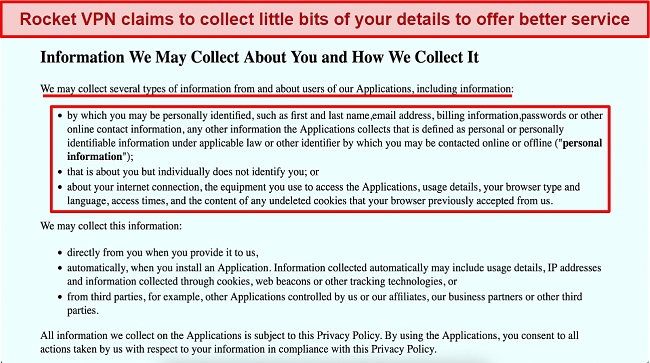
There is a tremendous amount of data being retained, which makes Rocket VPN capable of accessing much more data than you would think. Several VPNs are available on the market that either store non-invasive connection logs or none at all. Thus, this service is not worth paying for.
The company has its headquarters in Ireland, which is not a member of the 5/9/14 Eyes Alliance. As a result, this VPN is unlikely to be compelled by government authorities to disclose details about its users.
Torrenting — Not Advised
The Rocket VPN service is not optimal for torrenting since it only offers a handful of server locations. So, you shouldn’t expect fast downloads or uploads when using torrents. It also does not provide many features that might assist you in downloading torrents safely. The program logs too much information, and there is no kill switch to prevent accidental IP exposure.
You should know that peer-to-peer file sharing without permission is unlawful, and we do not support violating any laws. When in doubt, please check with local regulations within your area before torrenting and only downloading files available in the public domain.
Does Rocket VPN Work in China? No!
Rocket VPN doesn’t provide any obfuscation features to conceal the fact that you’re using a VPN if you’re an expat in China. Plus, I’m not sure what encryption and security protocols it employs. I reached out to the company’s customer support service to confirm this but received no response.
Smaller VPNs like Rocket VPN usually aren’t capable of bypassing the Great Firewall. A safer alternative like ExpressVPN can be used to access blocked websites in highly-censored countries . The protection offered by a VPN doesn’t allow you to commit illegal acts, so follow basic precautions when using a VPN in China. While non-government approved VPNs are banned in China, no foreigners have reported being fined or sanctioned for using them.
Server Locations
Simultaneous Device Connections — Supports Up to 5 Devices
Rocket VPN allows you to connect up to 5 devices simultaneously. While five devices may seem reasonable if you want to share your account with friends and family, it seems excessive for a VPN designed specifically for mobile devices.
Device Compatibility — Apps for iOS & Android Only
Rocket VPN doesn’t have apps for Windows, macOS, and Linux — iOS and Android are the only supported OSes. As far as I know, there are also no extensions or workarounds available for the devices that aren’t supported. This means you will need to use a different VPN to protect your other devices.
Ease of Setup & Installation — Super Easy and Fast Set-Up
The VPN software can be downloaded from the Google Play Store or Apple Store, and installation is pretty straightforward. The official website also has a link to the Apple or Android store where you can download the software.
The user interface is clean and easy to use for a VPN app . Besides providing the ability to connect and disconnect, it also offers the ability to change location directly from the homepage. In the next section, you can add apps and specify what locations each app should spoof when launched. It’s easy to set up – choose an app, a location, and you’re ready to go.
A built-in web browser is available at the bottom of the home page, which allows you to access websites anonymously. While it may be a viable browsing solution, media content does not display correctly. So, I had to switch to Mozilla Firefox when I was doing streaming tests.
How to Install and Set Up Rocket VPN on Android:
- Download Rocket VPN’s client. The client can be downloaded and installed from the Google Play Store.
- Launch the app. The app will launch on the app’s dashboard, where you will see a connect button next to the destination toggle.
- Choose your preferred server location. Tap the destination toggle to reveal the list of servers and choose your preferred one.
- Accept the connection request. An app message will appear asking you to allow the app to create a VPN connection.
| VPN vendor | Email response time | 24/7 support | Live chat | Refund policy | Native English |
|---|---|---|---|---|---|
| Rocket VPN |
| Rocket VPN | |
|---|---|
| Email response time | |
| 24/7 support | |
| Live chat | |
| Refund policy | |
| Native English |
Rocket VPN is both a free and paid service. It’s easy to overlook its premium package due to its popularity as a free service. All users receive a 250 MB bandwidth allowance at installation, automatically renewed every 30 days. It took me approximately half an hour to reach my data limit on the free version, so I decided to upgrade to the premium version to take advantage of the premium features.
Rocket VPN has the following offers
Final Verdict
A VPN selection based on the outcome of tossing a coin or rolling the dice is likely to deliver much better results than Rocket VPN. It falls short in features, security, reliability, privacy, logging, transparency, and support.
Even though Rocket VPN has a low price, its lack of security and inability to rely on its protection to maintain privacy is a fatal flaw. That said, you will not experience any noticeable lag in your connection, so you can watch Netflix and YouTube videos uninterrupted.
ExpressVPN offers excellent streaming and torrenting support, high-end security features, and fast speeds. You can test ExpressVPN out completely risk-free as it’s backed by a 30*-day refund policy — you can easily request a refund if you do not like it.
Editor’s Note: Transparency is one of our core values at WizCase, so you should know we are in the same ownership group as ExpressVPN. That said, our detailed reviews follow a strict methodology that examines all relevant performance factors to help you arrive at your own informed conclusion.
Yes, Rocket VPN offers a free plan. However, it is important to note that this plan has a 250 MB data limit – restricting your ability to stream and download large files. Free VPNs aren’t the best option anyway, since they often limit your connection speeds, lack advanced security features, and may expose your personal information.
Additionally, they have data usage limits, have buggy apps, and don’t work with streaming sites. Instead, I recommend checking out these free VPNs — they offer unlimited data, faster speeds, and better security than Rocket VPN.
- Overall
- Speed
- Servers
- User Experience
- Support
- Pricing

Editor’s Note: We value our relationship with our readers, and we strive to earn your trust through transparency and integrity. We are in the same ownership group as some of the industry-leading products reviewed on this site: ExpressVPN, CyberGhost, Private Internet Access, and Intego. That said, our detailed reviews follow a strict methodology that examines all relevant performance factors to help you arrive at your own informed conclusion.

