💡 Features 9.3 / 10
⚙️ Installation 9.2 / 10
👍 Ease of Use 9.6 / 10
📞 Support 8.9 / 10
🏷️ Pricing 8.6 / 10
Written By Shauli Zacks Tech Writer
REFOG Overview
With two teenagers in the house, I was looking for parental control software that would allow me to know what my kids are doing on the computer.
Even though it doesn’t have time management tools or a web filter (which I think are very important) the keylogger and screenshot features will let me know exactly what the kids are doing on the computer at all times.
I wanted to test and compare REFOG with the 50+ parental control apps I’ve used in the past few months.
I got a great price on a single device license from this hidden page on the REFOG website, and it has a 7-day satisfaction guarantee.
Try REFOG Risk-Free
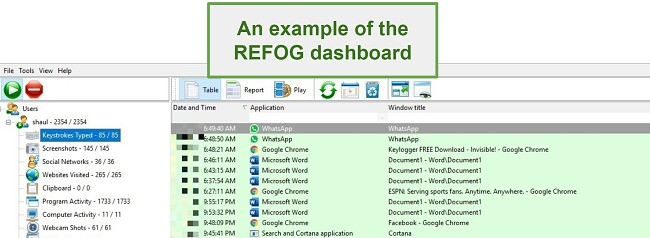
The dashboard is where you can see all the keylogger, webcam, and website history. You can either open the application by pressing SHIFT+CTRL+ALT+K at the same time or login to your REFOG account online and view the web-based dashboard.
Tracks Every Keystroke
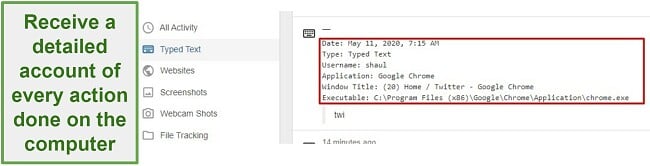
This is one of the most prominent features of REFOG and, at the same time, one of the reasons I was hesitant to put it on my kids’ computer . It’s basically the key to their private diary, recording everything that is typed. This means in chat rooms, Word documents, Google Docs, Facebook Messenger, WhatsApp Web, and more. If they’re typing it, REFOG is saving it and storing it in the dashboard . In addition to the keystrokes, you’ll have information on what website or app they were using and the timestamp .
Screenshots and Webcams
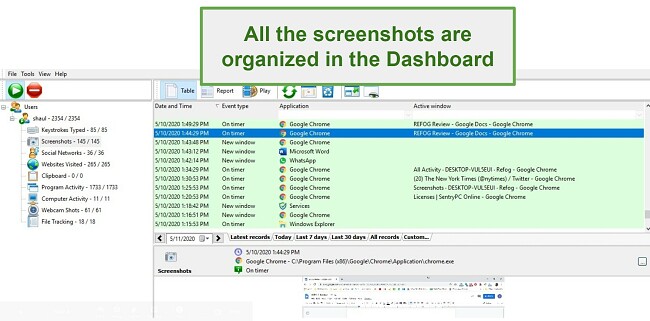
I’ve seen the screenshot feature in several parental control apps and I don’t really know who has the time to go through hundreds of images. One nice thing about REFOG is on the dashboard there is a slideshow feature, so at least I didn’t have to keep clicking next. I really liked that I can sort the images by application type, the title of the active window, and of course date and time . This made it much easier to find relevant screenshots. The screenshot is both on a 5-minute timer and will take a screenshot anytime a new window opens.
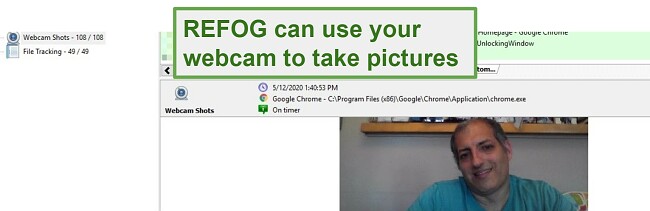
The webcam is something I haven’t seen on any other app . The only situation I can see its value is if you have multiple kids using the computer. If you see on the website log, screenshots, or keylog that someone on the computer went to a porn site (for example), there is no need to ask each kid what they’re doing online. The webcam gives you all the incriminating evidence you need. It’s set to work on a timer and take a picture every 5 minutes , although you can go to the settings and change the frequency.
Of course, it’s easy enough to block, at some point one of my kids just put a piece of tape over the camera.
Browsing History and Social Media Monitoring
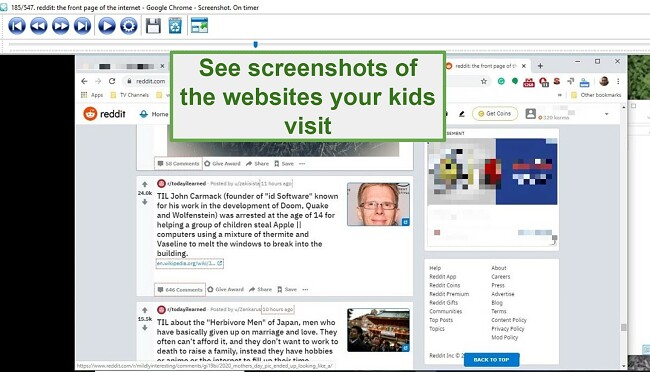
I like that instead of just providing a list of the websites visited, REFOG also shows the page title and either a screenshot or a clickable link , so I can easily see what the site is, even if I don’t recognize the URL. You can click on the image to see a higher definition picture in fullscreen mode.
REFOG has a social media monitoring feature that tracks Facebook, Whatsapp, Viber, and Telegram . I’m not sure what added value this has other than making this information easier to see than having to scroll through the general screenshot or browsing history sections.
Lacks Parental Control Features
It feels strange to penalize REFOG for not having screen time limits and a web filter since they are a monitoring tool. However, I found that in order to fully monitor my kids I needed to have both REFOG and another software program running simultaneously.
Even though I knew that I would get a virus alert when downloading the REFOG file, I still find it a bit disturbing. This is due to the nature of the software that can take screenshots and access the webcam, it appears as malware or spyware.
I had to temporarily turn off my virus scanner , just long enough to download the file and change the setting Safe Browsing setting in Chrome, which also prevented the download. Once that was done, I downloaded the ZIP file from the REFOG website , unzipped it, and restarted my computer.
Once I installed the software on the computer it started working in the background right away . As I learned, I could easily access the dashboard from any location and review the data. Managing both the web-based and application dashboard was a breeze. You can change the frequency of the screenshots and webcam pictures or set them to go off with every mouse click if you want. The dashboard also has a search feature and slideshow option that will help you go through the data quickly and efficiently.
Most antivirus programs will flag REFOG as malware, therefore you have to turn it off while the file is downloading and then add the file folder as an exception, so it won’t scan it.
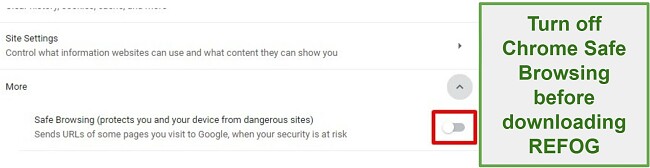
If Safe Browsing is enabled in the Chrome settings, it will also block the download. You can fix this by going Chrome > Settings > Privacy and Security > More > Turn off Safe Browsing . Once this is done, you shouldn’t have any trouble downloading and installing REFOG.
REFOG has two subscription plans. The first one includes 1 device , either Windows or Mac, and the second option protects 3 devices .
I tested the 3-day money-back guarantee and was able to get a full refund, even though I made the request near the end of the third day.
Bottom Line
I’ll be honest, I had very low expectations when I began using REFOG. I’m not a big fan of keyloggers in general, which I view as an invasion of privacy. With that being said, there are situations where, for the safety of your children and others, keyloggers are exactly what you need . In that case, I would recommend REFOG, which was extremely easy to use and has all the features that you need to monitor every action done on a Windows or Mac.
My suggestion is to pick a plan and take advantage of the risk-free 3 days. It’s more than enough to test the features and get a better understanding if it’s a good fit for your family.

- Features 9.3
- Installation 9.2
- Ease of Use 9.6
- Support 8.9
- Pricing 8.6