- Written by: Osama Zahid Cybersecurity Specialist
Panda Overview
Panda is a well-rounded antivirus with many features and both free and paid options depending on your needs. However, I wanted to see if it’s as good as the industry’s best antiviruses, so I put Panda to the test to see how effective it is .
After extensive tests, I found that Panda is a reliable antivirus but isn’t as good as the industry leaders . It has many unique features, like the Process Monitor and Rescue Kit, but its detection scores fall short compared to top choices like Norton. Also, while its plans offer decent value for money, they aren’t the cheapest.
If you want basic security, Panda’s free plan is worth getting. However, I consider Norton a better option if you want a comprehensive premium antivirus. Thankfully, the 30-day money-back guarantee lets you try Panda risk-free to see if it suits you.
Try Panda risk-free for 30 days
In a Rush? Here’s a 1-Minute Summary
- Effective security. Panda has good malware detection scores and a customizable firewall. Jump to read more about how effective its protection is .
- Many unique features. You’ll get a wide variety of features in Panda’s apps. Read more about all of Panda’s features here .
- Average user experience. The mobile apps are good, but I found Panda’s Windows app confusing. Discover more about its apps here .
- Poor customer support. Panda has multiple support channels, but few are helpful. Jump to learn more about my experience with its support .
- Decent pricing. You’ll get good value for money with Panda’s subscriptions. Learn more about its price plans here .
Security
It isn’t flawless, but I’m quite pleased with the level of security Panda offers . Its free plans are good for basic protection, and the premium subscriptions offer excellent security for all your devices. It’s on the same level as the best overall antiviruses , and it’ll keep you safe in most cases.
Virus Scan — Multiple Effective Scans to Find Malware and Enhance Security
Panda’s scans include 3 options, and the virus scanner was impressive throughout my tests. Its scans include the following:
- Critical areas — scan areas on your device most likely to be infected by malware, much like a normal quick scan.
- Full scan — checks your whole system to look for malware.
- Custom scan — scans the files and folders you choose.
Panda found all the malware on my system via its almost 2-hour-long full scan , which scanned 2,500,000+ files. Also, independent testing shows it successfully detects of all threats. Of course, this isn’t as impressive as Norton’s flawless score, but it’s solid nonetheless.
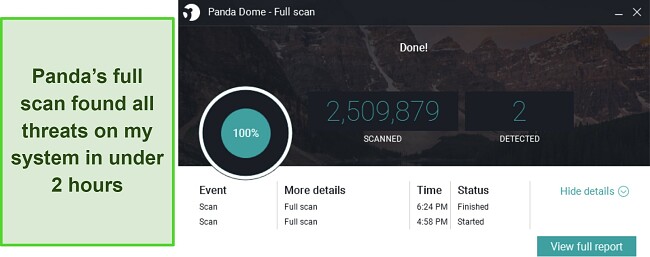
Note that Panda flagged 2 safe files as malicious during scans , which is actually much less than the industry standard. It’s a little annoying having to remove a few safe files from quarantine, but this shouldn’t be much of a problem.
Besides the usual virus scans, Panda also has a Cloud Cleaner available with its Rescue Kit feature . Cloud Cleaner does a deep scan of your system to find threats that traditional scans might miss. Also, this is a cloud-based scan, meaning it’s even more lightweight than Panda’s normal scans.
When I tried it, Cloud Cleaner found a PUP on my system that Panda’s full scan didn’t catch, meaning it’s worthwhile to use it from time to time to ensure a thorough system cleanup.
Real-Time Protection — Provides Reliable Defense Against Malware While Using Your Device
Panda offers excellent real-time security to ensure your system isn’t infected while you use it. During my tests, Panda reliably blocked of real-time threats and zero-day malware . Like the virus scans, Panda’s real-time protection score isn’t flawless like Norton’s detection rate, but it’s still as good as many other top antiviruses.
The reason behind Panda’s effective real-time security is that it doesn’t rely on a database. Instead, Panda relies on machine learning and big data to defend against real-time threats . It analyzes large amounts of data, and the machine learning functionality uses this analysis to teach itself how malware behaves, thus providing top-quality protection.
Anti-Ransomware — Stops Unauthorized Modifications to Your Files
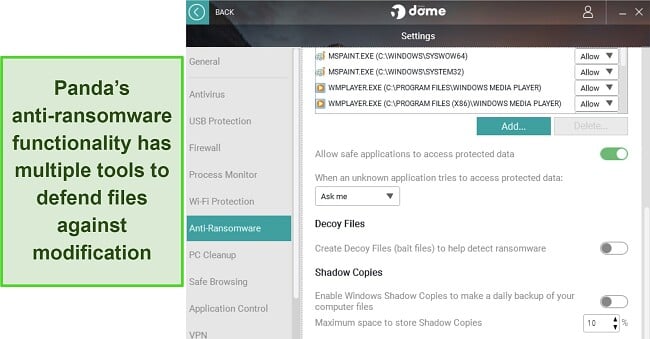
Ransomware attacks have been on the rise for many years, but Panda offers excellent defense against ransomware . Its Anti-Ransomware tool has a data shield that lets you specify which files and folders you want to protect against modification. You can also allow or deny specific apps from making changes to files.