| Speed | 8.0 / 10 |
|---|---|
| Servers | 7.0 / 10 |
| User Experience | 8.0 / 10 |
| Support | 6.0 / 10 |
| Pricing | 10 / 10 |
Mullvad VPNReview 2026: Before You Buy, Is It Worth It?
- Written By Clement Adegbenro Cybersecurity & Tech Writer
Mullvad VPN Overview
Mullvad VPN has garnered a reputation as one of the best VPNs on the market for those that put privacy and security as a top priority . This VPN offers transparent rates and complete anonymity from start to finish. I was impressed with the low price, beefy security features, and air-tight no-logs policy that ensures your data will never be leaked. Despite being a smaller VPN, this one offers security and privacy features that can rival the top options on the market.
If you’re looking for a VPN that places a high emphasis on security and privacy, Mullvad might be a fitting choice for you. However, this VPN lags behind its competitors when it comes to providing prompt customer support and the capability to unblock popular streaming platforms. It also slightly falls short in terms of allowing multiple devices to connect simultaneously.
I was happy to see that I could try this VPN out for 30-days and make use of a money-back guarantee if I wasn’t completely satisfied with the service . Mullvad VPN makes it easy to get a refund and accepts a wide array of payment options including Bitcoin. If you’re not convinced by what it offers, consider any of the leading VPN providers .
Don’t Have Time? Here’s a 1-Minute Summary
- Limited unblocking capabilities . I found that Mullvad VPN failed to unblock the most popular streaming services. Jump to see which sites Mullvad VPN could and couldn’t unblock .
- Fast speeds . I experienced quick connection speeds that made this VPN ideal for competitive online gaming. Click here to see my speed tests and full breakdown .
- Small but consistent server network . I liked that Mullvad VPN had region and city-level options and consistent connection speeds regardless of server distance. Read more here .
- Easy-to-use Application . I had no trouble installing the app or making an account. Click here to read more .
- Slow support . While the support team was able to answer all of my questions, the system may leave you waiting a while for answers. See the full list of support options here .
- Uniform pricing . Mullvad VPN doesn’t offer pricing tiers, extra upsells, or free versions. Find out more about that here .
Mullvad VPN’s lack of unblocking capabilities was disappointing . It could successfully access Netflix and Disney+, but most other streaming services were inaccessible.
When the streaming connection was successful, the quality and experience were great . There weren’t any major hiccups in terms of buffering or drops in the quality of the stream. Notably, Disney+ did require some fiddling to work. You can’t be connected to Mullvad while you sign into your account or you’ll be met with a black screen. However, there were no issues browsing and streaming content on Disney+ if Mullvad VPN was connected to the network after signing in.
Netflix, Disney+: Unblocked
Understood. You want to tell readers about the platforms unblocked by Mullvad VPN, namely Netflix and Disney+. It was effective in accessing these streaming services through various servers in different regions. However, it may not be the ideal choice for those seeking a VPN mainly for streaming while traveling.

While the streaming experience on Disney+ was positive, it did take some trial and error to access the catalog. It wasn’t as straightforward as accessing US Netflix , which didn’t require any waiting to sign in and connect to the network.

In addition to Netflix and Disney+, tests showed that Mullvad could access less-demanded streaming platforms like ESPN+, NOW TV, ITV Hub, and All 4.
It looks like you’re using an anonymous proxy or VPN
Fast Local and Long-Distance Connections
I was pleasantly surprised by the consistently high speeds provided by Mullvad VPN . Whether the server was near or far from my location, I experienced comparable download and upload speeds across all of them. The VPN performed exceptionally well, with no connectivity problems whatsoever. Each server maintained its stability, and switching between different locations was effortless and swift.
Speed Test Results
In my testing, I observed a significant accomplishment with Mullvad VPN as it only caused a 50% reduction in speed. This achievement is quite impressive for a smaller VPN service, considering that the usual speed decrease is often higher. To provide context, my initial internet speeds were 570 Mbps for downloads and 9 Mbps for uploads. After connecting to the VPN, my download speeds decreased to approximately 50% of the original value, while my upload speeds remained relatively unchanged .
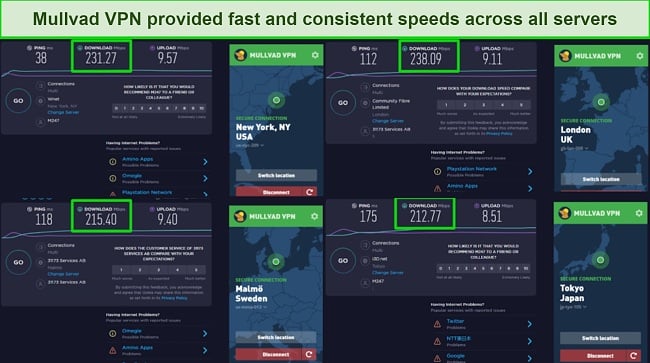
You’ll likely only notice performance dips if you have a slower base connection already. Even connecting to a server on the opposite side of the world proved to have little impact on my speeds. I tested a large number of servers not pictured above as well and found that Mullvad VPN kept the consistency coming with no noticeable dips in any of the regions .
Is Mullvad VPN Fast Enough for Gaming? Yes!
My connection was fast enough for competitive gaming . I was able to hop into an online game of Rocket League without stuttering or lag. My ping stayed right around 140ms, which allowed me to play without any noticeable latency. At no point did my connection drop or lag behind while playing. This experience was consistent across all of the servers I tested.
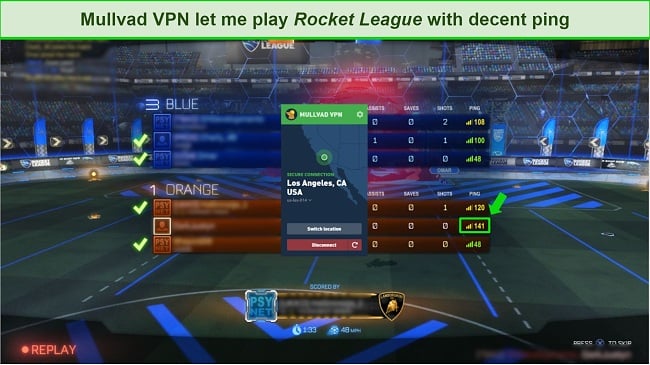
It is noteworthy that while the speeds of this VPN were considered outstanding, they were not as fast as not using a VPN at all. You may want to consider CyberGhost VPN if you need an even speedier connection . It offers such fast speeds that you likely won’t notice any noticeable latency drops compared to a standard connection.
| Download speed reduction | Upload speed reduction | Ping time to Google.com | Average time to connect (seconds) | Unblock successful for | |
|---|---|---|---|---|---|
| Mullvad VPN | 58% (UK) | 0.3% (FRA) | 47.42ms | 5 | BBC iPlayer Youtube |
| Average score of top 10 VPNs | 11% (UK) | 16% (FRA) | 24ms | 11 | Netflix Hulu Kodi ESPN Youtube BBC iPlayer |
| Mullvad VPN | Average score of top 10 VPNs | |
|---|---|---|
| Download speed reduction | 58% (UK) | 11% (UK) |
| Upload speed reduction | 0.3% (FRA) | 16% (FRA) |
| Ping time to Google.com | 47.42ms | 24ms |
| Average time to connect (seconds) | 5ms | 11ms |
| Unblock successful for |
Server Network — Modest Network With Decent Coverage
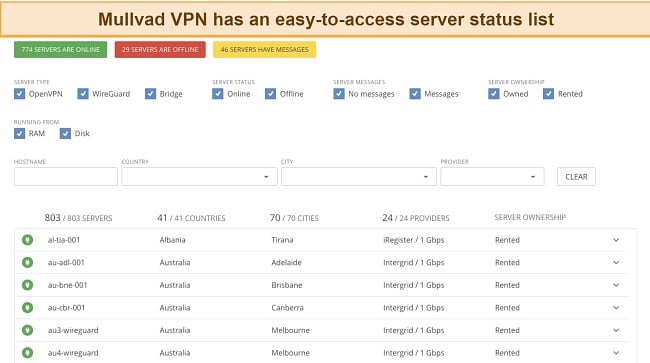
Mullvad VPN boasts a respectable coverage, despite being a small VPN provider. With over 800 servers located in 70 cities across 40+ countries , the coverage of Mullvad VPN can meet the needs of many users.
The server information is easily accessible through the VPN provider’s website, where users can view a full breakdown of server locations and their status. The same information is also available through the VPN app, where you can view a list of regions and expand it to see the available city-level servers. Although the server network of Mullvad VPN may not be the most comprehensive compared to other VPN providers, it is not the smallest either.
Mullvad VPN offers general purpose servers for all types of usage including gaming, streaming, and P2P file sharing . Unlike other VPNs, it does not have separate servers for specialized purposes. All servers in the list can be utilized interchangeably for the same activities.
It’s worth mentioning that the connection type for each server is listed alongside its option. This information is not available in the mobile or desktop application and can only be found on the server list page. The servers use OpenVPN, WireGuard, or Bridge (Double VPN) connections with around 300 using OpenVPN and WireGuard and 30 using Bridge for extra security.
It’s important to note that each server in Mullvad VPN’s network only has a single IP address. During my usage, I did not experience any performance issues due to overcrowding . However, this may be a concern and could occur in the future. If you’re looking for a VPN that offers even more servers and IP addresses, you might want to try CyberGhost which has over 11,690 servers in 100 countries .
Security — Safe Practices Backed by Independent Audits
Mullvad VPN offers a complete solution for secure access to public networks. The built-in security protocols and encryption measures effectively protect against potential threats , providing assurance for the preservation of your sensitive information.
The security features offered include:
- Military grade encryption – The encryption method employed is AES-256, which is the standard used across the industry. This encryption technique will ensure that your valuable data and information remain confidential and protected from potential leaks.
- OpenVPN and WireGuard protocols – Mullvad VPN integrates the OpenVPN and WireGuard protocols to enhance its security features. The implementation of these protocols not only enables Mullvad VPN to provide robust security, but also ensures that users can maintain high connection speeds.
- Kill switch – The integrated kill-switch feature adds an extra layer of protection for your data. It ensures that your information remains secure, even when your internet connection is lost or when you are transitioning between server locations. This feature cannot be turned off, ensuring that your data is always protected.
- Lockdown Mode – Mullvad offers a feature called Lockdown Mode which acts as an advanced kill switch mechanism. It guarantees that internet connection is fully terminated when not connected to the VPN. I conducted a test and confirmed that internet access is blocked until reconnecting to the VPN.
- Split Tunneling – The feature lets you selectively route specific applications and IP addresses outside of your VPN connection. This is useful if you want to avoid slowing down a specific application or if you wish to use a streaming service while still maintaining privacy and security for your other online activities.
- Multihop Connections – Mullvad provides a distinctive capability called multihop connections. This is accomplished by activating bridge mode on its client software. As a result, data travels through two servers prior to accessing the internet, instead of just one. The additional layer of connection strengthens the security of the transmission and also provides a means of circumventing VPN blocking.
- Ad blocker – Mullvad provides a feature that blocks ads, which can be accessed through the Windows application’s VPN settings. To assess the performance of the ad-blocker, I conducted a test by visiting a website that frequently displays ads. The initial results indicated the presence of advertisements on the website. However, when the ad-blocker was enabled in the VPN settings and the VPN connection was established, a subsequent visit to the same website revealed the absence of ads.
Mullvad VPN consistently demonstrates its commitment to privacy and security by incorporating a robust DNS leak protection system. This system effectively masks both IPv4 and IPv6 addresses, ensuring that the user’s online activities are kept private . Additionally, the VPN performs exceptionally well in preventing WebRTC leaks, which can often occur through web browsers.
Privacy — A Trusted VPN That Does Not Keep Logs
Mullvad VPN is a subsidiary of Amagicom AB, a company that places a high priority on data privacy and security. The company has a proven track record of protecting user data , with no reported incidents of data breaches or privacy violations.
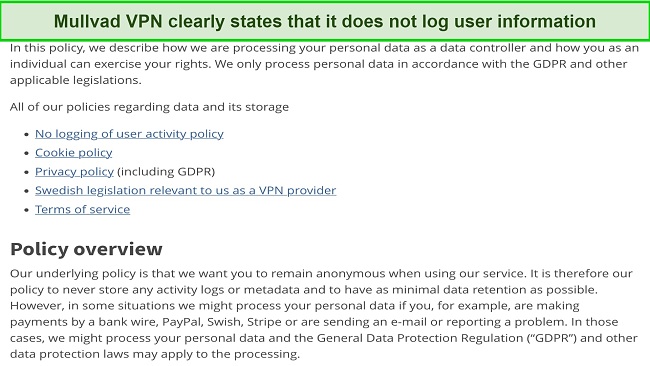
Mullvad VPN is considered one of the safest VPNs on the market right now and has had incidents where its security was put to the test. There has only been one minor security breach, and the company handled the situation well. The incident took place in 2020 and was a targeted attack that hit a very specific user base who were using an older version of the app and had a Windows account name labeled “build.” Most users remained safe, and Mullvad immediately worked to prevent such an attack from happening again.
As for audits, an independent one was done by Cure53 in June of 2020 and only found minor issues that were immediately patched by Mullvad VPN. No VPN is going to be flawless, and Mullvad has shown that it can adapt to threats and mitigate dangers quickly and efficiently .
This company is located in Sweden, which is part of the 14 eyes alliance . This alliance means that the countries within its jurisdiction share intelligence, data, and information with one another. While this may be a reason for concern in some countries, Sweden doesn’t require the keeping of any logs at all. Your information cannot be shared if none is logged.
If you’re looking for a privacy-focused VPN that is outside of the 14-eyes alliance then you should consider checking out ExpressVPN . It is under British Virgin Islands law, which isn’t in the jurisdiction of the 14-eyes alliance.
Torrenting — Fast and Reliable for File Sharing
I had no issues torrenting files while connected to Mullvad VPN . I was never concerned about data leaks given the VPN’s air-tight security policies. Plus, I was able to download files quickly with the speedy servers in the network. Since every server is optimized for P2P sharing, you won’t be stuck using one or two servers as you would on some smaller VPNs.
When torrenting, it is important to be aware of the laws and regulations in your local area. To avoid any potential legal issues, it is recommended to only download files that are publicly available and legally accessible. By doing so, you can ensure that your torrenting activities are in compliance with local laws and regulations.
Does Mullvad VPN Work in China? Yes, On Bridge Servers
Mullvad VPN will work in China as long as you are connected to the right server. You’ll need to be connected to one of the 30 Bridge servers that are backed by a powerful proxy system called Shadowsocks . You won’t have to do anything additional once you connect to one of these servers. You will just have to go and check the connection type for whichever server you plan to connect to on Mullvad VPN’s website first.
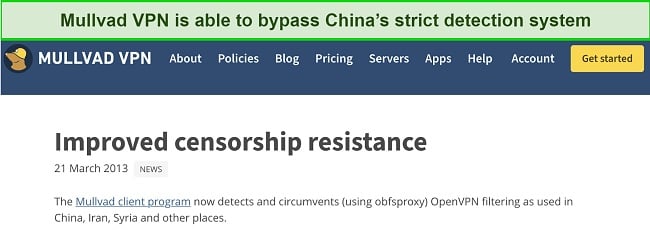
With this being said, if you’re looking to use a VPN that is non-government approved in China, you can rest easy knowing that there are no known cases of tourists in China having been arrested for using a non-approved VPN while in the country. China tends to fight VPN usage by technologically blocking VPNs that aren’t approved and they don’t go after the people who use them.
Server Locations
User Experience
Simultaneous Device Connections — Fewer Than Most
Mullvad VPN allows for 5 simultaneous device connections . This is only a handful of connections and may not be enough to offer full coverage of every device you wish to use with the service. The lack of supporting connections can end up with you having to keep tabs on which devices are connected at all times.
Device Compatibility — Works With Most Devices and Operating Systems
Mullvad VPN provides compatibility with several operating systems, including Windows, macOS, Linux, Android, and iOS, as well as select routers such as DD-WRT and Tomato . Setting up the service is straightforward through these systems, with easy-to-follow configuration steps. However, it is not natively supported on gaming consoles or smart TVs and must be set up through a compatible router, which can be a challenge for some users.
In terms of web browsing, Mullvad offers an add-on for Firefox , but not for Chrome or Opera. So, if your primary purpose is to streamline VPN services specifically for web browsing, this may not be the ideal solution for you. On the other hand, if you prefer a manual setup, Mullvad provides comprehensive guides for various operating systems, including Windows, macOS, Linux, iOS, Android, Qubes OS, and select routers.
Ease of Setup & Installation — Simple and Easy to Install
Mullvad is extremely easy to set up and install . As soon as you enter Mullvad’s website, there’s a bright green button in the upper-right corner that invites you to download the software for free.
Once you click on the button, you can select the proper version based on your operating system and download the application.
Once I had the application downloaded, the setup process only took a minute or so. The only bit of personal information that you’ll need will be an account number. You can get this from Mullvad VPN’s homepage by clicking on the big yellow button that says “Generate Account”
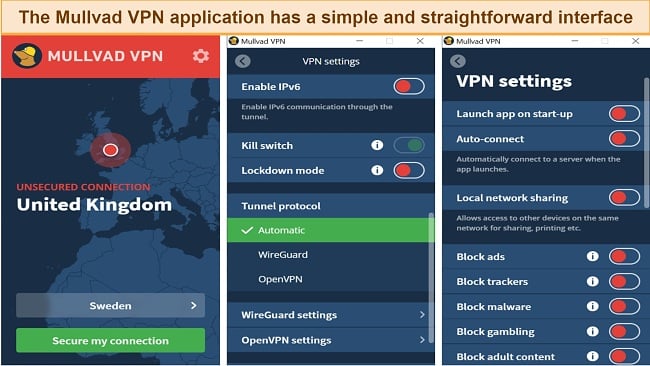
I had no issues accessing my account or using the application . It’s a very simple app with options to toggle location and connect to servers. I do wish that the application acted as a moveable window by default. You have to go in through the preferences tab to toggle that option on, which will allow you to view the application in the taskbar and move it around the screen.