McAfee vs Bitdefender 2026: Which Antivirus Is Best for You?
- Written by Enemali Okwoli Cybersecurity & Tech Writer
With almost identical features, McAfee and Bitdefender appear to be similar on the surface , making it tough to choose between them. That’s why I tested both antivirus programs and compared them in 15 different categories to find out which brand is the best.
Following extensive testing, McAfee emerged as the superior choice, albeit with only a slight advantage. Both antivirus solutions demonstrate strong performance in safeguarding against malware and providing a wide range of features. McAfee, in particular, outshines in a few aspects. Firstly, it boasts faster scan times and a higher capability for detecting phishing links compared to Bitdefender. Conversely, Bitdefender excels in optimizing device performance, and its VPN delivers quicker speeds.
Ultimately, both antiviruses would protect your devices, keeping your whole family safe online, but I found McAfee to be better overall. If you’d like to test the service for yourself, you can take advantage of McAfee’s 30-day money-back guarantee to make sure it’s right for you.
No Time? Here’s a 1-Minute Summary of Category Winners
McAfee and Bitdefender offer excellent protection for all devices, but I found McAfee’s security features and performance to be more comprehensive.
| Virus Scanner | Multiple scan types detected and quarantined 100% of malware | 5 types of virus scanners but flagged more files wrongly |
| Real-Time Malware Protection | Detected 100% of newly-released threats | Blocked nearly all zero-day threats |
| System Performance | No noticeable system impact | Minimal device slowdown |
| VPN | Servers in 23 countries — but slow and struggles to access streaming services | Fast speeds with servers in 27 countries and access Netflix US |
| Parental Controls | Comprehensive and user-friendly protection with location tracking, web filtering, and screen-time schedule | Difficult to set up and navigate. Features geo-fencing, web filtering, and screen time schedule — iOS has very limited options |
| Firewall | Works simultaneously with Windows’ firewall to block intrusions | Highly customizable firewall — but unavailable on Antivirus Plus or Free plan |
| Password Manager | Only stores 15 passwords for free | Unlimited password storage on all plans |
| Gaming Mode | Only included in a separate Gamer Security package | Game Mode automatically detects and optimizes gameplay |
| Optimization Tools | QuickClean, App Boost, and Web Boost | Battery Saver and OneClick Optimizer |
| Other Features | Browser extension, secure file shredder, ransomware protection, and more | Browser extension, secure file shredder, ransomware protection, and more |
| Device Compatibility | Windows, Mac, Android, iOS, and Linux | Windows, Mac, Android, iOS, and Linux, with easy-to-use apps |
| Customer Service | 24/7 live chat, phone support, and community forum | 24/7 live chat, phone support, email ticketing, and community forum |
| Price | Great value for money — all features available on every plan | Average value for money — limited features on all plans except 1 |
| Free Version | No free plan | Basic free version available |
| Money-Back Guarantee | 60 days | 30 days |
How I Tested and Compared McAfee vs Bitdefender
- Scans, Protection, and Performance — I tested how well each antivirus detects and blocks existing and newly-released malware. I also tested how much of my computer’s system resources each scan uses.
- Extra Features — I checked out all the other features each antivirus offers to see how well they worked and if they added value to the software.
- Device Compatibility — I tested the programs on multiple operating systems to see how well they worked.
- Customer Service — I contacted customer support to learn how helpful they were.
- Price — I compared subscription plans to find the best value for money.
- Free Version — I tested the free versions to see whether they’re worth using.
- Money-back Guarantee — I purchased a plan and tested the refund policy for each antivirus.
1. Virus Scanner — McAfee’s Fast Scans Detect of Known Malware
Both Bitdefender and McAfee have reliable malware scans. However, one key difference is that McAfee’s scans are much faster, especially the Quick Scan.
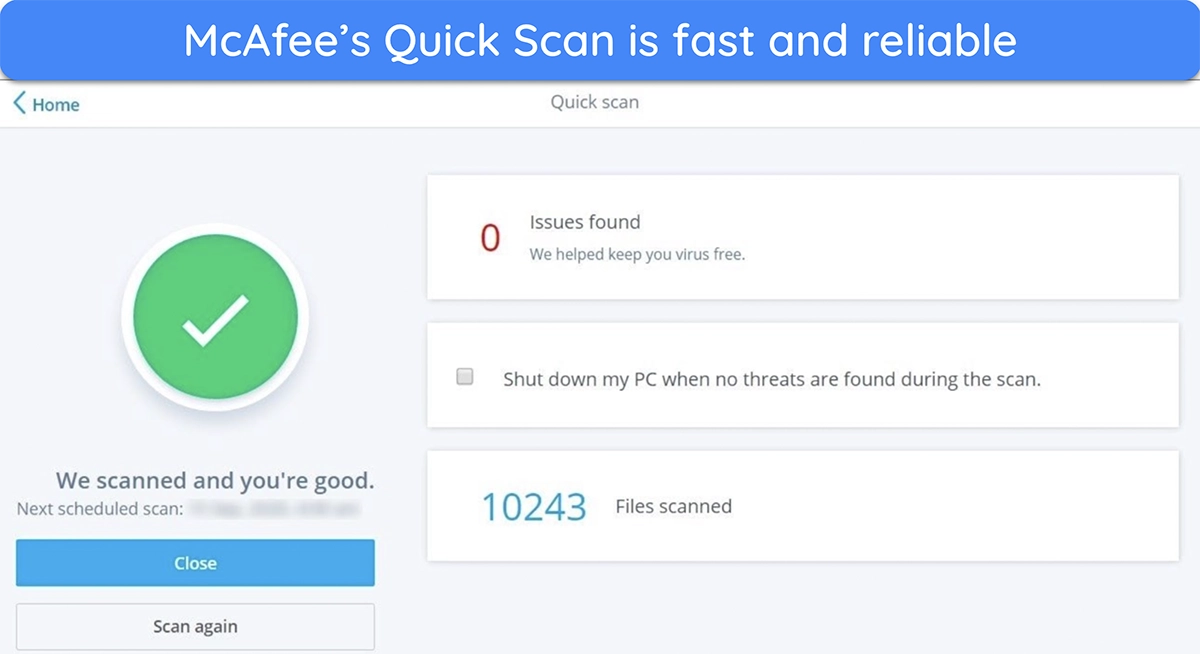
In terms of speed, McAfee’s scans are faster by a few minutes . Its Quick Scan took less than 5 minutes to check vulnerable areas, while the Full Scan took just under an hour to examine my whole system, which has over 280GB of data
In contrast, Bitdefender’s Quick Scan was slightly slower , taking just over 5 minutes. The Full Scan was just as fast as McAfee’s, though, taking under an hour to check my whole system.
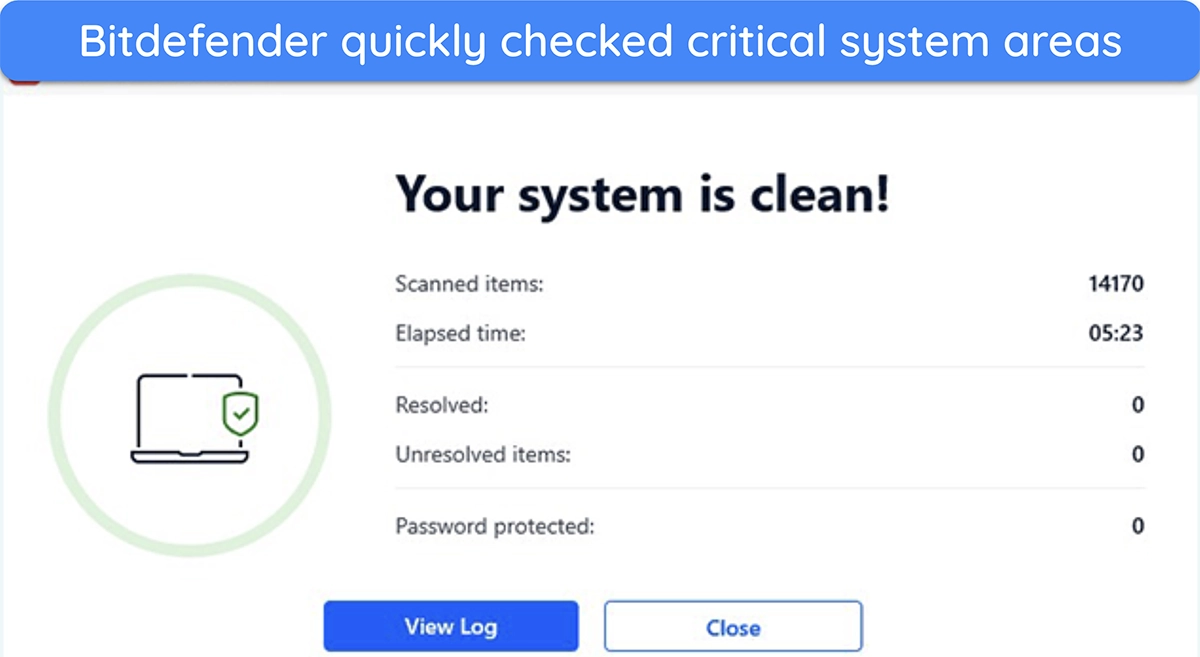
The following table shows the various scans available in both apps:
| Quick Scan | Full Scan | Custom Scan | Vulnerability Scan | Rescue Environment Scan | |
|---|---|---|---|---|---|
| McAfee | ✔ | ✔ | ✔ | ✘ | ✘ |
| Bitdefender | ✔ | ✔ | ✔ | ✔ | ✔ |
Bitdefender offers more scans than McAfee. I especially like the Rescue Environment Scan, which checks your devices during Safe Mode to remove stubborn threats that can’t be removed while the OS is running.
McAfee uses Advanced Threat Defense technology to power its malware protection, relying on signature-based defenses and heuristic analysis to find threats. Bitdefender’s technology is similar, but it regularly flags more false positives than McAfee (legitimate files incorrectly marked as malicious). So, while both apps offer reliable safety against malware, McAfee’s scans were more effective throughout my tests .
Virus Scanner Winner: McAfee
Remove malware with McAfee
2. Real-Time Malware Protection — McAfee Defends Against 100% of New Malware Attacks
In my tests, McAfee successfully protected my devices from all real-time threats. While Bitdefender had an almost-perfect detection rate , I prefer McAfee’s excellent protection scores.
To achieve a perfect score, McAfee uses Global Threat Intelligence technology. This cloud-based software analyzes the behavior of malware to accurately predict how threats will behave. When it discovers suspicious behavior in unknown items, McAfee blocks them before they can infect your device. Due to the cloud-based nature of this technology, McAfee is constantly updating to protect you from the latest threats.
Bitdefender uses similar technology to protect your devices from real-time malware attacks. Using a technique called “Behavioral Detection,” it closely monitors apps, software, and network connections (including downloaded files) for any suspicious behaviors. If these are detected, the items are immediately quarantined for you to look at so you can determine whether they’re safe or malicious.
One outstanding feature of McAfee is its Ransom Guard protection. It monitors your devices for suspicious changes to files and warns you if ransomware or spyware is detected, protecting you from zero-day ransomware threats.
When a program tries to encrypt your files — what McAfee calls File Content Transformation, the antivirus makes secure copies of such files, and if it finds that such changes are made by ransomware, it quarantines it and restores the backup files. In the same vein, McAfee’s WebAdvisor protects you from phishing attacks , cryptojacking, and other scams. It detected 98.8% of all phishing links during my tests compared to Bitdefender’s 94%.
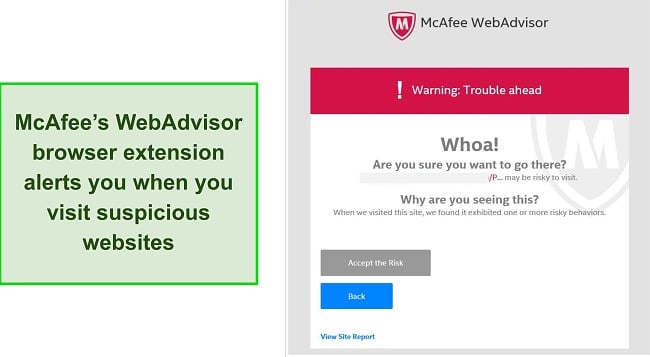
Overall, there isn’t a huge difference between these antivirus packages — both McAfee and Bitdefender are capable of protecting you from zero-day malware attacks. However, in my tests, McAfee was slightly better than Bitdefender and achieved a perfect score .
Real-Time Malware Protection Winner: McAfee
3. System Performance — McAfee Operates With Almost Zero Impact on Your Devices
It can be difficult to measure how much an antivirus affects system performance, especially with low-impact packages like McAfee and Bitdefender. After careful testing, McAfee beats Bitdefender.
With McAfee running in the background, my system slowdown was negligible. I could work, check my emails, stream HD-quality video, and install software without lagging or interruptions. It was as though McAfee wasn’t busy protecting my device!
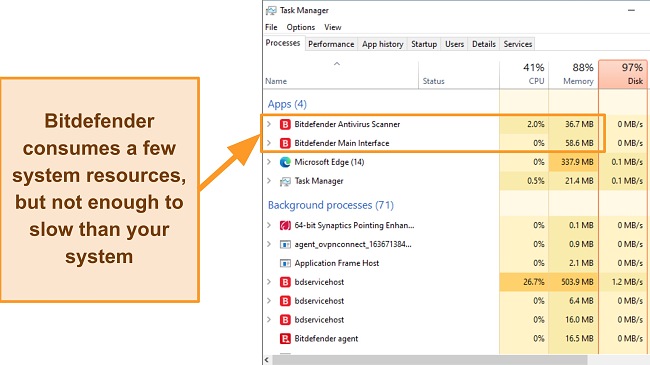
Bitdefender is also low-impact , and it’s unlikely you’ll notice a noticeable difference when it’s protecting you from online threats.
To see precisely how much system resources each antivirus consumes, I recorded my CPU, Disk, and Memory utilization before and during a scan . I compared the values, which helped me determine the antivirus that consumed more system resources.
| Test Type | CPU Utilization % (no scan) | Memory Utilization % (no scan) | Disc Utilization (MB/s) (no scan) | Full Scan CPU Utilization % | Full Scan Memory Utilization % | Full Scan Disc Utilization (MB/s) |
|---|---|---|---|---|---|---|
| McAfee | 7 | 80 | 70 | 28 | 84 | 85 |
| Bitdefender | 10 | 75 | 72 | 41 | 88 | 97 |
During my tests, I found that McAfee increased my CPU utilization from 7% to 28% and my memory utilization from 80% to 84%. In contrast, Bitdefender increased my CPU usage from 10% to 41%. Even then, I didn’t notice any significant impact on the speed of my PC .
Here’s an idea of how well McAfee minimized the impact on system performance compared to Bitdefender:
- Slowing down when launching a popular website: 12% slowdown (versus Bitdefender 21%).
- Copying files, both locally and in a network: 1% slowdown (versus Bitdefender 1%)
- Launching standard software apps: 10% (versus Bitdefender 20%)
Overall, both antiviruses won’t noticeably slow down your system , but when the numbers are put down, McAfee consumes fewer system resources than Bitdefender.
System Performance Winner: McAfee
4. VPN — Bitdefender Has Faster Download Speeds and Unblocks Streaming Services
Bitdefender’s VPN is better for streaming and has more server locations than McAfee. A VPN is a private tunnel your computer uses to connect to the internet. When you’re connected, it encrypts your entire internet traffic, preventing hackers from hijacking your online activity.
To gain access to the VPN, McAfee requires you to be signed up for auto-renewal , and Bitdefender only includes its VPN with its Premium plan. Between the 2 VPNs, I much prefer Bitdefender’s. Not only does Bitdefender’s VPN secure your online activities, but you can even watch Netflix and other streaming platforms.
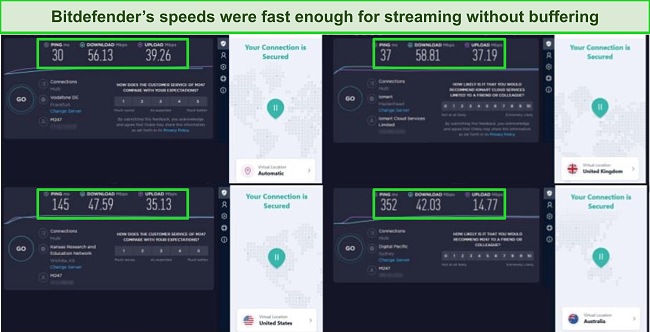
Unfortunately, McAfee’s VPN couldn’t access Netflix at all. McAfee also has fewer server locations (only 23 versus Bitdefender’s 27 server locations) and slower speeds. When I ran speed tests, Bitdefender’s VPN was fast enough to stream shows with only a couple of seconds of buffering .
In terms of security, both VPNs have high encryption levels that hide your online activity and prevent data leaks . I felt secure when accessing my banking app and shopping online, knowing that no one (not even my Internet Service Provider) could see what I was doing.
VPN Winner: Bitdefender
5. Parental Controls — McAfee Provides More Comprehensive Control for Children’s Devices
McAfee and Bitdefender both offer parental controls with their antivirus plans, but McAfee is better due to its advanced options and easy setup .
It took less than 3 minutes to download and set up McAfee’s Safe Family feature, and I like that I could easily see all the controls from the main dashboard. From there, you can accurately track your child’s location, schedule downtime away from screens, and filter harmful or inappropriate web content .
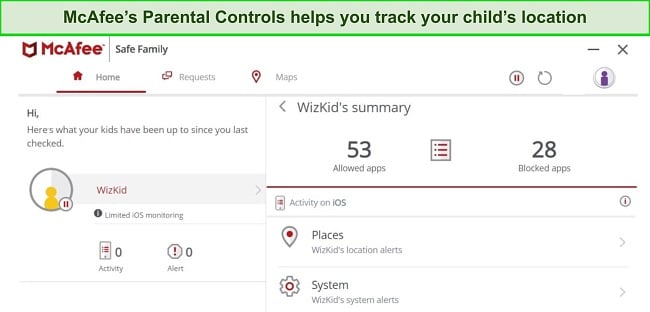
I also like that Safe Family alerts me if any changes are made to the app on my child’s device or if rules are breached. Kids are increasingly tech-savvy these days, so it’s a relief to know they can’t change any of McAfee’s settings without you being notified.
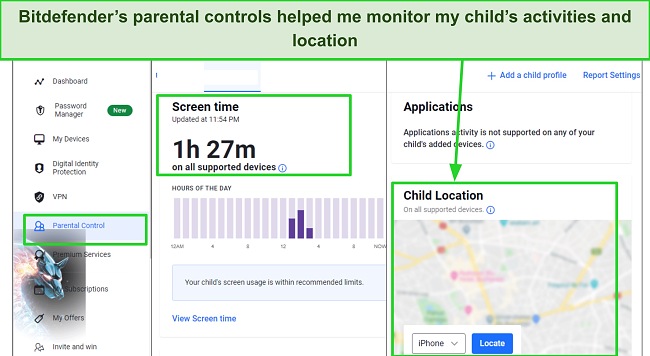
Bitdefender has a geo-fencing feature and solid web filtering , but the apps are difficult to set up. I spent more than 10 minutes downloading and configuring the apps to my child’s iPad because the settings were difficult to navigate.
McAfee’s Safe Family is available on Windows, Mac, Android, and iOS with similar features on all apps. Bitdefender’s Parental Advisor is supported on the same operating systems but is significantly less functional on iOS. For ease of use and level of coverage, I prefer McAfee’s Safe Family option.
Parental Controls Winner: McAfee
Stay protected using McAfee
6. Firewall — McAfee’s Firewall Is Available on All Plans
Both Bitdefender and McAfee have reliable firewalls, but McAfee’s firewall is available on all plans , while Bitdefender doesn’t offer a firewall in its basic Antivirus Plus package. Having a strong firewall is crucial for security, as even the built-in Microsoft Defender firewall has limitations.
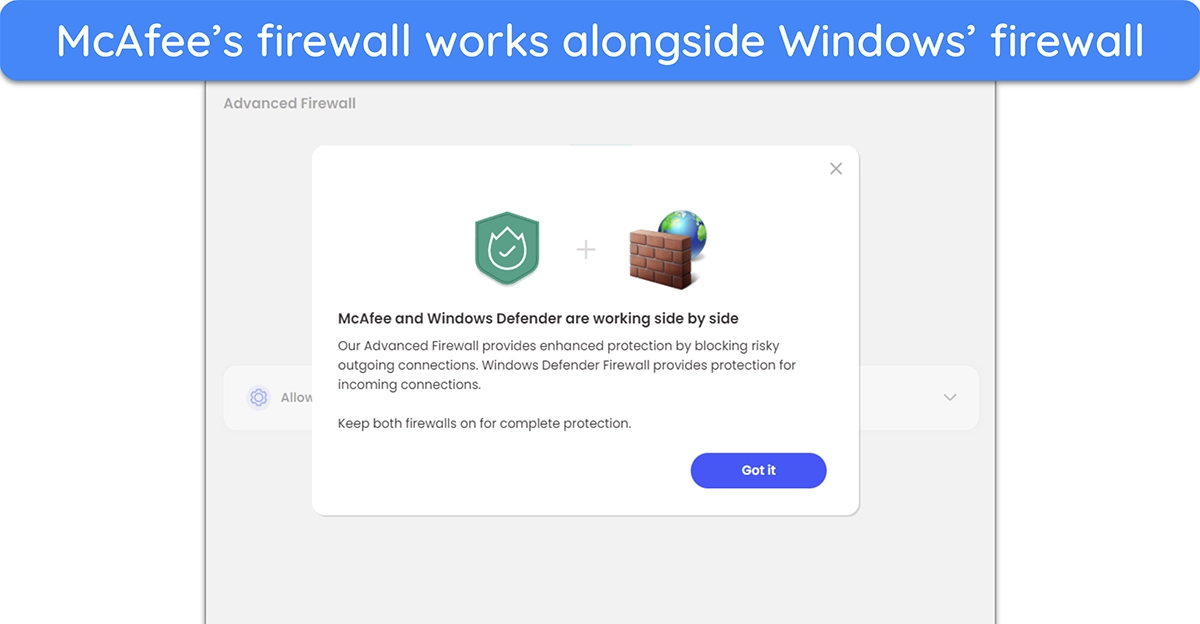
Instead of being a standalone option, McAfee’s firewall works alongside Windows’ own built-in firewall . It blocks suspicious outgoing connections, while Windows’ firewall works on blocking suspicious incoming connections. This combination maintains a reliable defense against network intrusions.
On the other hand, Bitdefender’s standalone firewall has lots of configuration options , letting you fine-tune it to your liking. However, if you aren’t comfortable configuring it yourself, the default configuration is enough to maintain reliable protection against most intrusions.
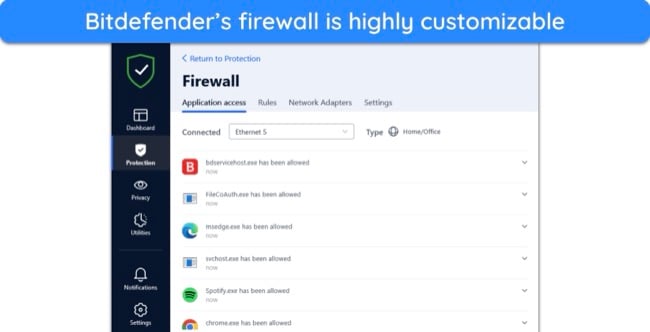
Although both apps offer great firewalls, McAfee wins in this category , because its firewall is available in every plan, while Bitdefender’s cheapest plan doesn’t have this feature.
Firewall Winner: McAfee
7. Password Manager — Bitdefender Offers Unlimited Password Storage
While McAfee’s True Key is a decent feature , Bitdefender’s password manager is one of the best I’ve tested from an antivirus package . You can generate secure passwords, store them in an encrypted vault, and auto-fill easily on both password managers.
Both Bitdefender and McAfee have unlimited storage for personal details like credit card numbers, social security information, and sensitive documents. All information you enter into either password manager is heavily encrypted , using the same AES-256-bit standard that militaries and government agents employ.
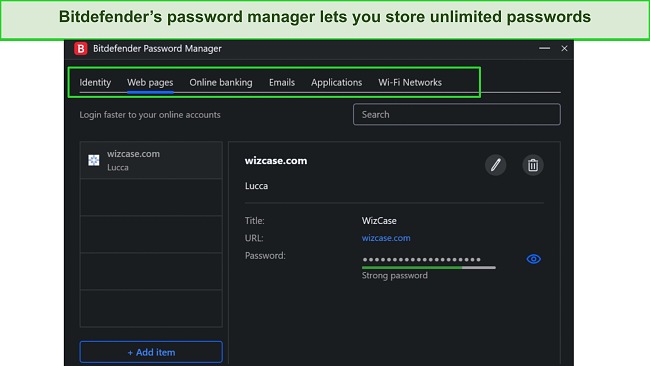
However, McAfee’s True Key lacks some features found in top password managers . Its free version limits you to just 15 passwords, whereas Bitdefender offers unlimited password storage across all plans. Also, True Key doesn’t support password sharing, password auditing, or dark web monitoring, all crucial features for any standard password manager.
It was very easy to transfer my passwords from my existing password manager to Bitdefender. I also didn’t experience any delays when Bitdefender automatically filled in my login credentials . Many password managers take a while to autofill the details, but Bitdefender entered my information in less than a second.
If you don’t have many passwords, McAfee’s True Key is a secure option. However, most people have far more than 15 passwords, so Bitdefender’s password manager is the superior choice overall .
Password Manager Winner: Bitdefender
8. Gaming Mode — Bitdefender Optimizes Gameplay With In-Built Game Mode
I was surprised that Bitdefender beat McAfee in this category as McAfee has a dedicated Gamer Security antivirus package. Unfortunately, to make it low-impact, McAfee compromised on some essential security features to make it low-impact, meaning Bitdefender is the better choice for a gaming antivirus .
Bitdefender has a specific Game Mode designed to optimize your system’s performance when you’re gaming. It diverts CPU power away from background processes towards your game, making them run more smoothly. Best of all, Game Mode starts automatically when it detects you’re playing, so you don’t have to set it up manually. I tested it while playing Call of Duty: Warzone , and I didn’t experience interruptions throughout the time I was gaming.
Bitdefender also has Autopilot Mode that learns how you use your device and suggests optimizations. If you game regularly, you’ll find Bitdefender adjusts settings automatically for optimal gameplay.
McAfee’s antivirus plans don’t have a dedicated Game Mode unless you opt for the Gamer Security package. However, I found that McAfee’s Gamer Security was ineffective in blocking malicious websites and phishing scams .
So while it performs well for playing games, you’re compromising on overall security. It’s better to stick with the comprehensive coverage Bitdefender offers, even though the antivirus isn’t specifically tailored toward gamers.
Gaming Mode Winner: Bitdefender
9. Optimization Tools — McAfee Significantly Boosts Device Performance
McAfee excels in this category, offering a range of tools designed to optimize the performance of your devices. Bitdefender does have some features that improve overall performance , but I found they weren’t as impactful as McAfee’s extras.
McAfee has 3 great optimization tools: QuickClean, App Boost, and Web Boost. The QuickClean tool gets rid of cookies, junk files, and browsing history to free up space on your device. In my tests, it took less than 20 seconds to run, and it found over 4,000 unnecessary items that could be safely deleted . This freed up almost 400MB of space on my Windows laptop.
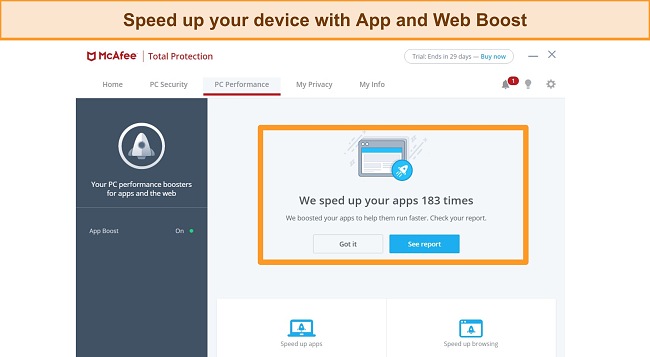
The App and Web Boost features work similarly to improve performance while you’re using your device. The App Boost determines which apps are open and diverts CPU power towards them , keeping speeds high and performance smooth. It also learns which apps you use the most to help them open and load more quickly.
Web Boost noticeably improved my browsing by stopping auto-play videos and ads , which also boosted my battery life. Unfortunately, this feature is only available as a Chrome browser extension for Windows.
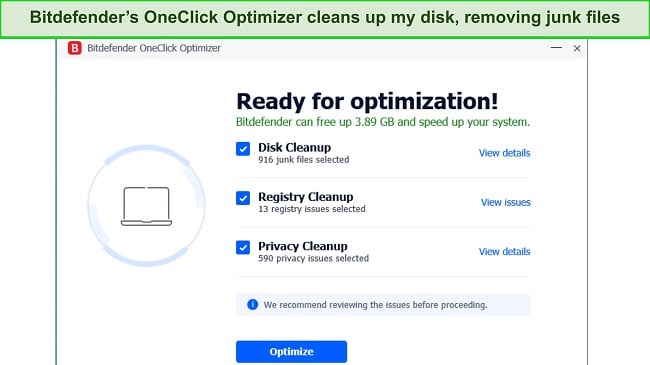
Bitdefender’s optimization tools work behind the scenes to improve performance. It has a Battery Mode that saves battery life for laptops and tablets. The OneClick Optimizer has 3 optimization tools that clear junk from your system — Disk Cleanup, Registry Cleanup, and Privacy Cleanup.
During my tests, Bitdefender removed over 3.89GB of junk files from my PC. However, I couldn’t view the details of all the files being removed. Having placed the optimization tools of both antiviruses side-by-side, I concluded that McAfee is a better antivirus for device optimization .
Optimization Tools Winner: McAfee
10. Other Features — Wide Range of Useful Tools on Both McAfee and Bitdefender
This category resulted in a tie because both McAfee and Bitdefender have features that work well to improve your security . Bitdefender has a bigger number of extra features , while McAfee’s offerings worked more effectively.
I’ve assembled the features of both antiviruses in this table.
| McAfee | Bitdefender | |
|---|---|---|
| Browser Extension | ✔ | ✔ |
| Ransomware Protection | ✔ | ✔ |
| Network Monitor | ✔ | ✔ |
| Anti-Spam Email Monitor | ✘ | ✔ |
| Webcam and Mic Protection | ✘ | ✔ |
| File Shredder | ✔ | ✔ |
| Identity Theft Protection | ✔ | ✘ |
| Encrypted Storage | ✔ | ✘ |
| Secure Banking | ✘ | ✔ |
Some features have limitations — McAfee’s WebAdvisor browser extension is only available on Windows, while Bitdefender’s Anti-Spam only works with a couple of email platforms.
I was especially impressed by McAfee’s ransomware protection (built into the anti-malware engine) . It monitors and blocks any suspicious changes to apps or software and alerts you when ransomware or spyware is found so you can take steps to prevent it. You can also take advantage of McAfee’s ransomware coverage that offers up to $25,000 insurance on the McAfee+ Ultimate plan.
Bitdefender’s most impressive feature is its SafePay tool , designed to secure your online banking and shopping. It opens a new desktop environment that blocks screenshots, keylogging, and any kind of data interception. I recommend using it whenever you need to access sensitive information.
I was pleased to find the features offered by both antiviruses are high-quality tools you’re likely to use . If you want features that will secure your device, McAfee has some better options. For protecting personal information online, Bitdefender’s features are more appropriate.
Other Features Winner: Tie
11. Device Compatibility — Bitdefender Is Easier to Use on Multiple Devices
McAfee and Bitdefender have apps available for popular operating systems. They’re both quick to download and set up, but Bitdefender comes out on top because of its easy-to-navigate apps for all devices .
Bitdefender works on the following operating systems:
- Windows (7 SP1, 8/8.1, 10, and 11)
- macOS 10.10 or later
- Android 5.0 or later
- iOS 12 or later
- Linux (popular distros supported on GravityZone plan)
McAfee is compatible with the following operating systems :
- Windows (8.1, 10, and 11)
- macOS 10.12 or later
- Android 7.0 or later
- ChromeOS
- iOS 13 or later
- Linux (popular distros supported on Trellix plan)
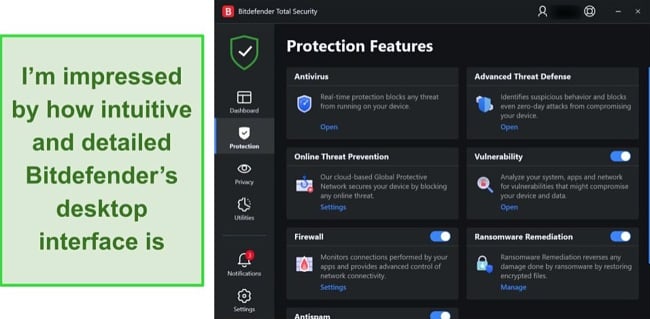
I found Bitdefender’s desktop apps are intuitively designed , so it’s easy to navigate between settings, make changes, and run scans. I like that the apps are suitable for beginners, while more advanced users can make specific configuration changes quickly.
Bitdefender’s Android and iOS apps are equally intuitive. You’ll find many features on the desktop app available on the Android app, like Threat Scanning, Account Privacy, Web Protection, Anti-theft, VPN, and more. However, you only get access to the Web Protection, VPN, and Account Privacy features.
McAfee is trickier to figure out , despite having a bright and inviting interface. Its apps for Windows and Mac are confusingly labeled, making it difficult to find the settings you’re looking for. For example, the QuickClean feature is a button labeled “Remove cookies and trackers.” It takes some time to learn where features and settings are with McAfee.
In contrast, McAfee’s iOS and Android apps are intuitive , but the Android app offers more features. For example, the optimization tools and anti-theft features aren’t available on the iOS app, but you’ll find them on the Android app. This is the case for most iOS antiviruses except for the iOS-focused antivirus apps .
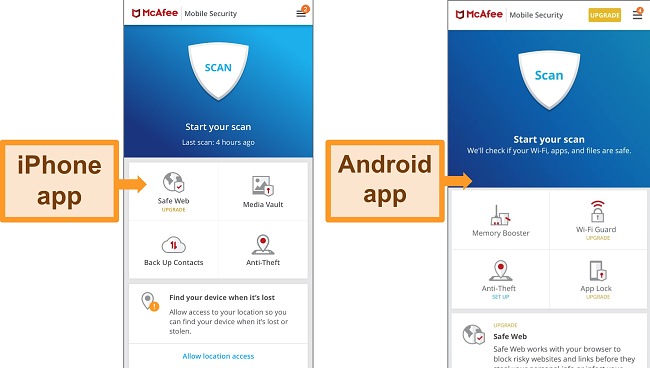
While McAfee’s mobile apps are much easier to navigate, Bitdefender is the better choice if you’re looking for a user-friendly antivirus app .
Device Compatibility Winner: Bitdefender
12. Customer Service — Bitdefender Has Speedy 24/7 Support
Bitdefender excels in this category, having multiple support options available through 24/7 live chat, email ticketing, and phone support. McAfee, on the other hand, while offering similar customer support channels, doesn’t offer email ticketing.
Take a look at all the support channels offered by both antiviruses:
| Live chat | Phone | Community Forums | FAQs and Knowledgebase | Social Media | ||
|---|---|---|---|---|---|---|
| McAfee | ✔ | ✔ | ✘ | ✔ | ✔ | ✔ |
| Bitdefender | ✔ | ✔ | ✔ | ✔ | ✔ | ✔ |
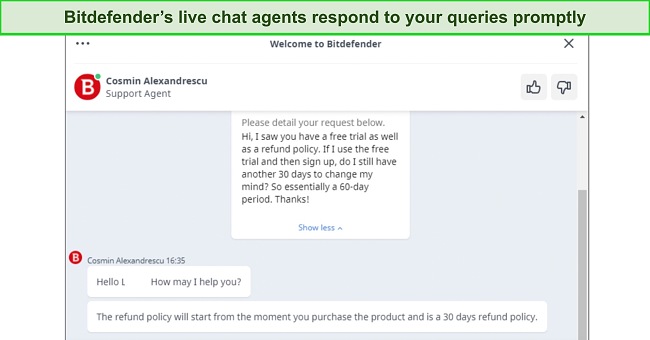
I tested all of Bitdefender’s customer service options and found that live chat was the most effective way to get help. I was connected to a representative in less than a minute and got detailed responses to my questions. If your queries aren’t time-sensitive, Bitdefender’s community forum is a good option .
Email ticketing was equally as impressive. I had an answer in just over an hour! If you contact Bitdefender by phone, you’ll probably spend a little time on hold, but it’s a great option if you have more complex questions.
Unfortunately, I was disappointed with McAfee’s live chat service as it took more than an hour to resolve my issue . In contrast, McAfee’s phone support and community forums were easy ways to get answers . I like that I didn’t have to wait on hold with McAfee as an agent called me back so I could go about my day — I got a call back in 10 minutes.
Phone support operatives are knowledgeable and helpful, but McAfee’s live chat was quite the opposite. It took 40 minutes to answer a relatively simple question, which I had to rephrase several times as the agent didn’t understand what I was asking. Live chat is usually the best way to get immediate support, but McAfee’s service was a disappointing experience.
Customer Service Winner: Bitdefender
13. Price — McAfee Total Protection Is Better Value for Money
While Bitdefender is cheaper overall, McAfee includes its premium features on all plans (except its Safe Family feature, which is only available on the Family plan). Bitdefender restricts some features for more expensive plans. This makes McAfee Total Protection a great value for money.
Bitdefender’s most affordable plans (Free and Antivirus Plus) only work on Windows — and don’t come with a firewall, device optimization tools, or parental controls. You won’t get these features unless you upgrade to the Premium package.
McAfee’s higher prices are reasonable for multiple device compatibility and comprehensive coverage. Both McAfee and Bitdefender accept credit/debit cards and PayPal.
Price Winner: McAfee
14. Free Version — Only Bitdefender Has a Free Plan
Bitdefender comes out on top in this category, as McAfee does not offer a free plan.
The free version offers Bitdefender’s advanced threat detection and real-time malware protection . I’m also pleased to see that you get web protection that filters harmful sites and optimization tools that improve device performance. You’ll find that Bitdefender’s free plan is very low-impact due to its cloud-based scanning. If you’re using a Windows device, you’ll also have anti-phishing and anti-fraud protection.
This free plan is missing advanced ransomware protection , so you’re not getting full-coverage security — but it’s standard practice for antivirus packages to reserve advanced features for premium users. If you’re looking for basic coverage on a device that isn’t used for sensitive information (like online banking or important documents), Bitdefender Free is a solid choice.
Free Version Winner: Bitdefender
15. Money-Back Guarantee — McAfee Offers 60 Days to Test the Service and Get a Full Refund
Both antiviruses offer a money-back guarantee, but McAfee’s policy is the longest at 60 days . You can get a refund from McAfee:
- Within 30 days of purchasing a new plan.
- Within 60 days of auto-renewing a plan.
- At any point, if McAfee fails to remove malware from your system.
In comparison, Bitdefender only has a 30-day money-back guarantee.
Both McAfee and Bitdefender make it easy to get a refund, but I was more satisfied with McAfee’s quick response time . I requested a refund using McAfee’s support site and chose “Other” when asked for a reason — I wasn’t asked to explain any further.
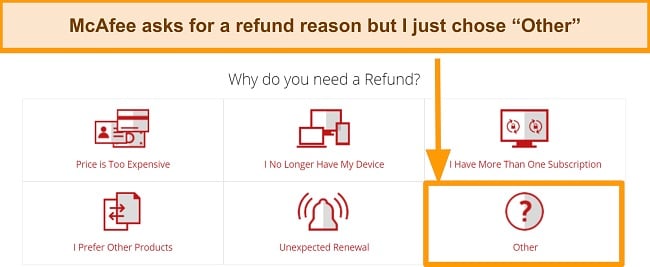
I was then asked to enter some contact details and waited less than 10 minutes for an agent to call me. I wasn’t asked to reconsider canceling — McAfee’s agent quickly processed my request, and I had my money back in 7 business days .
Bitdefender’s process is more straightforward but longer. I just had to email customer support asking for a refund. However, it took 5 days to get an email response which isn’t as quick as I’d like — I suggest sending a cancellation email a few days before the guarantee period runs out, just to be sure you don’t miss the refund window. I had my money back from Bitdefender in another 5 days.
Money-Back Guarantee Winner: McAfee
And the Winner Is… McAfee
Based on rigorous head-to-head tests, McAfee came out on top in 8 categories, while Bitdefender won 6 categories. Only 1 category resulted in a tie. As such, McAfee wins by a small margin .
- Virus Scanner — McAfee
- Real-Time Malware Protection — McAfee
- System Performance — McAfee
- VPN — Bitdefender
- Parental Controls — McAfee
- Firewall — McAfee
- Password Manager — Bitdefender
- Gaming Mode — Bitdefender
- Optimization Tools — McAfee
- Other Features — Tie
- Device Compatibility — Bitdefender
- Customer Service — Bitdefender
- Price — McAfee
- Free Version — Bitdefender
- Money-Back Guarantee — McAfee
Both McAfee and Bitdefender are excellent antivirus packages that provide top-tier protection from malware and help secure your devices.
McAfee is the better choice if your focus is more on device security. It provides consistently high-level protection with 100% malware detection rates for both new and known threats. It’s surprisingly low-impact on your system, considering the intensity and thoroughness of its scans.
Bitdefender is more configurable, making it a solid option for more advanced users. That’s not to say it isn’t good for beginners also — it has a clear interface and easy-to-use features that make choosing the right settings simple. If you do have issues, Bitdefender has excellent customer service available 24/7. You don’t have to take my word for it — Bitdefender gives you 30 days to test the service with its money-back guarantee , so you can make sure it’s right for you. If you change your mind, getting a refund is easy.
Overall Winner: McAfee
How To Download McAfee on Your Device
- Subscribe to a plan — Visit McAfee’s official website, click on “products,” and select a product you want to subscribe to.
- Enter your card details — Click “Get protection now” on the product page and enter your email address and credit card details to proceed.
- Download and install McAfee — Download McAfee’s setup file from its website and install it on your PC.
- Launch the app — After installing, you’ll have to enter the product key to activate the software.
Norton is better. While McAfee and Bitdefender are great antivirus options , they’re not nearly as robust as Norton. Firstly, Norton is richer in features, offering an extensive range of security features, perfect malware-detection scores, and optimization tools .
Secondly, Norton provides better performance than McAfee and Bitdefender. For instance, while they both have near-perfect anti-phishing protection scores (98% and 94%), Norton achieved 100% scores during my tests. Without any argument, Norton’s comprehensive security suite and robust performance put it easily ahead of McAfee and Norton.
Not at all. McAfee doesn’t slow down your computer because its lightweight application has no impact on your computer . I tested this while running a full scan and carrying out several activities. To my surprise, McAfee didn’t affect the speed of my laptop when checking my emails, streaming HD-quality video, and installing more than 3 different programs .
