How to Unblock Roblox in School: Play Securely on School WiFi
- Written by Sayb Saad Former Writer
- Fact-Checked by Amar Cemanovic Cybersecurity Expert
- Reader’s Comments 1
Missing Roblox sessions with friends during your school break is frustrating. While school WiFi doesn’t carry the risks of public networks, it often uses filters and firewalls to block Roblox access. It’s also heavily monitored to track students’ online activities on the network.
A VPN lets you play Roblox at school without being blocked or tracked. It routes your traffic through an encrypted tunnel so that it can’t be read by your school network. Not all VPNs can bypass network restrictions or sustain low ping for lag-free gaming, so you need a top one.
After extensively testing top industry options, ExpressVPN is the #1 VPN for playing Roblox at school. Its fast speeds, low ping, and DDoS protection ensure uninterrupted gaming. You can try ExpressVPN confidently as it’s backed by a 30*-day money-back guarantee. Editor’s Note: Transparency is one of our core values at WizCase, so you should know we are in the same ownership group as ExpressVPN. That said, our detailed reviews follow a strict methodology that examines all relevant performance factors to help you arrive at your own informed conclusion.
Play Roblox with ExpressVPN
Quick Guide: 3 Easy Steps to Unblock Roblox in School
- Get a VPN. I recommend ExpressVPN because its Lightway protocol ensures lightning-fast speeds and low ping for lag-free Roblox gaming on school WiFi.
- Connect to a server. Pick a server in your country and hit ‘Connect.’ This will change your IP address and make your online activities anonymous to third parties.
- That’s it! You can now launch Roblox on your school computer or Chromebook and start playing.
Why Do Schools Block Roblox?
Schools block Roblox so that students aren’t distracted during classes. To that end, school networks also block entertainment sites like Twitch and Netflix. Here are a few other reasons for such restrictions:
- Limited bandwidth — restricts non-educational activities like Roblox and entertainment sites so that the school network isn’t overused by data-intensive activities.
- Cyber safety — concerns are valid for school network administrators, as playing Roblox online can expose students to risks like identity theft and cyberbullying.
- Focus on education — prompts schools to only prioritize learning resources so that students aren’t distracted by the game and can’t play during school hours.
- Network integrity — prevents malware or security breaches that can happen if a malicious actor gains access to the school’s network infrastructure.
5 Ways to Unblock Roblox on Restricted School Networks
Mobile Data
On mobile data, you’re not using school WiFi. So, its filters and restrictions don’t apply anymore because the cellular network runs independently and doesn’t impose such specific limitations. To use mobile data, you must have a mobile device with an active mobile data option.
Playing Roblox can consume 200 to 600MB per hour. You can monitor data usage and not play Roblox for too long to avoid extra charges if you have a capped option. Make sure to cap your data to LTE, which is enough for lag-free gaming and not as resource-hungry as 5G. This will also help you save battery on your phone.
Mobile Hotspot
With mobile data, you can only play Roblox on a device with a SIM. On a school-issued Chromebook, you can extend your mobile data to the laptop through a hotspot . To create a hotspot on your mobile, go to ‘Settings,’ tap on ‘Connections’ or ‘Network & Internet,’ select ‘Mobile Hotspot and Tethering,’ and toggle on ‘Mobile Hotspot.’
Next, configure the network name and password of the hotspot. Click on the WiFi icon on the bottom-right of the taskbar from your school’s Chromebook. Click on the mobile hotspot network you’ve just created and enter the password to join. Note that school Chromebooks are often restricted from joining mobile hotspots .
Portable Browser
A portable browser is a standalone web browser that runs directly from a USB drive , independent of the installed browsers on your school computer. If a school’s installed browsers use site-blocking extensions, a portable browser won’t inherit them. This lets you play Roblox but only at the browser level.
Always download a trustworthy portable browser like Google Chrome Portable and Firefox Portable. However, even a portable browser can’t access Roblox if it’s blocked on the network level. School administrators can also restrict computers from running software from external devices, so it’s not the most reliable way to access Roblox.
Remote Desktop Application
A remote desktop application like TeamViewer lets you access your home computer from the school’s computer. On your home computer, which has unrestricted access to Roblox, the app should run in ‘host’ mode, ready to accept remote connections. On the school computer, you’ll use the app to connect to and control your home computer .
This way, Roblox runs on your home computer, but you play through the school’s computer. However, a stable internet is crucial at both ends to prevent lag because there’s added latency between the remote desktop apps. Plus, setting up a remote desktop application can be difficult due to restricted network permissions.
VPN
Using a top-rated VPN is the most effective way to play Roblox on school WiFi. You don’t need to spend additional money on extra mobile data or go through the hassle of using a portable browser and remote desktop application, which aren’t guaranteed to work.
A VPN encrypts your traffic and routes it through a virtual tunnel so that a school network can’t inspect data packets to enforce restrictions. School networks block internet ports commonly used by games. VPNs use different ports like HTTPS traffic over Port 443 , standard for secure web browsing and unlikely to be blocked.
The Best VPNs to Unblock Roblox in School in 2026
1.ExpressVPN — #1 VPN for Playing Roblox on School WiFi
Key Features:
- 3,000+ RAM-only servers in 105 countries with built-in obfuscation
- Provides DDoS-free gaming with TrustedServer technology, military-grade encryption, a kill switch, and IPv6 leak protection
- Lets you play Roblox at school on up to 14 devices simultaneously
- Offers fast customer support via live chat, email, and a detailed knowledge base
- Comes with a 30*-day money-back guarantee
ExpressVPN is the best overall VPN for playing Roblox at school. Its Lightway protocol is the fastest in the industry, providing near-baseline ping for lag-free gaming. With TrustedServer technology, ExpressVPN prevents any possibility of data logging and ensures that all servers run the same software to avoid vulnerabilities. To prevent DDoS attacks, it includes:
- Military-grade encryption — encodes your data into a 256-bit unreadable code so that third parties can’t know what you’re doing online.
- Kill switch — disconnects you from the internet if your device suddenly crashes and the server connection drops, preventing accidental data and IP address exposure.
- Split tunneling — lets you use a VPN only with Roblox and keeps other apps unencrypted to minimize VPN resource usage and latency spikes.
- Built-in leak protection — prevents IP and DNS leaks to preserve your anonymity while playing Roblox (it also has a dedicated IPv6 leak protection feature).
In my tests, ExpressVPN’s distant servers in the US averaged 94Mbps with a ping of 41ms, up from my baseline of 32ms. Its Lightway protocol uses a lean codebase for faster processing and data transfers without compromising on security. You can also pick IKEv2 or OpenVPN, but I suggest Lightway for all-rounded performance.
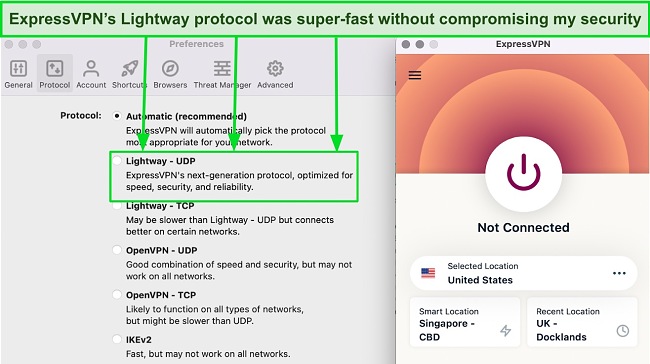
With 3,000+ servers in 105 countries, ExpressVPN’s network spread gives you the flexibility of playing Roblox anywhere you go. All its servers are obfuscated, masking your VPN traffic as regular internet traffic. ExpressVPN constantly replaces its blacklisted IP addresses to hide from powerful firewalls on restricted networks.
You can play Roblox with ExpressVPN on up to 14 devices simultaneously . It takes a couple of taps to find a server and connect to it. All apps have a consistent and user-friendly interface, making it easy to switch devices.
A small drawback of ExpressVPN is that it’s a bit pricey compared to its peers. However, it’s well worth the investment because of its industry-leading performance . The Lightway protocol delivers the best speeds and protects you against DDoS attacks. It’s also one of the best VPNs to play resource-heavy games like Call of Duty: Warzone .
Editor’s Note: Transparency is one of our core values at WizCase, so you should know we are in the same ownership group as ExpressVPN. That said, our detailed reviews follow a strict methodology that examines all relevant performance factors to help you arrive at your own informed conclusion.
2.CyberGhost — Special Gaming Servers Offer Low Latency for Playing Roblox at School
Key Features:
- 11,690+ servers in 100 countries with specialized connections for gaming, torrenting, and streaming
- Includes NoSpy servers, secure protocols, built-in leak protection, and a kill switch for secure gaming
- Supports 7 simultaneous connections on a single offer
- Offers quick technical assistance through live chat, email, and an online knowledge base
- Provides a 45-day money-back guarantee for a risk-free purchase
CyberGhost’s specialized gaming servers ensure lag-free Roblox gaming at school. They use smart routing algorithms to automatically connect you to the best server for Roblox in your location. They also have higher bandwidth allocations compared to standard servers for faster data transfers and lag-free gaming.
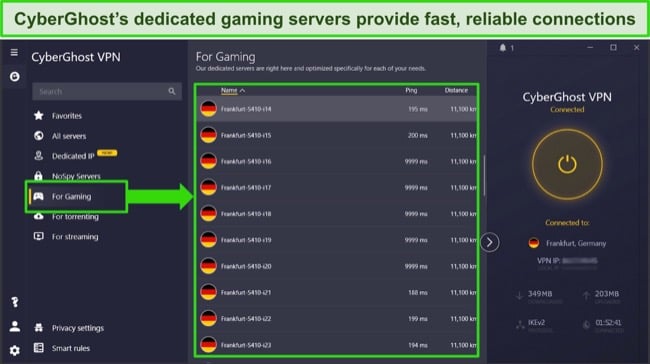
Even CyberGhost’s standard servers are sufficient for lag-free gaming. While its optimized servers were 9% faster in my tests, regular ones in distant locations in the US and Canada averaged 85Mbps with ping under 60ms. These scores are excellent, even for pro gamers.
I suggest playing Roblox on NoSpy servers. CyberGhost owns and manages these servers in its private data center in Romania, outside any intelligence-sharing alliance. This minimizes the risk of potential third-party data mishandling. In addition, it ensures secure gaming with:
- Built-in leak protection — keeps your Roblox data within the VPN tunnel at all times, hiding it from snoopers.
- Malware blocker — blocks malicious ads and trackers if you accidentally click on an infected URL in Roblox’s in-game chat.
- Smart WiFi protection — activates CyberGhost automatically when you join a network so that you don’t forget to encrypt your device before playing Roblox at school.
Unfortunately, CyberGhost’s gaming servers are limited to the US, UK, Germany, and France. However, I still got slightly faster speeds than regular servers despite being pretty far away. If your internet is slow, you can use standard servers, as they’re well-equipped for gaming too.
3.Private Internet Access — NextGen Network Provides Ample Bandwidth for Uninterrupted Roblox Gaming
Key Features:
- Extensive network of 29,650+ high-bandwidth servers in 91 countries
- Offers flexible encryption, SOCKS5 proxy, split tunneling, and built-in leak protection
- Allows unlimited simultaneous connections so you can play Roblox safely on all your devices
- Has troubleshooting guides and offers support via live chat and email
- Backs every offer with a 30-day money-back guarantee
PIA’s NextGen network ensures uninterrupted Roblox gameplay at school. It uses 10Gbps network cards that prevent servers from getting overcrowded during peak hours. I tested 10 hot servers in the US, UK, and Japan and never experienced congestion or connection instability.
While its 29,650+ servers in 91 countries let you play Roblox anywhere in the world, PIA’s virtual servers fill coverage gaps in restrictive locations like Brazil and India. Virtual servers can impact ping due to routing complexity, so I suggest you stick with physical ones.
In my tests, PIA’s physical and virtual servers yielded similar speeds of 83Mbps but there were a few ping spikes on virtual connections in Mexico and Malta. Distant servers were a bit slow but still ensured uninterrupted Roblox gaming.
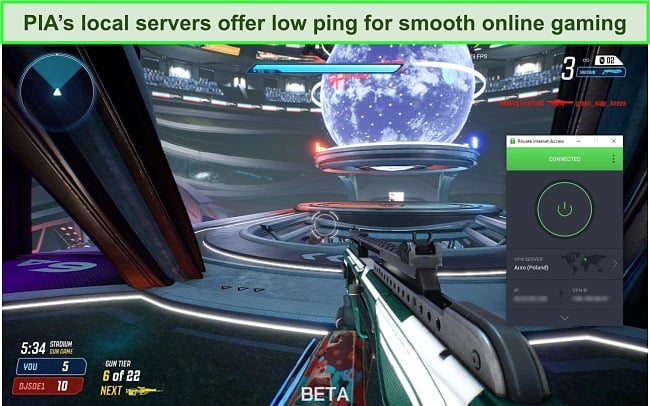
While it doesn’t work on Fire Stick, PIA has apps for all the main platforms. You can play Roblox securely on unlimited devices , which compensates for this small downside. I used PIA on 7 of my devices without glitches or crashes, an issue I’ve faced with other VPNs.
How I Tested and Ranked the Best VPNs to Unblock Roblox in School
In my search for the best VPNs to unblock Roblox in school, I focused on specific features crucial for an optimal gaming experience.
- Large network — ensures that you have nearby servers for low-latency gaming. All VPNs on my list have a decent server spread.
- Unblocking abilities — guarantee seamless access to Roblox on restricted networks by obfuscated servers and fresh IP addresses.
- Fast speeds — are crucial for lag-free Roblox gaming. I picked VPNs with efficient protocols that delivered near-baseline speeds.
- Security and privacy — features like military-grade encryption, a kill switch, and leak protection prevent potential DDoS attacks from interrupting your Roblox sessions.
- Money-back guarantee — gives you a window to try the VPN risk-free. The VPNs I picked have a tried-and-tested refund policy.
The official website is the best way. I suggest using Chrome because it has Roblox-specific extensions like BT Roblox and Roblox Enhancer that enhance your gaming experience. You can also play Roblox on mobile via its app on iOS and Android or other websites such as:
- Now.gg — is a cloud gaming platform that lets you play Roblox on your web browser without downloading.
- Linkvertise — aggregates links to various content, including Roblox games. However, be cautious, as some links may not be from reputable sources.
- GamePix — offers a curated selection of online games, including some Roblox titles. This could be a good option if you’re looking for other similar games to try.
Not if you’re using a reliable VPN like ExpressVPN on school-issued devices. Laws like the Children’s Internet Protection Act (CIPA) allow schools to track students’ online behavior and ensure internet safety. Here are some ways schools can monitor activities on their network:
- Direct device monitoring software — can access detailed usage information, such as application usage and location data.
- Browser-based monitoring — tracks browsing history, searches, and document storage. It’s often limited to specific browsers pre-installed on school devices.
- Content filtering — blocks access to specific websites or types of content deemed inappropriate, distracting, or harmful for students.
- Usage analytics — tracks how and when students use school devices, including app use and duration.
It’s compatible with Windows, macOS, iOS, and Android. To play anonymously, you can use a VPN in 3 easy steps . They work with all Roblox-friendly platforms and provide uninterrupted and DDoS-free gaming. Here are the device specifications for each operating system:
| Desktop | Mobile |
|---|---|
| Windows (64-bit): 7, 8.1, or 10. Note that Windows 8.1 requires Desktop Mode Mac: macOS 10.13 (High Sierra) and later | Android: 5.0 of laters (supporting at least OpenGL ES 3.0) iOS (64-bit): iOS 11 or later |
Yes, but I would avoid it. Free VPNs aren’t reliable and suitable for gaming. Instead, you can use a reliable VPN like CyberGhost for free for 45 days with its money-back guarantee. Just submit a refund request before the period expires, and you’ll get your money back.
Many free VPNs sell your data to third parties , while others can even infect your device with malware. While there are a few safe free VPNs , they have constraints like data caps, bandwidth limitations, and fewer servers, making them unsuitable for proper gaming.
Use a Reliable VPN to Unblock Roblox at School in 2026
Most school networks restrict you from playing Roblox. Gaming on mobile data works, but it’s not sustainable because data offers are expensive. Similarly, portable browsers aren’t enough to get past network-level blocks. VPNs are the only reliable solution that can consistently access Roblox on restricted networks.
After testing 20 top VPNs, ExpressVPN was the premier choice for playing Roblox at school . Its Lightway protocol ensures fast, reliable connections essential for gaming, and its robust DDoS protection secures your gameplay. What’s best, you can try ExpressVPN confidently as it’s backed by a 30*-day money-back guarantee.
*Please note that ExpressVPN’s generous money-back guarantee applies to first-time customers only.
Summary: These are the Best VPNs to Unblock Roblox in 2026
Editor’s Note: We value our relationship with our readers, and we strive to earn your trust through transparency and integrity. We are in the same ownership group as some of the industry-leading products reviewed on this site: ExpressVPN, CyberGhost, Private Internet Access, and Intego. That said, our detailed reviews follow a strict methodology that examines all relevant performance factors to help you arrive at your own informed conclusion.
Level UpYour Gaming With PIA
- Ultra-fast speeds (with no bandwidth limits)
- Unrestricted access to worldwide content
- Prevent ISP throttling & DDoS attacks
$11.99
$2.03

83% OFF
AS SEEN AND RECOMMENDED IN:
PIA Is The World’s #1 Gaming VPN
Say Goodbye To Lag
Our blazing-fast network architecture reduces ping times and bypasses ISP throttling on all gaming sessions.

Game Across Borders
Change your virtual location and access geo-restricted games, exclusive deals, and worldwide content.

Defend Against Attackers
Avoid mid-game DDoS attacks with a protected IP address and state-of-the-art server infrastructure.
One Subscription, Unlimited Devices
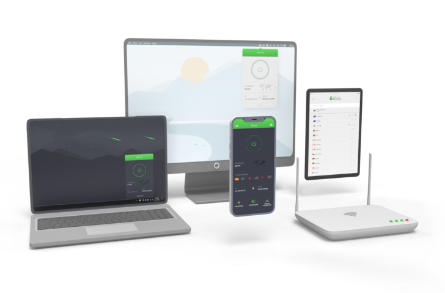
Dedicated apps for every major platform and device.

Why Gaming With PIA VPN Is Better
PIA sends your data through a private, encrypted tunnel that hides your location and enhances your gaming experience.
Normal encrypted traffic
Geographic restrictions
Local servers only
ISP throttling
Network vulnerabilities
ISP/admin surveillance
Highly encrypted traffic
No geographic restrictions
Worldwide server access
Lightning-fast pings
DDoS attack protection
No ISP/admin surveillance
PIA Is The World’s Favorite Gaming VPN



Has Never Let Me Down!
Has Never Let Me Down! I’ve been using PIA for well over a year now, Best VPN I’ve ever used! PIA has NEVER let me down, constant uptime, and fast speeds… I’m able to game and stream with no increase in latency. It really is the Best VPN.

Michael
Everything I want/need in a VPN
Excellent server options with the anonymity everyone using a VPN strives for. The ping, up, and down speeds are all impressive. I can game on this VPN with little to no lag. I get about a 5 meg drop on my downloads when my VPN which isn’t much considering the 50+ meg/s options nowadays. I don’t notice much change in my up speeds. This is everything I want in a VPN.
Austin
Wonderful service.
Wonderful service. The VPNs are fast, low latency, and stable. There’s no reason to ever turn it off. I routinely play online games, stream movies, and download games through PIA and never had any issues with speed.
Jack
Choose The Plan That’s Right For You
Covered By Our 30-Day Money-Back Guarantee
Monthly
Select Plan
$11.99 per month
6 Months
Select Plan
$ 71.94 $45.00 per 6 months
83% OFF - Best Deal
2 Years
+ 4 Months
Get This Deal
$ 335.72 $56.94 first 2 years and yearly thereafter
Why do I need a VPN for gaming?
A gaming VPN blocks your ISP from spying on your data (and limiting your bandwidth usage), prevents hackers and website trackers from knowing your IP address, and allows you to access geo-restricted games, features, and deals. And PIA VPN is one of the best VPNs out there – it’s fast, it’s cheap, it’s highly customizable, and it’s really, really secure.
Does PIA store user logs?
PIA stores zero user logs, and all of our apps are 100% open source – there is simply no possibility for us to log user data and not have people know about it! Almost no other VPN service provider does this. PIA VPN is simply the most transparent, the most honest, and the most secure no-logs VPN on the market.
Will PIA VPN restrict my bandwidth?
PIA will NEVER restrict your bandwidth. Every PIA subscription gives you an unlimited amount of data that you can choose to use however you want. With our high-speed network infrastructure, you’ll always be able to maintain fast pings, downloads, and uploads on every PIA server.
What payment methods does PIA accept?
Which PIA VPN subscription is the best?
Is there a money-back guarantee on my PIA subscription?
Yes! We’re so confident you’ll love gaming with PIA VPN that if you’re not satisfied for any reason, simply return it within 30 days of your purchase date to take advantage of our full, 100% money-back guarantee.
Try PIA Risk Free
If you’re not satisfied, get a refund with our 30-day money-back guarantee.
Copyright © Private Internet Access, Inc. All Rights Reserved.
