How to Lower Ping for Gaming: Step-by-Step Fixes in 2026
- Written by Sayb Saad Former Writer
- Fact-Checked by Sarah Frazier Former Content Manager
You’re lining up a shot, but the game stutters — and suddenly you’re dead. High ping wrecks precision and turns smooth matches into frustrating messes. Whether you’re on PC, console, or mobile, ping spikes can cost you wins.
The fix isn’t always to upgrade your internet plan. You can often lower your ping with simple changes , from switching to Ethernet and closing background apps to tweaking your router. And in some cases, a fast VPN can even reduce ping by bypassing bad routing or ISP throttling.
In other cases, like when you’re on restricted networks that block gaming traffic, a VPN is your best option — but not all VPNs cut it. ExpressVPN is my top pick for gaming due to its high speeds and low ping. You can test it out yourself as it comes with a 30*-day money-back guarantee. Editor’s Note: Transparency is one of our core values at WizCase, so you should know we are in the same ownership group as ExpressVPN. That said, our detailed reviews follow a strict methodology that examines all relevant performance factors to help you arrive at your own informed conclusion.
Use ExpressVPN for Gaming
Quick Guide: How to Lower Your Gaming Ping
- Download a reliable VPN. I recommend ExpressVPN as its Lightway protocol is optimized for gaming with minimal latency impact and automatic routing optimization.
- Connect to a server near your game server. Choose a VPN server geographically close to where your game servers are located to minimize additional routing distance.
- Test your connection and start gaming. Use in-game ping displays or online tools to verify your ping improvement and enjoy smoother gameplay.
What Is Ping and Why Does It Matter for Gaming?
Ping is the delay between your device sending a signal to a game server and getting a reply back. It’s measured in milliseconds (ms). Every move you make — whether shooting, driving, or casting a spell — has to travel across the internet to the server and then return. That round trip is your ping.

Low ping keeps your actions in sync with the game. If your ping is high, you’ll see a gap between pressing a button and seeing the result on screen. That delay can ruin fast matches, make you lose trades, or cause weird glitches like rubber-banding. Ping is as important as frame rate when it comes to smooth play.
Here’s what’s considered good ping for different game types:
- First-person shooting games ( Fortnite, Valorant, CS2, CoD ): Under 30 ms feels instant, and under 70 ms is still fine. Past 80 ms, aiming and reaction time suffer.
- Multiplayer Online Battle Arena ( League of Legends, Dota 2 ): 20–50 ms is ideal, and even up to 80 ms feels playable. Beyond 100 ms, skill shots and combos get harder to land.
- Massively Multiplayer Online ( World of Warcraft, Final Fantasy XIV, ESO ): Casual questing is fine up to 200 ms, but PvP or raids need below 150 ms to stay sharp.
- Racing & Sports ( Rocket League, Gran Turismo, FIFA ): Anything under 60 ms is smooth. Once you pass 100 ms, inputs feel delayed, and cars or players may “teleport.”
How to Use a VPN to Lower Your Gaming Ping
1. Measure Your Baseline (Ping, Jitter, Packet Loss)
Start by checking your normal ping, jitter, and packet loss before adding a VPN. Most games have a network stats screen, or you can run a ping test in Windows with the command ‘ping -n 20 ’ or on Mac/Linux, ‘ping -c 20 ’. This gives you a baseline so you’ll know if the VPN helps or not.
2. Pick and Install a Fast VPN
Choose a VPN with fast servers and low delay, like ExpressVPN . Install it on the device you’ll play on, or on a router if you want all traffic covered. Sign in, keep the default settings for now, and confirm the app runs without issues. That’s all you need to get started.
3. Set the Right Protocol
Most VPNs let you pick a protocol, but different protocols serve different needs . For gaming, pick a fast protocol like Lightway or WireGuard. If those fail, try OpenVPN with UDP. Avoid TCP unless your network blocks the others, as it’s slower for games. Turn on the kill switch to stay connected safely.
4. Choose a VPN Location Near Your Game Server
Don’t just pick the server closest to you — choose one close to the game server you join most. Ideally, the server location should be both close to you and the game server. For example, if your matches run in Frankfurt, connect to a VPN in Frankfurt or Paris. Save two or three nearby spots so you can swap fast if one slows down.
5. Clean Up Your Network Before You Test
A messy network can make any VPN test useless. Use a cable (Ethernet) if you can, or 5 GHz WiFi near your router. Close apps that sync or download in the background, like Steam or cloud storage. This makes sure only the VPN path is being tested.
6. Run A/B Tests
Test without the VPN first. Play three short matches or ping for one minute and write down your average ping, jitter, and loss. Then do the same on each VPN server you saved. If a VPN gives a lower or more stable result, it’s worth using.
7. Try Small Tweaks if Results are Close
If the results are close, test a different protocol or another nearby server location . Sometimes, a nearby hub, like London instead of Frankfurt, gives a smoother path. Keep changes small, one at a time, so you know which one made the difference.
8. Console Play (PS/Xbox/Switch) — Share or Use a Router
On consoles like Xbox or PlayStation, you can’t install a VPN app. Instead, share your PC’s VPN through Ethernet or a WiFi hotspot , or set up the VPN on a router. Turn on UPnP or set the NAT Type to open so your console can join matches easily.
9. Use Router QoS
QoS (Quality of Service) lets you set your game device as a top priority. This doesn’t lower ping by itself, but stops lag when others stream or upload. Just log in to your router, find QoS, and move your console or PC to “High Priority.”
10. Decide and Lock It In
Keep the VPN only if your logs show clear gains in ping or smoother gameplay across sessions. If your results are the same or worse, play without the VPN. The goal is not to always use a VPN, but to use it only when the route is better.
Editor’s Note: Transparency is one of our core values at WizCase, so you should know we are in the same ownership group as ExpressVPN. That said, our detailed reviews follow a strict methodology that examines all relevant performance factors to help you arrive at your own informed conclusion.
What Causes High Ping in Online Gaming?
High ping usually means your game data is taking a longer or less direct route to the server. This can be caused by many factors outside your control, but knowing them helps you fix issues faster and avoid wasted troubleshooting.
- Distance to game servers — The farther you are from the game’s servers, the longer it takes for data to travel. Connecting to servers in another region or country adds natural latency that can easily double or triple your ping.
- ISP throttling and poor routing — Some ISPs slow down certain types of traffic, especially during heavy use, or send your data on longer routes instead of the shortest path. Both lead to extra delay and weaker performance.
- Network congestion and interference — Evening hours often bring higher ping because more people are online. Shared home WiFi or interference from nearby devices can also create lag spikes, even if your base internet speed looks fine.
- Outdated hardware or software — Old routers, modems, or gaming gear can’t keep up with current standards. Missing firmware or system updates may also prevent your device from handling newer connection methods efficiently.
- WiFi over wired connections — Playing over Wi-Fi adds extra latency and is prone to drops. Using an Ethernet cable often cuts ping by a noticeable margin, especially in competitive games.
Why You May Need a VPN to Lower Ping (and Play Without Lag)
Ping spikes often come from the path your data takes to reach a game server. ISPs don’t always give you the most direct route, which can add extra milliseconds that build into noticeable lag. A VPN can reroute your traffic through faster, more stable paths, helping you cut down wasted hops.
Some networks also throttle gaming traffic when they detect high bandwidth use. This leads to delays, rubber-banding, or sudden spikes in latency. A good VPN encrypts your data , making it harder for network administrators to single out your gaming sessions and slow them down. This can keep your speeds more consistent during peak hours.
Choosing the right server is very important. If your game’s servers are in Frankfurt but you live in Istanbul, connecting through a nearby German VPN server can shorten the route and improve response times. Premium VPNs also run gaming-optimized protocols , like ExpressVPN’s Lightway or CyberGhost’s gaming-optimized servers.
Best VPNs to Lower Ping for Gaming in 2026
Not all VPNs work effectively for gaming – many actually increase ping due to encryption overhead and poor server selection. I tested the top gaming VPNs to find which ones genuinely improve ping and gaming performance. Here are my results:
| Average Ping Impact | Server Network | Protocol Choices | Device Connections | Money-Back Guarantee | |
|---|---|---|---|---|---|
| ExpressVPN | -2% to +15% | 3,000+ servers in 105 countries | Lightway, OpenVPN (UDP/TCP), and IKEv2 | 14 | 30* days |
| CyberGhost | +5% to +15% | 11,690+ servers in 100 countries | WireGuard, OpenVPN, and IKEv2 | 7 | 45 days |
| Private Internet Access | +10% to +30% | 29,650+ servers in 91 countries | WireGuard and OpenVPN | unlimited | 30 days |
1. ExpressVPN — Lightway Protocol Delivers Ultra-Low Latency for Gaming
ExpressVPN’s Lightway protocol is one of the best for gaming. It’s built from the ground up to cut latency while keeping connections secure. In our tests, nearby servers often reduced ping by 2–5ms compared to a direct ISP link. That difference may sound small, but in competitive FPS titles, it’s the edge that helps you land shots faster than your opponent.
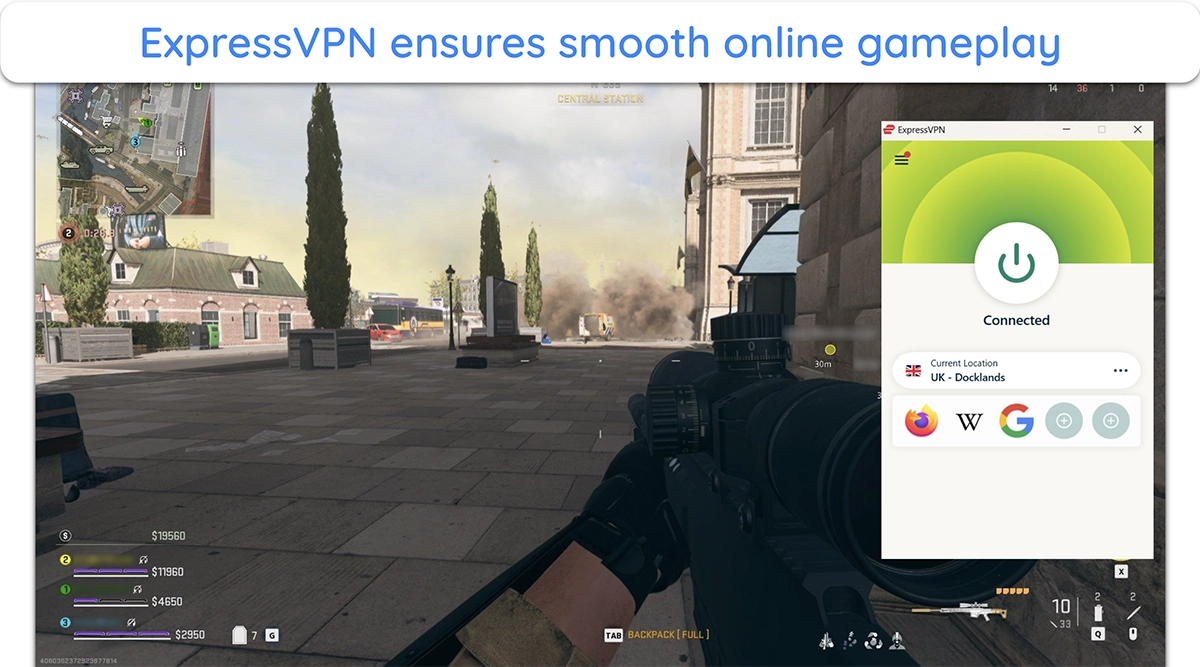
The Smart Location feature takes out the guesswork by auto-picking the lowest-ping server available. When we connected from the UK to US servers in New York, ExpressVPN’s Smart Location instantly found the best route with lower jitter than manual selection. This is especially useful when you’re gaming abroad and aren’t sure which server region will perform best.
ExpressVPN costs more than other VPNs, but the stability and performance make it worth it. It also works perfectly well on consoles if you install it on your router, keeping ping consistent on devices that don’t natively support VPNs. If you’re a serious gamer, you can try ExpressVPN out for yourself with its 30*-day money-back guarantee.
Editor’s Note: Transparency is one of our core values at WizCase, so you should know we are in the same ownership group as ExpressVPN. That said, our detailed reviews follow a strict methodology that examines all relevant performance factors to help you arrive at your own informed conclusion.
2. CyberGhost — Gaming-Optimized Servers Built to Keep Your Ping Stable
CyberGhost is one of the few VPNs with special gaming servers tuned for low latency. These servers are located in hubs like Frankfurt, London, and New York — places where major game data centers are hosted. When we tested its Frankfurt gaming server, my ping held steady at around 30 ms in League of Legends, even during peak evening hours.
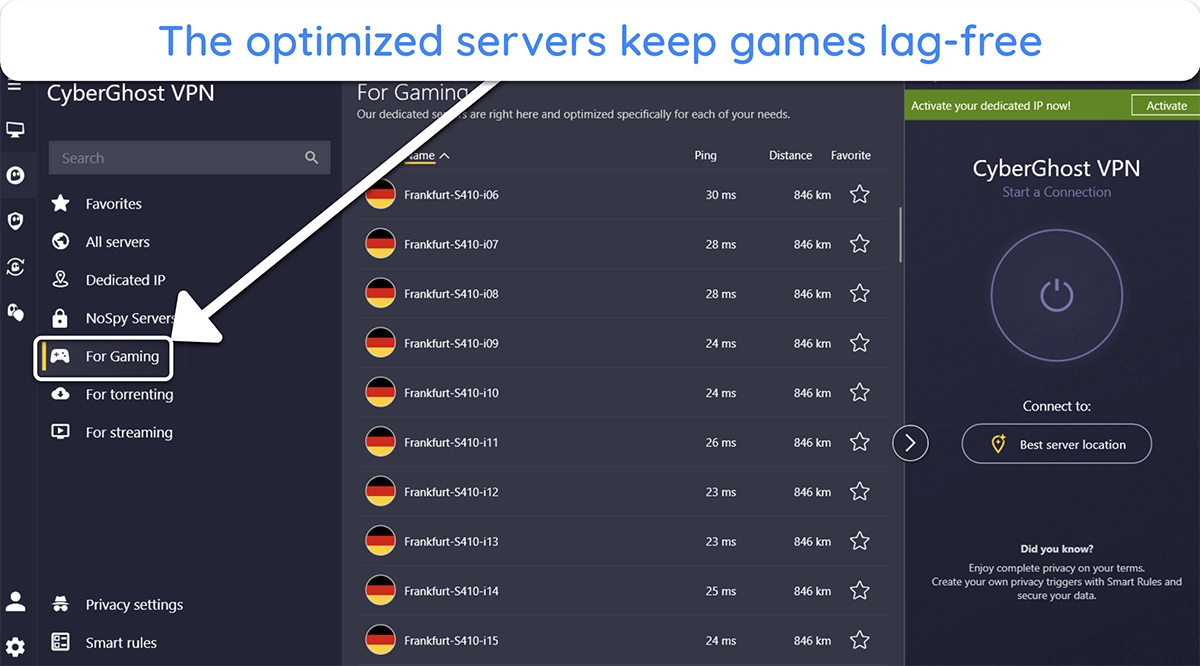
What I really like is the server list showing real-time ping and load data. Instead of guessing, you can see which server has the lowest latency before connecting. And with Smart Rules automation, you can auto-connect to your preferred server every time you launch your game or connect to the internet.
One catch is that CyberGhost’s gaming servers are only available on its Windows app . That’s not a big drawback since most people use PCs for gaming. The upside is that Windows users get optimized servers ready out of the box without tweaks. You also get a 45-day money-back guarantee, the longest of any VPN on this list.
Editor’s Note: Transparency is one of our core values at WizCase, so you should know we are in the same ownership group as CyberGhost VPN. That said, our detailed reviews follow a strict methodology that examines all relevant performance factors to help you arrive at your own informed conclusion.
3. Private Internet Access — No Cap on Device Connections for Gaming Households
PIA covers unlimited device connections , which makes it great for homes where multiple people game at once. In our tests, we had two PCs running Overwatch , one console on Rocket League , and a phone streaming — all connected through PIA without ping spikes. It’s rare to see that kind of stability with so many active devices.
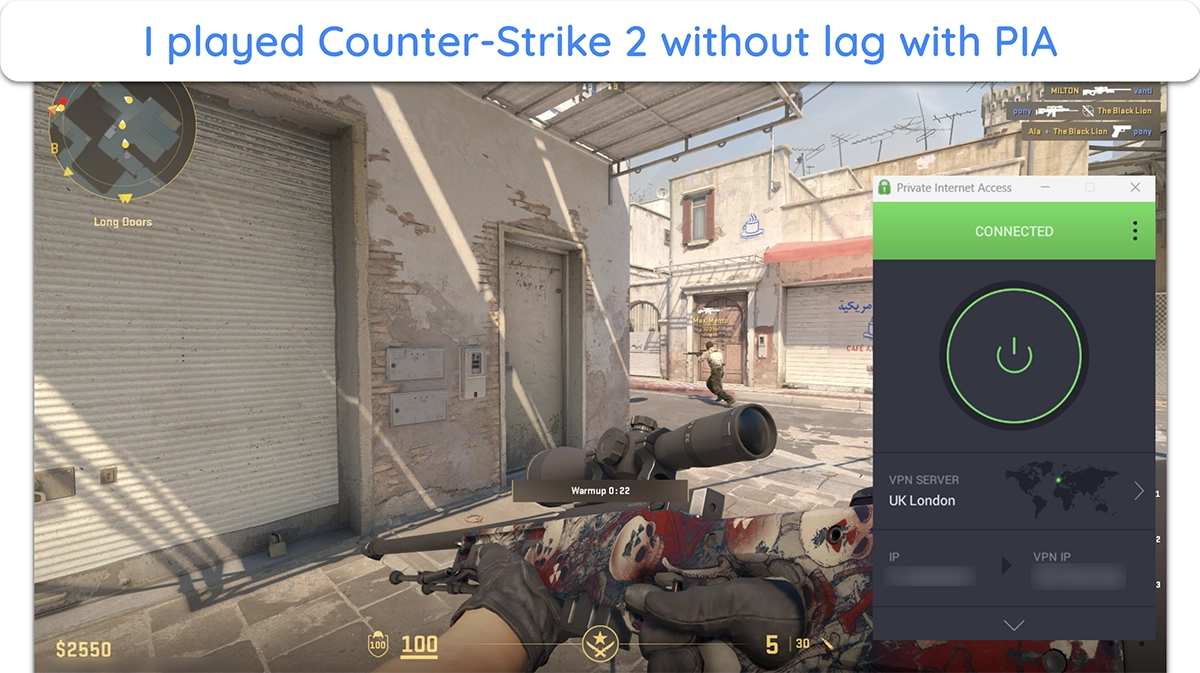
The network itself is massive, with servers in every US state and 91 countries worldwide. This means you can always find a VPN server close to the game’s data center. I noticed this especially when traveling — I could connect to a local PIA server near me and keep ping low while playing Counter-Strike 2 with my friends.
Because PIA is based in the US, you might worry about privacy laws. But its no-logs policy has been proven in court and confirmed by independent audits, plus all servers run on RAM-only tech. As one of the most affordable month-on-month VPNs , PIA offers serious value for gaming families, especially with its 30-day money-back guarantee,
Editor’s Note: Transparency is one of our core values at WizCase, so you should know we are in the same ownership group as Private Internet Access. That said, our detailed reviews follow a strict methodology that examines all relevant performance factors to help you arrive at your own informed conclusion.
Pricing update for Black Friday: $ 2.03 /month for a three-year plan with 4 months free ( 83 %)!! This is a limited offer so grab it now before it’s gone. See more information on this offer here .
Our Methodology for Testing VPNs for Gaming
To give you results you can trust, we tested each VPN under controlled yet realistic conditions. Every factor was chosen to reflect how you’d actually experience ping and lag during live matches.
- Testing environment — We used a 200 Mbps fiber line on a gaming PC (Intel i7-12700K, RTX 4070) with wired Ethernet to keep results consistent.
- Ping measurement — We measured ping in Valorant, League of Legends, and CS2, plus command-line pings to servers during peak evening hours.
- Server selection — We tested servers within 500 miles of each game server and compared them against the provider’s nearest suggested server.
- Real-world gaming — We played live matches to track lag, rubber-banding, and spikes that don’t appear in simple speed or ping tests.
Other Ways to Lower Ping for Gaming Without a VPN
If you want smoother gameplay, there are also simple fixes beyond using a VPN. These methods can shave off extra delay and make your connection more stable.
- Restart your router regularly — A weekly reboot clears cached data and forces your router to find a cleaner channel. This can stop random spikes that build up over time.
- Keep your gear updated — Router firmware and network drivers often include stability fixes. Updating both ensures your device handles new game server protocols without adding delay.
- Fine-tune your WiFi setup — If you can’t use Ethernet, switch to 5GHz and place your router higher up in a central spot. This reduces interference from walls and household devices.
- Enable QoS or Gaming Mode — Many modern routers let you prioritize gaming traffic so downloads or streams on other devices don’t cause lag. Enabling this feature gives your game priority access to bandwidth.
- Disconnect idle devices — Smart TVs, tablets, or even a guest’s phone can quietly eat up bandwidth. Kicking them off the network keeps your connection free for gaming.
- Upgrade a slow internet plan — If your speed is under 25 Mbps or you face constant lag, no setting can fix it. Upgrading to a faster plan gives your games the room they need.
- Try gaming network tools — Apps like ExitLag, WTFast, or NoPing reroute traffic through optimized paths. They’re built for gamers and can smooth connections where ISPs fall short.
Play Games Smoothly With Lower Ping
High ping is one of the biggest frustrations for gamers — it delays your actions, disrupts flow, and can swing matches against you. The causes often go beyond raw internet speed, tied instead to routing, congestion, and how your network is set up. By targeting those factors directly, you can reduce delay without costly upgrades or complicated fixes.
The real advantage comes from testing and applying changes step by step. Simple tweaks like using Ethernet, updating firmware, or prioritizing traffic often make the biggest difference. If issues persist, a reliable VPN can help stabilize routes when your ISP falls short .
*Please note that ExpressVPN’s generous money-back guarantee applies to first-time customers only.
Summary — The Best VPNs to Lower Ping in 2026
Editor’s Note: We value our relationship with our readers, and we strive to earn your trust through transparency and integrity. We are in the same ownership group as some of the industry-leading products reviewed on this site: ExpressVPN, CyberGhost, Private Internet Access, and Intego. That said, our detailed reviews follow a strict methodology that examines all relevant performance factors to help you arrive at your own informed conclusion.
