How to Get ExpressVPN Free Trial for 7 & 30 Days in 2026
- Written by Osama Zahid Cybersecurity Specialist
- Fact-Checked by Sarah Frazier Former Content Manager
ExpressVPN provides a 7-day free trial, but you can only use it on Android and iOS after entering payment information. Plus, you have to adhere to your app store’s refund policy, meaning this isn’t really the best choice.
ExpressVPN’s money-back guarantee is a much better alternative. You can get it directly via ExpressVPN’s website, and it lets you try all the app’s features risk-free for 30* days. If you’re unsatisfied, you can easily contact support to ask for a refund.
I even tested the app’s refund policy to ensure that you can try Express VPN without risk . After using the VPN for 20 days, I contacted the 24/7 live chat and asked for a refund. They processed the refund request immediately, and the money was back in my account within 5 business days. Editor’s Note: Transparency is one of our core values at WizCase, so you should know we are in the same ownership group as ExpressVPN. That said, our detailed reviews follow a strict methodology that examines all relevant performance factors to help you arrive at your own informed conclusion.
Try ExpressVPN risk-free for 30* days
Quick Guide: How to Try ExpressVPN Risk-Free For 30* Days
- Sign up for ExpressVPN . You can choose any plan, as they all offer 30*-day money-back guarantees.
- Install and use ExpressVPN. Download and install ExpressVPN on your device, launch the app, and connect to a server to secure your connection.
- Request a refund if unsatisfied. If you aren’t satisfied with ExpressVPN, you can contact support and ask for a full refund during the 30*-day window.
How to Get an ExpressVPN Trial for Windows and Mac
- Choose the trial. Access the official ExpressVPN website and click the free trial option.
- Pick a plan. Choose the offer options that suits your requirements.
- Start signing up. Enter your email address to start signing up for ExpressVPN.
- Pay for ExpressVPN. Enter your payment details to purchase ExpressVPN.
- Download ExpressVPN. Get ExpressVPN’s setup from your Windows or macOS device and copy the app’s activation code.
- Activate ExpressVPN. Install ExpressVPN, enter the activation code, and complete the remaining steps to set it up.
- Contact live chat support. If you’re unsatisfied with ExpressVPN’s performance, you can contact support to get a refund. I suggest using live chat, as it’s the fastest option.
- Request a refund. Ask ExpressVPN support for a full refund, and they’ll process it immediately if you’re in the 30*-day refund window.
Warning! Always make sure you download ExpressVPN from the official website. Some websites may claim to offer unlimited ExpressVPN for free, but these are likely fake and contain malware.
How to Get a 7-Day ExpressVPN Free Trial for Android and iOS
- Install ExpressVPN. Access your device’s app store and install ExpressVPN.
- Choose the trial. Launch ExpressVPN and tap “Start Free Trial” to get the 7-day trial.
- Choose an option. Pick one of ExpressVPN’s offers and tap “Start Free Trial” again.
- Confirm payment details. Choose your payment details and tap “Purchase” to begin your 7-day trial. You won’t be charged as long as you cancel the offer before the 7-day period ends.
Why Choose ExpressVPN?
Key Features:
- Provides over 3,000 servers in 105 countries
- Maintains consistently fast speeds for smooth browsing, gaming, and streaming
- Uses AES 256-bit encryption, a strict no-logs policy, leak protection, and more to ensure online safety
- Allows up to 14 simultaneous device connections
- Delivers helpful support via 24/7 live chat, email, and a detailed knowledge base
- Comes with a 30*-day money-back guarantee
Massive Network of Servers
ExpressVPN has an enormous global server network consisting of 3,000+ options in 105 countries. This extensive network ensures you can easily find a nearby server no matter where you are, giving you the fastest possible speeds. Plus, the variety of servers prevents overcrowding.
Lightning-Fast Speeds for Streaming, Gaming, and Torrenting
After extensive testing, I found that ExpressVPN is consistently the fastest VPN available . Its proprietary Lightway protocol is the main reason for this, as it maintains unbreakable security without compromising speeds. I ran multiple speed tests on servers in the US, UK, Germany, and Australia, and connection speeds never slowed more than 18%.
The fast speeds mean ExpressVPN is excellent for streaming and lets you watch your favorite Netflix shows lag-free . Plus, my team and I found that the app works with the following streaming platforms:
| Netflix | Disney+ | Hulu | Amazon Prime Video | BBC iPlayer |
|---|---|---|---|---|
| Vudu | Max | ITVX | ESPN | DAZN |
| Sling TV | Crunchyroll | Paramount+ | YouTube TV | …and more! |
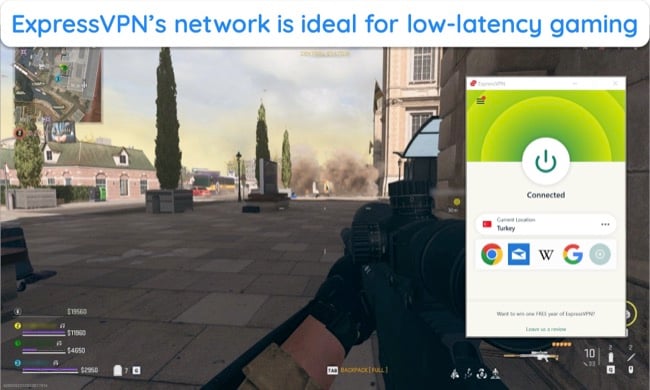
Another highlight is that ExpressVPN allows P2P traffic across its entire network, meaning it’s excellent for downloading torrents safely and quickly. The app also ensures low latency while connected to nearby servers, letting you enjoy games like Call of Duty: Warzone without lag.
Unbreakable Protection Through Various Security Measures
ExpressVPN guarantees safety and anonymity. It uses AES 256-bit encryption to safeguard your traffic against prying eyes. Plus, it’s based in the British Virgin Islands, meaning it isn’t bound by any data retention laws. The app also has the following features to enhance security even further:
- Leak protection — prevents accidental IP, DNS, and WebRTC leaks that could compromise your anonymity.
- Network Lock kill switch — stops your internet if the VPN disconnects, ensuring you stay anonymous.
- Obfuscation — masks your VPN traffic as regular traffic to avoid VPN detection mechanisms in censorship-heavy locations.
- Split tunneling — lets you choose which apps use the encrypted VPN tunnel and which apps use regular traffic.
- TrustedServer technology — means that all servers run on RAM, meaning they’re unable to store data and are wiped clean during scheduled reboots.
- No-logs policy — ensures that no logs of your activity are kept on ExpressVPN servers, confirmed when an ExpressVPN server was seized by Turkish authorities but no data was recovered.
Many Native Apps and a Generous Simultaneous Connection Allowance
I also like that ExpressVPN provides MediaStreamer to let you use it on devices without native VPN support . It’s not as secure as using a native VPN app, but it’s still a worthwhile alternative if you want to use ExpressVPN on smart TVs without native app support and game consoles.
Another highlight is that ExpressVPN allows 14 simultaneous device connections . This generous connection allowance lets you secure online activity across all your devices without worrying about logging out from anywhere.
Responsive and Helpful Customer Support
Many competitors use chatbots, but ExpressVPN has dedicated support representatives available 24/7 via live chat . You can easily contact them by opening ExpressVPN’s official website. In my tests, I never had to wait more than a few minutes to connect with an agent, and everyone I talked to gave detailed answers to each question.
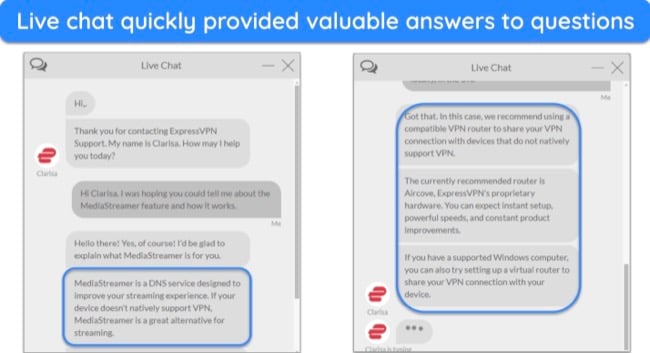
Besides the live chat, ExpressVPN provides responsive email support and a detailed knowledge base . The knowledge base is excellent for basic troubleshooting, while email support is a reliable resource for asking in-depth questions when you don’t need a response urgently.
Editor’s Note: Transparency is one of our core values at WizCase, so you should know we are in the same ownership group as ExpressVPN. That said, our detailed reviews follow a strict methodology that examines all relevant performance factors to help you arrive at your own informed conclusion.
How to Cancel Your ExpressVPN Trial
If you change your mind, it’s easy to cancel your ExpressVPN trial in just a few simple steps.
Windows & Mac
- Access the ExpressVPN website using your Windows or macOS browser.
- Sign in to your ExpressVPN account with your email address and password.
- Click “My Offer” on the left-hand menu to access your purchase details.
- Click “Turn Off Automatic Renewal” and follow the prompts given to you.
- Contact ExpressVPN’s 24/7 customer support to claim a refund if you’re within the 30*-day money-back guarantee period.
Android & iOS
- Open the app store on your iOS or Android device.
- Find your ExpressVPN offer in the “Offers” menu option.
- Tap your offer and then “Cancel Offer.” You’ll be asked to confirm your cancellation before it’s processed.
- That’s it! Your trial will now be canceled, and you won’t get charged.
Note: If you’re using an iOS device and your purchase is billed through the App Store, you won’t get ExpressVPN’s 30*-day money-back guarantee. Instead, you’ll need to request a refund through the App Store, which is approved at the App Store’s discretion.
Which is Better: ExpressVPN Free Trial or Money-Back Guarantee?
I consider ExpressVPN’s money-back guarantee the better choice . It requires an upfront payment, but you also get 30* days to test all the app’s features, and you can easily claim a refund if you’re unsatisfied. The iOS and Android free trial doesn’t require an initial payment, but it only gives you 7 days to test the VPN, which isn’t enough to test the VPN.
The following table shows the main pros and cons of each option:
| Money-Back Guarantee | Free Trial | |
|---|---|---|
| Pros | 30* days | No upfront payment (billing information is still required) |
| Cons | Pay upfront (but can get a refund during the money-back guarantee period) | Only free for 7 days |
I recommend using ExpressVPN’s free trial instead of a free VPN. With ExpressVPN’s trial, you’ll get top-grade security, fast connection speeds, a massive server network, and unlimited bandwidth. Free VPNs are much slower, have poor security, and offer small server networks, leading to overcrowding.
There are a few good free VPNs , but using a premium option like ExpressVPN is always better .
Try ExpressVPN Risk-Free for 30* Days
ExpressVPN is among the best VPNs in 2026 , making it worth trying if you’re looking for one. There’s a 7-day free trial on Android and iOS, but a week isn’t really enough to fully test the VPN.
Alternatively, if you purchase a full offer, you can try ExpressVPN without risk for 30* days . This gives you a lot of time to try the app and see if it suits you. If the performance and features aren’t to your liking, you can get a full refund by contacting support. When I tested the app’s refund policy, I had my money back within 5 business days.
Editor’s Note: Transparency is one of our core values at WizCase, so you should know we are in the same ownership group as ExpressVPN. That said, our detailed reviews follow a strict methodology that examines all relevant performance factors to help you arrive at your own informed conclusion.
*Please note that ExpressVPN’s generous money-back guarantee applies to first-time customers only.
Summary — Best VPN Coupons and Offers (Valid 2026)
Editor’s Note: We value our relationship with our readers, and we strive to earn your trust through transparency and integrity. We are in the same ownership group as some of the industry-leading products reviewed on this site: ExpressVPN, CyberGhost, Private Internet Access, and Intego. That said, our detailed reviews follow a strict methodology that examines all relevant performance factors to help you arrive at your own informed conclusion.
