How to Get a NordVPN Free Trial for 7 & 30 Days (2026 Guide)
- Written by Deep Shikha Content Writer
- Fact-Checked by Justyn Newman Former Lead Cybersecurity Editor
NordVPN lets Android users test all its premium features with a 7-day free trial . If you want a VPN for your Android device, you can try it without paying, but you do have to provide your credit card details upfront.
For all other devices, NordVPN offers a 30-day money-back guarantee . It’s a better option since it gives you more time to test its features. Plus, it covers Windows, Mac, iPhone, iPad, Apple TV, PlayStation and other consoles with router compatibility.
I recommend you try NordVPN for 30 days using its money-back guarantee . If you’re not happy, simply get a refund. To test this policy, I contacted support through live chat. The agent asked me why I wanted to cancel and approved my request as soon as I explained my reasons. I received the full fee back in my account 4 days later.
Try NordVPN risk-free
Editor’s Note: We value our relationship with our readers, and we strive to earn your trust through transparency and integrity. We are in the same ownership group as some of the industry-leading products reviewed on this site: ExpressVPN, CyberGhost, Private Internet Access, and Intego. That said, our detailed reviews follow a strict methodology that examines all relevant performance factors to help you arrive at your own informed conclusion.
Quick Guide: 3 Steps to Get a NordVPN 7-Day Free Trial on Android
- Download the NordVPN Android app. Visit the Google Play Store on your Android device, search for NordVPN, and install the application.
- Create an account. Open the NordVPN app and sign up for a new account with your email address.
- Start a free trial. Select the 7-day free trial option to start enjoying NordVPN’s features. You must cancel the trial before it ends to avoid getting charged.
Step-by-Step Guide: How to Get a NordVPN Free Trial
Get a NordVPN Free Trial on Android
- Download and install the NordVPN app from the Google Play Store . Click “Open” once installed.
- Click “Sign up” to be directed to NordVPN’s website. There, you can enter your email or opt to sign up with Google or Apple. After creating a password, you’ll be redirected back to the NordVPN app.
- Click “Try for USD 0.00” (currency varies as per your location) for the 7-day trial.
- That’s it! You can use all NordVPN features free for 7 days. Be sure to cancel before the trial ends (via Google Play Store offers) to avoid charges.
Try NordVPN (Free) On All Your Devices
- Visit the NordVPN website . Click “Get NordVPN” to sign up for an account.
- Select your offer . Since offers are charged in full upfront, choose the 1-month option to be charged the lowest amount. Whichever offer you choose, you’ll be able to get your money back.
- Complete the signup process . Enter your email address, choose your payment method, and input your payment details. Then, click “Continue.”
- Check your email for an account activation link . Once you click it, your 30-day trial will begin.
- Download NordVPN . Open NordVPN and log in with your new username and password.
- That’s it! You can click “Quick Connect” to find the fastest server. You can now try NordVPN risk-free and get a refund if you cancel within 30 days.
How to Cancel the NordVPN Free Trial
Cancel NordVPN’s 7-Day Free Trial on Android
- Open Google Play Store . Scroll to “Payments and offers period”
- Tap “Cancel offer” under NordVPN . Follow any confirmation steps.
- Verify that your offer has ended . You won’t be charged after the 7-day trial and can use the app until the trial period ends.
Get a Refund With NordVPN’s 30-Day Money-Back Guarantee
- Visit NordVPN.com and sign in using your credentials . To request a refund, you’ll need to log in on your browser and use live chat support — it can’t be done through the app.
- Click the chat icon at the bottom right of NordVPN’s site . You’ll be greeted by a bot.
- Type “live chat” in the chat box to chat with the human agent. The bot will try to troubleshoot your problem again. Click on “Account & BIlling questions,” then, “Other.” When prompted, enter your email to be connected to a live support agent.
- Give a reason for cancelation . The agent will attempt to resolve issues, so be clear on why you’re leaving. I said I didn’t need the service anymore.
- Await confirmation . The agent will likely approve your refund immediately after you provide your reason.
- Get your refund . It may take 10 business days for the money to return to your account. Mine arrived in just 5 days.
Why Choose NordVPN?
Key Features :
- 8918+ servers in 178 countries around the world
- Superfast global server speeds for lag-free browsing, gaming, and streaming
- Connect 10 devices simultaneously
- 30-day money-back guarantee, so you can try it risk-free
- Military-grade 256-bit encryption keeps your online activities anonymous
- Customer support via 24/7 live chat, email, and online knowledgebase
NordVPN has reliable servers all across the globe and our international team of testers found that it also works with the following streaming services:
| Netflix (US, UK, Japan, and more) | Amazon Prime Video | Hulu | Disney+ | BBC iPlayer |
|---|---|---|---|---|
| Paramount+ | Apple TV+ | Sky | DAZN | Showtime |
| Peacock | fuboTV | YouTube TV | Twitch | …and more! |
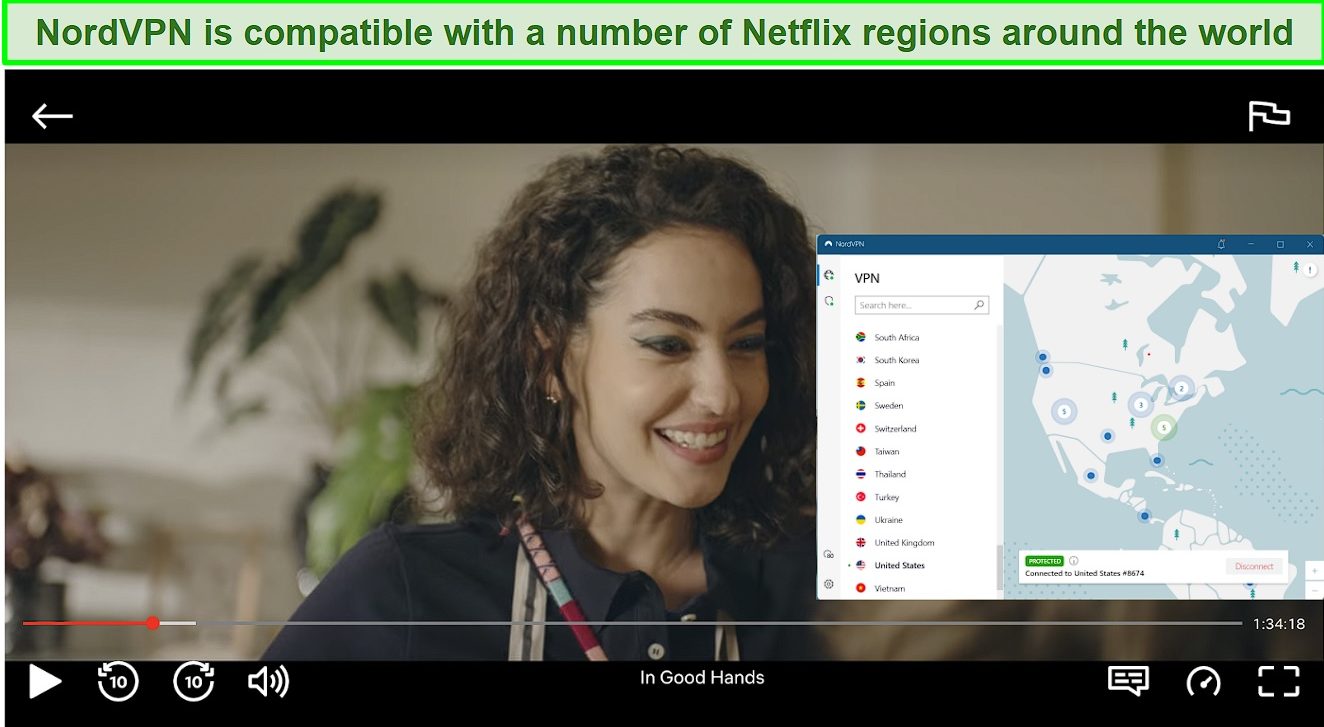
Its speeds are also great, which means you can stream American Netflix (and other platforms) without any buffering or lag.
Fast Speeds With Unlimited Bandwidth
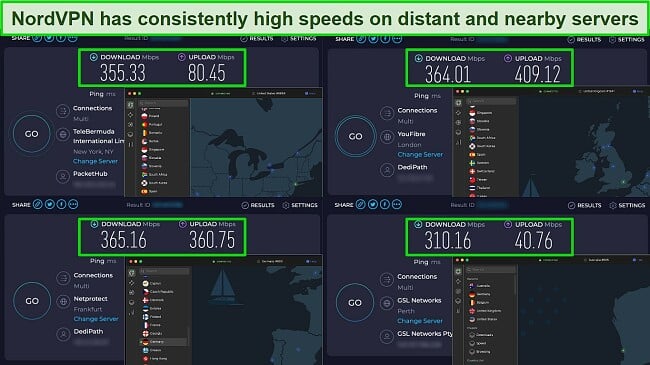
I tested NordVPN’s speeds on servers close to and far from my location. The results showed an average speed of 348 Mbps , a mere 17% drop from my baseline speeds of 420 Mbps.
I recommend choosing NordVPN’s proprietary protocol, NordLynx, for the best possible speeds. NordLynx is based on the WireGuard protocol, which is known for its speed and efficiency. Better still, NordVPN has also optimized NordLynx for even better performance.
Wide Range of Security and Privacy Measures
NordVPN employs a range of security features to keep your online activity safe and anonymous. These include:
- Military-grade encryption — ensures your data remains confidential, protecting against hackers and third-party surveillance.
- Threat Protection — blocks intrusive ads, trackers, and malware, safeguarding your devices and personal data.
- IP/DNS/WebRTC leak protection — prevents exposing your real IP address or DNS requests.
- An automatic kill switch — cuts off your internet connection if the VPN drops, ensuring your data isn’t accidentally exposed.
- Strict no-logs policy — verified by PwC and Deloitte; confirms that NordVPN doesn’t track or store your online activities.
- Double VPN — routes your traffic through 2 VPN servers, doubling the encryption and security.
- Meshnet — lets you securely share files and route traffic through other devices anywhere in the world.
- Dark Web Monitor — alerts you if your personal details appear on the dark web, protecting you against identity theft.
- Auto-connect — automatically connect to a NordVPN server on all networks or just specified networks such as WiFi, Ethernet, or mobile networks.
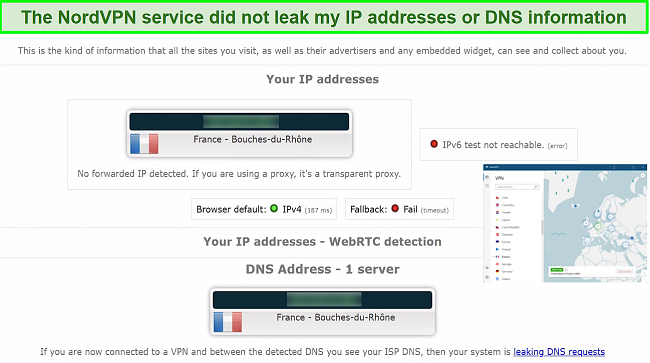
I even ran multiple leak tests to confirm whether NordVPN reliably protects your IP, DNS, and WebRTC data. NordVPN passed each time and never revealed my actual location. The kill switch also worked perfectly — it stopped my internet each time I switched servers.
Best of all, NordVPN’s company headquarters are in Panama, outside the reach of global intelligence alliances, mandatory data-retention laws, and international copyright laws.
Huge Network of Global Servers for Accessing Your Local Accounts
NordVPN has 8918+ servers in 178 countries . Its servers are located across every continent, ensuring a nearby, fast connection from anywhere. This means you can securely use banking apps, access social media platforms, and log into other local accounts without any issues.
Compatible With All Major Devices and Operating Systems
NordVPN has friendly apps for Windows, macOS, Linux, iOS, Android, and more . Also, you can simultaneously protect 10 devices using a single offer. It’s even possible to create a virtual router on your PC to set it up on smart TVs , PlayStation, Xbox, and Roku devices, which don’t support VPN apps.
For a more permanent solution, I recommend installing NordVPN directly on your physical router (if compatible). It can be a bit tricky, but you’ll find helpful guides on the website to walk you through the process.
Wide Range of Pricing and Payment Options
Quick Comparison: NordVPN Free Trial vs. Money-Back Guarantee
| Free Trial | Money-Back Guarantee | |
|---|---|---|
| Duration | 7 days | 30 days |
| Device Connections | 1 device | 10 simultaneous device connections |
| Device Compatibility | Android devices only | Windows, macOS, Linux, Chromebook, Android, iOS, Raspberry Pi, Chrome, Firefox, Apple TV, Roku, Amazon Fire TV, Nvidia Shield, Chromecast, Android TVs, routers, and more. |
Even if 7 days is all you need, there are other reasons you might want to take advantage of the 30-day money-back guarantee:
NordVPN doesn’t restrict access to any of its features during the 7-day free trial. However, if you want a VPN for streaming and torrenting, you’ll only be able to test it on your mobile device (rather than your PC or media player).
Yes, NordVPN offers a 7-day free trial , but it’s limited to Android users through the Google Play app. You can enjoy all the features without paying anything for that period, although you’ll need a valid payment method to start the trial.
If you want to use NordVPN on a non-Android device or need more time to evaluate the service, I recommend using NordVPN’s 30-day money-back guarantee. This provides a risk-free way to try the service on multiple devices.
NordVPN’s 7-day free trial doesn’t restrict access to any of its features and is fairly comparable to other premium VPNs. However, unlike NordVPN, the other VPNs I’ve tested offer free trials on more than 1 operating system:
| Free Trial Duration | Available Devices | Limitations on Usage During Trial | Payment Details Required | Money-Back Guarantee | |
|---|---|---|---|---|---|
| NordVPN | 7 days | Android | ✘ | Yes | 30 days |
| ExpressVPN | 7 days | Android and iOS | ✘ | Yes | 30* days |
| CyberGhost | 7 days | iOS | ✘ | Yes | 45 days |
| 3 days | Android | ✘ | Yes | ||
| 1 day | Windows and macOS | ✘ | No | ||
| PIA | 7 days | Android and iOS | ✘ | Yes | 30 days |
| Surfshark | 7 days | Android, iOS, and macOS | ✘ | Yes | 30 days |
Yes, you can use NordVPN on any device for free by signing up for a offer and canceling within the 30-day money-back guarantee period. NordVPN has apps for all major desktops, mobile devices, and even Google TV-based media players.
For Xboxes and other devices that don’t support VPN apps, you can set up a virtual router on your PC and connect these devices to it. If your physical router is compatible, you can also configure NordVPN on your router to protect all WiFi-connected devices.
No, I don’t recommend using a free VPN as a substitute for NordVPN’s free trial .
It’s expensive to run a VPN network, and no legitimate company can do this for free indefinitely. As a result, many supposedly free VPNs are actively collecting and selling your private data, browsing history, and other sensitive information to make money. Some even secretly install spyware and trackers onto your device.
While there are a few safe free VPNs , these VPNs come with some restrictions, such as limited bandwidth or data.
Editor’s Note: We value our relationship with our readers, and we strive to earn your trust through transparency and integrity. We are in the same ownership group as some of the industry-leading products reviewed on this site: ExpressVPN, CyberGhost, Private Internet Access, and Intego. That said, our detailed reviews follow a strict methodology that examines all relevant performance factors to help you arrive at your own informed conclusion.
Try NordVPN for Free Today
NordVPN offers new Android users a 7-day free trial through the Google Play app. However, you’re only allowed 1 connection and will be charged for a non-refundable annual offer after the 7-day trial period (unless you cancel).
If you want more time and to test it on all your devices, you can use NordVPN’s 30-day money-back guarantee . You’ll have 30 days and 10 simultaneous connections to test its performance on your desktop, gaming console, smart TV, router, or media player.
You’ll need to pay for the offer upfront, but it’s easy to get a refund if you cancel your offer within 30 days. When I tested it, the money was credited to my account just 5 days later.
*Please note that ExpressVPN’s generous money-back guarantee applies to first-time customers only.
Summary — The Best VPNs With Free Trials or Money-Back Guarantees in 2026
Editor’s Note: We value our relationship with our readers, and we strive to earn your trust through transparency and integrity. We are in the same ownership group as some of the industry-leading products reviewed on this site: ExpressVPN, CyberGhost, Private Internet Access, and Intego. That said, our detailed reviews follow a strict methodology that examines all relevant performance factors to help you arrive at your own informed conclusion.
