| Speed | 7.0 / 10 |
|---|---|
| Servers | 7.0 / 10 |
| User Experience | 7.0 / 10 |
| Support | 4.0 / 10 |
| Pricing | 6.0 / 10 |
HolaReview 2026: Before You Buy, Is It Worth It?
- Written By Clement Adegbenro Cybersecurity & Tech Writer
Hola Overview
You can try out this VPN yourself by opting for its free offer. If you are dissatisfied with its free service, you can test Hola VPN’s paid service by taking advantage of its 30-day money-back guarantee .
Try Hola risk-free
Don’t Have Time? Here’s a 1-Minute Summary
- Unblocks Netflix and several other streaming services . I was able to unblock Netflix, Hulu, HBO, and more with Hola. Find out about my streaming experience .
- Decent speeds from nearby servers . I had the fastest speeds with the servers closest to me, while distant servers were significantly slower. See my speed test results .
- Lacking security and privacy features . The P2P server infrastructure, lack of encryption, and subpar no-logs policy are all worrying signs of weak security. Learn how secure Hola is .
- Support for multiple devices . I connected 6 different devices at once and was pleasantly surprised by the stable connectivity. See supported devices .
- Offers a free and paid service . The free version operates as a global peer-to-peer (P2P) VPN, sharing your computer’s resources with other users when it’s not in use. Here are the available pricing options .
Try Hola risk-free
I was impressed by Hola’s ability to unblock numerous streaming services, even in its free version . However, it’s important to note that the free version doesn’t offer unlimited streaming time, so opting for a paid package is necessary if you require uninterrupted streaming.
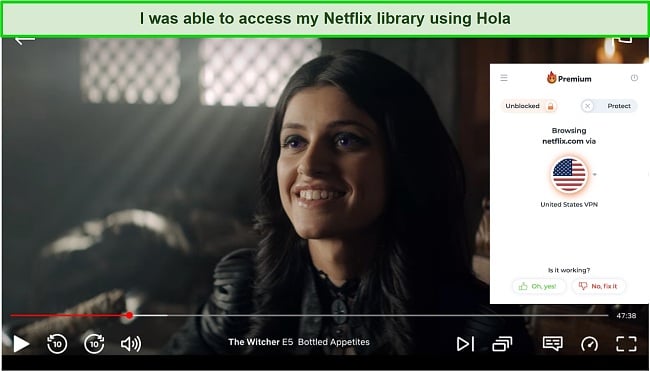
It surprised me that I was able to access the US Netflix library and stream in perfect HD quality on the free and paid versions. Hola VPN also enables you to access your Netflix account in other regions, including the UK, Canada, and Japan .
Unfortunately, I had to wait up to a minute before the video quality settled into HD. You may also experience slower speeds if you are using the free version.
It took me only a few seconds to unblock HBO Max with Hola . Streaming perfected to HD after about 10 seconds with very limited lag on the premium version.
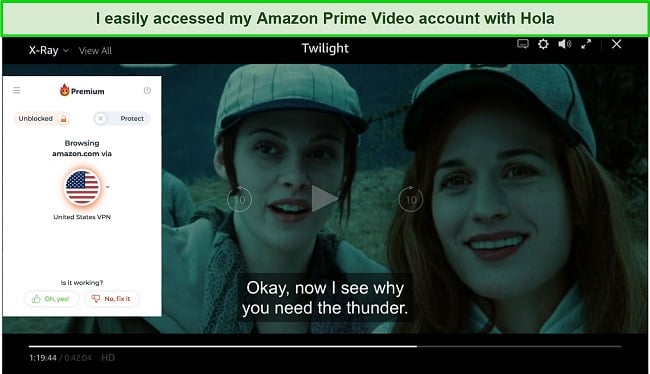
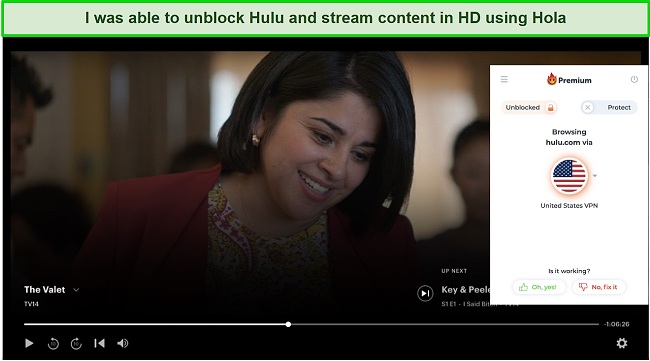
Hulu didn’t pose any problems at all when I tried to access it with Hola . I was impressed with the efficiency I experienced while streaming. Hola VPN also works with BBC iPlayer and other popular platforms in the UK like ITV and Channel 4.
Disney+: Blocked
Oddly enough, it was Disney+ that caused some problems. Hola was able to detect that I was connected to a VPN, and prevented me from accessing the Disney+ homepage. I tried several other servers, but without success.
CyberGhost’s speed and security make it a good choice for streaming Disney+ from abroad. You will also be able to access Netflix US, ITV Hub, and Sling TV from anywhere.
Try Hola risk-free
Reduced Speeds on Distant Servers
Hola’s speed is one of the few outstanding benefits it offers to its customers . The UK server had the fastest internet speed, while the US was second. Next, I tested France and Australia servers, and both yielded very satisfactory results.
While it’s inevitable that a VPN will slow down your connection, Hola makes it as minimal as possible. In other words, Hola’s speed is without question one of the fastest VPN services available today.
Speed Test Results
Hola delivers the best speeds if you opt for servers closest to your location . Before testing out Hola servers, I gauged the base speed of my ISP and it read 64.74 Mbps. If you are located in Western Europe or North America, using a VPN may not even be noticeable because speeds average just a few Mbps less than base speeds.
When I connected to the US server — which is the closest to my location — the download speed declined by just 29% at 45.33 Mbps. The UK server performed better at a download speed level of 49.16 Mbps. My experience with the France server was quite similar, with just a 34% slowdown in speed.
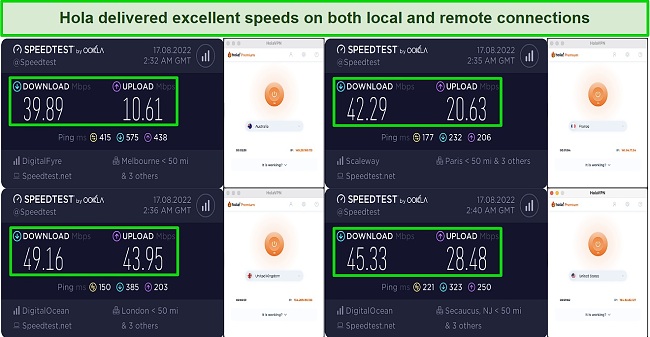
Despite the fact that long-distance connections tend to be more resource-intensive than their localized counterparts, Hola provides excellent performance. A 64.74Mbps east coast US connection dropped to 39.89Mbps over an Australian server, a difference only noticeable during very heavy downloads.
On the other hand, Hola’s free version doesn’t offer reliable enough speeds to make browsing enjoyable . I experienced an average dip of 81% while connected to servers in the US, UK, France, and Australia. So, you should stick with Hola’s premium and ultra offers if you want a VPN with faster and more stable speeds.
Try Hola risk-free
| Download speed reduction | Upload speed reduction | Ping time to Google.com | Average time to connect (seconds) | Unblock successful for | |
|---|---|---|---|---|---|
| Hola | 24% (UK) | 59% (FRA) | 8.43ms | 7 | Youtube |
| Average score of top 10 VPNs | 11% (UK) | 16% (FRA) | 24ms | 11 | Netflix Hulu Kodi ESPN Youtube BBC iPlayer |
| Hola | Average score of top 10 VPNs | |
|---|---|---|
| Download speed reduction | 24% (UK) | 11% (UK) |
| Upload speed reduction | 59% (FRA) | 16% (FRA) |
| Ping time to Google.com | 8.43ms | 24ms |
| Average time to connect (seconds) | 7ms | 11ms |
| Unblock successful for |
Server Network — A Unique P2P Server Infrastructure
Hola is not a traditional VPN, rather it operates as a peer-to-peer network of more than 1,500 servers spread across 195 countries . This means you have access to servers in almost every country around the world, but that also means that your device’s resources may be used by others.
You may upgrade to either the Premium or Ultra version if you do not wish to be used as a peer. That way you’ll gain access to Hola’s hybrid network of peers and a dedicated VPN server infrastructure for more stable connections and higher speeds.
Hola took around 10-15 seconds to connect to each of the servers I tested . While this is a longer wait than most other VPNs I’ve tested, it’s still a reasonably short time to wait. Disappointingly, its manual servers don’t show you an exact city-level location, so you can’t immediately choose the closest one to you — which will potentially further increase your wait times.
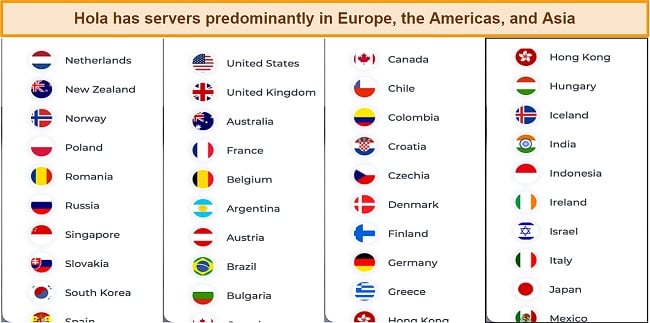
Hola’s standard server list mostly comprises countries in Europe, Asia, and the Americas . I couldn’t locate servers in Africa or the Middle East.
Security — Does Not Encrypt User Traffic on Free Offers
Hola’s P2P infrastructure undermines security . The provider’s free offer works by redirecting your internet traffic through the devices of other users. Thus, traffic from your computer may pass through the devices of other users and vice versa.
The following are some of Hola’s most important safety features:
- Strong traffic encryption – The company uses AES 256-bit encryption to protect its premium users’ data but does not provide encryption to its free users. When I installed Hola, I was prompted with a message box that alerted me of the lack of encryption if I use the free service. There is also an option for Windows users to choose between AES 128, AES 192, or DES3 encryption.
- Regular connection protocols – Premium users can choose between IKEv2/IPsec and PPTP/L2TP protocols. No information is available on which protocols are accessible to free users.
- Auto-connect – The Auto-connect settings ensure all of your internet traffic is encrypted from the moment you turn on your device.
- App kill switch – The app kill switch shuts down specific apps when the VPN stops working. The feature is limited to Windows users.
Considering the free version’s limited features, it may be worth purchasing the paid version if you’re interested in taking advantage of additional features. But then, I don’t think these security integrations are sophisticated enough to keep users safe as exclusively as ExpressVPN which maintains solid encryptions even on free offers and features an automatic kill switch as well as a functional adblocker.
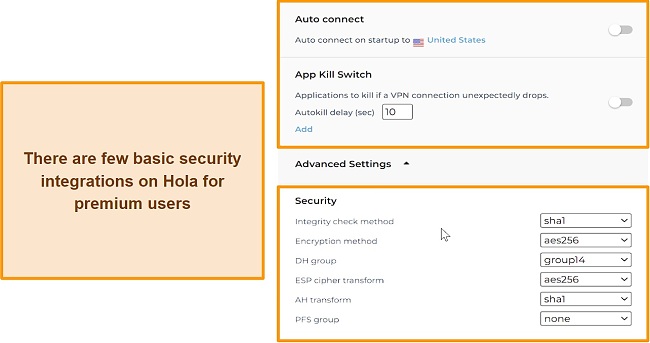
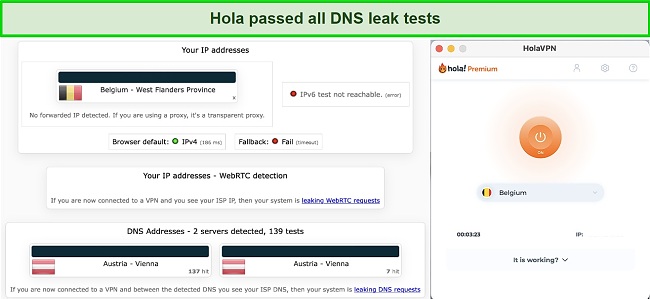
One of the snags associated with Hola’s P2P infrastructure is the possibility of other people intercepting your data or visiting illegal websites using the same IP address as you. This situation could get you into trouble even if you didn’t do anything illegal yourself. However, I was pleased that Hola did not expose my real IP to the open internet when I conducted IP, DNS, and WebRTC leak tests. Similarly, the results were positive on all tested premium servers.
Hola also has a history that might trigger suspicions . The service faced a DDoS attack in 2015 after operating as a botnet, which is a network of computers used to execute illicit activities without the knowledge of their original users. Although this played out years ago, I’m yet to detect significant security improvements since then.
Editor’s Note: Transparency is one of our core values at WizCase, so you should know we are in the same ownership group as ExpressVPN. That said, our detailed reviews follow a strict methodology that examines all relevant performance factors to help you arrive at your own informed conclusion.
Privacy — Retains Data
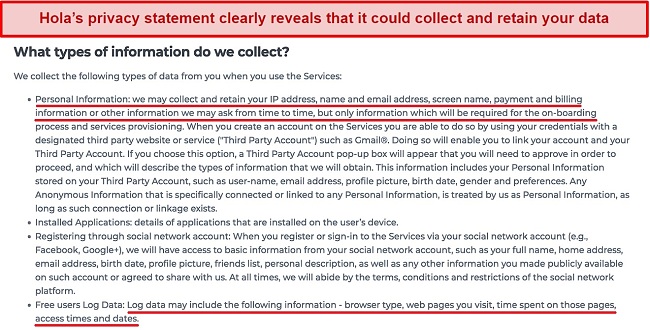
Your personal information is made available to the virtual private network provider when you create a free Hola account . Hola collects a variety of information, including the IP address assigned to you by your local internet service provider. This alone is a serious violation of internet privacy. Moreover, this provider monitors and records all of the pages and websites you visit while connected to the VPN.
You should also be aware that the time and date of your visit to a website will also be recorded. The time spent viewing and accessing a certain webpage will also be recorded. As if that was not enough, I discovered that Hola also records the browser type and applications installed in your local computer system. VPN service providers or hackers may be able to track your internet browsing habits and patterns based on these logged data.
A Google Play Store account for Hola VPN was reportedly compromised by hackers on July 9th, resulting in the exposure of private client information. Reports indicate that a fake Hola VPN version was uploaded to the app store, leaving MyEtherWallet users vulnerable for a few hours before it was removed. There is yet another reason to be cautious with this provider.
Hola made it clear in its privacy statement that it retains your data for as long as the service deems necessary . This might upset a lot of privacy-focused users, and it didn’t sit well with me either. I do not recommend Hola to persons that would rather remain anonymous while using a VPN as it has a very poor privacy arrangement. I would only use Hola if an independent auditory body confirms its privacy to be safe like ExpressVPN .
Try Hola risk-free
Torrenting — Unsupported
Hola blocks BitTorrent protocol traffic on its network, meaning you can’t download content from any torrent site or use software like Popcorn Time . This is likely for the best due to Hola’s lack of logging protections, user privacy, and encryption on its free offer. Hola is also clear about not permitting the distribution of peer-to-peer files with its service as seen on the website.
Does Hola Work in China? No!
Due to Hola functioning as a peer-to-peer proxy service, the possibility of it breaking through the solid wall of internet censorship in China is too slim . Hola customer service confirmed as well that their service can’t be used in China.
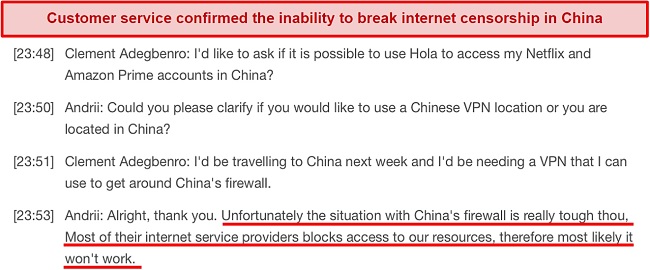
VPNs that can break this wall must have top-level encryptions and the ability to hold access without implicating the original IP addresses of users; sadly, Hola is yet to offer this level of encryption. You would have to opt for a VPN like ExpressVPN which a proven ability to unblock geo-restricted firewalls.
Try Hola risk-free
Editor’s Note: Transparency is one of our core values at WizCase, so you should know we are in the same ownership group as ExpressVPN. That said, our detailed reviews follow a strict methodology that examines all relevant performance factors to help you arrive at your own informed conclusion.
Server Locations
Simultaneous Device Connections — Up to 20 Devices at Once
Free users are limited to one device at a time. There is a limit of 10 simultaneous devices on the Premium offer, and up to 20 on the Ultra offer . I tried connecting a Windows desktop and laptop, a MacBook Air, an Android phone, an iPhone, and a PS4 and there was no difference in streaming, browsing stability, or speeds. None of the connections dropped during the hour I was connected.
Device Compatibility — Special Apps and Browser Extensions
It is possible to use Hola across a wide range of devices . You can install it on Windows, macOS, Android, and iOS. The Android app is blocked on the Google Play Store due to malware issues, but it can still be downloaded directly from the Galaxy Store.
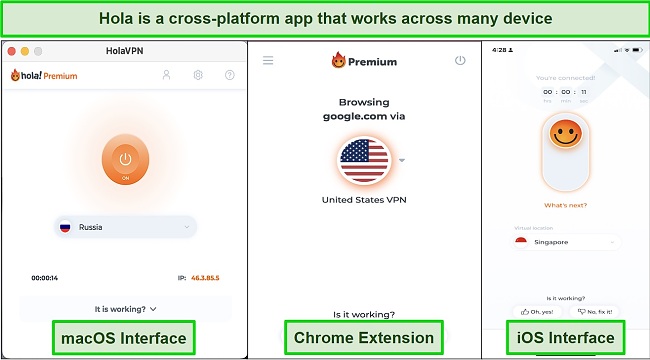
With the Chrome extension, I was able to unblock most streaming sites. I also used it as a sort of hedge if I felt like connecting to a VPN only on my browsers without it affecting all other software on my device. Using Hola on my Windows 8 and 10 also marks it out as a suitable VPN for all Windows devices.
Ease of Setup & Installation — Get Started in Less than 5 Minutes
The Hola VPN apps adhere to Hola’s simple principle, so you do not need any experience in downloading and installing them . There are designated sections on the site to download Hola’s VPN client on your devices. I downloaded and installed Hola on my Windows device without experiencing any hassle. The entire installation process should not take more than a minute.
Clicking the small arrow directly below the “ON” button will open a new window with a location selector. You can narrow down the selection by searching for a particular country or browsing the entire list to select your favorite. However, your server selection is limited to countries. The service does not provide city-level selection, ping times, speeds, or load statistics. A session time and your IP address are displayed once you have connected to a server.
You can access the settings in the upper right corner of the window . The settings menu allows you to choose what options you want to activate, including starting the VPN instantly upon device startup, or enabling the Kill Switch to disconnect your device automatically if the VPN is interrupted.
Steps to Installing Hola on Windows:
- Download Client. Go to hola.org/download and download the right version for your device.
- Install the setup file. Open the file (named Hola-Setup.exe on Windows) and go through the installation process.
- Connect to your preferred server. Launch Hola, enter your login information, select a server, and click ON it to establish your connection!
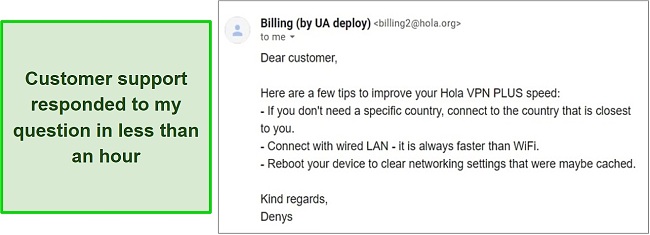
Customer support is mostly prioritized for users that have gotten a premium offer and not for free users . Hola offers a live chat service that is available 24/7 to respond to your inquiries. Alternatively, you can submit a request through the website’s support system if you have more detailed questions.
While these inquiries may take longer to answer, they can provide more helpful information when it comes to resolving complex problems. When I inquired about how to scale my connection speeds with the service, I was pleased to receive a response in less than 1 hour.
Try Hola risk-free
| VPN vendor | Email response time | 24/7 support | Live chat | Refund policy | Native English |
|---|---|---|---|---|---|
| Hola |
| Hola | |
|---|---|
| Email response time | |
| 24/7 support | |
| Live chat | |
| Refund policy | |
| Native English |
I find Hola’s price to be excessive considering the limited features it offers . Although it is mainly advertised as a free VPN service, you can also choose to upgrade to its Premium or Ultra option for a better service. Hola’s free offer has a daily time limit, as do most free VPNs. Other than that, it’s only usable with one device, and you can’t stream HD content. As a plus, around 500 servers are available around the world with this offer.
Alternatively, you can upgrade to a Premium offer if you need a VPN for more than one hour per day. It provides access to more than 7,000,000 IPs, lets you connect to 10 devices at once, and streams HD video. Furthermore, the premium version of Hola VPN adheres strictly to a no-logs policy and uses advanced security measures.
There is a substantial price difference between the Ultra and Premium packages. To justify the high price, the offer provides 1,500 servers, 4K video streaming, smart DNS service, and the ability to connect up to 20 devices simultaneously. It would be nice if this offer had more features considering it costs twice as much as the Premium option.
There are several methods to pay for a offer. I paid using my credit card but you can do so using PayPal, Google Pay, AliPay, Sofort, GiroPay, and iDeal . I was impressed when colleagues in other regions revealed that they were able to purchase to Hola using their local cards, which operated with their local currencies.
When you pay for a Hola offer, you are automatically eligible for an unconditional 30-day money-back guarantee . I tested this provision and was happy to be reimbursed in full the following day. While the process is extremely fast, you may have to wait a short period of time before receiving a decision.
Hola doesn’t offer a free option on its iOS app, but you can try out the paid service for 3 days without charge. Due to the company’s free trial offer, purchases canceled during the active offer period are not eligible for a refund. You should therefore ensure that you stay within the period of the trial if you are testing the service.
Hola has the following offers
Final Verdict
While I have mixed feelings about Hola, it solves one of the primary problems that VPNs are used for — accessing content. The app features a very simple user interface, provides decent server performance, and has insanely fast speeds due to the peer-to-peer proxy approach. However, it falls very short when it comes to user privacy and security. Combined with a price that matches or even exceeds some better VPN choices, Hola’s service is hard to recommend.
It is recommended that you invest in one of Hola’s paid options if you decide to use its services since these come with additional perks like advanced security protocols and no data logging. It does, however, monitor the network activity of clients to some degree despite its no-log policy. If you need a VPN to do anything more than a stream, you should avoid Hola. I’m personally sticking with a tried-and-tested premium VPN like ExpressVPN , as it is fantastic at unblocking content and is still super secure.
Try Hola risk-free
Editor’s Note: Transparency is one of our core values at WizCase, so you should know we are in the same ownership group as ExpressVPN. That said, our detailed reviews follow a strict methodology that examines all relevant performance factors to help you arrive at your own informed conclusion.
Try Hola risk-free
- Overall
- Speed
- Servers
- User Experience
- Support
- Pricing

Editor’s Note: We value our relationship with our readers, and we strive to earn your trust through transparency and integrity. We are in the same ownership group as some of the industry-leading products reviewed on this site: ExpressVPN, CyberGhost, Private Internet Access, and Intego. That said, our detailed reviews follow a strict methodology that examines all relevant performance factors to help you arrive at your own informed conclusion.

