| Speed | 3.0 / 10 |
|---|---|
| Servers | 5.0 / 10 |
| User Experience | 7.0 / 10 |
| Support | 8.0 / 10 |
| Pricing | 6.0 / 10 |
HideIPVPNReview 2026: Before You Buy, Is It Worth It?
- Written By Sayb Saad Former Writer
HideIPVPN Overview
HideIPVPN offers one of the widest arrays of encryption protocols in the VPN market and offers excellent security. That’s a great start, but unfortunately, after extensive testing, I found it fell short in many areas.
For a VPN that only has servers in 12 countries, HideIPVPN can get past some, if not all, geoblocks. Although I was impressed with HideIPVPN’s ability to access most of my streaming libraries, I was not able to stream in HD . My speeds dropped significantly when connected to HideIPVPN servers— especially those furthest away from my true location.
HideIPVPN provides the industry-standard 30-day money-back guarantee , but it comes with some strings attached. Instead, I would test HideIPVPN using the 24-hour free trial. Overall, if you’re looking for a VPN with multiple encryption protocols, HideIPVPN is a good choice .
Try HideIPVPN risk-free
Don’t Have Time? Here’s a 1-Minute Summary
- Unblocks some streaming websites. HideIPVPN successfully unblocks Netflix, Hulu, and YouTube. View the entire list of unblocked streaming services .
- Low speeds. Nearly all the servers I tested gave me slower connections and were almost too slow for HD streaming. Find out which servers performed the best .
- Customizable kill-switch. I was able to block specific applications from running if the VPN dropped. Learn more about HideIPVPN’s Application Killer .
- Unlimited DNS connections. You can connect all of your devices on the separate Smart DNS feature. See which devices HideIPVPN is compatible with .
- Decent user experience. HideIPVPN is compatible with multiple platforms. See how many simultaneous device connections you get .
- Limited 24-hour trial. The trial is limiting, but it’s the only free chance to test the service considering its terrible 30-day money-back guarantee. Read its 30-day money-back guarantee conditions .
Try HideIPVPN risk-free
I was surprised HideIPVPN could unblock various popular streaming services with its small network of 20+ servers — having fewer servers (and network addresses) makes it easier for streaming platforms to recognize connections, which can then be blocked.
For now, Netflix, Hulu, and YouTube all stream successfully. It did unblock HBO Max, but I encountered lag when using the service.
Netflix, Hulu, HBO Max, and YouTube: Unblocked
I successfully accessed my Netflix US account and experienced minimal buffering when streaming The Office (U.S.) .

I also experienced 6 connection drops while connected to one of HideIPVPN’s US servers. This caused an annoying error, which prevented me from viewing any content. To bypass the Netflix proxy error, I simply needed to reset my browser and VPN connection.
Pardon the interruption. This title is not available to watch instantly. Please try another title.
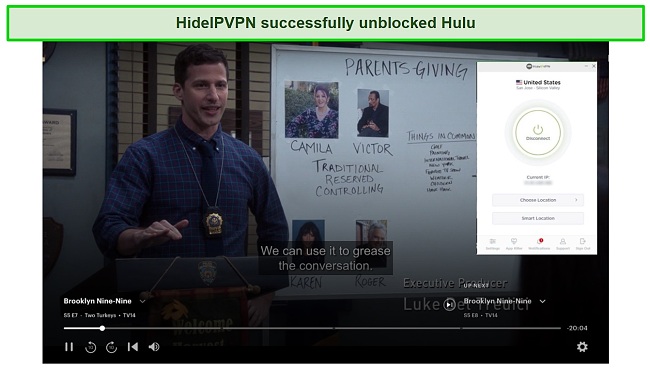
I continued testing and successfully unblocked Hulu , which allowed me to stream Brooklyn Nine-Nine in high-quality.
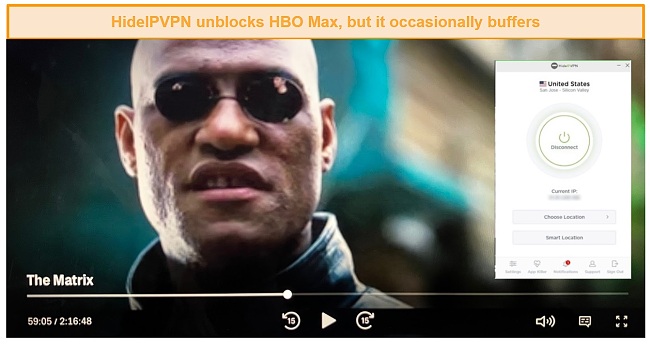
When streaming The Matrix on HBO Max, I did experience buffering throughout the movie . It stuttered on occasion and paused to buffer 5 times and the quality dropped to SD.
After trying to access the Disney+ library, it never managed to load past the login screen when connecting with HideIPVPN. Later, I noticed HideIPVPN didn’t work with Disney+ at all, giving me the below error message every time.
I asked my colleague in the UK to test out her BBC iPlayer account using HideIPVPN. She connected to 3 UK servers but could not access her BBC iPlayer account. Each attempt resulted in the same error message, similar to one from Disney+.
Your device is connected to the Internet using a VPN or proxy service.
If you want to stream any of these services, I strongly recommend you try ExpressVPN . Not only can it access most streaming platforms, but it also provides blazing-fast speeds consistently anywhere in the world.
Try HideIPVPN risk-free
HideIPVPN Offers Good Speeds on Nearby Servers
I connected to multiple nearby, mid-range, and distant servers and my findings were consistent – HideIPVPN’s performance significantly drops with distance .
Speed Test Results
HideIPVPN only has servers in 12 countries, including the US and Canada. Since I travel a lot between North America and South Asia, I’m currently in a country that isn’t on HideIPVPN’s list. However, I was able to connect to a nearby server in Singapore and got decent speeds, enough to binge-watch Netflix in HD.
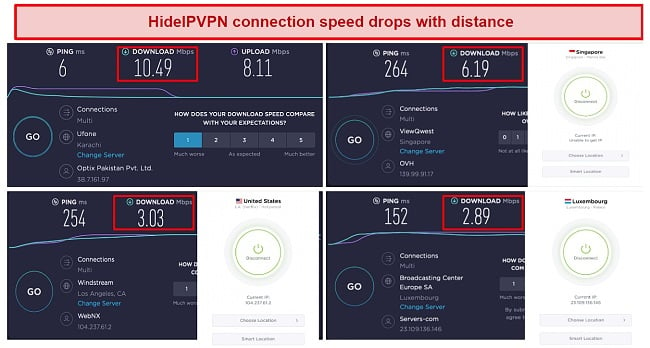
My baseline download speed was 10.49Mbps. When I connected to a nearby server in Singapore, my speeds dropped by 41% to 6.19Mbps. That’s a significant speed drop but just enough that you can surf the internet and stream videos without any problems.
When I connected to two long-distance servers – one in Los Angeles and the other in Luxembourg – I got ridiculously slow speeds. These servers gave me speed drops of 71% and 72.4%, respectively. At this point, I wasn’t even able to surf the internet properly, let alone stream videos.
When I searched something on Google, for instance, it took about 5 seconds for the page to load. Opening a website, especially streaming platforms, including Netflix and Hulu took ridiculously long.
Having said that, this slow down was much more apparent because my base speed was slow . If your internet is faster than mine, surfing the web won’t be a problem. If you want to stream, you might still have some buffering and the video quality may drop to SD from time to time.
HideIPVPN also offers a Smart Location feature, which connects you to the best available server depending on your location. When I tried it, I was connected to a server in Luxembourg, which is odd considering it’s a long-distance server. My speeds dropped to 2.89Mbps and there was a lot of buffering while streaming.
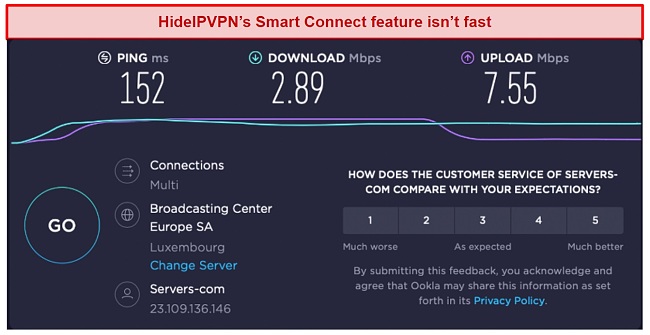
The Smart Location feature connects you to a server randomly and provides no better speeds than most long-distance servers. I recommend that you pick a short-distance server manually from the list of servers.
Overall, I was not impressed by HideIPVPN’s performance . It’s not suitable for streaming and doesn’t have a big server network. If you want a VPN that offers a large server network and provides blazing-fast speeds on both short- and long-distance servers, try out ExpressVPN .
Try HideIPVPN risk-free
| Download speed reduction | Upload speed reduction | Ping time to Google.com | Average time to connect (seconds) | Unblock successful for | |
|---|---|---|---|---|---|
| HideIPVPN | 58% (UK) | 43% (FRA) | 262ms | 8 | Netflix Hulu Youtube |
| Average score of top 10 VPNs | 11% (UK) | 16% (FRA) | 24ms | 11 | Netflix Hulu Kodi ESPN Youtube BBC iPlayer |
| HideIPVPN | Average score of top 10 VPNs | |
|---|---|---|
| Download speed reduction | 58% (UK) | 11% (UK) |
| Upload speed reduction | 43% (FRA) | 16% (FRA) |
| Ping time to Google.com | 262ms | 24ms |
| Average time to connect (seconds) | 8ms | 11ms |
| Unblock successful for |
Server Network – Small Server Network
HideIPVPN is one of the lesser-known VPNs I’ve tested, so I wasn’t surprised to see it only had 20+ servers across a dozen countries. Servers are located mostly in Europe, with only a handful in the US and Asia . This puts HideIPVPN at a significant disadvantage, especially when you compare it to some of the other big VPN providers.
During my research, I also discovered that HideIPVPN doesn’t offer unlimited bandwidth (restricted to 1Gbps). Thankfully, you shouldn’t use that much bandwidth for general internet activity like streaming Netflix or browsing social media.
Apart from that, HideIPVPN’s native app doesn’t include the proxy feature and you’ll need to set it up manually. A proxy is an intermediary between you and the internet and it’s a must-have if you want to use HideIPVPN’s SmartDNS feature . I was able to set it up on my Mac using the step-by-step tutorial on HideIPVPN’s website.
If you’re concerned by HideIPVPN’s server limitations, you should check out other VPNs. ExpressVPN has a vast server network of 3,000 servers in 105 countries , most of them in the US and UK – both popular choices for streaming geo-restricted content.
Editor’s Note: Transparency is one of our core values at WizCase, so you should know we are in the same ownership group as ExpressVPN. That said, our detailed reviews follow a strict methodology that examines all relevant performance factors to help you arrive at your own informed conclusion.
Security – Provides a Range of Encryption Protocols
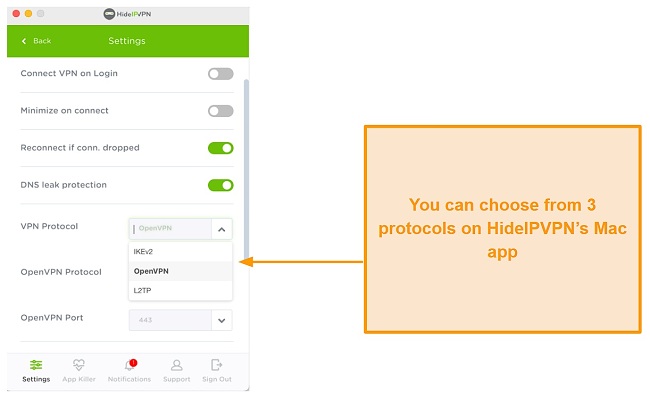
HideIPVPN offers a wide range of encryption protocols, including OpenVPN, IKEv2, and many others. On my Mac, however, I could only see 3 encryption protocols – OpenVPN, IKEv2, and L2TP.
I prefer using OpenVPN because it’s fast, secure, and open source. Plus, it provides military-grade encryption and is the recommended choice when using any VPN. Apart from OpenVPN, you can also choose:
- IKEv2 — which is popular with mobile users because it provides exceptional security and is one of the fastest encryption protocols.
- L2TP — Another secure protocol great for maintaining complete anonymity online.
I asked one of my colleagues to check which protocols HideIPVPN offers on Windows. I found out that apart from the ones available on Mac, it additionally provides SSTP and PPTP.
Using HideIPVPN’s Application Killer prevents DNS leaks . Applications added to the App Killer list will shut down if the VPN connection drops, keeping your data secure.
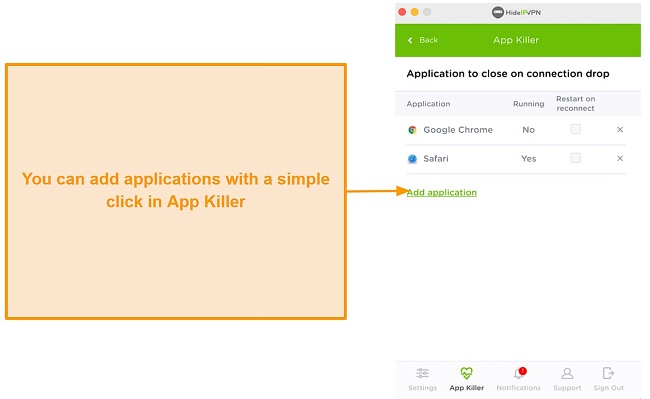
I monitored HideIPVPN’s connection and noticed it disconnected every few minutes before immediately reconnecting to the network, causing the App Killer to shut down my browser. Once reconnected, it failed to notify me or reopen the closed applications, proving it to be more annoying than helpful.
For this reason, the App Killer isn’t as effective as a kill switch. If you’re doing a more sensitive task like accessing your bank account, and the connection to the VPN server drops, a kill switch wouldn’t close your browser like the App Killer. Instead, it will kill your internet, protecting your data. That’s why HideIPVPN’s Mac app could definitely use a kill switch.
HideIPVPN offers a smart DNS service with unlimited device connections. Smart DNS lets you route your internet traffic from a different IP and is handy for avid streamers. You can access smart DNS within the app, but I’d recommend caution if you decide to use it. Your data is unsecured when using this DNS service, meaning your IP address can be traced by your ISP, government, or any malicious users.
Privacy – Has a Questionable No-Logs Policy
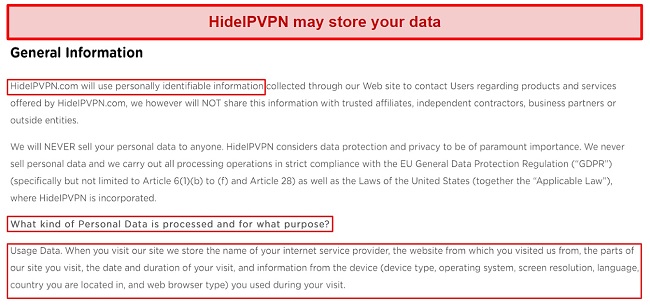
During my research, I came across lots of conflicting information over the actual location of HideIPVPN. I decided to contact customer support for a clear answer.
Torrenting – Few Servers for Torrenting
At first glance, HideIPVPN doesn’t appear to have P2P servers that support torrenting . I tried torrenting a copyright-free file while being connected to servers in the UK, the US, Canada, France, and Australia, but none of them allowed torrenting.
I researched for hours on end and stumbled upon one of HideIPVPN’s blog posts, which said that torrenting is only allowed on servers in Germany and the Netherlands. After reading this, I connected to a server in Germany and was able to download a 1.7GB file within 10 minutes, which is good enough. Then, I connected to a server in the Netherlands and was able to download the same file within a similar span of time.
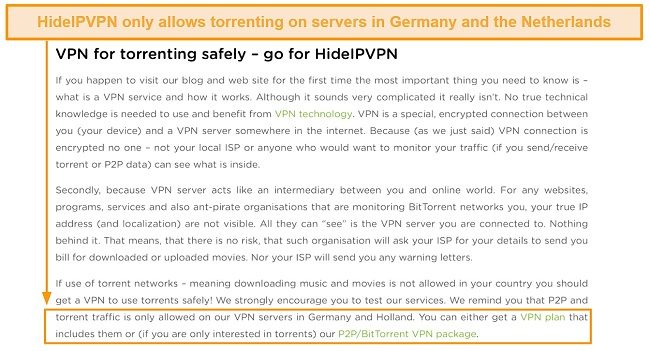
Although I was satisfied with the torrenting performance, HideIPVPN should mention that it only supports torrenting on servers in Germany and the Netherlands. Upon consistently testing these torrent-compatible servers, I found that my speeds dropped by 52%. That’s because Germany and the Netherlands are far from my location. So, you’ll likely get great speeds if these countries are nearby you.
Having said that, my team and I don’t condone illegal torrenting, so it’s always wise to check the rules and regulations in the country you’re in.
Does HideIPVPN Work in China?
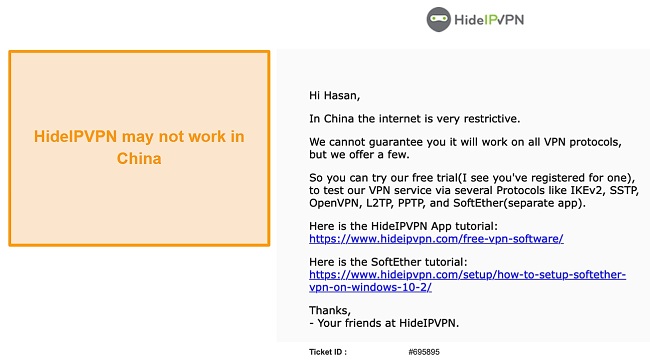
During my research, I found mixed views on whether HideIPVPN works in China or not. Therefore, I decided to contact the support team.
I didn’t receive a concrete answer from the support team, though. It stated that HideIPVPN can’t guarantee whether it will work in China on all VPN protocols since the internet is highly restrictive there. The team, however, recommended some VPN protocols that might be able to do the job. Oddly, it recommended all the protocols that the VPN supports.
Try HideIPVPN risk-free
Getting past the Great Firewall of China is something only a handful of VPNs are capable of doing. If you want a VPN that works in China, I highly recommend you use ExpressVPN. If you’re travelling to China, make sure you install ExpressVPN’s app on your devices beforehand , otherwise, you won’t be able to.
Simultaneous Device Connections – Allows for 3 Devices at a Time
HideIPVPN can be used across a maximum of 3 devices , meaning I could simultaneously link my Macbook, iPhone, and iPad. When testing this myself, the connections ran smoothly, but I did see a drop in speed on my iPhone and iPad.
If you have a lot of devices to protect or want to make sure your family or team’s devices are protected too, HideIPVPN might not be ideal. I would recommend looking at IPVanish which allows unlimited device connections on one offer .
Device Compatibility – 4 Native Applications With a Simple, Shared Interface
HideIPVPN’s applications across Windows, macOS, Android, and iOS all share an identical user interface. Though each app looks similar, I realized the mobile applications offer fewer features than the desktop apps . Android and iOS applications lose the Smart DNS feature, App Killer, and the ability to select other encryption protocols.
HideIPVPN is also available on Linux, but it doesn’t offer a native application and instead provides you with tutorials on manual installation. HideIPVPN is also compatible with TP-Link, DD-WRT, and D-Link routers and a range of gaming consoles, including PlayStations 4 and 5, Xbox One, and more. Plus, it also has a Chrome extension.
Easy of Set-Up & Installation – Email Verification for Desktop and Mobile
Installing HideIPVPN is easy , requiring only your email for the free trial. In the email, you’re given a username and login that gives you access to the website dashboard and VPN. If you’re after the paid version, you can follow these steps.
Get HideIPVPN in 4 Easy Steps
- Create an account for HideIPVPN and fill out your details.
- Select “Start using VPN” and then click “Download HideIPVPN software
- Choose your platform to download and install HideIPVPN.
- Login with the details sent to your email and try out HideIPVPN free for 24 hours!
If you wish to upgrade your option, you can do so easily from HideIPVPN’s online dashboard. It offers all the current packages, and you can quickly contact support.
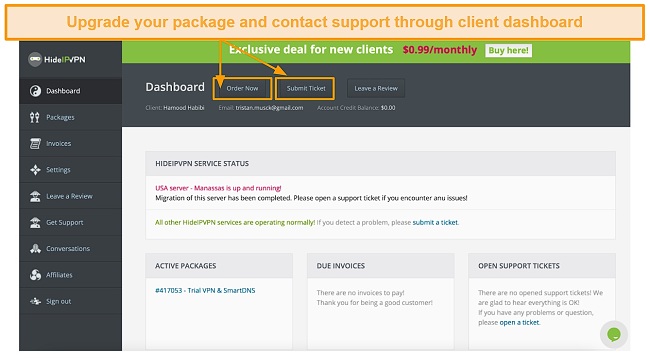
HideIPVPN offers you 2 support options: a ticketing system and a live chat. With over 6+ years of testing VPN services, I know that support can make or break the deal for getting a VPN.
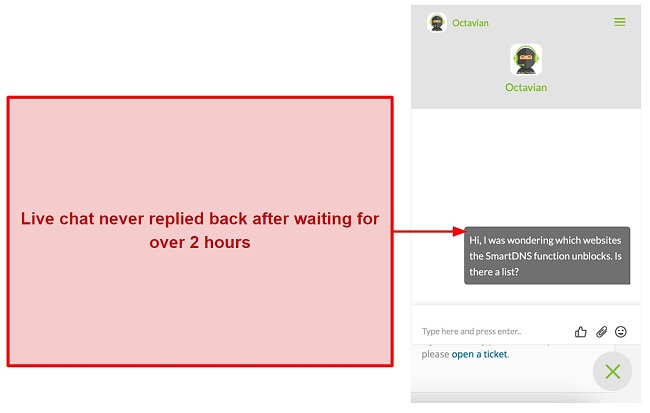
I also tested HideIPVPN’s live chat support. Most often, I got a response immediately, but at other times, it took hours to get a response. That’s because live chat has specific working hours that aren’t specified. If you message the team after working hours, you won’t get a fast response.
Try HideIPVPN risk-free
| VPN vendor | Email response time | 24/7 support | Live chat | Refund policy | Native English |
|---|---|---|---|---|---|
| HideIPVPN | 3 minutes |
| HideIPVPN | |
|---|---|
| Email response time | 3 minutes |
| 24/7 support | |
| Live chat | |
| Refund policy | |
| Native English |
You can purchase 3 packages for HideIPVPN, which all give you the same features and connections — but you can decide whether to pay monthly, quarterly, or annually.
HideIPVPN will accept a variety of payments, including major credit cards, PayPal and Bitcoin. Regardless of the payment method you choose, you must provide a valid email address and certain pertinent personal information.
If you want to try out HideIPVPN for free, you can get the 24-hour trial version (only an email is needed). It’s one of the more limited options I’ve seen from a VPN provider, but it should give you enough time to check out the speeds and whether it’s worth the price — which brings me to HideIPVPN’s money-back guarantee.
HideIPVPN advertises a 30-day money-back guarantee on its website. I decided to try this out for myself to see if it’s true.
I’ve discovered a few key points worth noting:
- You won’t be refunded for slow speeds
- If you accidentally let your offer renew, you won’t be given a refund
- HideIPVPN won’t refund you if you can’t bypass geo-blocked content
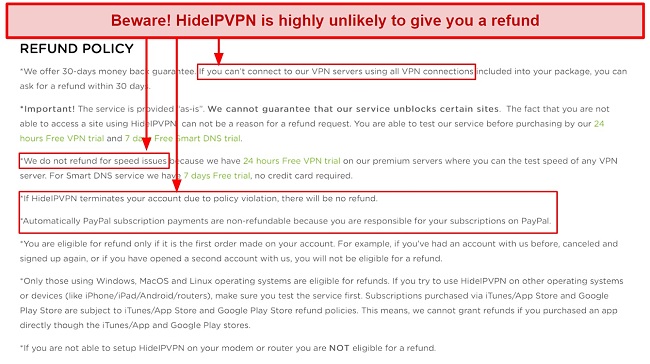
Refunds are only given if you’re unable to connect to any of the servers with any available connection (an unlikely scenario!). HideIPVPN has one of the most unforgiving refund policies I’ve seen. In comparison, you can easily get a refund with premium VPNs like ExpressVPN and CyberGhost.
HideIPVPN has the following offers
Final Verdict
HideIPVPN offers a great choice of encryption protocols across the US and Europe. It falls short, however, on speeds and its ability to bypass geo-restrictions on streaming platforms like Disney+ and BBC iPlayer.
The unfriendly refund policy combined with slow speeds makes it hard to justify the price when better services are available.
If a flexible choice of encryption protocols with the ability to manually install it on routers and other personal devices interests you, HideIPVPN might be worth considering. Just remember to use its 24-hour free trial, so you can see if you like it before committing.
Try HideIPVPN risk-free
It’s okay. HideIPVPN is a not-so-strong contender in the VPN market. Although it provides a range of encryption protocols , it falls short on its server network.
It doesn’t provide blazing-fast speeds on all servers (especially long-distance ones) and isn’t suitable for streaming. Its torrenting performance is better, but you can only torrent on servers in Germany and the Netherlands.
Free VPN services often come with bandwidth limits and limited security features. But, if you’re interested in testing out VPNs with longer trial periods there are a few reliable options .
Try HideIPVPN risk-free
- Overall
- Speed
- Servers
- User Experience
- Support
- Pricing

Editor’s Note: We value our relationship with our readers, and we strive to earn your trust through transparency and integrity. We are in the same ownership group as some of the industry-leading products reviewed on this site: ExpressVPN, CyberGhost, Private Internet Access, and Intego. That said, our detailed reviews follow a strict methodology that examines all relevant performance factors to help you arrive at your own informed conclusion.