| Speed | 5.0 / 10 |
|---|---|
| Servers | 5.0 / 10 |
| User Experience | 6.0 / 10 |
| Support | 6.0 / 10 |
| Pricing | 8.0 / 10 |
Hide My IP VPNReview 2026: Before You Buy, Is It Worth It?
- Written By Clement Adegbenro Cybersecurity & Tech Writer
Hide My IP VPN Overview
Hide My IP VPN makes some bold claims about offering robust online security and lightning-fast speeds . I got curious, so I decided to try a month-long option to see if it really is as fast and as safe as it claims. I put it through rigorous testing to see if it truly ranks as one of the best VPNs currently available.
Hide My IP VPN offers reasonable local connection speeds and enables access to popular streaming platforms . In addition, it has several security features and advanced configuration options that provide users with complete control over their online privacy. However, it does collect identifiable data and has limited server availability. Furthermore, it is headquartered in the United States, which may not be ideal for users who prioritize data privacy.
There is a 7-day free trial available that is complemented by a discount on the one-year offer. Hide My IP VPN also offers a 30-day refund policy as an additional risk-free testing period.
Don’t Have Time? Here’s a 1-Minute Summary
- Impressive unblocking performance . I could access all the popular streaming platforms I tested using Hide My IP VPN. See which platforms I could access .
- Inconsistent speeds. I experienced decent performance connecting to local servers, but my connection to other servers was inconsistent. Find out how to get the best speeds from this VPN .
- Limited server network . Hide My IP VPN has a relatively small network of servers, with only 130+ servers available for use. Here’s my full review of its servers .
- Extensive compatibility . Almost all major platforms are supported, and the VPN provides native apps for each platform. See which of your devices are compatible .
- Solid customer support . The live chat feature and email support made contacting the Hide My IP VPN team a breeze. More details about its customer service are available here .
- Plenty of offer options . There are 3 different options available and all come with a 30-day money-back guarantee. Check out Hide My IP VPN’s range of offers .
Hide My IP VPN effectively unblocked every streaming platform I tested, making it a reliable solution for accessing your favorite content . However, it is important to note that some servers may not provide sufficient speed for UHD streaming.
Hide My IP VPN also includes a free Smart DNS service with its VPN options for accessing regional content. This service offers faster speeds and reliably unblocks streaming services, although it doesn’t encrypt or alter your IP.
Thanks to the VPN’s reliable local server connections, I enjoyed uninterrupted UHD streaming without any buffering issues . Additionally, tests of different server locations worldwide, including Asia, Australia, and Europe showed they were able to access Netflix libraries specific to those regions.

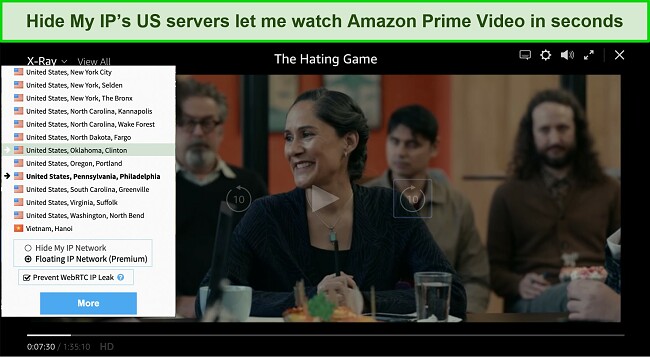
Servers were also able to unblock Disney+ in various other countries where it has been launched . Hide My IP VPN covers the US, Germany, Australia, Canada, India, Japan, Italy, the Netherlands, Ireland, the United Kingdom, Spain, Sweden, and New Zealand, among others — enabling you to access your Disney+ library even if you are traveling around the world.
Furthermore, I was pleased to discover that almost all of Hide My IP VPN’s US server locations were able to unblock HBO Max immediately . This streaming service is only available in the United States and in some territories of Latin America and the Caribbean. I watched a few shows and was impressed with the consistent quality of the picture.
Hulu, on the other hand, is currently only available in the United States, Puerto Rico, and parts of Japan. Nevertheless, I was able to watch Curb Your Enthusiasm and other shows on Hide My IP VPN’s Maryland server without any issues.

When traveling abroad, you can use Hide My IP VPN to access your favorite BBC iPlayer shows . Although connecting to the UK server may take time, once connected, you can seamlessly watch your preferred shows.
Hide My IP VPN is a dependable tool for bypassing geo-restrictions and accessing a more extensive range of content that might be blocked in your region. However, to unlock all of the streaming platforms mentioned earlier, it’s necessary to install Hide My IP VPN’s browser extension, as the client application alone may not provide the same outcome.
Inconsistent on Most Servers
Hide My IP VPN ranks middle of the pack when it comes to speed . I experienced good speeds when connecting to closer servers, but the speed noticeably decreased when I connected to servers that were farther away. If you are located near one of the 134 server locations that Hide My IP VPN maintains, you will find that the speed is fast enough for full HD streaming and general web browsing.
Speed Test Results
While hiding My IP’s connections are acceptable in local and neighboring servers, don’t expect lightning-fast speeds across continents . The servers that I tested were all-sufficient for general web browsing as well as other activities such as UHD streaming, torrenting, and gaming.
To establish a comparison, I initially tested my internet speeds without connecting to the VPN. The results showed that my download speed was 94Mbps, my upload speed was 675Mbps, and my ping was a mere 1 ms. However, when I connected to the US server, there was a significant decrease in my speeds. Specifically, my download speed reduced to 50Mbps and my upload speed decreased to 146Mbps . This indicates a loss of 46% in download speed and 78% in upload speed.
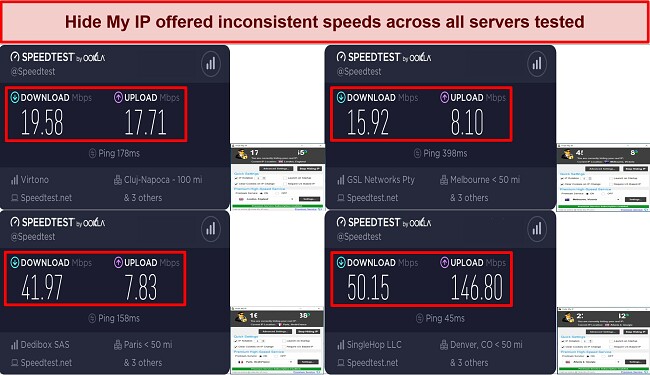
When I connected to a server in the UK, my download speed dropped by over 70% to 19Mbps and my upload speed was reduced to 17Mbps, a decrease of over 90%. My speed worsened when I connected to a server in Australia, with a record-low download speed of just 15.92Mbps . However, my speed improved when I tried a server in France, where my download speed dropped by 55% — a far better result than what I recorded on the UK and Australian servers.
It is evident that Hide My IP VPN is an unreliable service when it comes to achieving fast internet speeds, particularly on servers located at a considerable distance. To ensure a smoother experience, it is advisable to connect to a server that is in close proximity, as this will likely eliminate any potential issues.
| Download speed reduction | Upload speed reduction | Ping time to Google.com | Average time to connect (seconds) | Unblock successful for | |
|---|---|---|---|---|---|
| Hide My IP VPN | 78% (UK) | 98% (FRA) | 69ms | 19 | Youtube Netflix BBC iPlayer Hulu Kodi |
| Average score of top 10 VPNs | 11% (UK) | 16% (FRA) | 24ms | 11 | Netflix Hulu Kodi ESPN Youtube BBC iPlayer |
| Hide My IP VPN | Average score of top 10 VPNs | |
|---|---|---|
| Download speed reduction | 78% (UK) | 11% (UK) |
| Upload speed reduction | 98% (FRA) | 16% (FRA) |
| Ping time to Google.com | 69ms | 24ms |
| Average time to connect (seconds) | 19ms | 11ms |
| Unblock successful for |
Server Network — Limited Server Coverage
According to Hide My IP VPN’s website, the company boasts over 130 VPN servers that are secure and located across 70 global locations . This network offers comprehensive global geographic coverage, reaching every region, even those typically overlooked by other VPN providers. Notably, the combined server locations in Asia and Oceania surpass those in North America.
What sets Hide My IP VPN apart from its competitors is its inclusion of servers in China and Russia, which is uncommon among most VPN providers. Moreover, important server locations are also available in Africa and South America.
Hide My IP VPN ensures maximum privacy protection by personally owning, running, and controlling all of its servers . Third-party management of the server network is not allowed. Additionally, the company offers unlimited bandwidth, allowing you to enjoy uninterrupted browsing and streaming experiences.
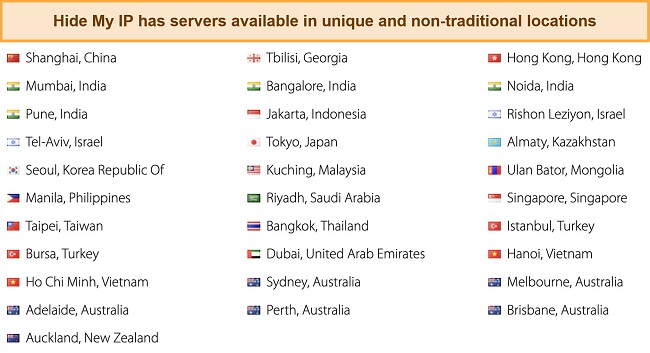
At present, the VPN lacks the capability to filter or sort servers according to your preferences . While it is generally advisable to connect to the server nearest to you for a reliable connection, it may not always be the fastest option. However, this approach may not be suitable if you need to access websites that are restricted to a specific country or are blocked in your country. To address this, Hide My IP VPN enables you to filter out all IP addresses except those from the United States, but you can also achieve this manually.
In addition, the company offers numerous DNS proxies that cover over fifty countries. Some of these proxies have proven effective at accessing all popular streaming platforms, but keep in mind that they may be blocked at any time. To begin, go to the company’s website and navigate to the DNS proxy page. Select the proxy manually and enter the license key you used for the client. Then, you can access content from your home region on your chosen streaming channel. However, it’s crucial to confirm whether the channel you want to unblock is compatible with a proxy. You can contact live support to obtain information about the status of a particular channel.
Security — Theoretically Solid
Hide My IP VPN ensures exceptional security for your connection through the use of advanced encryption technology . The service exclusively uses OpenVPN, which is paired with the highly robust AES-256 encryption cipher to safeguard your data. This powerful combination is virtually unbreakable, even for the most advanced computers.
In addition to the above, Hide My IP VPN offers several advanced features, which are detailed below:
- IP rotator (Multihop) — this function periodically changes your IP address, enhancing privacy by preventing location tracking. Simultaneously, you can opt to mask your User Agent, conceal Referrer Header, and clear cookies with each IP change, ensuring a cleaner browsing experience. By selecting “Require US-based IP,” IP rotation will be limited to addresses within the United States.
- Smart DNS proxy — the smart DNS proxy enables you to obscure specific information about your internet connection. Unlike traditional VPNs that route your entire session, it offers faster speeds and broader device compatibility. However, this improved performance comes at the cost of reduced security, as it lacks encryption.
- Kill switch — the automatic kill switch enhances privacy and security by maintaining protection even when your VPN connection briefly drops. The connection stays closed until the VPN tunnel is reestablished or the kill switch is disabled, providing an added layer of security to prevent accidental data exposure. Please note that this feature is only present on its Android application.
- DNS Protection — the primary role of DNS protection is to prevent DNS leaks, which can expose your browsing activities and compromise your privacy.
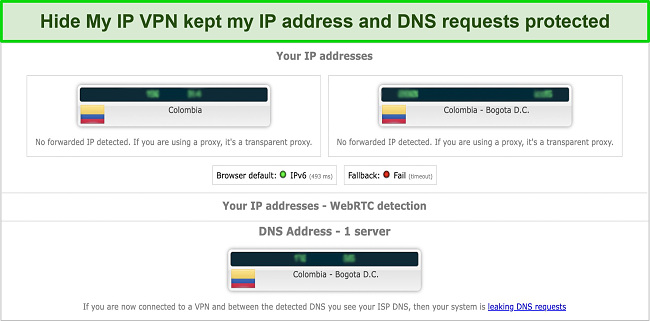
To verify the effectiveness of Hide My IP VPN’s security features, I conducted a comprehensive examination of various servers, including both local (US) and international options. Throughout this testing process, the connection consistently delivered the expected level of security, without any instances of IP, DNS, or WebRTC breaches . This in-depth analysis clearly illustrates the robust and dependable security measures employed by the system.
Privacy — Unnecessary Data Logging
Additionally, the company acknowledges recording information about your usage and access to its website, products, services, or network . Collecting such a vast array of data for troubleshooting purposes seems excessive to me. Moreover, Hide My IP VPN retains this data for an extended period even after deactivating your account, which I find unsettling.
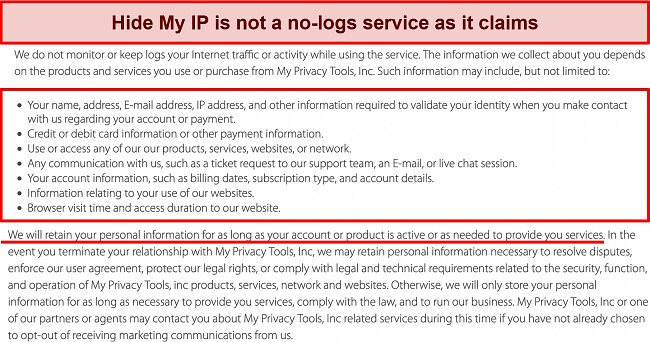
If you’re worried about online privacy, you may want to think twice about using Hide My IP VPN. The service is based in the United States, a country with a multitude of anti-privacy laws that allow online activity tracking. What’s more, the United States is a founding member of the 5-eyes intelligence network, which acts as a surveillance system and monitors specific targets. So, if you’re concerned about global surveillance or local data collection, ExpressVPN might be a better option .
Hide My IP VPN offers a unique advantage of a daily accountless purchase option, which provides additional anonymity without the need for an account or offer . This feature can be obtained using Bitcoin, giving you a bit more anonymity.
Torrenting — Supported but Not Safe
Hide My IP VPN has P2P-optimized servers but is not recommended for torrenting due to its invasive logging policy . Additionally, the desktop client lacks a kill switch, which could expose your true IP address if the VPN connection drops.
Neither my team nor I condone illegal activities. Check your country’s rules and regulations to make sure you aren’t breaking any laws. With these providers, you can enjoy ultra-fast speeds and no restrictions on torrenting while having the most secure privacy policies.
Does Hide My IP VPN Work in China? Yes!
A support representative confirmed that Hide My IP VPN works in countries with restricted access , but did not provide details on the connection method. The service has servers in China, Japan, India, Korea, and Hong Kong, enabling fast VPN speeds in China. However, it lacks advanced obfuscation tools such as StealthVPN and Smart Mode to conceal VPN traffic as regular HTTPS traffic.
When traveling to China, I find that using ExpressVPN is the best option due to its proven effectiveness . Nevertheless, it is crucial to exercise caution while using any VPN in China, as it does not grant permission to participate in unlawful activities.
Server Locations
Simultaneous Device Connections — Limited to 5
Hide My IP VPN permits the simultaneous connection of up to 5 devices . To verify this capability, I decided to connect my smartphone, tablet, and laptop at the same time. Despite my initial concern about potential speed issues with multiple connections, I encountered no problems or slowdowns.
However, in today’s era, many households possess more than 5 devices. With the prevalence of phones, personal computers, smart TVs, and even gaming consoles that can benefit from VPN connectivity, it becomes necessary to consider alternative options. If you offer to connect more than 5 devices, I suggest exploring CyberGhost as it allows up to 7 device connections .
Device Compatibility — Supports Mainstream Devices and OSs
Hide My IP VPN offers applications that cater to mobile and desktop platforms, including Android, iOS, Apple macOS, and Microsoft Windows . For Linux users, the service is also available, but it requires manual configuration. If your specific platform isn’t listed, you have the option to install the VPN software directly on your router. This allows multiple devices to connect simultaneously, providing a seamless experience for users across various platforms.
To further improve your browsing experience, Hide My IP VPN also offers extensions for popular web browsers, including Microsoft Edge, Firefox, Google Chrome, Netscape, Opera, Safari, Maxthon, MyIE, Avant Browser, and Lolifox. This ensures seamless transitions and logical connections between different platforms and devices.
Ease of Setup & Installation — Ready to Go In 3 Minutes
It was very easy to download the Hide My IP VPN application for Windows directly from the provider’s website . The process of signing up for an account, downloading, and installing the app hardly took any time.
The interface of the app allows you to have full control of the VPN from the main page, and everything is a click away . From choosing a server to adjusting all other configurations, all is right there in front of you. It’s actually very basic, to be honest. Other apps are available for more platforms, and all of them are considered at the same level of simplicity as that of the Windows app.
It has an outdated look from an appearance standpoint, and there are a few things lacking. For example, optimized servers don’t exist . Consequently, you may have to sift through a variety of servers to find the best one, which can be a bit annoying.
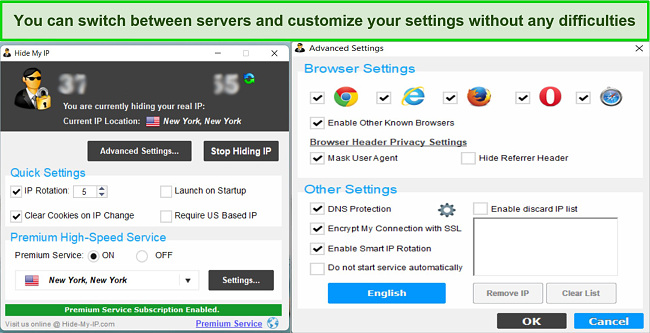
There are a few settings you can play with — clearing cookies on IP change, launching the app at startup, and requiring a US-based IP. Other features include whether you want the app to only work for web browsers, for all internet apps, or only for selected applications, and choosing always to use the same IP from previous sessions. Additional advanced options include DNS protection, masking user agents, smart IP rotation, and SSL encryption for secure connections .
Steps to Installing Hide My IP VPN on Windows:
- Visit the official Hide My IP VPN website . Open your preferred web browser and navigate to the official Hide My IP VPN website. Then proceed to create an account.
- Download the Hide My IP VPN software . On your account dashboard, locate the download button or link for the Hide My IP VPN software. Click on it to initiate the download process.
- Run the installer . Once the download is complete, locate the installer file and double-click on it to run the installer. The installation wizard will guide you through the installation process.
- Wait for the installation to complete . The installer will now copy the necessary files and install Hide My IP VPN on your Windows system. Depending on your computer’s specifications, this process may take a few moments.
- Launch Hide My IP VPN . Once the installation is finished, you will be notified that Hide My IP VPN has been successfully installed. Click “Finish” to exit the installer. To launch Hide My IP VPN, locate the desktop shortcut or access it from the Start menu. Double-click on the Hide My IP VPN icon to open the application.
- Log in to your Hide My IP VPN account . If you don’t have one, create an account by following the prompts. You will also need to activate the application with your license key before you can start using the VPN.
- Connect to a server . You will need to select a server location. Choose a server location that is closest to your physical location for the best connection speed.
- Establish connection . Once you’ve selected a server location, click on the “Connect” button to establish a connection to the selected server. Wait for the Hide My IP VPN app to establish a secure connection.
Hide My IP VPN provides various channels for direct contact, ensuring easy communication with their team . These channels include an online chat, an online ticket system, an email support system, postal mail, and a toll-free phone support number. Although telephone support is limited to weekdays from 9 am to 4 pm PST, live chat support is available during regular business hours.
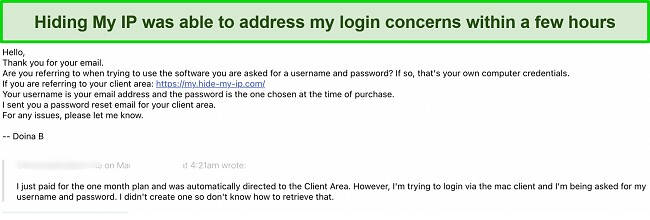
If you have technical or advanced questions, it is recommended to use the email support system. While waiting for a response can be a bit frustrating, it is the best avenue to reach someone with more knowledge . In my experience, I received replies to my emails within a few hours. The support engineer I interacted with was both polite and helpful.
| VPN vendor | Email response time | 24/7 support | Live chat | Refund policy | Native English |
|---|---|---|---|---|---|
| Hide My IP VPN | 8 hours |
| Hide My IP VPN | |
|---|---|
| Email response time | 8 hours |
| 24/7 support | |
| Live chat | |
| Refund policy | |
| Native English |
Hide My IP VPN is a valuable service that justifies its price . While it does offer a free version, it does come with certain limitations in terms of bandwidth and server choices. However, it’s important to note that these limitations do not apply to Android users who can enjoy the free account without any restrictions.
Apart from the free version, it also provides a three-option system, giving you the flexibility to choose between a one-month, three-month, or one-year offer . Opting for a longer purchase option will give you the best value for your money. I would like to mention that all offers provide access to the identical range of features, eliminating the need for any extra payment towards supplementary servers or tools.
Payments are accepted via select credit/debit cards (Visa, Mastercard, Discover, and American Express), PayPal, Alipay, and Payza . You can also pay in cryptocurrency, such as Bitcoin and Litecoin. Those who are uncomfortable giving out personal information as part of a regular payment process will be attracted to this option.
The service offers a 7-day free trial of its paid option, although it comes with limited capabilities such as no server selection and slow speeds. This trial period allows you to test the service without any financial obligations.
Additionally, all offers come with a 30-day money-back guarantee, but it’s important to note that a valid reason is required to request a refund. All refunds are processed through the same payment method that the original order was made with. In other words, you cannot claim a refund if you use an anonymous payment method.
Hide My IP VPN has the following offers
Final Verdict
Hide My IP’s VPN is very advantageous as it offers good services . Its most noteworthy features are its video streaming capabilities, beefy security, cross-platform compatibility, and functional browser extensions. In terms of VPN pricing, it is one of the cheapest on the market and, for the services it offers, it is quite viable. It guarantees your money back in case you are not satisfied with the service.
While Hide My IP VPN does have some cool aspects I haven’t seen before, I expected a VPN that’s been operating for more than 10 years to have more groundbreaking advances and technology to offer its users. ExpressVPN outperforms Hide My IP VPN in areas where the latter falls short. Moreover, you can try ExpressVPN out without any financial risk since it provides a 30*-day money-back guarantee.
Hide My IP VPN is a highly secure VPN due to its military-standard AES-256 encryption and strong OpenVPN protocol . The service won’t leave any traces of your online activity behind. However, the provider logs excessive amounts of sensitive data and does not provide a kill switch.
Free VPNs are not as well-made as paid ones, making them more prone to security vulnerabilities. These vulnerabilities can result in your data and IP address being leaked, allowing anyone who has the opportunity to view them. If you’d like to test out other free VPN services , these are a few safe and reliable options.
- Overall
- Speed
- Servers
- User Experience
- Support
- Pricing

Editor’s Note: We value our relationship with our readers, and we strive to earn your trust through transparency and integrity. We are in the same ownership group as some of the industry-leading products reviewed on this site: ExpressVPN, CyberGhost, Private Internet Access, and Intego. That said, our detailed reviews follow a strict methodology that examines all relevant performance factors to help you arrive at your own informed conclusion.

