- Written by: Osama Zahid Cybersecurity Specialist
Heimdal Security Overview
Heimdal claims to provide innovative security and unbeatable malware detection. I wanted to see for myself if it could truly deliver on those promises. So, I put Heimdal through a number of tests to evaluate how effective it is at safeguarding your system .
After extensively testing Heimdal, I found that it offers powerful virus scans and good customer support. Unfortunately, Heimdal doesn’t offer a lot of extra features like parental controls, a password manager, and identity theft protection.
Overall, Heimdal has effective virus scans and real-time protection but it is lacking in its feature set. If you want to try it, I suggest getting the Premium Security Home plan that combines its reactive and proactive security features. Best of all, you can try Heimdal out yourself completely risk-free for 30 days with its money-back guarantee.
Try Heimdal Security risk-free for 30 days
In a Rush? Here’s a 1-Minute Summary
- Near-flawless malware detection via scans. Heimdal offers multiple virus scans with impressive detection rates. Learn how effective Heimdal’s scans are .
- Doesn’t have many features. Heimdal is missing many useful security features you’d get in other top antiviruses. Jump here to read more about Heimdal’s features .
- Highly intuitive apps. I found Heimdal’s desktop and mobile apps really easy to use. Find out more about its mobile and desktop apps here .
- Responsive customer support. Heimdal’s customer support is highly responsive, even though it’s missing various support channels. Read more about my experience with its customer support .
- High cost for what you are getting. You won’t get the best value for money with Heimdal’s plans. Discover which of its plans is best suited for you .
Security
Heimdal’s scans provide decent security against malware and are incredibly easy to set up. Its real-time security, however, doesn’t flag 100% of threats and can let a few slip by.
Virus Scan — Heimdal Includes Multiple Different Scans to Eliminate Malware
Among Heimdal’s biggest strengths is its wide variety of scans that remove malware from your system. Heimdal’s scans detected and quarantined 99% of threats during tests , which is impressive but less effective than the virus scans in top antiviruses like Norton.
The scans you get with Heimdal include the following:
- Quick Scan — scans the locations most commonly targeted by malware.
- Active Processes Scan — scans all the processes active on your system.
- Full Scan — scans your whole computer to look for cyber threats.
- Hard Drive Scan — scans all the data on your hard drives.
- Local Drive Scan — scans your hard drives and external storage devices.
- Removable Drive Scan — scans any external storage devices connected to your system.
- System Scan — scans the system directory where your OS is installed.
- Network Drive Scan — scans all the drives on your local network.
After testing, I found that this app’s scans are slower than most antiviruses. Heimdal’s Quick Scan took roughly 12 minutes, and its Full Scan took over an hour. In contrast, Norton finishes these scans in under half the time on the same system.
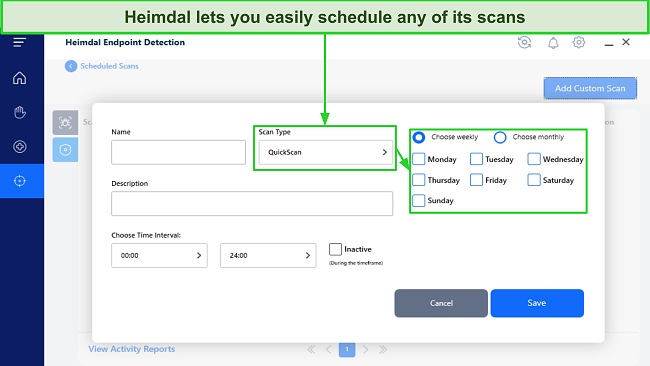
Something I like about Heimdal’s scans is that they’re easy to schedule. You can set any of Heimdal’s scans to run at a time of your choosing or on a daily/weekly/monthly basis.