| Speed | 7.0 / 10 |
|---|---|
| Servers | 5.0 / 10 |
| User Experience | 6.0 / 10 |
| Support | 6.0 / 10 |
| Pricing | 6.0 / 10 |
DisconnectReview 2026: Before You Buy, Is It Worth It?
- Written By Clement Adegbenro Cybersecurity & Tech Writer
Disconnect Overview
With over 800m+ monthly active users across its apps (VPN, malvertising blocker, and save search browser extension), Disconnect’s popularity is impressive . Launched in 2011, this VPN claims to be “the easiest way for you to take back control” and protect your privacy online. I wanted to test these claims and see if this VPN, which is limited to only macOS and iOS users, can truly safeguard my online privacy like these reputable VPNs on the market .
My results revealed that while Disconnect does block trackers and unblocks a few streaming platforms, it has a small network of servers . Disconnect also lacks basic privacy features like a kill switch. What’s more, the VPN blocks torrenting on its servers.
Luckily, you can try Disconnect for yourself and see if you like it without risking a long-term commitment , as the VPN offers a 7-day free trial via its iOS application. With this, you can check out all its features, and if you still need more time, the 30-day money-back guarantee gives you extra time to test the app thoroughly and get a full refund if it’s still not for you.
Don’t Have Time? Here’s a 1-Minute Summary
- Unblocks a few streaming sites . I watched Netflix, Amazon Prime Video, and HBO Max without buffering — but had trouble with other services. Check out my streaming results here .
- Impressive speeds . Despite being a small VPN with a handful of servers, I was impressed with the speeds I got. Jump to my speed test results .
- A limited number of servers . Only six different server locations are currently available across Disconnect’s network. Click here to see the locations covered .
- Only compatible with macOS/iOS . It works on limited devices and only allows for 3 simultaneous connections. See which devices you can use it on .
- Slow customer support . While the answers were helpful, I got reply delays of up to several days from its support team. Read about my customer support experience .
- Decent pricing, but not a very good value . Offer fees are reasonable, but you get a lot more for a similar price with better-known VPNs. Check out Disconnect’s pricing options .
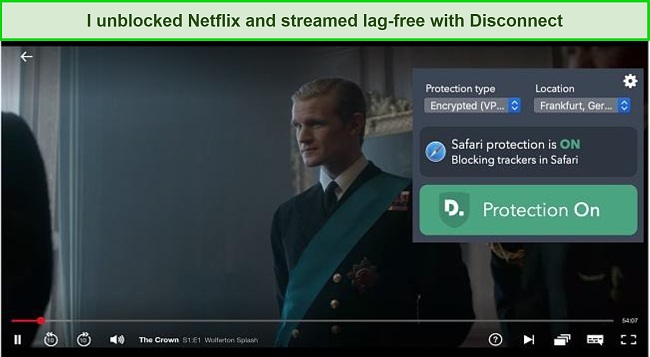
Disconnect unblocked popular streaming services but only on select servers . During my tests, I had no difficulty accessing my Netflix US account. I was able to watch The Crown in HD without experiencing any interruptions. Disconnect can also access UK and Germany. Unfortunately, Disconnect doesn’t seem to work with Netflix offers in other regions.
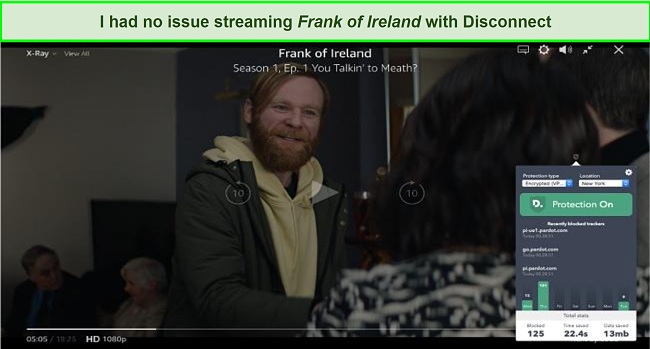
Disconnect allowed me to watch HBO Max from all its US servers, but I experienced occasional buffering . When watching Dolittle , my stream started instantly and I had no lag in standard definition. However, when I tried to watch in HD, the movie stopped to buffer every few minutes.
Hulu, Disney+, BBC iPlayer: Blocked
I was disappointed to find out that Disconnect couldn’t access some popular streaming platforms . I was able to log into Hulu while using Disconnect, but that’s as far as I could get. When I tried to stream Hulu from servers in the US, I was told I’d have to disable the proxy or VPN in order to watch.
The Disney+ page didn’t load at all when I tried to log in while connected to Disconnect. I even tried different servers but to no avail.
“BBC iPlayer only works in the UK. Sorry, it’s due to rights issues.”
Even though it’s a smaller VPN provider, I was still disappointed to see how few streaming platforms Disconnect could access . You’ll need a top-tier provider like ExpressVPN to access Hulu, Disney+, BBC iPlayer, and more of Netflix’s international libraries. ExpressVPN has the fastest speeds of almost any VPN I’ve tested and always gives me lag-free streams on the most popular streaming platforms.
I Got Fast Speeds on Short and Distant Servers
I was pleased with the fast speeds I got with Disconnect during my tests . Although the VPN has a small network of servers, I didn’t experience any significant drop in speeds even with distant servers.
Speed Test Results
During my tests, I got decent speeds slightly above 18Mbps, an 18% drop from my base internet speed .
Before I connected to the Disconnect servers, my base internet speed was around 22Mbps. With just 6 server locations to choose from, I didn’t expect to have fast speeds. Surprisingly, I got a download speed of 19Mbps with the server in Frankfurt, 20Mbps with the server in New York, and 17Mbps with the London server. Even on the most distant server from me (the server in Singapore), I still got 14Mpbs — a 36% drop in speed .
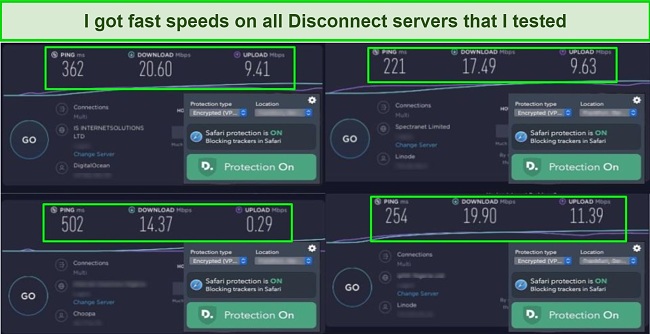
However, the latency was high across all the servers . I got an average latency of 200ms, which means that Disconnect isn’t ideal for activities like gaming, where a latency of less than 100ms is recommended. A low latency VPN is suitable to avoid lags where split-second decisions need to be made, like in gaming.
| Download speed reduction | Upload speed reduction | Ping time to Google.com | Average time to connect (seconds) | Unblock successful for | |
|---|---|---|---|---|---|
| Disconnect | 11% (UK) | 19% (FRA) | 11ms | 1.17 | Youtube |
| Average score of top 10 VPNs | 11% (UK) | 16% (FRA) | 24ms | 11 | Netflix Hulu Kodi ESPN Youtube BBC iPlayer |
| Disconnect | Average score of top 10 VPNs | |
|---|---|---|
| Download speed reduction | 11% (UK) | 11% (UK) |
| Upload speed reduction | 19% (FRA) | 16% (FRA) |
| Ping time to Google.com | 11ms | 24ms |
| Average time to connect (seconds) | 1.17ms | 11ms |
| Unblock successful for |
Server Network — 100+ Servers in 6 Locations
Disconnect has over 100 servers in only 6 locations: New York, California, Frankfurt, Toronto, London, and Singapore . I successfully connected to all of the offered server locations on both iOS and macOS devices. It always worked on the first try, and I never got disconnected unexpectedly.
It’s easy to find the best server, as Disconnect automatically defaults to the fastest option in your chosen country . Even though my connections were reliable, I found the small server network limiting — especially for unblocking censored websites and streaming sites. A larger server network also helps ensure faster speeds by preventing overcrowding, which happens when too many users connect to the same server at once.
So, it’s usually preferable to use a VPN with a massive server network for unblocking popular streaming services. For example, the likes of CyberGhost with thousands of servers in 100+ locations gave me super-fast speeds and unblocked all streaming sites during my tests.
Editor’s Note: Transparency is one of our core values at WizCase, so you should know we are in the same ownership group as CyberGhost VPN. That said, our detailed reviews follow a strict methodology that examines all relevant performance factors to help you arrive at your own informed conclusion.
Security — Military-Grade Encryption but Few Security Features
While Disconnect may have good encryption and solid protocols, I strongly advise against using it due to the lack of an automatic kill switch . Without this critical feature, your online security and privacy are at risk. In the event of a server crash or connection error, your IP address, real location, online activities, and identity could be exposed, leaving you vulnerable to cyber threats.
Security features offered by Disconnect include:
- Military-grade encryption – Disconnect uses AES-256-bit encryption to safeguard your connection from malicious third parties. I was also thrilled to learn that it uses top-of-the-line 2048-bit Diffie-Hellman encryption for key exchange, which guarantees you unbeatable Perfect Forward Secrecy (PFS) protection. This is a security feature that protects each VPN session with its own “private key.” This means that even if a third party somehow hacks your connection, a brand new set of keys would be used to encrypt your next session and keep your data safe.
- Multi-protocols – with its use of top-rated security protocols like OpenVPN and IKEv2/IPSec, you can rest assured that your connection will be safeguarded against any potential threats. Don’t overlook the importance of this crucial security feature when choosing a VPN.
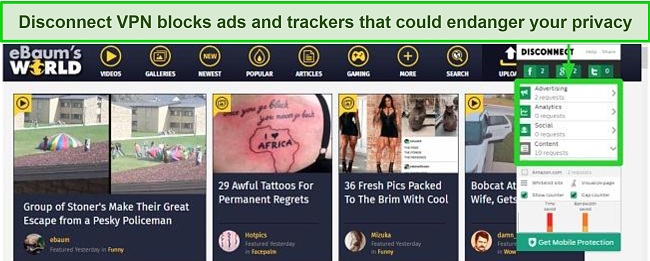
- Ad-blocker and tracker-blocker – an ad blocker blocks advertisements, while a tracker blocker blocks online tracking tools. These features in VPNs enhance user privacy and security by preventing advertisers and online trackers from collecting user data. When I tested Disconnect’s tracker-blocker on an ad-heavy video site, it stopped multiple trackers from Google, Facebook, Amazon, and third-party marketers. For me, it was redundant since I already use a free ad-blocker. If you don’t have one yet, Disconnect’s tool may be a good solution.
This security protocol and encryption standard are military-grade features to keep you protected from hackers, but with weak or poorly designed VPNs, some data like your real IP address and location can still leak out.
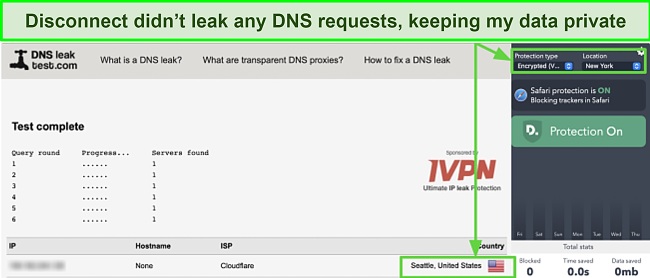
To ensure all this data stayed private, I ran multiple DNS leak tests on every server location. Each server passed my DNS test, confirming my real IP and location stayed hidden while I was connected.
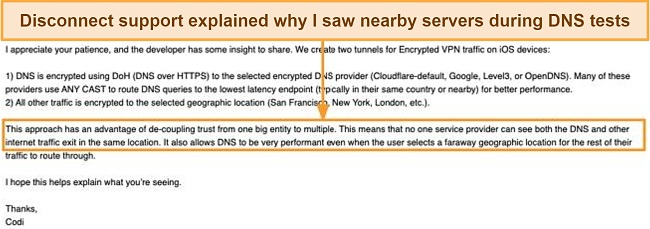
I became concerned when I went back to do more DNS testing a second time. Disconnect started showing a server near my real location, which made me think I might have a data leak. I reached out to support and was relieved that I only saw Disconnect’s encrypted servers and my real IP address wasn’t compromised.
Privacy — Might Share Data
It worries me a little that Disconnect is headquartered in San Francisco, which is in the United States . This puts it under the jurisdiction of the Five Eyes Alliance, an international intelligence-sharing agreement between the US, UK, Canada, Australia, and New Zealand. Under the agreement’s rules, companies based in the US can share customer information with any government that is part of the alliance. Disconnect is transparent about these requirements and says that it will share your information with law enforcement agencies upon request.
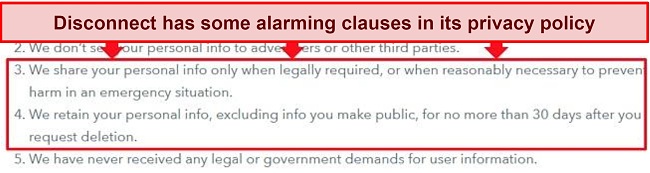
If you need a VPN to stay private online, I suggest you use CyberGhost instead . It’s based outside of the Five Eyes alliance and has special, NoSpy servers that are physically located in Romania — a country with no internet surveillance laws. You can stay completely anonymous by paying with various cryptocurrencies.
Torrenting — Unfortunately, It Doesn’t Support P2P
It was disappointing to learn that Disconnect prohibits torrenting generally . Normally, it’s legal to torrent in many jurisdictions as long as you’re not involved with any illegal file sharing. But Disconnect blocks torrenting totally on several ports commonly used for torrenting in the past with its VPN. It claims this prevents abuse and advises its users not to use its VPN for torrenting or P2P.
So if what you need is a VPN that outrightly supports P2P, my recommendation would be CyberGhost. You can try CyberGhost with hundreds of P2P servers in 100+ countries that are optimized to give you faster speeds as you torrent safely.
Does Disconnect Work in China? Yes
Disconnect lacks stealth or obfuscation tech, but users reportedly use it in China per the company’s support . While I can’t confirm its effectiveness there, it’s noteworthy that Disconnect operates where non-government-sanctioned VPNs are banned by a strict Firewall. The leading VPNs have only managed to bypass this with one such technology.
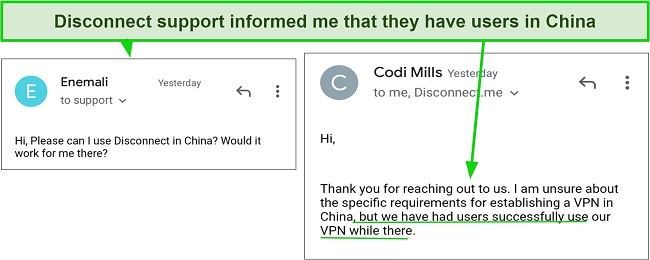
If you’re planning a trip to China and need to access content from your home country, I strongly recommend considering ExpressVPN as your go-to solution . While Disconnect may seem like a viable option, it lacks stealth technology and leaves me skeptical about its effectiveness in China. With ExpressVPN, you can rest assured that your online activity remains private and secure while accessing the content you need. That said, please note that using a non-approved VPN in China is illegal, and my team doesn’t advise our readers to break any country’s rules.
Editor’s Note: Transparency is one of our core values at WizCase, so you should know we are in the same ownership group as ExpressVPN. That said, our detailed reviews follow a strict methodology that examines all relevant performance factors to help you arrive at your own informed conclusion.
Simultaneous Device Connections — Works on 3 Devices at Once
I successfully connected my iPhone, iPad, and MacBook at the same time without slowdowns or delays . If you already have 3 devices connected but want to use the VPN on a different device, simply delete the application from one of the connected devices. Then, install the app on the new device using your custom code link.
If you need a VPN that works on more than 3 devices at once, I recommend using CyberGhost as it offers more simultaneous device connections. Better yet, I experienced no connectivity issues or network slowdowns when using CyberGhost on 7 devices at once.
Device Compatibility — Only for iOS, macOS, and Web Browsers
Unfortunately, Disconnect doesn’t work on most popular operating systems. To access the VPN feature, you must have an iOS or OSX-based device and purchase to Disconnect Premium . Alternatively, there is a browser extension version called “Disconnect Basic” available for Firefox, Chrome, Safari, and Opera. However, this extension only includes the ad and tracker-blocking tool and not the VPN. Additionally, Disconnect offers two other versions, namely Disconnect DNS and Disconnect Pro, which function exclusively on iOS devices.
There used to be an Android version of Disconnect, but I couldn’t find it during my tests. When I asked customer support about it, the agent replied that Disconnect’s premium Android app was unavailable until further notice. He also said that other operating systems weren’t compatible either. So if you’re a Windows user, you won’t be able to use Disconnect on your device. For that, I’ll suggest you check out these top-rated VPNs that work on Windows.
Ease of Setup & Installation — It’s Easy to Get Started With Disconnect
But for power users who demand more control and customization, you may want to explore other VPN options. Disconnect’s settings section is pretty bare-bones compared to other VPNs on the market.
Steps to Installing Disconnect on iOS:
- Download the app . Go to the Apple App Store on your iOS device and search for “Disconnect VPN. Download and install the app on your device.
- Launch the app . Once the app is installed, open it and sign up for the free trial.
- Switch to full VPN mode. After signing up for the free trial, you will be taken to the main screen of the app. By default, the app will be set to “Tracker Blocking Only” mode. To switch to full VPN mode, tap the toggle button at the top of the screen.
- Select your server of choice . Once you’ve switched to full VPN mode, you can select a server location from the available 6 locations.
- Establish connection. Once you’ve selected a server location, you can turn on the VPN by tapping the toggle button in the middle of the screen. When the VPN is connected, the toggle button will turn green.
Since Disconnect’s customer service team is only available between 9 am to 5 pm PT, don’t expect a response outside of those times. You can also reach out via a Twitter account that accepts direct messages, but reply times are inconsistent (from 1 hour to 3 days). In addition, Disconnect features a blog where you can read the latest happenings in the VPN industry and with the service itself.
| VPN vendor | Email response time | 24/7 support | Live chat | Refund policy | Native English |
|---|---|---|---|---|---|
| Disconnect | 6 hours |
| Disconnect | |
|---|---|
| Email response time | 6 hours |
| 24/7 support | |
| Live chat | |
| Refund policy | |
| Native English |
There are 2 Disconnect packages, including monthly and annual options. Signing up for a longer period gives you a whopping 71% discount on the price. It also offers a 7-day free trial that allows you to test the app for yourself before committing to an offer.
It can be a little confusing that Disconnect offers four different packages. Disconnect is the full VPN and the product that I have reviewed in this article . There are also Disconnect Pro and Disconnect DNS, which are iOS-only VPN apps. Last of all is Disconnect Basic, which is a free browser extension. The latter only blocks trackers — it doesn’t offer a VPN.
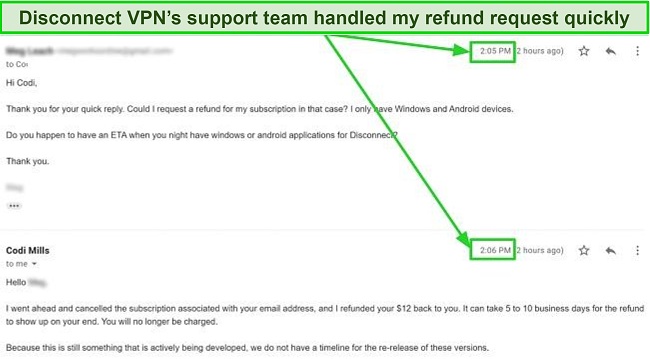
You get a 30-day money-back guarantee with Disconnect . You have to ask for refunds over email, but the process is still fast. I informed the support team via email that the VPN wasn’t suitable for my needs due to my usage of Windows and Android devices. Surprisingly, within a minute of my communication, the agent promptly terminated my offer. Although they said it could take over a week for the refund to reach my bank, I had the money just 2 days later. Disconnect is only sold through the Apple Play Store, so all of its payment methods are indirectly supported.
If you are looking for a VPN offer that provides excellent value for your money, I highly recommend that you consider selecting one of the VPNs from our list of the best monthly VPN services . In addition to offering affordable pricing, these VPNs also provide a plethora of features that can help enhance your online security and privacy.
Disconnect has the following offers
Final Verdict
For a VPN with thousands of super-fast servers, powerful security, and a location outside of any international surveillance agreements, try browsing the web with ExpressVPN . It can unblock the most popular streaming sites and is compatible with macOS, iOS, Windows, Android, and many other devices. ExpressVPN also has an independently verified no-logs policy, so your information stays private. Plus, ExpressVPN offers a 30*-day money-back guarantee so you can try it out for yourself completely risk-free. If you’re not satisfied, you can always get a full refund.
Editor’s Note: Transparency is one of our core values at WizCase, so you should know we are in the same ownership group as ExpressVPN. That said, our detailed reviews follow a strict methodology that examines all relevant performance factors to help you arrive at your own informed conclusion.
Yes, you can try Disconnect free with its 7-day free trial or for 30 days with its money-back guarantee . I tested it myself, and getting a refund took a couple of days (since I had to contact support via email). The only other downfall is that you have to pay with a credit card or PayPal. That means that your name and additional information can be attached to your account, risking your anonymity.
I don’t often recommend using a completely free VPN because they often have low bandwidth and come with a number of security concerns. But, if you did want to test a few, I would recommend taking a look at these safe free VPNs .
- Overall
- Speed
- Servers
- User Experience
- Support
- Pricing

Editor’s Note: We value our relationship with our readers, and we strive to earn your trust through transparency and integrity. We are in the same ownership group as some of the industry-leading products reviewed on this site: ExpressVPN, CyberGhost, Private Internet Access, and Intego. That said, our detailed reviews follow a strict methodology that examines all relevant performance factors to help you arrive at your own informed conclusion.

