- Written by: Sayb Saad Former Writer
Comodo Overview
Comodo never struck me as an extraordinary antivirus , capable of providing the ultimate security against ever-evolving cyber threats. However, I set aside my assumptions and put Comodo to the test to find out if it’s underhyped.
I tested Comodo extensively across several aspects, including its malware scanner, real-time protection abilities, firewall performance, and ease of use. I learned that Comodo is a decent antivirus with some useful features , but I’d rather use its free plan than pay for an upgrade.
It gave me an average real-time protection score. Many of its features like the ad blocker don’t work, while others have been discontinued. Comodo is sufficient to prevent common everyday threats, but you’ll need a premium antivirus like Norton to keep you safe from complex viruses . You can buy Norton risk-free with its 60-day money-back guarantee.
Try Norton risk-free for 60 days
In a Rush? Here’s a 1-Minute Summary
- Decent malware protection. Comodo offers 4 scan types and has a powerful anti-malware engine. Jump here to see how it scored in my real-time tests .
- System performance. It has a lightweight scanner that doesn’t hog system resources. Check out Comodo’s full scan impact on my computer .
- Extra features. Comodo advertises a long list of features, but some of them don’t work or aren’t available anymore. Here are some useful extras it offers .
- User-friendly apps. Comodo works on Windows, iOS, and Android. Its apps have beginner-friendly interfaces. See what features the desktop and mobile apps include .
- Good customer support. You can get fast support via Comodo’s live chat. See what other customer support options Comodo offers .
- Offers a decent free plan. Comodo’s free plan has all the necessary security features for basic protection. Find out here if upgrading to the paid plan is worth it .
Security
Comodo’s malware scanner and real-time protection are average — decent, but not outstanding. However, many of its extra features like the ad blocker, VPN, and cloud storage don’t work. That makes Comodo a basic virus scanner that can’t compete with top brands like Norton and McAfee, which have better protection scores and are loaded with features.
Virus Scan — Offers 4 Scan Options
Comodo has 4 scan types, namely Quick Scan, Full Scan, Rating Scan, and Custom Scan. I highly recommend running the full scan, especially if you’re checking your computer for viruses for the first time. Below is a detailed breakdown of what each scan type entails:
- Quick Scan — swiftly examines critical areas of your system, focusing on commonly infected locations.
- Full Scan — checks your entire computer for hard-to-detect malware that often hides in unassuming areas on your hard drive.
- Rating Scan — uses its cloud database to check your apps and give them a security rating, marking them as trustworthy or untrustworthy.
- Custom Scan — lets you scan specific files and folders, which is especially useful for checking for viruses in external hard drives or USB sticks.
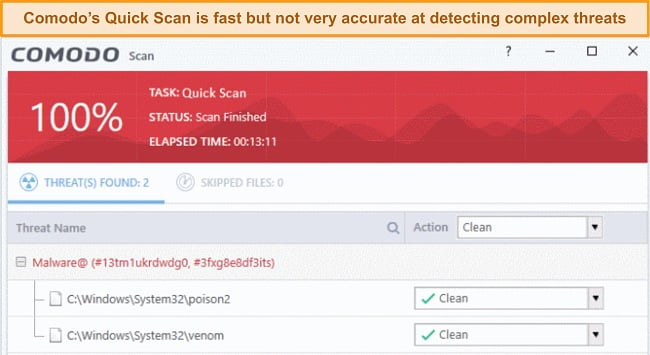
Comodo’s Quick Scan checked about 15,000+ files on my computer in 13 minutes. While its speed was commendable, its accuracy was below average during my testing. It missed some malware samples I had intentionally placed on my system like ZeroAccess rootkit, which is good at evading traditional scans.