| Speed | 6.0 / 10 |
|---|---|
| Servers | 4.0 / 10 |
| User Experience | 6.0 / 10 |
| Support | 5.0 / 10 |
| Pricing | 7.0 / 10 |
BTGuardReview 2026: Before You Buy, Is It Worth It?
- Written By Clement Adegbenro Cybersecurity & Tech Writer
BTGuard Overview
BTGuard is advertised as a great choice for secure torrenting and P2P connections . I was curious to see if this Canada-based VPN could hold true to these promises. I put BTGuard through a wide array of tests to see if this VPN was worthwhile and find out where it ranked among its competitors.
BTGuard is indeed optimized for secure torrenting and other online activities. A major strength of this software is its encryption capability. However, BTGuard’s shortcomings outweigh its positives . Because BTGuard is based in Canada, it must abide by certain data retention laws. The VPN’s server network is small, and it fell far short of my expectations when it came to unblocking streaming services.
The lack of a money-back guarantee by BTGuard is particularly disappointing. Fortunately, there are many better VPN options on the market if BTGuard doesn’t suit your specific needs.
Don’t Have Time? Here’s a 1-Minute Summary
- Unblocks Netflix. BTGuard can unblock Netflix but can’t access any other streaming services. Read about my streaming experience below .
- Poor speeds. With BTGuard’s network, my speeds were slower than normal no matter which server I selected. Learn about BTGuard’s speeds .
- Only 3 servers. BTGuard offers 3 servers in 3 countries and 1000 different IP addresses. Here’s more on BTGuard servers .
- Military-grade security. BTGuard has AES 256-bit encryption, along with the choice of two protocols: OpenVPN or PPTP. Read up on BTGuard’s security features .
- Up to 5 devices. You can connect up to 5 devices at once with BTGuard. Learn about BTGuard and simultaneous connections below .
- No refunds. BTGuard doesn’t offer a money-back guarantee. Read about BtGuard’s pricing .
The only streaming platform I was able to unblock using BTGuard was Netflix . While speeds with Netflix were consistent and in high definition, every other service I tried detected my usage of a VPN and prevented me from accessing my content. You can also use BTGuard to bypass some of the less robust anti-VPN blocking platforms, including YouTube and Kidi.
Netflix: Unblocked
Netflix Canada was accessible on my first attempt without any issues . My shows were in clear HD, and I didn’t experience buffering or connection loss. Also readily accessible is Netflix Netherlands.
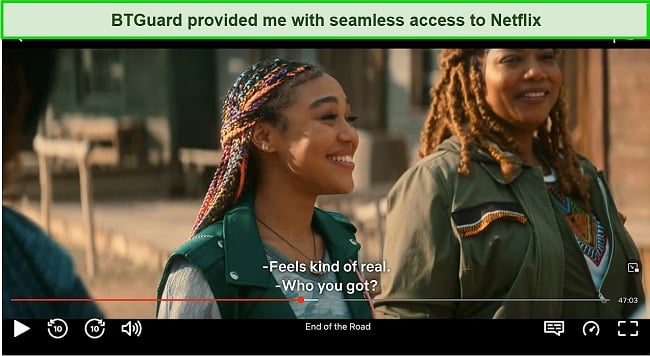
BTGuard is currently unable to offer access to American Netflix, the largest library of Netflix shows that streaming enthusiasts are eager to explore. So you might be better off looking elsewhere for streaming access if you want to access your US Netflix account from abroad.
If you want a VPN that allows you access to all of the streaming services you’ve paid for, I recommend you go with a premium service like ExpressVPN . This VPN can unblock all of the platforms outlined above and stream content without any delays or pixelation.
Editor’s Note: Transparency is one of our core values at WizCase, so you should know we are in the same ownership group as ExpressVPN. That said, our detailed reviews follow a strict methodology that examines all relevant performance factors to help you arrive at your own informed conclusion.
Fast Speeds on Every Server
BTGuard’s connection speeds are astonishingly reliable, despite having only a few servers . This provider claims that it offers multi-homed bandwidth to multiple tier-one networks to give you fast reroute speeds, and I did experience those speeds.
Speed Test Results
As BTGuard only offers three server locations, I expected it to be slower than most VPN services. However, its servers provided an average download speed of 26.8 Mbps – a minimal decrease of 37% .
As a point of comparison, I recorded 43.08Mbps download speed and 17.63Mbps upload speed when connected to my home internet connection. My first test was conducted on a BTGuard server in the Netherlands. This server recorded a download speed of 28.19 Mbps, an upload speed of 9.28 Mbps, and a ping time of 205 ms . While download speeds dropped by 34%, playing HD videos on YouTube was as smooth as it could be.
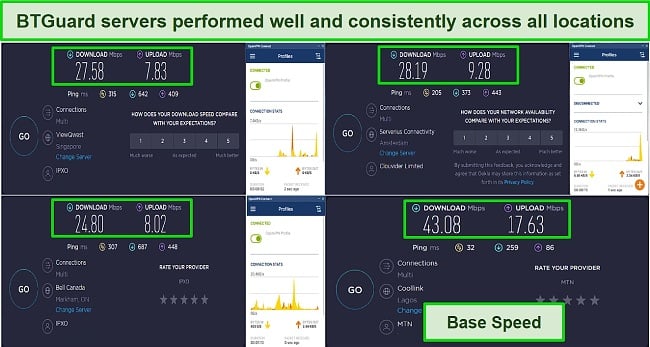
Switching to a Canadian server also resulted in decent speed. The download speed dropped by 42%, and the upload speed was 8.02 Mbps, which is still quite fast. As for the Singapore connection, it suffered a 35% loss in download speed and a 55% loss in upload speed, both of which are quite respectable.
The upload speeds across the entire pool of servers were consistently average . This is more than sufficient to play online multiplayer games which require upload speeds of 3-4Mbps on average. However, the latency/ping scores did not impress me, given that most servers delivered an average of 275 ms.
| Download speed reduction | Upload speed reduction | Ping time to Google.com | Average time to connect (seconds) | Unblock successful for | |
|---|---|---|---|---|---|
| BTGuard | 37% (UK) | 70% (FRA) | 205ms | 16 | Youtube Kodi |
| Average score of top 10 VPNs | 11% (UK) | 16% (FRA) | 24ms | 11 | Netflix Hulu Kodi ESPN Youtube BBC iPlayer |
| BTGuard | Average score of top 10 VPNs | |
|---|---|---|
| Download speed reduction | 37% (UK) | 11% (UK) |
| Upload speed reduction | 70% (FRA) | 16% (FRA) |
| Ping time to Google.com | 205ms | 24ms |
| Average time to connect (seconds) | 16ms | 11ms |
| Unblock successful for |
Server Network — Only 3 Servers to Choose From
BTGuard has 3 servers in 3 countries and 1000 different IP addresses . You can connect to its networks in Canada, the Netherlands, and Singapore. Despite having 1000 different IP addresses, 3 servers aren’t enough when you’re looking for high speeds. With too few servers available, BTGuard easily becomes overcrowded.
Connecting to servers also takes more time when so many users are trying to do so. I don’t like waiting when using a VPN network. With other VPNs like Cyberghost, you don’t have to wait. Cyberghost has 11,690 servers to choose from around the globe , and these servers are designed to make switching between them within the network even easier.
Editor’s Note: Transparency is one of our core values at WizCase, so you should know we are in the same ownership group as CyberGhost VPN. That said, our detailed reviews follow a strict methodology that examines all relevant performance factors to help you arrive at your own informed conclusion.
Security — Needs More Options
BTGuard’s basic level of security is its strongest asset with military-grade AES 256-bit encryption . You can choose between two protocols, OpenVPN and PPTP, which both create a secure, point-to-point transfer between your computer and other networks. While PPTP may offer faster speeds, OpenVPN is the more popular protocol due to its better security measures.
What BTGuard lacks in security is a greater list of options . It doesn’t let you customize the proxy or SSL tunneling features available, which are protocols that enable another level of encryption with a single connection between your computer and the web server, like an online store or news site. BTGuard also lacks an automatic kill switch, which protects your data if your connection drops. Without it, your information could suddenly be exposed to others online.
Privacy — Some Logs Are Kept
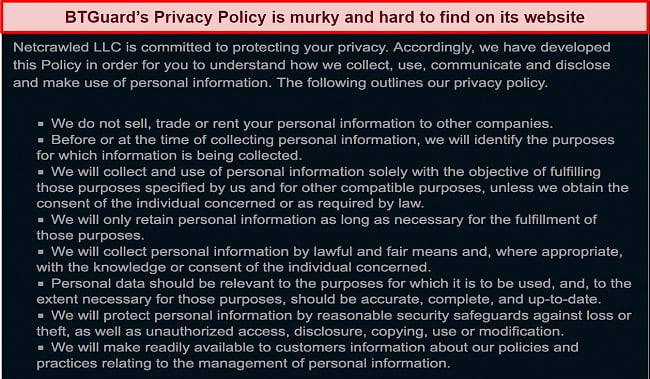
The policy of keeping logs can make some users uncomfortable, as this means that your data is more accessible to hackers than it would be if it weren’t retained at all. As a privacy-minded internet user, I prefer VPNs with a genuine zero-logs policy. ExpressVPN has had its no-logs policy audited by a third party and has proved air-tight in real-life cases.
Torrenting — Supported on all Servers
BTGuard was originally designed to provide anonymity when torrenting . As a matter of fact, the BT in the name is an acronym for BitTorrent, which speaks volumes about BTGuard’s suitability for torrenting.
You will benefit from unlimited torrenting regardless of what server you connect to . BTGuard only operates three servers, but when you connect to one of them, you will be able to enjoy unlimited speed. Make sure that you live near the servers available before signing up for the service since unlimited speed may not be as useful if you live in a distant location.
You should keep in mind that it is illegal to torrent copyrighted files. I always recommend doing your due diligence to make sure that any content you torrent is in the public domain, as well as researching your country’s copyright laws.
Does BTGuard Work in China? No!
BTGuard is not designed to hold up against China’s surveillance and censorship laws , nor does it feature any functionality that makes online access easier in suppressed countries. I’ve confirmed with the BTGuard support team that they’re not currently investing time in workarounds as it currently only works with OpenVPN instead of a dedicated client.
ExpressVPN has been designed to work well in China . The service does not keep any activity logs, guarantees fast speeds across all servers, and offers a wide range of security measures. The protection of a VPN doesn’t give you a license to commit illegal acts, so please exercise a basic level of caution when using a VPN in China.
Editor’s Note: Transparency is one of our core values at WizCase, so you should know we are in the same ownership group as ExpressVPN. That said, our detailed reviews follow a strict methodology that examines all relevant performance factors to help you arrive at your own informed conclusion.
Server Locations
Simultaneous Device Connections — Up to 5
A single BTGuardVPN offer supports up to 5 simultaneous connections . While it is in accordance with industry standards, the number of connections isn’t the most generous. You’ll likely need more than this if you’re planning to connect many frequently-used devices simultaneously. As an alternative, Cyberghost offers 7 simultaneous connections with all premium offers .
Device Compatibility — Compatible With Major Devices
I was fairly impressed with BTGuard’s range of device options, especially given how small this VPN is . It is compatible with Linux, Windows, Mac OS, iOS, Android, gaming consoles, Smart TVs, and Roku through router configurations. However, BTGuard lacks browser extensions for Chrome and Firefox.
Ease of Setup & Installation — Manual Setup on All Platforms
Installation of BTGuard was straightforward enough, and tutorials for setup on each device are available on the BTGuard website . However, these are all manual setups, which means extra steps for users.
Since BTGuard doesn’t have a dedicated client, you’ll also need to download the open-source OpenVPN software . Each installation guide on the BTGuard website provides the link on how to install OpenVPN. You can download it from the OpenVPN website or download it as an app through Google Play or the App Store.
Steps to Using BTGuard on macOS:
- Download OpenVPN client. It is necessary to first download OpenVPN Connect, a free open-source client for OpenVPN.
- Install the VPN client. The setup wizard will guide you through the process of installing the client.
- Get OpenVPN configuration files from BTGuard. These configuration files will be used by the client to establish server profiles.
- Import the configuration files. Once the configuration files have been downloaded, import them into the OpenVPN client.
- Connect to a server profile. In addition, BTGuard provides login credentials for the server profile on its website. To establish a connection, click “Connect” and enter your password when prompted.
BTGuard doesn’t have much in the way of quality customer support . The only way to contact the support team is through a ticket on the website. As a result, you are subject to the provider’s response times, which vary widely by time zone.
When I reached out to BTGuard, it was about a week before they responded, and I found it more effective to search online for answers to my questions, as those were quicker to find and more thorough.
| VPN vendor | Email response time | 24/7 support | Live chat | Refund policy | Native English |
|---|---|---|---|---|---|
| BTGuard |
| BTGuard | |
|---|---|
| Email response time | |
| 24/7 support | |
| Live chat | |
| Refund policy | |
| Native English |
The cost of BTGuard is not justified , especially since it lacks many features available in free and cheaper VPN services. This VPN offers 4 different options, and I purchased the 1-month option to test out all BTGuard’s features. Fortunately, none of BTGuard’s features are restricted to lengthier options, so no matter the option you choose, you will have access to all servers and the ability to enable all its security features.
BTGuard doesn’t offer a money-back guarantee of any kind . The major disadvantage here is that if you are unsatisfied with the product, you are out of luck. These VPNs with affordable monthly offers enable anyone to acquire a reliable and trustworthy VPN service without overspending. Most importantly, these VPNs provide a guarantee of refunding your money, along with essential features to safeguard your online privacy, protect your data, and maintain internet freedom.
It also doesn’t offer a free trial to test out its software , so you’re locked into paying for it if you want to try it. It doesn’t seem right that consumers are subjected to this kind of unfairness, especially when some policies surrounding the product are unclear. It is only possible to make payments using PayPal.
BTGuard has the following offers
Final Verdict
I found BTGuard underwhelming in my tests . On the positive side, the provider offers reasonably fast speeds, supports torrent downloads, and is protected by the highest level of encryption available. As a drawback, BTGuard cannot unblock the majority of streaming services, lacks enough servers to prevent overcrowding, is not available in China, and lacks a client app for popular OSes.
Even worse, BTGuard does not adhere to privacy and trust standards . It maintains some identifiable logs under Canadian jurisdiction, which means that you cannot maintain complete privacy while using this service. It is also outrageously expensive, considering there are numerous freemium VPNs that offer a wider range of services than BTGuard. The lack of a money-back guarantee and the absence of a free trial make BTGuard an unsuitable choice.
There are top VPNs on the market that are worth considering before you purchase BTGuard. It is optimized for lightning-fast speeds, can unblock all major streaming platforms, and allows for safe torrenting. You can test ExpressVPN out completely risk-free as it’s backed by a 30-day money-back guarantee — if you don’t like it, you can easily get a full refund.
Editor’s Note: Transparency is one of our core values at WizCase, so you should know we are in the same ownership group as ExpressVPN. That said, our detailed reviews follow a strict methodology that examines all relevant performance factors to help you arrive at your own informed conclusion.
Yes, BTGuard has military-grade AES 256-bit encryption and the choice between OpenVPN and PPTP protocols . But BTGuard doesn’t have any additional security features that you can customize for your online activities or needs like a kill switch or other options for proxies and tunneling.
It’s also worth mentioning that BTGuard is vague about what personal data it keeps from its uses . This is concerning especially because the VPN is located within the 5/9/14-Eyes Alliance. If you are looking for a genuine zero-logs VPN that falls outside the 5/9/14-Eyes jurisdiction then I would recommend trying out ExpressVPN .
- Overall
- Speed
- Servers
- User Experience
- Support
- Pricing

Editor’s Note: We value our relationship with our readers, and we strive to earn your trust through transparency and integrity. We are in the same ownership group as some of the industry-leading products reviewed on this site: ExpressVPN, CyberGhost, Private Internet Access, and Intego. That said, our detailed reviews follow a strict methodology that examines all relevant performance factors to help you arrive at your own informed conclusion.

