Best VPNs for MLB.TV: Avoid Blackouts and Buffering in 2026
- Written by Osama Zahid Cybersecurity Specialist
- Fact-Checked by Sarah Frazier Former Content Manager
MLB.TV is the best way to watch Major League Baseball in the US, as it broadcasts every single match in the league. However, MLB.TV blacks out games in your local market to drive stadium attendance and protect regional broadcasters. This means you can’t watch your home team’s games live on MLB.TV, even if they’re playing in another city.
Thankfully, a VPN helps you to watch any MLB.TV game by changing your virtual location. If your local games are blacked out, you can connect to a server in a nearby state to watch your favorite teams play without worrying about missing a moment of the action.
A few VPNs are effective, but ExpressVPN is the #1 choice for watching MLB.TV . Its network has multiple US servers, and the fast connection speeds maintain lag-free streams. Plus, the 30*-day money-back guarantee lets you buy ExpressVPN with confidence. Editor’s Note: Transparency is one of our core values at WizCase, so you should know we are in the same ownership group as ExpressVPN. That said, our detailed reviews follow a strict methodology that examines all relevant performance factors to help you arrive at your own informed conclusion.
Try ExpressVPN risk-free
Quick Guide: Best VPNs for MLB.TV in 2026
- ExpressVPN — The #1 overall VPN, with many US servers and fast speeds for lag-free MLB.TV streaming.
- CyberGhost — Offers smart rules that automatically connect to a server when watching MLB.TV, but it isn’t the easiest to use.
- Private Internet Access (PIA) — Has a vast server network covering every US state, but its speeds aren’t the fastest.
Editor’s Note: We value our relationship with our readers, and we strive to earn your trust through transparency and integrity. We are in the same ownership group as some of the industry-leading products reviewed on this site: ExpressVPN, CyberGhost, Private Internet Access, and Intego. That said, our detailed reviews follow a strict methodology that examines all relevant performance factors to help you arrive at your own informed conclusion.
The Best VPNs for MLB.TV (Tested in 2026)
1. ExpressVPN — Fast Connection Speeds for Lag-Free UHD MLB.TV Streams
Key Features:
- Multiple US locations in its network of 3,000+ servers
- Delivers fast connection speeds for lag-free MLB.TV streams
- Works on multiple devices and offers MediaStreamer for platforms without native VPN support
- Supports up to 14 simultaneous connections
- Includes a 30*-day money-back guarantee
ExpressVPN is the #1 choice for watching MLB.TV. It delivers fast speeds with its Lightway protocol, maintaining lag-free UHD streams without any quality drops. Throughout my tests, connection speeds dropped by an average of 15% when using ExpressVPN’s US servers. My connection was consistently fast enough for smooth MLB.TV viewing.
The app’s extensive network of 3,000+ servers includes many options in the US , including New York, New Jersey, Dallas, Miami, and Seattle. This ensures you can find a nearby location where your preferred MLB game isn’t blacked out.
You can use ExpressVPN on up to 14 devices at once, and it has native apps for Windows, macOS, iOS, Android, and many other platforms . Plus, ExpressVPN has a MediaStreamer feature and router configuration options , letting you use it on gaming consoles and smart TVs without native app support.
Editor’s Note: Transparency is one of our core values at WizCase, so you should know we are in the same ownership group as ExpressVPN. That said, our detailed reviews follow a strict methodology that examines all relevant performance factors to help you arrive at your own informed conclusion.
2. CyberGhost — App Rules for Automatic Connections When Watching MLB.TV
Key Features:
- Network of 11,690+ servers, including many options in the United States
- Provides smart rules to connect automatically when watching MLB.TV
- Supports Windows, macOS, iOS, Android, smart TVs, and router configuration
- Allows 7 simultaneous connections
- Long-term offers have a 45-day money-back guarantee
CyberGhost’s smart rules feature offers convenience when you’re about to watch matches on MLB.TV. You can set up various app rules to connect the VPN automatically when you launch your browser for streaming on MLB.TV. You can pair this with the WiFi protection feature to ensure CyberGhost is always working when you’re watching MLB.TV.
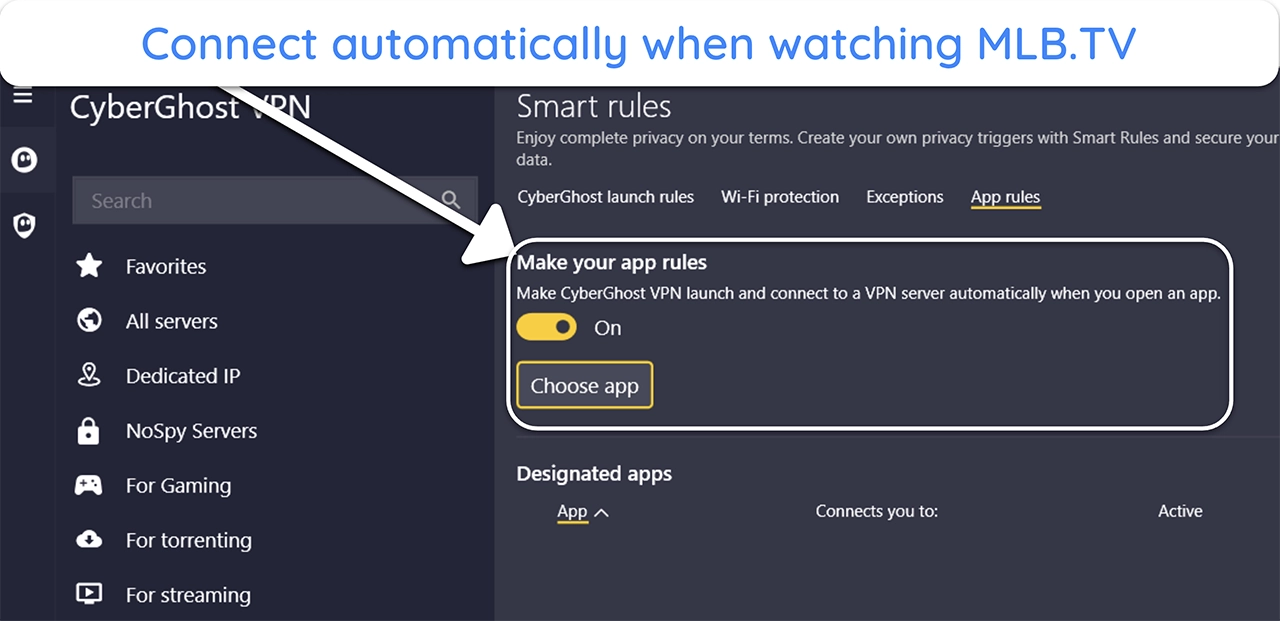
During speed tests, CyberGhost delivered consistently impressive performance . Its network includes 11,690+ servers, and the average speed drop on nearby servers was 20%, but note that this may be higher based on your distance from the server. You’ll get the best speeds for streaming in nearby locations that are outside of your blackout area.
While they aren’t as user-friendly as ExpressVPN’s apps, CyberGhost provides native apps for Windows, macOS, iOS, and Android . Also, it fully supports router configuration, letting you use the VPN on devices without native VPN apps, like routers and gaming consoles.
Editor’s Note: Transparency is one of our core values at WizCase, so you should know we are in the same ownership group as CyberGhost VPN. That said, our detailed reviews follow a strict methodology that examines all relevant performance factors to help you arrive at your own informed conclusion.
3. Private Internet Access — Enormous Network With Servers in Every US State
Key Features:
- 29,650+ servers, including an option in every US state
- Good connection speeds when connected to nearby servers
- Supports router configuration and has apps for Windows, macOS, iOS, and Android
- Has an unlimited simultaneous connection allowance
- 30-day money-back guarantee
PIA’s enormous network of 29,650+ servers includes an option in every US state. This means you can find an uncrowded server nearby where the MLB game you want to watch isn’t blacked out. There’s also a latency indicator in the server menu that helps you choose a server with a fast and stable connection.
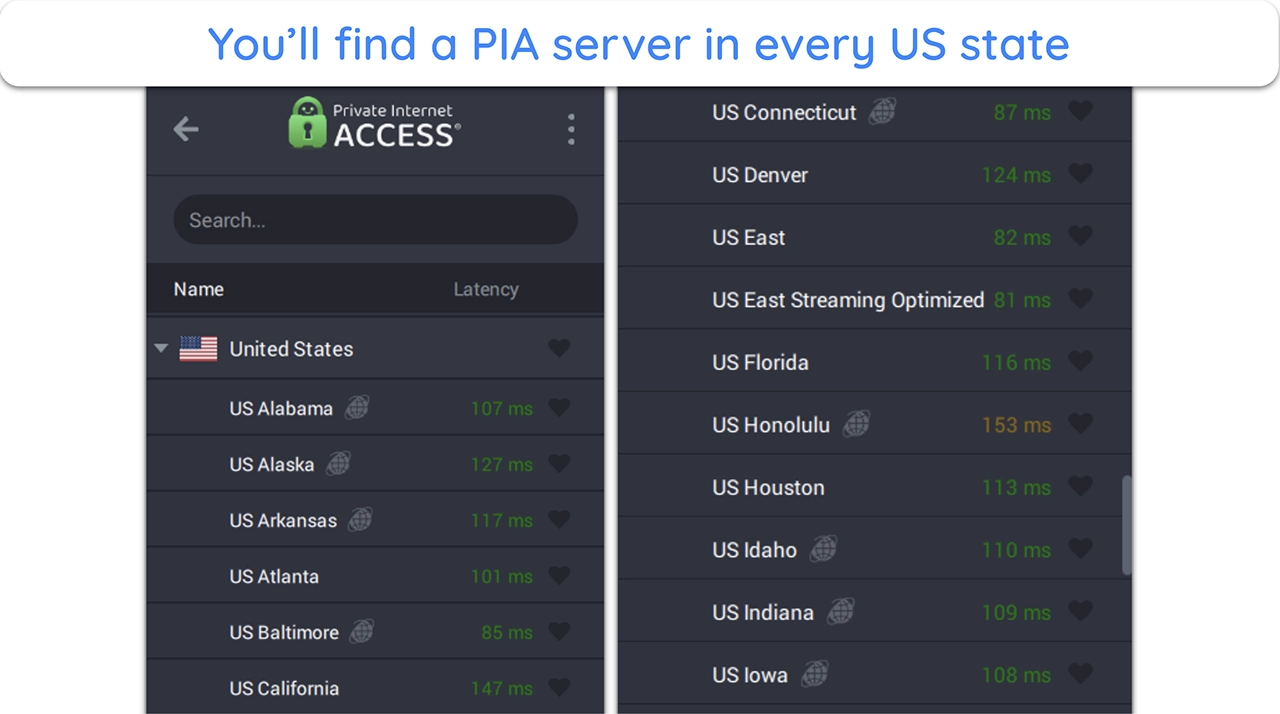
It’s not as fast as ExpressVPN, but PIA’s connection speeds remained impressive in my tests . On nearby servers, the average connection speed drop is only 30% compared to baseline values. Of course, this might be higher if you’re a long distance from the server, meaning you’ll get the best performance if a game isn’t blacked out in a location close to you.
What’s most impressive is that PIA allows unlimited simultaneous connections . This lets you use the VPN to watch MLB.TV on all your devices without logging out anywhere. It also supports configuration on supported routers, making it easy to use it with smart TVs without native VPN support.
Editor’s Note: Transparency is one of our core values at WizCase, so you should know we are in the same ownership group as Private Internet Access. That said, our detailed reviews follow a strict methodology that examines all relevant performance factors to help you arrive at your own informed conclusion.
PIA works with: Windows, macOS, Linux, Chromebook, Android, iOS, Chrome, Firefox, Edge, Opera, Playstation, Xbox, AppleTV, Kodi, Chromecast, smart TVs, Nvidia Shield, routers, and more.
Pricing update for Black Friday: $ 2.03 /month for a three-year plan with 4 months free ( 83 %)!! This is a limited offer so grab it now before it’s gone. See more information on this offer here .
Comparison Table: 2026’s Best VPNs for Watching MLB.TV
| US Servers | Connection Speeds | Simultaneous Connections | Money-back Guarantee | |
|---|---|---|---|---|
| ExpressVPN | 15+ locations | Fastest | 14 | 30* days |
| CyberGhost | 10+ locations | Fast | 7 | 45 days |
| PIA | All 50 US states | Fast (on nearby connections) | unlimited | 30 days |
Editor’s Note: We value our relationship with our readers, and we strive to earn your trust through transparency and integrity. We are in the same ownership group as some of the industry-leading products reviewed on this site: ExpressVPN, CyberGhost, Private Internet Access, and Intego. That said, our detailed reviews follow a strict methodology that examines all relevant performance factors to help you arrive at your own informed conclusion.
3 Easy Steps: How to Watch MLB.TV With a VPN
- Get a VPN. Purchase to your preferred VPN through the official website and download its app.
- Connect to a server. Access the server browser and connect to a US server where the game you want to watch isn’t blacked out.
- Watch MLB.TV. Access MLB.TV and stream your team’s matches live in UHD without lag.
Our Methodology For Testing and Ranking the Best VPNs for MLB.TV
I used our comprehensive testing methodology and ranked VPNs against the following criteria to find the best options for streaming MLB.TV:
- Servers in the US — I chose VPNs with vast server networks that include connections in multiple US states.
- Connection speeds — I selected VPNs that maintain fast connection speeds to ensure lag-free MLB.TV streams.
- Ease of use — I found VPNs that work on all major platforms, letting you watch MLB.TV on your preferred devices.
- Value for money — I picked VPNs that are worth the price, especially when you get a long-term option.
- Money-back guarantee — I prioritized VPNs that have money-back guarantees, letting you try them without risk.
What are MLB Blackouts?
MLB blackouts are restrictions that stop you from livestreaming local games. Even paid MLB.TV users experience them because MLB often gives regional sports networks (RSNs) the broadcast rights to a specific team’s matches.
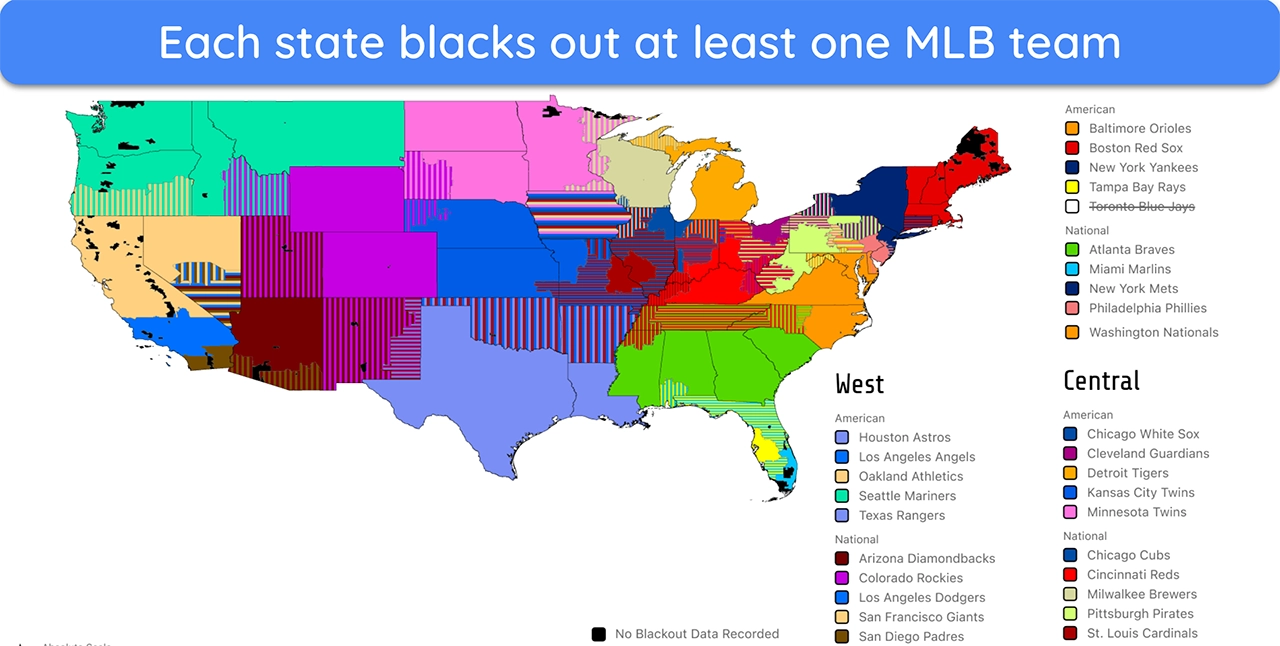
Blackouts are used to give the local team’s broadcaster exclusive coverage of a match and to drive up local stadium attendance.
Where Can I Watch MLB Games?
Several platforms are broadcasting MLB games other than MLB.TV. These include the following:
| Country | Platform | Description |
|---|---|---|
| The US | YouTube TV | Includes MLB Network, which broadcasts some out-of-market games, and select local channels that may air in-market games. |
| Hulu + Live TV | Provides MLB Network and select local channels. | |
| FuboTV | Partnered with MLB and other RSNs — a good choice for watching in-market games. | |
| Sling TV | Has a few different packages, including one that includes MLB Network. | |
| DirecTV Stream | Includes MLB Network and a variety of regional sports networks. | |
| Canada | Sportsnet NOW | Live and on-demand access to all MLB games, including in-market and out-of-market games. |
| DAZN | Live and on-demand access to some MLB games, including all playoff games. | |
| The UK | TNT Sports | Live and on-demand access to some MLB games, including all playoff games. It is included in some BT TV packages. |
| Sky Sports | Live and on-demand access to some MLB games, including all playoff games. It is included in some Sky TV packages. | |
| Australia | Kayo Sports | Live and on-demand access to all MLB games, including in-market and out-of-market games. |
| Fox Sports Australia | Live and on-demand access to some MLB games, including all playoff games. It is included in some Foxtel packages. |
Important 2026 MLB Schedule Dates
The following are the key dates you need to keep in mind to ensure you don’t miss out on any important events in the 2026 MLB season:
| Event | Dates |
|---|---|
| Spring Training | 20th February 2025 |
| Tokyo Series | 18th and 19th March 2025 |
| MLB Opening Day | 27th March 2025 |
| Rivalry Weekend | 16th to 18th May 2025 |
| MLB All-Star Game | 15th July 2025 |
| Roberto Clemente Day | 15th September 2025 |
| End of Regular Season | 28th September 2025 |
The first thing to do is ensure you’re using a reliable VPN to watch MLB.TV . If it’s still not working, try the following troubleshooting steps:
- Try a new server. Connect to another VPN server in the same location and try again.
- Run leak tests. Run a DNS, IP, and WebRTC leak test to ensure your VPN is working properly. If not, restart the VPN and try again.
- Turn off location services. Turn off the GPS on your device, as MLB.TV might use this to see your location.
- Clear browser data. Clear your browser’s cache and cookies, reconnect to the VPN, and try again.
- Update your VPN. Update to the latest version of your VPN before trying again.
You can use the top VPNs on this list to watch MLB.TV on many platforms, including Windows, macOS, iOS, Android, smart TVs, and gaming consoles .
Note that gaming consoles and some smart TVs don’t natively support VPN apps. However, there are alternative ways to set up a VPN on your smart TV , ensuring you can watch MLB.TV on the big screen.
Maybe, but using a top premium VPN is better. Free VPNs often have small server networks, meaning you may not find options in the US-based location where you need a server. Plus, they have poor security and offer slow connection speeds.
Some of the “freemium” VPNs by reputable vendors might be worth considering, but a reliable paid VPN is always going to be the better choice.
Get a VPN (That Works) to Stream on MLB.TV
Using a VPN is the best way to ensure you can watch your favorite MLB teams play. All the above VPNs are effective, as they provide servers in various US locations while maintaining fast connection speeds for smooth streaming on MLB.TV.
Of the top choices, ExpressVPN stands out as the best option . It has servers across the US and maintains fast connection speeds, even over long distances. Plus, it comes with a 30*-day money-back guarantee, letting you try ExpressVPN risk-free . If unsatisfied with its performance, you can get a full refund by contacting support.
Editor’s Note: Transparency is one of our core values at WizCase, so you should know we are in the same ownership group as ExpressVPN. That said, our detailed reviews follow a strict methodology that examines all relevant performance factors to help you arrive at your own informed conclusion.
*Please note that ExpressVPN’s generous money-back guarantee applies to first-time customers only.
Summary — The Best VPNs for MLB.TV in 2026
Editor’s Note: We value our relationship with our readers, and we strive to earn your trust through transparency and integrity. We are in the same ownership group as some of the industry-leading products reviewed on this site: ExpressVPN, CyberGhost, Private Internet Access, and Intego. That said, our detailed reviews follow a strict methodology that examines all relevant performance factors to help you arrive at your own informed conclusion.
