| Speed | 7.0 / 10 |
|---|---|
| Servers | 5.0 / 10 |
| User Experience | 6.0 / 10 |
| Support | 6.0 / 10 |
| Pricing | 5.0 / 10 |
AdGuard VPNReview 2026: Before You Buy, Is It Worth It?
- Written By Clement Adegbenro Cybersecurity & Tech Writer
AdGuard VPN Overview
AdGuard claims to be the solution to your privacy concerns with its trusted VPN service. They tout their years of experience in the industry and promise a secure and confidential online environment, but it remains to be seen if these claims hold up . In this review, I put AdGuard’s assertions to the test and help you determine if their VPN service is actually worth considering.
AdGuard delivers on its promise of protecting your privacy while browsing the web, but the VPN component isn’t quite up to par . Being in a secure location, having effective security measures in place, and enabling you to access some well-known streaming services on a variety of devices are all nice, but they don’t make up for the high price.
If you’re considering signing up for AdGuard VPN, there’s no need to worry about committing to a long-term offer without trying it out first. All annual and biannual purchasers are eligible for a 30-day money-back guarantee, so you can try AdGuard VPN risk-free and see if it meets your needs. Plus, you can even test out the service with the free version before committing to an offer.
Try AdGuard VPN risk-free
Don’t Have Time? Here’s a 1-Minute Summary
- Unblocked some streaming services . I could only unblock Netflix, Hulu, and Disney+ with AdGuard VPN’s servers. Click here for full test results .
- Fast speeds, but only on short-distance servers . While AdGuard VPN has fast speeds on short-distance servers, its remote servers are too slow for streaming or downloading torrents. See how I tested AdGuard VPN’s speeds below .
- Servers across 65+ locations . AdGuard is present in 65+ different locations, with a network of 1000+ servers. Find out more about AdGuard VPN servers .
- Supports all major operating systems and more . In addition to browser extensions, AdGuard VPN also has native clients for desktops and mobile phones. Check to see if it supports your device .
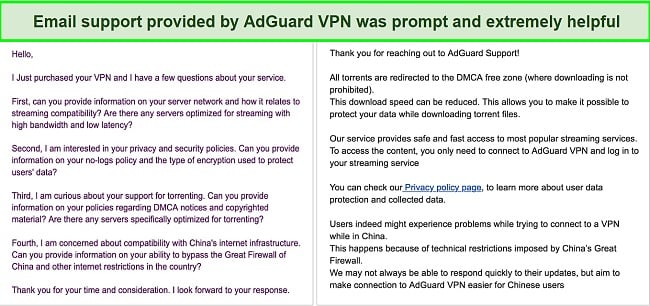
- Customer support is easily accessible . AdGuard VPN’s email support team quickly and helpfully responded to my inquiry. You can learn more about AdGuard’s other support options here .
- 30-day money-back guarantee . Only long-term purchasers of AdGuard VPN can take advantage of the 30-day money-back guarantee. More details about its pricing are available here .
Try AdGuard VPN risk-free
Netflix, Disney+, and Hulu: Unblocked
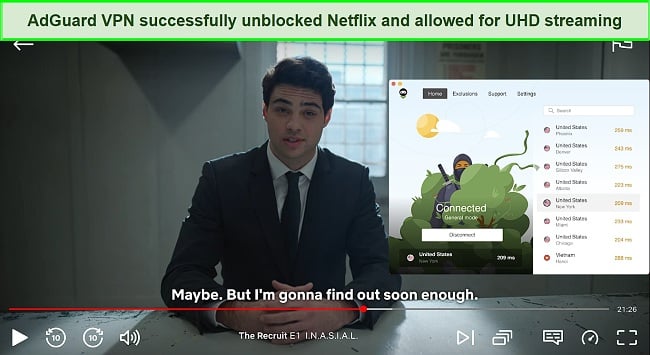
Adguard VPN offers a convenient way to access Netflix’s US library and get the most out of your offer . The service boasts high average speeds, ensuring smooth streaming of Netflix content in high resolution from nearly any server without lag.
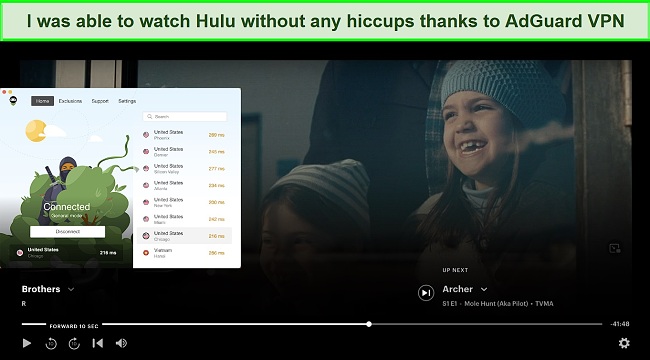
Alternatively, Hulu is a streaming service that offers a wide selection of TV shows and a Live TV feature. It is available in the US, certain areas of Japan, and US territories and military bases. If you are traveling outside of these locations and have an active offer, you can use AdGuard VPN to access Hulu content without any noticeable slowdown .
Streaming services like Disney+ are expanding their library to meet rising demand. If you have a Disney+ account, you can use AdGuard VPN to access the service from any country and view content from your home country . I personally tested the server in New York and was able to unblock the streaming service without any difficulty.
Try AdGuard VPN risk-free
Good Speeds on Short-Distance Servers
AdGuard VPN offers faster speeds on short-distance servers, but it may struggle when connecting to servers located farther away . In my testing, the best performance was seen on servers in the US, UK, France, and other European locations. However, servers located in remote countries such as Australia and Singapore may experience lower-than-average performance.
It is worth noting that AdGuard VPN has a higher latency level, which may make it less suitable for gaming. If you’re looking for a VPN to use for gaming, I recommend checking out CyberGhost instead . Its gaming-optimized servers make it one of the best VPNs for COD: Warzone and other fast-paced games.
Speed Test Results
AdGuard VPN was impressive particularly on short-distance servers. To assess the impact of AdGuard VPN on internet connection speed, I conducted tests with and without the VPN. First, I checked my download and upload speeds without the VPN, and the results showed an average download speed of 28.51 Mbps and an average upload speed of 15.24 Mbps. Then, I decided to put AdGuard VPN to the test by trying it out on servers in the US, UK, France, and Australia.
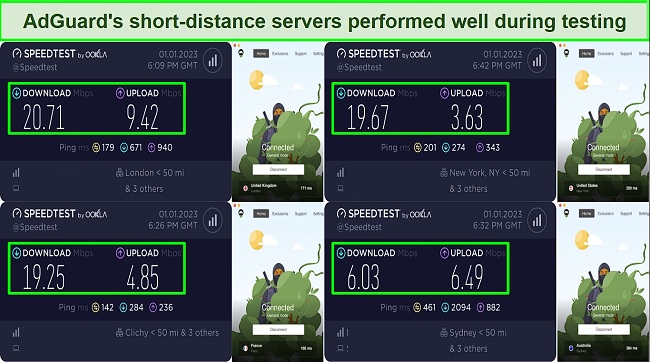
There was a 27% decrease in local connections within the United States and a 30-35% reduction in speeds for connections between the United States and Europe. It is important to note that these reduced speeds may only be noticeable when downloading large files or for those without a stable base connection.
Outside of North America and Europe, the performance of AdGuard’s connections wasn’t as consistent. For example, I experienced a 78% decrease in speed when I connected to Australia from the US. This may cause issues with downloading files and streaming video.
In Asia, servers had even slower speeds, with over 90% loss in Hong Kong and Thailand, resulting in speeds as low as 1-2Mbps. This may make regular web browsing and accessing media-heavy websites such as Facebook and Instagram difficult due to timeout errors.
Try AdGuard VPN risk-free
| Download speed reduction | Upload speed reduction | Ping time to Google.com | Average time to connect (seconds) | Unblock successful for | |
|---|---|---|---|---|---|
| AdGuard VPN | 31% (UK) | 68% (FRA) | 51.77ms | 11 | Netflix Hulu Youtube |
| Average score of top 10 VPNs | 11% (UK) | 16% (FRA) | 24ms | 11 | Netflix Hulu Kodi ESPN Youtube BBC iPlayer |
| AdGuard VPN | Average score of top 10 VPNs | |
|---|---|---|
| Download speed reduction | 31% (UK) | 11% (UK) |
| Upload speed reduction | 68% (FRA) | 16% (FRA) |
| Ping time to Google.com | 51.77ms | 24ms |
| Average time to connect (seconds) | 11ms | 11ms |
| Unblock successful for |
Server Network — Limited Server Offerings
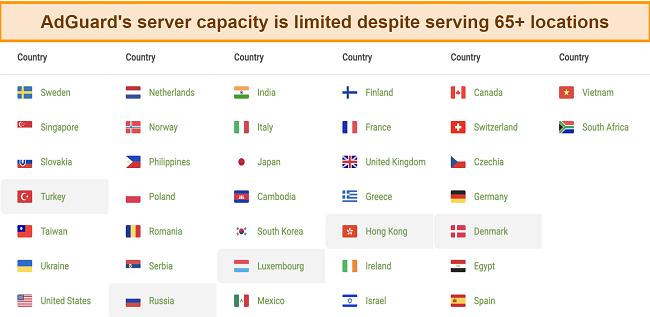
AdGuardVPN’s server network covers 50 countries and over 65 locations , allowing you to choose the server that best fits your needs and make your connection appear to be from any desired country. There are totally 1000+ servers available, covering many popular server locations including the United States, Europe, and Asia. With an AdGuard VPN offer, you can access all available locations and unlock content while protecting your online activity from being monitored.
Unlike other VPNs that provide recommendations for servers based on specific tasks such as streaming, gaming, and torrenting, AdGuard VPN does not offer any guidance on which servers are the fastest to use. Instead, it redirects you to the appropriate servers based on your needs. This approach is more user-friendly since it eliminates the need for you to switch between different servers for various purposes. For instance, if you are downloading a torrent file, AdGuard VPN will redirect your traffic to special servers situated in the DMCA-free zones.
Furthermore, the list of server locations not only shows the available servers but also their corresponding ping numbers. These ping numbers can help you identify the quickest and most suitable server for your specific needs. By choosing a server with the lowest ping time, you can ensure a fast and efficient connection.
Security — Industry-Standard Encryption
AdGuard VPN has implemented several security measures to ensure the protection of its users . However, the effectiveness of these measures may vary in different areas.
These features include:
- Military-grade encryption – AdGuard VPN utilizes robust encryption capabilities to protect your data. Specifically, they have chosen to use AES-256, which is widely considered the best encryption method currently available.
- Protocol – AdGuard VPN uses proprietary HTTPS (TLS) and HTTP/2 as transport protocols, making it harder to detect the use of a VPN. However, these custom protocols aren’t open source and have not been tested as thoroughly as more established options.
- Kill switch – The kill switch is a feature that blocks internet access if the VPN connection is lost. It is a standard feature in the industry designed to protect your internet protocol address in the event of any technical issues.
- Split tunneling – AdGuard’s split tunneling function allows you to selectively use a VPN connection. This can be useful for tasks that don’t require strong privacy protection, as it allows for normal connection speeds and can save on bandwidth usage. With split tunneling, added applications will work normally without the encryption and speed throttling that often comes with a VPN connection.
- Auto start – The auto-start feature allows the VPN to automatically start when you turn on your device, meaning you don’t have to manually start the VPN every time. This can be helpful for those who rely on the VPN for security or privacy, as it ensures that your connection is always protected.
- Website safelisting – AdGuard also provides a Website safelisting feature that allows you to fine-tune your protection based on specific web addresses. This feature functions similarly to split tunneling, but it operates on a website level rather than on individual applications.
- Subnet exclusions – This function allows you to specify regular network routes for a specific address on your network, such as a printer. It is recommended, however, that this task be handled by a network administrator, particularly if you are not very tech-savvy.
- SOCKS5 proxy – This function provides a random IP address for interacting with others but does not encrypt your network traffic. This results in generally faster connections since encryption is not used. It is important to note that this feature works on the application level, meaning you must manually set it up in the settings of each individual application in order to use the SOCKS5 proxy.
- Custom DNS – AdGuard VPN also gives you the option to customize your DNS settings. While custom DNS servers can offer faster connections, web filtering, ad blocking, phishing protection, and other benefits, they can also undermine the privacy aspect of using a VPN. In general, you don’t need to customize your DNS if you’re using a privacy-respecting VPN.
To ensure that AdGuard VPN is able to effectively hide my IP address, I conducted various leak tests on its servers. The results of these tests showed that AdGuard is successful in preventing any leaks from occurring.
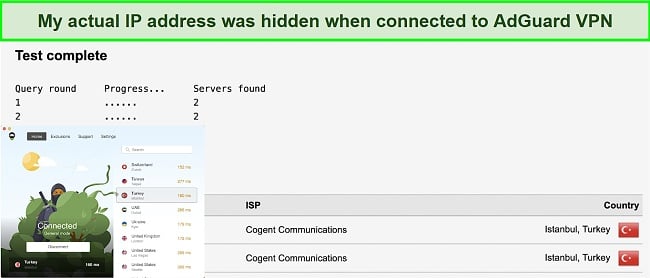
Additionally, this test also demonstrated that AdGuard protects against WebRTC leaks . If AdGuard had not taken measures to secure it, my IP address would have been visible in the Public IP address section through the WebRTC leak. While AdGuard effectively handles WebRTC leaks, it is important to note that this is a browser-based vulnerability and even a well-functioning VPN may still potentially leak your IP address through WebRTC.
Privacy — Not 100% Log-Free
More importantly, AdGuard VPN does not track your browsing data, metadata, source IP address, VPN IP address, or DNS queries. In other words, your online activity remains private and secure.
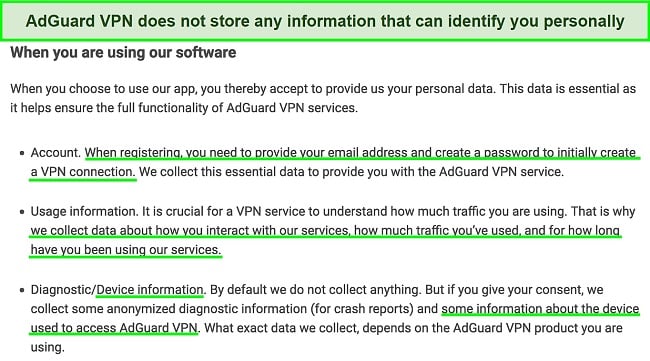
The Cyprus-based headquarters of AdGuard VPN is advantageous from a privacy standpoint because it is not subject to data retention, logging, or monitoring by any of the 14-Eyes regions. Additionally, AdGuard VPN supports Bitcoin as a payment option, further demonstrating their dedication to customer anonymity.
It’s worth noting that AdGuard VPN has not undergone a third-party audit like other VPN companies, so we are just taking their word for it. If maintaining anonymity is crucial to you, consider trying ExpressVPN instead , since it has been externally verified to keep no logs.
Try AdGuard VPN risk-free
Editor’s Note: Transparency is one of our core values at WizCase, so you should know we are in the same ownership group as ExpressVPN. That said, our detailed reviews follow a strict methodology that examines all relevant performance factors to help you arrive at your own informed conclusion.
Torrenting — Supports P2P File Sharing
AdGuard VPN is well-suited for torrenting and P2P file sharing , and it performs best when connected to servers that are located near you. AdGuard VPN provides unlimited bandwidth, ensuring a fast and consistent speed for downloading large files.
In addition, the company places a high emphasis on customer privacy by keeping minimal logs of activity . While they have a limited number of servers, our testing showed that AdGuard VPN maintained a stable connection, making it a reliable choice for torrenting.
Please note that my team and I do not condone illegal torrenting. It is important to check the rules and regulations in your country and make sure that the torrents you download are copyright-free.
Does AdGuard VPN Work in China? Yes!
Even though I was unable to test it myself, I received confirmation from the support team that the service works properly in China . AdGuard’s representative stated that it uses a custom protocol that can easily blend in with normal traffic, making it difficult for Chinese censorship to detect and combat. The representative also mentioned that the service can only maintain a limited number of servers in China and therefore concentrates on a select few to allow Chinese users to effectively evade censorship. Additionally, due to this custom protocol, it is among the few VPN providers that operate in Russia despite facing repeated blockades.
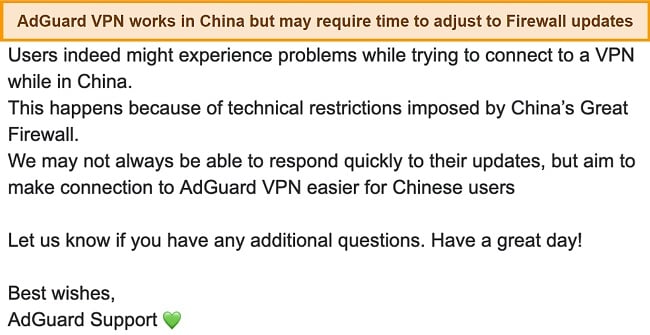
If you’re planning to travel to China or need a VPN service that works within the country, it’s important to have a backup option in case your primary choice is unavailable. ExpressVPN is one of the few VPNs that reliably work in China , making it a smart choice for those in need of a VPN service in this region.
Although it is wise to be cautious when using a VPN in China, there have been no known cases of the Chinese government punishing foreigners for using one. The government tends to block VPNs technologically rather than targeting individuals who use them.
Try AdGuard VPN risk-free
Server Locations
User Experience
Simultaneous Device Connections — 10 Connections Per Account
AdGuard VPN allows you to link up to 10 devices at the same time, which is a significant advantage compared to the industry’s typical limit of 5 devices . This means that you can protect not only your laptop and phone, but also your tablet, smart TV, and other devices that are capable of connecting to the internet. Additionally, having more connections available can help you switch between devices seamlessly, ensuring that all of your devices remain protected and anonymous while browsing the internet.
Device Compatibility — Available on Popular Platforms
AdGuard VPN offers a range of options for device and platform compatibility, including standalone apps for Windows, Mac, iOS, and Android , as well as browser extensions for Chrome, Edge, Firefox, and Opera.
It is crucial to understand that browser extensions do not provide the same level of protection as VPNs. While they may offer some security measures for web browsing, they function as a proxy service rather than creating an encrypted connection like VPNs. Therefore, they are not a complete VPN solution.
Ease of Setup & Installation — Straightforward for Most Devices
AdGuard VPN is a solution that is easy to use and set up for users of all levels of VPN expertise . It is user-friendly for ordinary users and has advanced settings and options for those who know what they want to do. The design is consistent across all devices and allows users to connect to a server right away without distractions. The main elements are clearly displayed, and there is a single primary button that can be used to ensure safety and protection.
To download AdGuard VPN, you can visit the app store or the AdGuard VPN website, depending on your operating system. The installation process is quick and easy, and you can be up and running in just a few minutes .
The basic settings of AdGuard VPN are straightforward. You can choose a server based on location or ping, set up the app to work only on specific sites, and enable advanced features like the kill switch to browse the internet anonymously and safely.
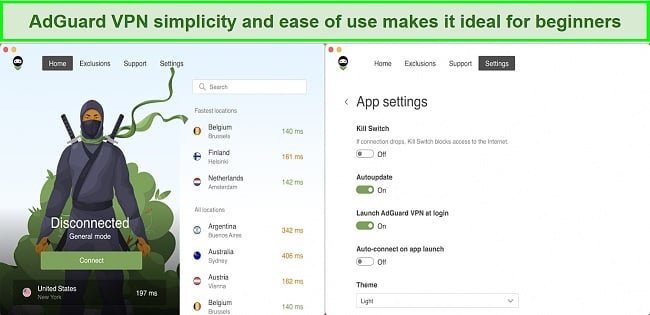
Overall, the mobile and desktop versions of AdGuard VPN are designed with the convenience of the user in mind. The app is easy to use and has advanced options for those who need them. The installation process is quick and the basic settings are straightforward.
Steps to Install AdGuard VPN on Windows
- Download the AdGuard VPN client . To download AdGuard VPN on Windows, visit the company’s website, click “Product,” and choose the Windows version to save the installation file to your computer.
- Run the installation file . To begin the installation process, you will need to find the downloaded installation file and double-click on it. A window will appear with the terms and conditions of the installation. If you agree to these terms, click “I Agree.” Then, click the “Install” button to start the installation process.
- Launch the application . After the installation is complete, click the “Finish” button to launch the app.
- Sign in to your account . To use AdGuard VPN, you must log in with your login credentials, which will then grant you access to the server and connection interface.
- Establish a connection . To start using AdGuard VPN on your Windows device, simply select a server from the list and click “Connect.” After the connection has been established, you will be protected by the VPN. It’s that easy!
Try AdGuard VPN risk-free
| VPN vendor | Email response time | 24/7 support | Live chat | Refund policy | Native English |
|---|---|---|---|---|---|
| AdGuard VPN |
| AdGuard VPN | |
|---|---|
| Email response time | |
| 24/7 support | |
| Live chat | |
| Refund policy | |
| Native English |
In addition to its premium paid version, AdGuard VPN also has a freemium option . The free version, though it comes with limitations, has certain restrictions on its functionality. You’re restricted to a mere 3GB of monthly data usage, which falls short even for streaming a single HD movie. Additionally, the connection speed is capped at 20 Mbps.
You can pay for AdGuard VPN with a variety of methods, including credit card, PayPal, or cryptocurrency, so you don’t have to worry about revealing your true identity. Each offer comes with a 30-day money-back guarantee, which gives you the opportunity to try out Adguard VPN risk-free . This guarantee, however, is valid only for annual or longer purchases and cannot be applied to the monthly option.
AdGuard VPN has the following offers
Final Verdict
AdGuard VPN offers a reliable platform, great email customer service, all the necessary security features, and a user-friendly interface . It effectively unblocks certain streaming platforms and actively protects against DNS, IP, and WebRTC leaks.
While AdGuard VPN may not be a “no-logs” service, it does not keep logs of your IP address or web browsing activity. However, AdGuard VPN could improve by expanding its server offerings as its network is currently limited.
Considering its relative youth, AdGuard VPN could use some time to mature into a fully functional product. So, it might not be as smart to choose AdGuard VPN over more well-known services like CyberGhost, which has a wider range of features and costs about the same. You can test CyberGhost out completely risk-free as it’s backed by a 45-day money-back guarantee — if you don’t like it, you can easily get a full refund.
Try AdGuard VPN risk-free
Editor’s Note: Transparency is one of our core values at WizCase, so you should know we are in the same ownership group as CyberGhost VPN. That said, our detailed reviews follow a strict methodology that examines all relevant performance factors to help you arrive at your own informed conclusion.
Yes! AdGuard VPN does offer a free version , however, it comes with a number of restrictions in comparison to the premium offer. For instance, you’re limited to a maximum of 20 Mbps and can only connect to two servers at once . Moreover, the monthly VPN traffic limit for free users is set at 3 GB.
While free VPNs may be tempting, it is important to be aware that they may sell your data to third parties in exchange for providing their services. This means that your personal information could be shared for financial gain. For this reason, it is generally recommended to use a paid VPN service to protect your data. However, if you are unable to afford a paid VPN, there are still a few free VPN options that can provide adequate protection for your data .
Try AdGuard VPN risk-free
- Overall
- Speed
- Servers
- User Experience
- Support
- Pricing

Editor’s Note: We value our relationship with our readers, and we strive to earn your trust through transparency and integrity. We are in the same ownership group as some of the industry-leading products reviewed on this site: ExpressVPN, CyberGhost, Private Internet Access, and Intego. That said, our detailed reviews follow a strict methodology that examines all relevant performance factors to help you arrive at your own informed conclusion.

