9 Best FREE VPNs for Chromebook in 2026 (+ Setup Guide)
- Written by Kate Hawkins Former Editor
You’ll find plenty of free Chromebook VPNs claiming to be secure, private, and 100% free. In reality, many free VPNs have tiny data allowances, restricted servers, and slow speeds. The worst free Chromebook VPNs are even filled with hidden malware and trackers.
To save you from risking your own Chromebook, I tested 50+ VPNs and ranked the best free VPNs for Chromebook in 2026 . These VPNs are safe for most online activities — but if you regularly use a VPN, I suggest you invest in an affordable option like ExpressVPN.
ExpressVPN has an easy-to-use Chrome extension and Android app, as well as unlimited data and bandwidth, military-grade security, and a global server network. You can try ExpressVPN on Chromebook risk-free as it’s backed by a 30*-day money-back guarantee. If you’re not satisfied, you can get a full refund with no questions asked. Editor’s Note: Transparency is one of our core values at WizCase, so you should know we are in the same ownership group as ExpressVPN. That said, our detailed reviews follow a strict methodology that examines all relevant performance factors to help you arrive at your own informed conclusion.
Get ExpressVPN for Chromebook
Quick Guide: Best Free VPNs for Chromebook in 2026
- ExpressVPN — #1 paid VPN for Chromebook with blazing fast speeds and top-tier security. Try ExpressVPN on Chromebook now !
- CyberGhost — Free Chrome proxy extension and Chromebook-compatible Android VPN app, but the VPN is only free for 45 days.
- Proton VPN — Unlimited free data and 3 server locations on the Android app, but no streaming or torrenting.
- Hotspot Shield — No data limits on free Chrome extension and 15GB monthly data on Android VPN app, but only 1 free US server available.
- hide.me — Free Chrome extension and Android VPN app for Chromebook, but both options have downsides (like restricted servers or data).
- TunnelBear — Connect to any server in 47+ countries on the Android VPN app, but only 500MB of free data per month.
- NordVPN — Steady and fast connections on Chromebook, but its apps for some devices are not easy to use.
- Surfshark — Allows you to connect all your devices besides Chromebook, but it doesn’t unblock some streaming services.
- ZenMate — Chrome browser extension has free data and 4 server locations, but extremely slow speeds and no streaming allowed.
Get ExpressVPN for Chromebook
Editor’s Note: We value our relationship with our readers, and we strive to earn your trust through transparency and integrity. We are in the same ownership group as some of the industry-leading products reviewed on this site: ExpressVPN, CyberGhost, Private Internet Access, and Intego. That said, our detailed reviews follow a strict methodology that examines all relevant performance factors to help you arrive at your own informed conclusion.
The Best Free VPNs for Chromebook (Tested 2026)
1.ExpressVPN — #1 VPN for Chromebook With Top-Tier Encryption and Fast Speeds
Key Features:
- Unlimited data on Chrome browser extension and Android app
- 3,000+ servers in 105+ countries
- AES-256 bit encryption, kill switch, and leak protection protects your Chromebook
- 24/7 customer support available via live chat and email
- Allows 14 device connections at the same time
ExpressVPN easily ranks as the best VPN for Chromebook , as well as the best all-round VPN in 2026 . The Chrome browser extension isn’t a standalone proxy like extensions offered by other VPNs — it works alongside ExpressVPN’s app for full VPN protection and so you can easily control your connections from within your browser.
You just need to install the Android app before you can start using the browser extension. ExpressVPN is compatible with a variety of Chromebooks including Dell, Acer, HP, Samsung, and more. The app file size is relatively small at just 33MB so it won’t take up too much storage space.
ExpressVPN protects your data with military-grade encryption and its built-in kill switch keeps you secure if the connection is interrupted. Both the Chrome browser extension and Android app protects against IP, DNS, and WebRTC leaks to ensure your data is safe while connected to a server.
On average, I only saw an 18% drop from my standard speed of 115Mbps — this meant I could stream, torrent, and game online with no lag. Even when I connected to servers 15,000+ km away, ExpressVPN provided fast connection speeds. You can connect to the proprietary Lightway protocol for the fastest speeds , although ExpressVPN also supports OpenVPN (UDP and TCP), IKEv2, and L2TP/IPSec.
While it’s not free, my tests proved that ExpressVPN is #1 for Chromebook and it’s well worth testing for yourself with the 30*-day money-back guarantee. If you don’t like it, you’re entitled to a refund. I tested the process myself and it took less than 5 minutes for a live chat agent to approve my refund. I had my money back in less than 5 days.
Editor’s Note: Transparency is one of our core values at WizCase, so you should know we are in the same ownership group as ExpressVPN. That said, our detailed reviews follow a strict methodology that examines all relevant performance factors to help you arrive at your own informed conclusion.
Get ExpressVPN for Chromebook
2.CyberGhost — Free Chrome Browser Extension With Unlimited Data and Servers in 4 Countries
Key Features:
- No data limits on free Chrome browser extension or Android app
- Only 4 server countries on Chrome extension, but 11,690+ servers in 100+ countries on app
- Military-grade encryption, kill switch, and leak protection on Android app
- 24/7 customer support over live chat and email
- Connect 7 devices at the same time
CyberGhost has a free Chrome browser extension with servers in the US, Germany, the Netherlands, and Romania. In my tests, I ran checks for data or IP address leaks, and none were detected. I was even more impressed when I streamed Netflix US — there’s unlimited bandwidth and data, so I didn’t have to wait for any buffering or loading during my favorite shows.
Unfortunately, the Chrome extension is actually a proxy (not a VPN) , so you don’t have advanced encryption options, protocols, or a kill switch. While you might not need these security features for casually browsing the internet, I strongly recommend having stronger privacy measures in place if you want to ensure your personal details remain private — especially if you like torrenting or you regularly bank online.
Luckily, CyberGhost’s Android app is a full VPN service and it works with a range of Chromebooks , including Acer, Dell, HP, and more. It’s only 30MB, so it won’t take up a lot of space on your Chromebook.
You do need to pay an upfront cost, but you can take advantage of the generous 45-day money-back guarantee and use CyberGhost’s Android app for free on Chromebook . It’s essentially the same as a free trial, which makes CyberGhost ideal if you only need a VPN for a short time as you can easily get a full refund when you’re finished using it.
Editor’s Note: Transparency is one of our core values at WizCase, so you should know we are in the same ownership group as CyberGhost VPN. That said, our detailed reviews follow a strict methodology that examines all relevant performance factors to help you arrive at your own informed conclusion.
Get CyberGhost for Chromebook for free
3.Proton VPN — Unlimited Free Data and Top-Tier Security on Android App for Chromebook
Key Features:
- Unlimited data on the free offer
- Free servers in the US, Netherlands, and Japan
- AES-256-bit encryption, kill switch, leak protection, and no-logs policy
- Customer support available through email
- Supports 1 connection per account for free users
Proton VPN’s free Android app for Chromebook has unlimited data , so you can use it as much as you want without worrying about data caps. There are 3 server countries to choose from: the US, Netherlands, and Japan.
Unlimited data would be ideal for streaming and torrenting, but Proton VPN blocks data-intensive activities for free users . While I could watch YouTube and some other video sites, streaming services like Netflix, Hulu, and Disney+ were mostly inaccessible. Proton VPN’s US server #8 could sometimes unblock Netflix, but I often got the proxy error message.
My speed dropped around 65% on average from 115Mbps to 40Mbps. This didn’t create a noticeable difference for me, but if your regular speeds are slower, you could experience a more obvious slowdown.
Proton VPN is compatible with the majority of Chromebooks , including devices from HP, Asus, Dell, and Samsung. At around 18MB, the file size is very small to ensure you have plenty of space leftover. Simply create a free account to use Proton VPN for free on Chromebook today.
Proton VPN works on: Windows, Android, macOS, iOS, Linux, and more.
Get Proton VPN for free on Chromebook
4.Hotspot Shield — 15GB of Month Free Data on Android App or Unlimited Data on Chrome Extension
Key Features:
- No data limits on Chrome extension, but only 500MB free daily data on VPN app
- 1 virtual US server available for free users
- Blocks ads, cookies, malware and trackers
- Customer support via email only
- 1 device connection allowed
Hotspot Shield provides a free Chrome extension and an Android app, but they can only be used on one device at a time. The free offer limits users to a single US server and a daily data cap of 500MB. This is enough for approximately 45 minutes of low-quality streaming, as this consumes roughly 700MB per hour. Users must decide whether to install the extension or use the app.
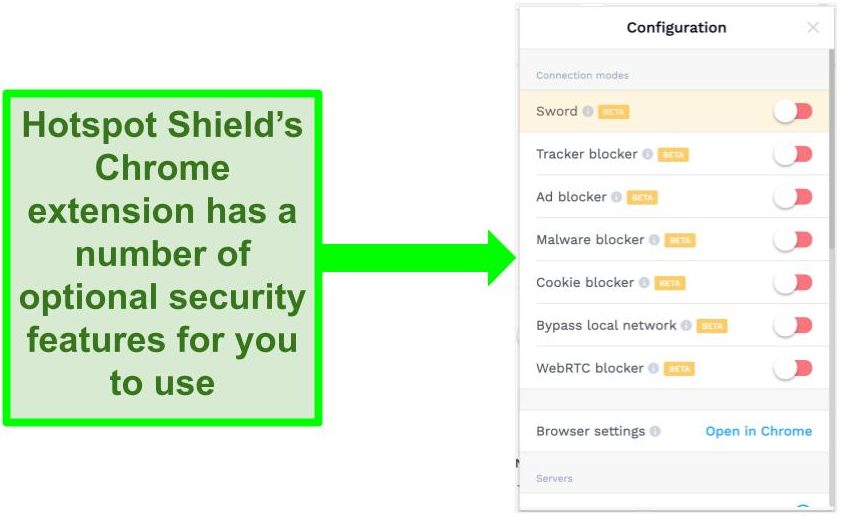
The browser extension includes blockers for trackers, ads, cookies, and malware , plus a Sword feature that feeds fake tracking information to websites to ensure your online activity is anonymous.
As an Android app user, your internet network is safeguarded using robust encryption methods employed by the military . You receive the same level of protection as our paying purchasers, including features like a kill switch, integrated leak protection, and the advanced Catapult Hydra protocol exclusive to Hotspot Shield. The app itself has a compact size of only 53MB and is fully compatible with Chromebooks manufactured by Asus, Dell, HP, and Samsung.
The extension and Android app both work with Netflix US , which surprised me as the free offer doesn’t officially unblock streaming platforms. I also successfully accessed Disney+ and Hulu in tests.
Unfortunately, the free offer doesn’t allow torrenting. Basic information is also logged, such as your IP address, email, and some device information. You won’t have either of these issues on the paid option if you do choose to upgrade.
Hotspot Shield unblocks: Hulu, Disney+, HBO Max, SlingTV, SHOWTIME, DAZN, ITV, Spotify, and more.
Get Hotspot Shield for Chromebook for free
5.hide.me — 10GB of Free Monthly Data on Android App and Unlimited Data on Chrome Browser Extension
Key Features:
- No data limits on Chrome extension and 10GB free monthly data on Android app
- 5 server locations (Android app) and 3 server locations (Chrome extension)
- Military-grade encryption, kill switch, and leak protection on VPN app
- Customer support available through live chat and email ticketing
- 1 device connection for free users
hide.me provides a complimentary Chrome browser extension and an Android app designed specifically for Chromebook users. The Chrome extension grants unlimited data usage, but it solely encrypts your browser traffic and operates servers in Canada, Netherlands, and Germany. For comprehensive protection of your entire Chromebook’s internet connection, I recommend downloading the Android app. With the app, you’ll gain access to two additional servers in the US (though the free data allowance is limited to 10GB per month).
To make the 10GB of free data go further, you can set up the split tunneling feature. This allows you to specify which apps on Chromebook to use specifically with the VPN and which apps to exclude — this significantly helps to conserve data usage.
The free servers do permit torrenting and streaming, but regrettably, the speeds are quite sluggish. On average, my speed decreased by about 80% (from 115Mbps to 20Mbps). I’ve noticed that hide.me is most suitable for light web browsing rather than data-heavy tasks such as video streaming or large file downloads. The verified no-logs policy ensures that no user data is ever stored, ensuring complete anonymity for your browsing actions.
The Android app is around 27MB , so it won’t take up much space in your Chromebook’s storage. It’s compatible with Chromebooks from Dell, Asus, Acer, Lenovo, and more. Best of all, you can download the hide.me Chromebook-compatible Android app for free without creating an account.
Get hide.me for Chromebook for free
6.TunnelBear — Connect to Servers in 47+ Locations for Free on Chromebook-Compatible Android VPN
Key Features:
- 500MB free monthly data on Android app and Chrome extension
- Servers in 47+ locations on VPN app and 20 locations on Chrome
- Strict no-logs policy and military-grade encryption secures internet traffic
- Email ticketing support available on the free offer
- Supports unlimited device connections per account
TunnelBear has an Android VPN app offering many of the same features as its paid offer. This includes access to its entire server network across 47+ locations, AES 256-bit encryption, and leak protection (Vigilant Mode). There’s also a Chrome browser extension, but it’s more limited with only 20 server locations available.

TunnelBear doesn’t throttle speeds for free users, so I only experienced a small 21% drop from my regular speeds. I could also connect to Netflix US, although I didn’t have much luck with other streaming services.
TunnelBear’s tiny file size of just 16MB for its Android app means you save space on your Chromebook. The Android app is compatible with multiple Chromebooks, including HP, Acer, and Lenovo.
Unfortunately, you only get 500MB of free data per month . This is very limited — it’s not a good choice if you want to use your Chromebook to stream, game, or download files.
TunnelBear also works on: Windows, Android, macOS, iOS, Linux, Chrome, Firefox, Kodi, Roku, and more.
TunnelBear unblocks: Netflix, HBO Max, SlingTV, SHOWTIME, ITV, Kodi, YouTube, and more.
Get TunnelBear for Chromebook for free
7.NordVPN — Premium VPN With Cheap Prices on Long-Term Offers
Key Features:
- Short and long-term options available
- 30-day money-back guarantee
- 8918+ global servers in 178 countries
- Unlimited bandwidth
- Protect up to 10 devices at once
I did, however, have issues with using NordVPN’s native Fire TV app. Although it worked and unblocked some streaming services, it sometimes had issues unblocking Netflix US and kept crashing. I also found that NordVPN’s user interface for desktop devices was less user-friendly than ExpressVPN and CyberGhost .
NordVPN has the following security and privacy features:
- AES 256-bit encryption
- A kill switch that cuts your internet access if your connection to a VPN server drops suddenly
- Built-in ad and malware blocker , so you don’t need a third-party ad blocker
- Fully audited no-logs policy (audited by PwC) – NordVPN doesn’t store any personal or identifying data while you’re connected to the VPN
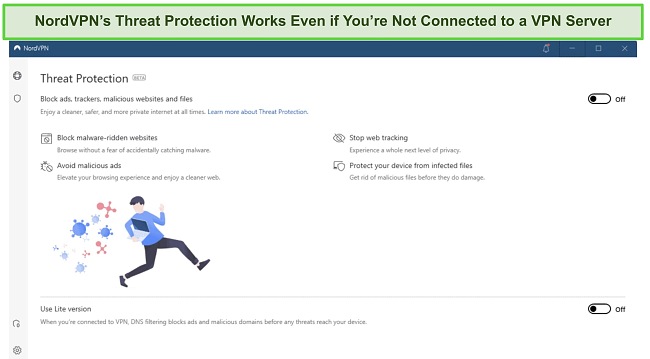
In addition, NordVPN includes Threat Protection that protects you from viruses, infected websites, and trackers – and it works whenever you have the NordVPN app open, even if you’re not connected to a VPN server .
NordVPN works on: Windows, Mac OS, Android, iOS, Windows Phone, Chromebook, Linux, Chrome, Firefox, Fire Stick, and Android TV
Get NordVPN today
8.Surfshark — Best Value for Money with Unlimited Device Connections and Fast Speeds
Key Features:
- Short and long-term offers available
- 30-day money-back guarantee
- 4,500+ global servers in 100 countries
- No bandwidth restrictions
- Connect unlimited devices at once
Surfshark offers the best value for money out of every premium VPN on the market . You can connect an unlimited number of devices with a single purchase, which means you can use Surfshark on all your devices without getting logged out.
I tested Surfshark’s simultaneous connections on 2 PCs, 2 phones, a Fire Stick 4K, and an iPad. My connection remained reliable on all 6 devices. Even while I was actively streaming on all my devices, my average speed was 112 Mbps — fast enough for UHD quality.
When I saw the price of this service, I thought it couldn’t possibly have top-grade security features for such a low price, but I was pleasantly surprised.
Surfshark has the following security and privacy features:
- AES 256-bit encryption on all devices, with ChaCha encryption available for Android users
- Wireguard VPN protocol enabled by default
- Diskless, RAM-only servers to protect your privacy (no data can be physically extracted from any servers)
- Kill switch (although this isn’t enabled by default)
- IP and DNS leak protection
Surfshark offers two-factor authentication (2FA) on your account. This feature requires you to enter an extra code before you can log in to ensure that only you can access your account.
While Surfshark does have slightly fewer global servers than rivals such as CyberGhost and PIA, I didn’t experience any issues during my tests . I easily connected fast working servers every time, and I had excellent speeds for streaming Netflix in UHD, downloading torrents, and browsing the internet.
Surfshark works on: Windows, Mac OS, Android, iOS, Linux, Fire Stick, Samsung Smart TVs, LG Smart TVs, Android TV, Kodi, and selected routers
Get Surfshark today
9.ZenMate — Chrome Browser Extension Offers Unlimited Bandwidth and 4 Free Servers
Key Features:
- No data restrictions on free Chrome browser extension
- 4 servers available in the US, Germany, Romania, and Singapore
- 128-bit encryption, OpenVPN protocol, and customizable privacy features
- Customer support available with through email
- 1 device connection on the free offer
ZenMate has a free Chrome browser extension with servers in the US, Germany, Romania, and Singapore. There’s even optional tracker and malware blockers, plus a WebRTC Protect feature. The malware blocker didn’t always work in my tests, but I was pleased to find the WebRTC Protect feature effectively masked my real IP address on IPLeak.net.
While the server selection is limited with just 4 locations, ZenMate provides unlimited data and can access streaming sites like Netflix, Hulu, and Disney+ . However, I experienced lag and interruptions while streaming as ZenMate slows down speeds for free users. My speed dropped almost 90% to just over 10Mbps, making a noticeable impact on loading times and buffering.
There’s no signup involved so it’s quick to protect your Chromebook with ZenMate’s browser extension for free . The browser extension is a tiny 2.6MB, which is ideal if your Chromebook has limited storage.
Get ZenMate for Chromebook for free
Comparison Table: 2026’s Best Free VPNs for Chromebook
| Data Allowance | Server Countries | Chrome Extension | Android App | |
|---|---|---|---|---|
| ExpressVPN | Unlimited | 3,000+ | ✔ | ✔ |
| CyberGhost | Unlimited | 11,690+ | ✔ | ✔ |
| Proton VPN | Unlimited | 3 | ✘ | ✔ |
| Hotspot Shield | 15GB/month | 1 | ✔ | ✔ |
| hide.me | 10GB/month | 5 | ✔ | ✔ |
| TunnelBear | 500MB/month | 47+ | ✔ | ✔ |
| NordVPN | Unlimited | 178+ | ✔ | ✔ |
| Surfshark | Unlimited | 100+ | ✔ | ✔ |
| ZenMate | Unlimited | 4 | ✔ | ✘ |
Get ExpressVPN for Chromebook
Editor’s Note: Transparency is one of our core values at WizCase, so you should know we are in the same ownership group as ExpressVPN. That said, our detailed reviews follow a strict methodology that examines all relevant performance factors to help you arrive at your own informed conclusion.
How I Tested and Ranked Free Chromebook VPNs
I tested and ranked the best free VPN services to find the best free VPNs for Chromebook in 2026.
- 100% free — I made sure each VPN is offered by a trustworthy company with no shady track records or hidden costs.
- Strong security and privacy features — Even a free VPN should have high-level encryption, leak protection, a kill switch, and a strict no-logs policy.
- Free data — I suggest getting a service that offers at least 10GB of data if you enjoy activities like torrenting, streaming, and gaming online. If you want a free VPN for casual browsing, checking emails or online banking, then 500MB can be enough.
- Decent speeds — Most free VPNs throttle speed and bandwidth, making it nearly impossible to browse, stream or even download files.
- Works on Chromebook — The VPNs need to be compatible with Chrome OS and offer either an Android app or Chrome browser extension. The best VPNs even work on Windows , Mac, Android, iOS, Linux, and other devices.
Of all the VPNs I tested, ExpressVPN emerged as the top choice for Chromebook. It’s easy to configure with Chrome OS, plus ExpressVPN’s huge server network and fast speeds make it ideal for streaming, gaming, torrenting, and more. While it’s not free, you can try ExpressVPN on Chrome risk-free as it’s backed by a 30*-day money-back guarantee. I believe you’ll find ExpressVPN or your Chromebook, but if you don’t agree, you can easily get a full refund.
Get ExpressVPN for Chromebook
Easy Setup Guide: How to Use a Chromebook VPN
Install a Browser Extension for Chrome OS
Using a VPN browser extension for your Chromebook is the quickest way to get protection. It’s important to remember that most browser extensions are proxies that don’t offer the same high-level encryption as a full VPN app.
- Purchase to a VPN. I recommend ExpressVPN for Chromebook as its Chrome browser extension offers the same premium features as the VPN app. ExpressVPN
- From the VPN website, navigate to the Google Chrome web store. Your VPN will provide a link that directs you straight to the extension page.
- Click “Add to Chrome” and then “Add extension” on the following pop-up. This confirms that you’re happy for the VPN to make the necessary changes to your browser privacy.
- Click the extension icon in your Chrome browser to open the VPN. You’ll find this in the top right of your browser — if you can’t see it right away, click the puzzle-piece icon to browse and manage your extensions.
Get ExpressVPN for Chromebook
Download an Android VPN App for Chromebook
All Chrome OS devices that launched in or after 2019 support Android apps. Most Chromebooks from 2016 onward have Android app compatibility.
- Purchase to a VPN. ExpressVPN has a dedicated app for Chromebook that works flawlessly with the OS.
- From the VPN website, navigate to the Google Play store. Your VPN will have options for downloading the service to your device.
- Click “Install” on the VPN product page. The app will download to your Chromebook automatically.
- Sign in to your VPN app and connect to a server. You’re ready to start browsing securely on your Chromebook.
Get ExpressVPN for Chromebook
Manually Configure a Chromebook VPN (OpenVPN and L2TP Setup)
If you’re unable to install Android apps on your Chromebook, you can manually set up a VPN using the Chrome OS built-in VPN client . Most VPNs support OpenVPN and L2TP for manual configuration.
- Sign up for a VPN. CyberGhost is free for 45 days and you can manually set it up with either OpenVPN or L2TP protocols.
- Open the Chrome OS VPN client. This is located in your Chromebook’s notification area. Click the VPN icon to open the client.
- Click the plus (+) symbol next to OpenVPN/L2TP. This will open the window in which you fill in your VPN’s configuration details.
- Enter your VPN’s OpenVPN/L2TP details. These can be found in your account settings on your VPN’s website. There should be multiple configuration options for different server locations.
- Click “Connect” to connect to the specified VPN server. You can now connect and disconnect the VPN whenever you want. You can also add multiple configurations to access global server locations.
Get CyberGhost for Chromebook
Set Up a VPN on a Router
If you can’t install a VPN specifically for your Chromebook, you have the option to configure a VPN service with your router. With a router VPN, every device that connects to your WiFi is protected by the VPN encryption, including your Chromebook.
- Get a VPN that is compatible with routers. I suggest ExpressVPN as it’s one of the rare VPNs with a router app .
- Configure your VPN with your router. You can find out how to set up a VPN with a compatible router in this easy step-by-step guide .
- Connect to a VPN server. This provides an encrypted connection for every device that uses your WiFi to access the internet.
- Connect your Chromebook to your WiFi. With the VPN enabled, your Chromebook will be protected by the VPN’s encryption without having to download any apps or manually configure the service.
Get ExpressVPN for Chromebook
Use a Linux VPN App
Chromebooks released in or after 2019 have built-in support for Linux. If your VPN supports Linux, this means you can configure a Linux VPN app on your Chromebook — but this will only secure your Linux connections. To have full VPN encryption on your Chromebook, you’ll need to run the Linux VPN app alongside an Android or OpenVPN/L2TP setup.
- Get a VPN for Linux. ExpressVPN works with Linux and can be controlled with a graphical user interface (GUI) by installing the Chrome browser extension.
- Make sure Linux is enabled on your Chromebook. You can do this by going to “Settings” then “Apps” and turning on “Linux (Beta).”
- Follow the setup instructions provided by your VPN. Configuring a VPN app with Linux is a little different for each service — your VPN will have a detailed setup guide available on its help website.
- Connect to a VPN server and secure your Linux apps for Chromebook. Remember, a Linux app will only secure Linux connections — to secure your entire Chromebook, you’ll need to also run an Android app or OpenVPN/L2TP setup.
Get ExpressVPN for Chromebook
Editor’s Note: We value our relationship with our readers, and we strive to earn your trust through transparency and integrity. We are in the same ownership group as some of the industry-leading products reviewed on this site: ExpressVPN, CyberGhost, Private Internet Access, and Intego. That said, our detailed reviews follow a strict methodology that examines all relevant performance factors to help you arrive at your own informed conclusion.
Yes, but make sure you choose a free VPN that’s proven to be safe for Chromeboo k. Not all free VPNs are safe — many shady free VPNs will secretly log your private data to sell to third parties as a way to generate revenue, which is a huge invasion of your privacy. Other free VPNs have been found to contain malware that finds and steals your personal data, putting you at risk of identity theft and fraud.
Unfortunately, even the best free VPNs have limitations . You might find yourself restricted to 1-2 server locations or faced with small data allowances each month. While it isn’t free, a premium VPN like ExpressVPN has a wide range of advanced VPN features for Chromebook so you don’t have to suffer through any restrictions. It’s backed by a 30*-day money-back guarantee, so you can simply get a refund if you don’t like it.
Yes, you should use a VPN with your Chromebook . Without a VPN, you leave your online activity and device data exposed to anyone who wants to see it. By protecting your Chromebook with a VPN, you ensure your data is securely hidden — no one can see your IP address, the websites you visit, or the files you download.
As well as protecting your data, a VPN allows you to avoid network and location restrictions by hiding your IP address . The VPN masks your true location and replaces it with one from its server, making it look like you’re in a different place. This means you can use a VPN to access your Netflix US account when abroad, catch up with regional news, or even check Facebook when on your work network.
Get ExpressVPN for Chromebook
Editor’s Note: Transparency is one of our core values at WizCase, so you should know we are in the same ownership group as ExpressVPN. That said, our detailed reviews follow a strict methodology that examines all relevant performance factors to help you arrive at your own informed conclusion.
Secure Your Chromebook With a Free VPN Today
So many free VPNs come with unreasonable limits and restrictions — or worse, leave your Chromebook exposed and vulnerable to trackers, hackers, and spies. After testing more than 50 free VPNs, I shortlisted the best for Chromebook in 2026 that won’t compromise your security or privacy.
ExpressVPN is the #1 VPN for Chromebook with its military-grade security, huge server network, and blazing-fast connection speeds. While you do need to pay upfront, ExpressVPN has a 30*-day money-back guarantee so you can get a refund if you decide it’s not for you. I’ve even tested the refund policy myself to make sure it works — just speak to a customer support representative over 24/7 live chat and the refund will be approved within minutes.
*Please note that ExpressVPN’s generous money-back guarantee applies to first-time customers only.
Other Top VPNs for Chromebook in 2026
Editor’s Note: We value our relationship with our readers, and we strive to earn your trust through transparency and integrity. We are in the same ownership group as some of the industry-leading products reviewed on this site: ExpressVPN, CyberGhost, Private Internet Access, and Intego. That said, our detailed reviews follow a strict methodology that examines all relevant performance factors to help you arrive at your own informed conclusion.
