6 Best 100% FREE Android Antivirus Apps — Updated in 2026
- Written by Osama Zahid Cybersecurity Specialist
- Fact-Checked by Justyn Newman Former Lead Cybersecurity Editor
Hackers are constantly finding new ways to steal your information, so it’s essential to secure your Android devices. With this in mind, I was alarmed to learn that most free Android antiviruses are useless at protecting you from cyber threats .
In my quest to identify the top free antivirus options available on the Google Play store, I dedicated weeks to thoroughly testing the most widely used selections. To streamline your search and save you valuable time, I’ve carefully curated a list of the six best free antivirus applications tailored for Android devices. While these antivirus solutions offer respectable protection, I highly recommend considering the option of Norton Mobile Security. This antivirus, although reasonably priced, packs a powerful punch. Plus, you can explore its capabilities with a complimentary 7-day trial period.
However, if you’re only looking for a basic level of security, Avira Mobile Security is the #1 free Android antivirus . Its virus scanner easily detected and eliminated every bit of malware on my phone. Plus, it offers other useful features like a free VPN.
Try Avira on Android for free
Quick Guide: The Top Free Android Antivirus App for Phones & More
- Avira Mobile Security — Top free Android antivirus with a powerful malware scanner, rootkit protection, and a built-in VPN. Try Avira for free !
- Panda Dome — AI-powered free antivirus app that detects the latest Android-based threats, but collects some of your data.
- TotalAV Antivirus & VPN — Reliable Android antivirus with a data breach checker, but no real-time protection on the free app.
- Bitdefender Mobile Security — Automatically scans apps during installation and updates to keep your Android secure, but doesn’t have many advanced features.
- Sophos Intercept X — Safeguards you from malicious sites with its link checker, but doesn’t offer rootkit detection on its Android app.
- Kaspersky Internet Security — Offers a helpful call filter to secure you from scammers, but the free Android version doesn’t offer real-time protection.
Update 2026: Norton Mobile Security isn’t a free antivirus for Android, but I’ve found that its advanced scanner detects all malware targeting Android. You can use Norton’s free trial for 7 days to see if it’s right for you.
The 6 Best 100% Free Android Antivirus Apps (Tested 2026)
1.Avira Mobile Security — #1 Free Android Antivirus With Rootkit Protection and VPN
Key Features:
- Virus scanner that detects and eliminates all threats
- Comes with a built-in VPN and rootkit protection
- No ads or intrusive app permissions
- Available for Android versions 6.0 and up
- Customer support available through phone and email
Avira Mobile Security is among the most impressive free Android antiviruses, especially when it comes to features. Plus, it has an effective virus scanner that easily detects all threats on your Android while highlighting whether your device has privacy or optimization issues.
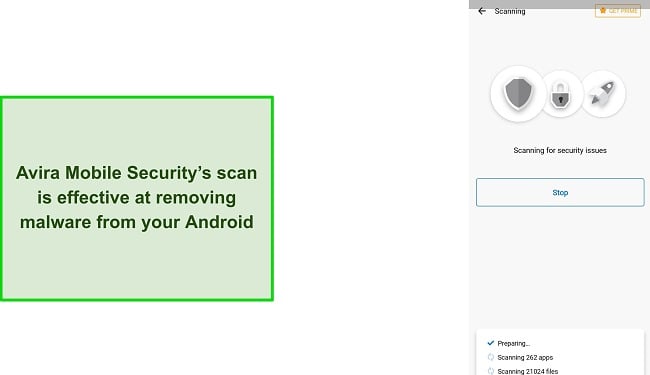
During tests, Avira’s virus scanner took under 5 minutes to scan 100+ apps and 20,000+ files and successfully detected any threats on my Android . Plus, it gave me easy one-tap solutions to get rid of the privacy and optimization issues on my device.
You can also find a wide range of other security features in Avira Mobile Security such as:
- Identity Protection — Checks if your email was involved in any data breaches.
- Permissions Manager — Shows all the permissions you’ve given to the various apps on your Android device .
- App Lock — Lets you lock and secure any sensitive apps you might have, such as banking apps.
- Call Blocker — Helps avoid any unwanted calls by setting up filters.
I was pleased to learn that Avira comes with a built-in VPN with many servers that you can use to browse the web safely. Unfortunately, the free plan only offers 100MB of data, so you can’t use it for bandwidth-heavy tasks like streaming. However, it’s still a secure way to check your emails or access your online banking. The free VPN doesn’t let you choose a server manually but still connects to a fast nearby location to guarantee good connection speeds.
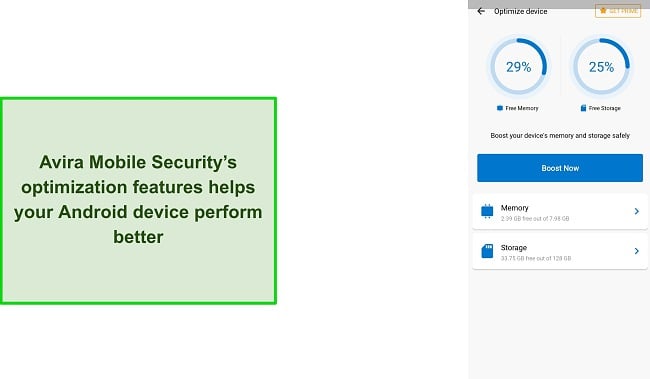
Avira Mobile Security also has its share of optimization features that help your Android perform faster. You can use its optimization tools to free up storage on your device and clear its memory to ensure optimal performance.
I’m not fond of Android antiviruses that ask for unnecessary permissions like your camera or microphone. Thankfully, Avira never does this. It only asks for necessary permissions like access to your files so it can run proper scans and analyze them. Plus, Avira Mobile Security doesn’t have any annoying ads, which can slow down your Android .
2.Panda Dome — AI-Powered Virus Scanner With Free Theft Protection
Key Features:
- Removes all malware and threats from your Android via its virus scanner
- Includes a built-in VPN and a helpful anti-theft feature
- Doesn’t show ads or require any personal information to sign up
- Works on Android 4.1 and above
- 24/7 live chat, email, and phone support are available
Panda Dome is a reliable free Android antivirus that uses advanced artificial intelligence (AI) to improve its threat detection. Its advanced detection features reliably defend your Android device against the latest malware and threats.
I put Panda Dome’s virus scanner to the test and was very impressed with its detection rates . Panda Dome’s scan took roughly 10 minutes to go through 21,000+ files and 100+ apps and detected all malware without giving any false positives. Plus, the scans can easily run in the background, and I didn’t notice any slowdowns as I used my phone during them.
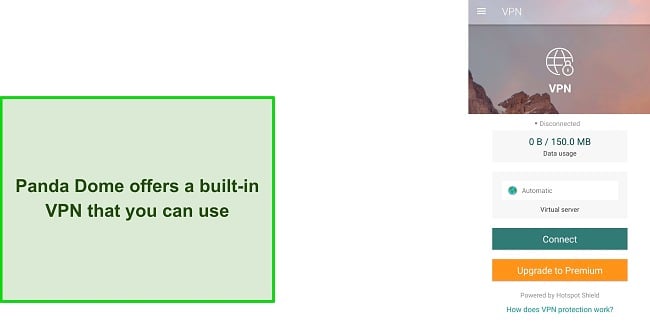
You’ll also find a secure built-in VPN in Panda Dome, which you can use to safely browse the web. Panda Dome’s VPN is powered by Hotspot Shield — a renowned name in the VPN space — so it’s very secure and provides fast connection speeds. The only downside here is that the free Android app’s VPN has a 150MB/day data limit, so it’s not useful for streaming and downloading. Thankfully, this limited bandwidth is still more than enough to securely access banking and other sensitive websites.
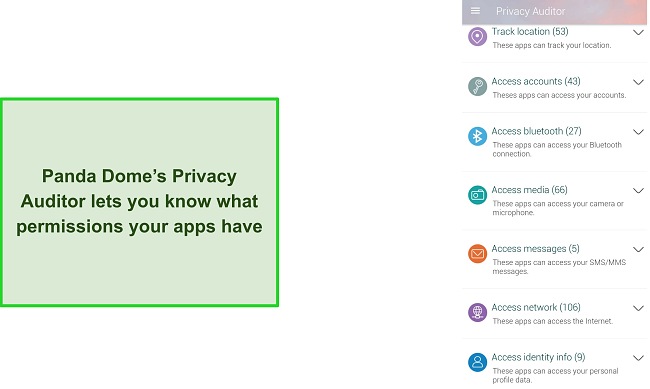
You’ll also find a helpful anti-theft feature in Panda Dome’s free Android antivirus. You can easily set up this feature in a few steps and it’ll then provide precise location updates about where your Android device is . So, you can easily track it down if it’s ever lost or stolen. Plus, there’s also a Privacy Auditor that highlights all the permissions your apps have.
3.TotalAV Antivirus & VPN — WiFi Analyzer Keep Android Safe From Unsecured Connections
Key Features:
- Successfully blocks and removes malware from Android devices
- Comes with a WiFi security tool and helpful WebShield
- Lets you check if your logins have been compromised in data breaches
- Available for Android 5.0 and up
- 24/7 live chat, phone, and email support
TotalAV’s free Antivirus & VPN app for Android is a simple and effective way to safeguard your device. While testing it, I learned that TotalAV offers helpful security features to keep your Android secure and doesn’t have any effect on its performance or battery life .
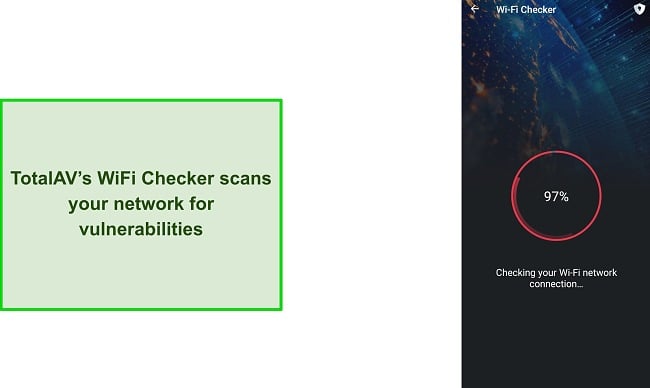
I especially like TotalAV Antivirus & VPN’s WiFi Checker, which is a useful tool that I frequently use to check if the networks I connect to are secure or not. The WiFi Checker takes just a few seconds to scan the network you’re connected to and lets you know whether or not it has any vulnerabilities.
Another one of TotalAV’s key features on Android is WebShield, which provides effective protection against suspicious websites. You can easily set up the web shield by giving TotalAV some permissions in your accessibility settings. Once you’ve set it up, TotalAV’s WebShield will safeguard you from malicious websites online and ensure that your Android device isn’t infected with malware .
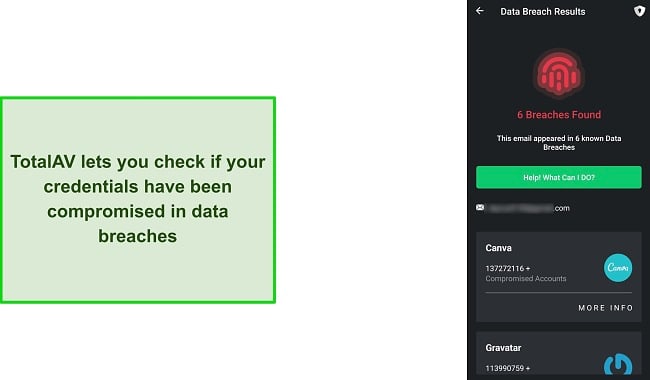
There’s also a useful Data Breach Check feature in TotalAV that informs you if your email and credentials have ever been leaked in a data breach. What’s great about this feature is that you can use it to check any email, not just the one you signed up for TotalAV with. I frequently used the Data Breach Check to learn whether I needed to change any of my credentials.
4.Bitdefender Mobile Security — Scans New Apps Upon Installation on Android
Key Features:
- Constantly scans new apps to check for hidden malware
- Helpful Scam Alert feature to protect you from infected links and dangerous texts
- No ads or intrusive app permissions
- Works on Android 5.0 and later
- Comes with 24/7 live chat, phone, and email support
For Android users, Bitdefender Mobile Security proves to be a highly efficient antivirus solution available at no cost. Notably, Bitdefender performs automatic scans on newly installed apps, effectively detecting any concealed malware . Consequently, there is no need for manual scans, as Bitdefender adeptly handles these security tasks in the background. Moreover, the antivirus software exerts minimal influence on battery consumption and device performance, ensuring a seamless user experience.
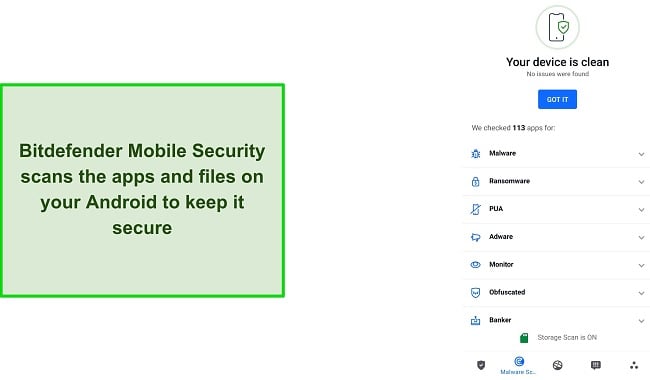
I tested Bitdefender’s virus scanning capabilities by intentionally downloading malware on my Android device and it had a perfect malware detection rate . Also, I was pleased to learn that its scans are really fast — taking only 5 minutes to go through over 20,000 files and over 100 apps.
You’ll also find various other helpful security features in Bitdefender Mobile Security such as:
- Web Protection — Protects you from visiting malicious links that could infect your device.
- Secure VPN — Lets you safely and anonymously surf the web.
- Anti-Theft — Helps find your device in case it’s ever lost or stolen.
- Identity Protection — Monitors your email and lets you know if your credentials are leaked in data breaches.
There’s also a VPN option in Bitdefender Mobile Security, but it requires you to install a separate app before you can use it. Bitdefender’s VPN is fast, but it has a 200MB bandwidth limit unless you’re on a premium plan.
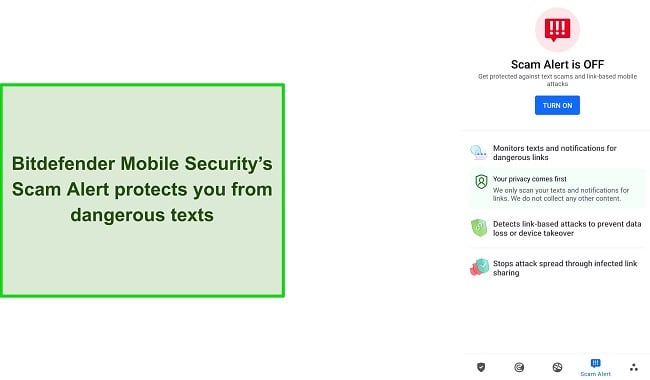
I found Bitdefender’s Scam Alert feature to be quite impressive. It provides valuable protection by keeping you safe from potentially harmful texts. This feature actively monitors all your text messages and notifications, alerting you if any of them contain dangerous links . By enabling Scam Alert, you can ensure that you remain protected against malware or other harmful content that may be concealed within those links.
Alongside everything else, Bitdefender Mobile Security is completely ad-free and there aren’t any annoying pop-ups that get in your way . So, I highly recommend that you try Bitdefender Mobile Security free to protect your Android . The free antivirus has many great features, but you can also choose from one of Bitdefender’s premium plans for additional security and features. The plans range from its most basic Bitdefender Antivirus Plus to the most premium Total Security. Plus, the plans are affordable and you can get one for as low as $34.99.
5.Sophos Intercept X — Link Checker Protects Your Android From Dangerous Websites
Key Features:
- Automatically scans and protects your Android from malware
- Comes with link scanning and WiFi security features
- Doesn’t require an account or any intrusive permissions
- Runs on Android 7.0 and above
- Offers email support if you ever need assistance
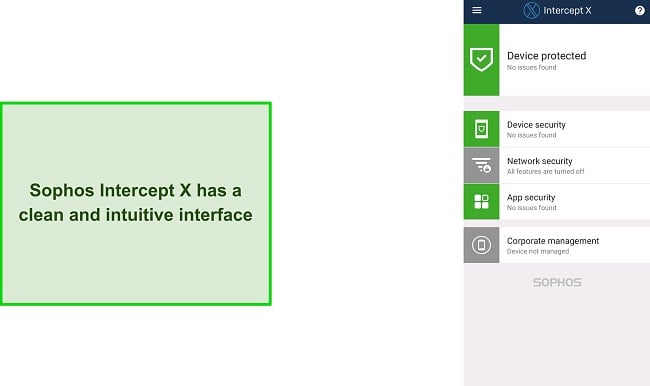
Sophos Intercept X is an effective and intuitive free antivirus for Android. Out of all the antiviruses on this list, I found Sophos the most newcomer-friendly because it has the most straightforward interface and design I’ve seen in an Android antivirus .
I appreciate the convenience of Sophos Intercept X as it performs automated scans on your Android device at regular intervals, effectively detecting and addressing any potential threats or malware. Additionally, it offers comprehensive reports regarding the security status of your Android device, highlighting any pressing privacy or security concerns that require immediate attention.
Sophos also comes with a series of other useful security features, including the following:
- Web Filtering — Filters malicious websites to keep you safe online.
- WiFi Security — Scans your network and lets you know if there are any vulnerabilities.
- Health Recommendations — Provides helpful insights on how you can further improve your privacy and security.
- Privacy Advisor — Lets you know which permissions you’ve given to each of your apps.
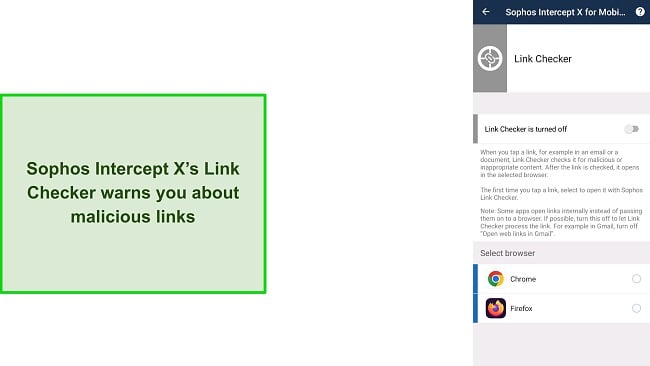
Sophos Intercept X’s Link Checker is also a useful feature that scans links and lets you know if they’re malicious. This feature is easy to set up, and as long as it’s enabled, it’ll safeguard you from any dangerous links in emails or documents.
I especially like that Sophos doesn’t require any intrusive permissions and doesn’t have any in-app ads that would slow it down. Plus, it didn’t have any impact on my Android phone’s performance or battery drain.
6.Kaspersky Internet Security — Includes an Android Call Filter to Block Scams and Spammers
Key Features:
- Secures your Android by eliminating most malware
- Call filter to help cut down on annoying spam calls
- Doesn’t require any personal information to sign up
- Available on Android 5.0 and later
- Offers 24/7 live chat, email, and phone support
Kaspersky Internet Security isn’t the most feature-rich free Android antivirus on this list, but it gets the job done. It has a sleek and intuitive interface, a reliable virus scan, and various other features that make it a great way to protect your Android device.
During tests, I learned that Kaspersky Internet Security offers a Quick Scan, Full Scan, or Selective Scan . This is different from most choices on this list because they only offer a single scan option. I ran Kaspersky’s full scan and it took around 5 minutes to scan 20,000+ files and 100+ apps while detecting every single piece of malware.
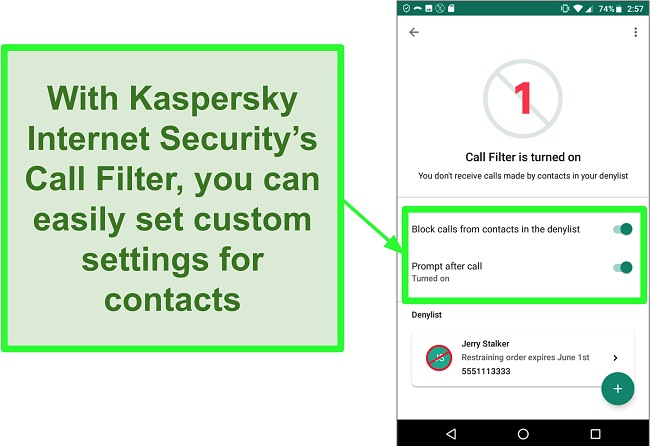
I really like Kaspersky’s call filter, which is a useful tool that lets you block annoying calls. You can create a deny list consisting of blocked numbers and will even receive notifications about how many times calls from these numbers are blocked.
There are also various other helpful security features in Kaspersky Internet Security that further protect your Android device like:
- Data Leak Checker — Checks and informs you if your email and credentials have been leaked in data breaches.
- Where Is My Device — Anti-theft tool that lets you know where your device is in case it’s lost or stolen.
- Built-in VPN — Lets you securely browse the web while remaining anonymous.
- Weak Settings Scan — Scans your device settings and alerts you if any settings could leave you vulnerable.
7.Bonus: Norton Mobile Security — #1 Android Antivirus App but Only Has a Free Trial
Key Features:
- Detects 100% of malware threats on your Android device
- Offers WiFi security, app scanning, and malicious link detection
- Ad-free and doesn’t require unnecessary permissions
- Works on Android phones and tablets (8.0 or later)
- Comes with 24/7 live chat, email, and phone support
While it isn’t free, Norton is the best antivirus I’ve tested for Android . Plus, it comes with a 7-day free trial that’ll let you test it risk-free. Alongside its perfect malware detection rate, it offers some of the most advanced extra features I’ve seen in any Android antivirus.
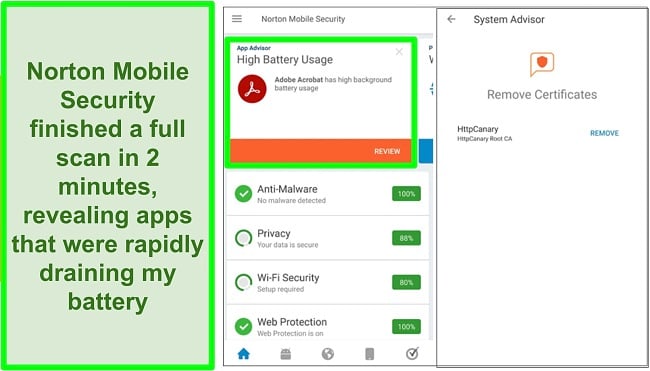
Norton Mobile Security took just under 2 minutes to do a full scan and showed me all potential security risks on my device. Plus, it even highlighted the apps draining my Android’s battery without ever affecting my phone’s performance.
Of course, Norton Mobile Security provides several other useful security features as well such as:
- WiFi Security — Monitors your network for any vulnerabilities.
- Internet Security — Keeps you safe from malicious websites online.
- SMS Security — Scans your text messages and alerts you of any potentially dangerous ones.
- Built-in VPN — Lets you surf the web safely and anonymously.
Norton also has a helpful App Advisor feature, which scans Android apps and gives a safety score. As someone who frequently likes to install the latest games on my smartphone, the App Advisor tool makes it much safer for me to download unknown apps.
I especially like Norton’s Cloud Backup feature which provides up to 100 GB of secure cloud storage. You can use this encrypted storage to back up any sensitive files and documents onto Norton’s secure servers. Plus, you can schedule regular backups and choose between backing up your files weekly, monthly, or through a manual schedule .
Norton offers a variety of plans, ranging from the most basic Norton Antivirus Plus to the most premium Norton 360 with LifeLock Select. All of its plans offer great value for money and its best plans let you secure up to 5 Android devices simultaneously. You can get Norton for as low as $ $ $ $ € € € € € € € 19.99 7.93 249 24.99 29.99 19.99 29.99 22.76 29.99 29.99 30.47 , but you can also try Norton Mobile Security free for 7 days via its free trial.
Quick Comparison Table: 2026’s Best Free Android Antivirus Apps for Phone and More
| Real-Time Protection | App Privacy Analyzer | Web Filter | WiFi Network Security | Built-in VPN | |
|---|---|---|---|---|---|
| Avira | ✔ | ✔ | ✘ | ✘ | ✔ |
| Panda | ✔ | ✔ | ✘ | ✘ | ✔ |
| TotalAV | ✘ | ✘ | ✔ | ✔ | ✔ |
| Bitdefender | ✔ | ✘ | ✔ | ✘ | ✔ |
| Sophos | ✔ | ✔ | ✔ | ✔ | ✘ |
| Kaspersky | ✘ | ✔ | ✘ | ✘ | ✔ |
| Bonus: Norton | ✔ | ✔ | ✔ | ✔ | ✔ |
Warning! Avoid These 3 Free Antivirus Brands for Android
1. Avast and AVG
While they have 4.5+ ratings on the Google Play store, I can’t recommend getting either AVG or Avast. It turns out that Avast was caught collecting and selling private user data without permission , which is a massive trust and ethics breach. Also, the free apps for both of these choices are riddled with ads, which ended up slowing down my phone quite a bit during tests. There are various free Android antiviruses that are ad-free and don’t sell your data, so you shouldn’t risk your personal information with Avast or AVG.
2. Trend Micro
During tests, Trend Micro failed to detect trojans and highlighted more false positives than any other free Android antivirus on this list . Trojans are among the biggest threats to Android devices because they imitate legitimate software. So, you should get an Android antivirus like Norton instead, which can safeguard you from all kinds of malware.
3. Google Play Protect
Google Play Protect is Android’s official free security app. Unfortunately, it’s not that effective against real-time cyber threats. Independent testing lab AV-Test found that Google Play Protect failed to detect 2 out of 3 malware attacks . Also, out of 1,260 apps, it flagged 24 apps as threats even though they were legitimate (the industry average is only 2). While you do get basic protection with Google Play Protect, you simply cannot rely on it to provide full-fledged security.
5 Easy Steps: How to Turn On Anti-Theft on Panda Dome
- Launch the Panda Dome app — Open the Panda Dome app on your Android device.
- Open the menu on the left-hand side — Tap the icon at the top left to open Panda Dome’s menu.
- Navigate to the Anti-Theft menu — Tap on Anti-Theft to navigate to the feature’s settings.
- Click on the Activate button — Tap the Activate button to start the process of turning on anti-theft.
- Provide the necessary permissions — Grant Panda Dome all the necessary permissions so that the anti-theft feature can work as it’s supposed to. That’s all you have to do. Anti-theft will be enabled once you’ve given Panda Dome the listed permissions and you can use it to easily keep track of your device.
How I Tested and Ranked the Best Free Antivirus Apps for Android in 2026
I ran my tests on a Xiaomi Mi 10T running Android 12. Below are the criteria I used to determine which antiviruses are the top choices for Android.
- Malware and threat protection — I looked for antiviruses that kept my Android device secure by effectively detecting and removing malware via their scans and real-time protection.
- Extra features — I made sure to recommend antivirus apps that offer helpful additional features like WiFi Protection and a VPN so that they can provide extra layers of security.
- Performance and battery drain — It’s important to have an antivirus that doesn’t excessively drain your battery or slow down your device’s performance. So, I checked these antiviruses thoroughly and only recommended ones that don’t impact your Android’s performance.
- Business model — Free antivirus apps often secretly make profits by selling private data stored on your Android device. I thoroughly vetted each antivirus company and only recommended those that don’t share or sell your data to third parties.
Safety Tip: You should only download an antivirus app from a trusted source. Unfortunately, the Google Play store isn’t one of them because it has various knock-offs and scam apps. Instead, I recommend getting an antivirus directly from the company’s website (all the links in this article will take you straight there).
Yes, you need a high-end antivirus to keep your Android device secure . While the Google Play store has various protective filters, it can’t detect and get rid of every malware-ridden app on the store. It takes a single wrong download to infect your Android device and this may end up giving hackers access to your banking details or damaging your Android.
Android devices come with Google Play Protect, which provides decent basic-level security, but it simply isn’t enough to protect you against most malware. So, it’s important to get a good antivirus for your Android to keep it fully secure.
After extensive testing, I can say that Avira Mobile Security is the best free Android antivirus . It offers many features that you’d usually only find in premium antiviruses, like a VPN, rootkit detector, and app permissions manager.
Unfortunately, you can’t rely on Avira Mobile Security to fully protect your Android . If you want maximum protection, it’s best to get a low-cost Android antivirus like Norton Mobile Security. It offers many useful features, airtight security through 100% malware detection, and even checks apps for malware before they’re installed on your Android. Plus, Norton comes with a 7-day free trial , so you can test it completely risk-free to see if it’s right for you.
However, if you want the best possible protection that goes beyond the basics, I recommend that you try Norton Mobile Security with its 7-day free trial .
Protect Your Android Devices With a Free Antivirus
I was surprised when I learned how many Android antiviruses were simply useless, fake, or even dangerous. Thankfully, though, I managed to find some reliable free options that provide impressive security. Out of all my choices, I consider Avira Mobile Security especially impressive.
While these free antiviruses offer decent protection which is certainly better than nothing, you can’t fully rely on them to safeguard your Android devices. Even the best free antiviruses aren’t usually strong enough to protect your Android from advanced cyber threats like identity theft, malicious links, and phishing scams.
If you want high-end protection without any compromises for your Android, I recommend a premium antivirus. Norton Mobile Security is an affordable premium option that catches even the most sophisticated threats. Also, it includes useful tools like a vulnerability checker, a built-in VPN, and a malicious link filter. Best of all, you can easily try Norton on Android free for 7 days .
