- Written by: Osama Zahid Cybersecurity Specialist
360 Total Security Overview
At face value, 360 Total Security seems like a promising and feature-rich antivirus with an excellent free plan. However, I was skeptical about whether it could provide the same kind of safety or features that you get with well-known antiviruses. I put it through a series of tests to find out.
I was impressed with 360 Total Security’s ability to safeguard against threats. It detected 98% of malware during my tests. It did, however, give a few false positives, and the detection rate isn’t on par with the best antiviruses available. Its bonus features are quite helpful, though, and will optimize your system in many ways.
While it isn’t the best choice for maximum security, 360 Total Security is a solid antivirus with much to offer. Its free plan comes with all its core security elements, and the premium plans will let you access its wide array of helpful features. Plus, there’s a 30-day money-back guarantee that’ll let you test its premium plan risk-free.
Try 360 Total Security risk-free for 30 days
In a Rush? Here’s a 1-Minute Summary
- Consistently detects and gets rid of most malware — 360 Total Security easily detects and gets rid of most malware. Find out how well it did in all my tests .
- Large set of useful features — 360 Total Security combines its amazing security with various helpful features. Discover all the features it offers here .
- User-friendly and highly intuitive — 360 Total Security offers an intuitive app that’s easy to use and navigate through. Learn more about the user experience here .
- Limited customer support — There’s no live chat, and 360 Total Security’s ticketing-based support is very unresponsive. Read more about the customer support experience here .
- Great free plan — You can get an amazing free plan for 360 Total Security that offers most of its core security features. Learn about all its plans here .
Security
360 Total Security’s security is solid. Its free plan includes most of its core security features, so you can use it to safeguard your system against threats for free. It doesn’t deliver the same performance you’d get out of the best antiviruses, but its capabilities definitely impressed me.
Before going into the specifics, I want to highlight that 360 Total Security initially used Bitdefender and Avira’s virus scanner engines. However, I learned in my tests that they’ve been replaced by the KunPeng engine. This is 360 Total Security’s own engine, and although it doesn’t perform on par with Bitdefender and Avira’s engines, it’s still fairly impressive.
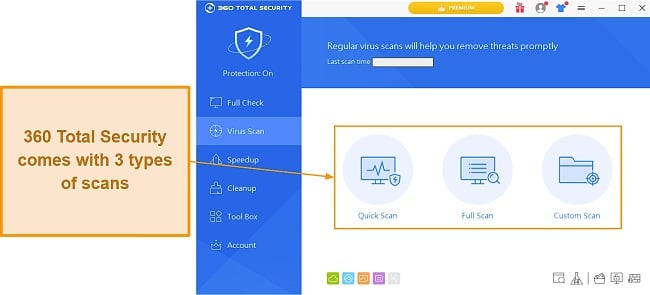
Virus Scan — 3 Types of Scans With Excellent Malware Detection Rates
I set up a Windows testing machine and intentionally downloaded various malware and other viruses to check 360 Total Security’s detection rates. In my tests, 360 Total Security successfully detected 98% of malware and eliminated it easily. It missed 5 malicious files, so its detection rates aren’t perfect (Norton detected 100% of malware), but it does a pretty solid job of detecting and removing malware and is slightly above the industry average.